April 28, 2014 at 12:59
How are videos made for games
- Tutorial
Hello everyone,
Recently we at Alconost made several videos for games and while working on them we ran into repeated questions from customers: what to show in the video, whether to make the video with or without a voice, how inexpensive it is to translate the video into several languages, what source materials are needed how to make a video capture of the screen of a mobile device ... In order to answer these burning questions once and for all, we want to tell and show with concrete examples how we make videos for games.
Our experience will be useful both to those who are trying to make a video on their own, and to those who are going to outsource the creation of a video for their game.
So, to make a video for the game, you need to go the following way:
The first thing we ask the client about is “why do you need a video?” Depending on the answer, we offer one of the types of video:
- A teaser clip . It does not show gameplay, does not say anything specific about the game, but creates interest in the game, teases the viewer.
Teaser for the dark and damn exciting toy Darklings 2 from Mildmania :
- In-game video . Used as an opening or final screensaver or cutscene. May be posted in the game review.
Opening screen saver for the game Lost In Reefs from Rumbic Studio :
- Video trailer showing the gameplay and features of the game. It is used wherever it can attract the attention of a potential gamer: in inapp advertising, on social networks and online media, even on television screens in shopping centers.
Trailer for the multiplayer version of the game LandGrabbers (for Android and iOs ) from Nevosoft :
The plot of the in-game video always follows the plot of the game, the video teaser gives rise to the same feelings and emotions as the game, and the video trailer shows the main feature of the game and gameplay from the first seconds.
When writing a script, we break the sheet into three columns: Scene task, Video sequence, and Speaker's speech.
The scenario of Lost in Reefs : The work on the script begins with filling column "challenge stage": for each scene we tezisno write why it is needed in the video. Examples are “the beginning of the video and the presentation of the game”, “the main catching chip”, “exciting gameplay”, “call action”. So we work out the sequence of scenes and create the plot skeleton of the script ... When only the “Scene Objective” column is filled out and the rest are empty, it is very easy to detect and correct the jambs in the narrative logic.
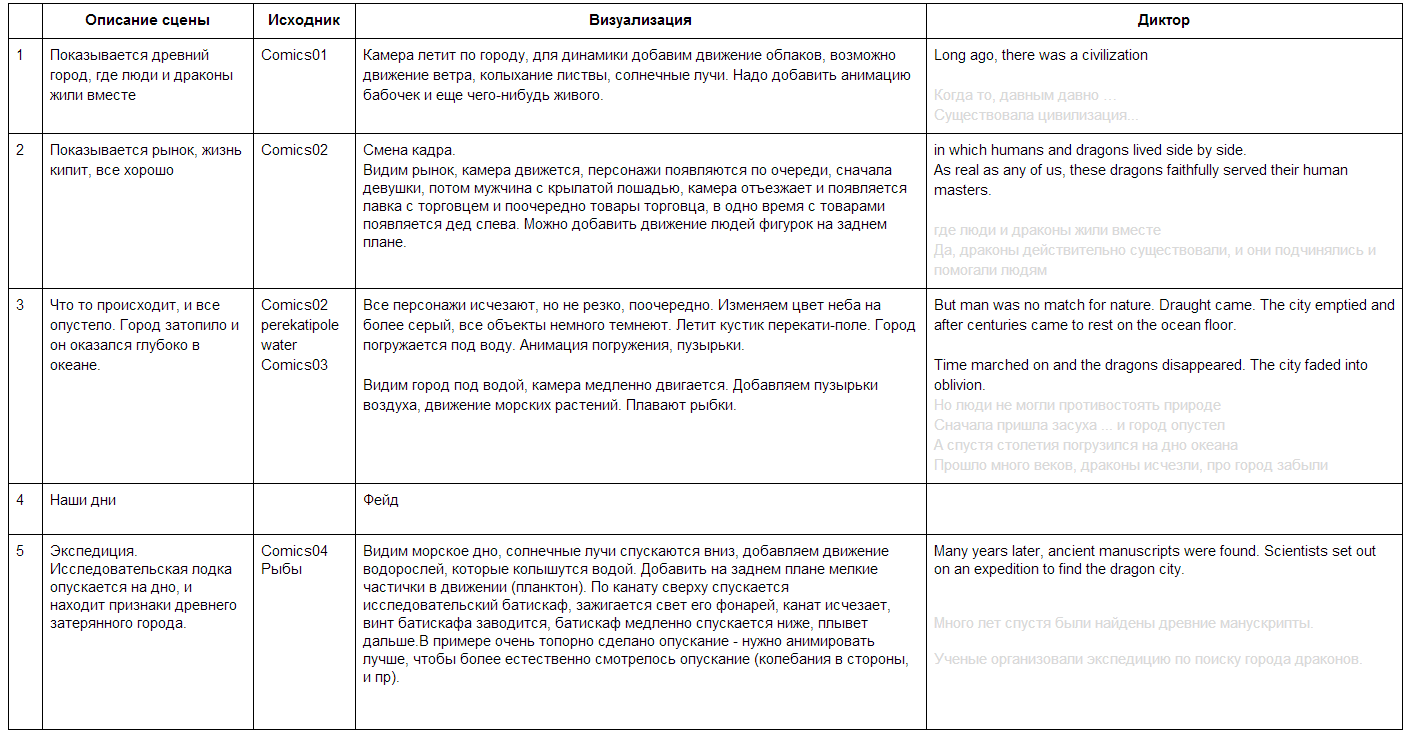
How detailed it is to describe the video sequence depends on the talent and feeling of the excellent video designer who will work on the project. We have guys who just need to write “the logo appears with cool animation” and give a reference, but there were a couple of cases when we had to meticulously paint “the appearance of an object through an increase in scale with a bounce effect and a decrease in opacity, movement with acceleration from the left edge to the center " etc.
Very important: the amount of narrator text in each scene should correspond to the number of events in the video sequence. We find the balance as follows:
2 announcer's words = 1 second.
One primary action on the screen = 1-2 seconds.
Of course, we can do the whole schedule ourselves. But why waste time and a client’s budget if a lot of work has already been done when creating the game to draw characters, a game interface, backgrounds, levels, etc. It remains for us to take these sources (psd's or ai's, broken down into layers, three-dimensional models, etc.) and independently draw all the necessary graphics. It often happens that the graphics provided by the client are completely enough to create a video.
Sources of Darklings :

By the way, we want to recommend a good application for recording video from the screen of iOS devices: Reflector (in trial mode, you can record video for up to 10 minutes in one session, which is more than enough for showing the gameplay in the video). For Android devices, we have not yet found the same convenient thing, we will be grateful for the advice in the comments.
The storyboard allows you to see what the video will be long before the end of the work.
Depending on the complexity of the video, the storyboard can be different: from a set of hand-drawn sketches to almost freeze frames from a future video. The more detailed the storyboard, the fewer unexpected comments from customers at later stages of work (which means less edits and lost time). We try to include all key frames in the video in the storyboard.
Storyboard Darklings :
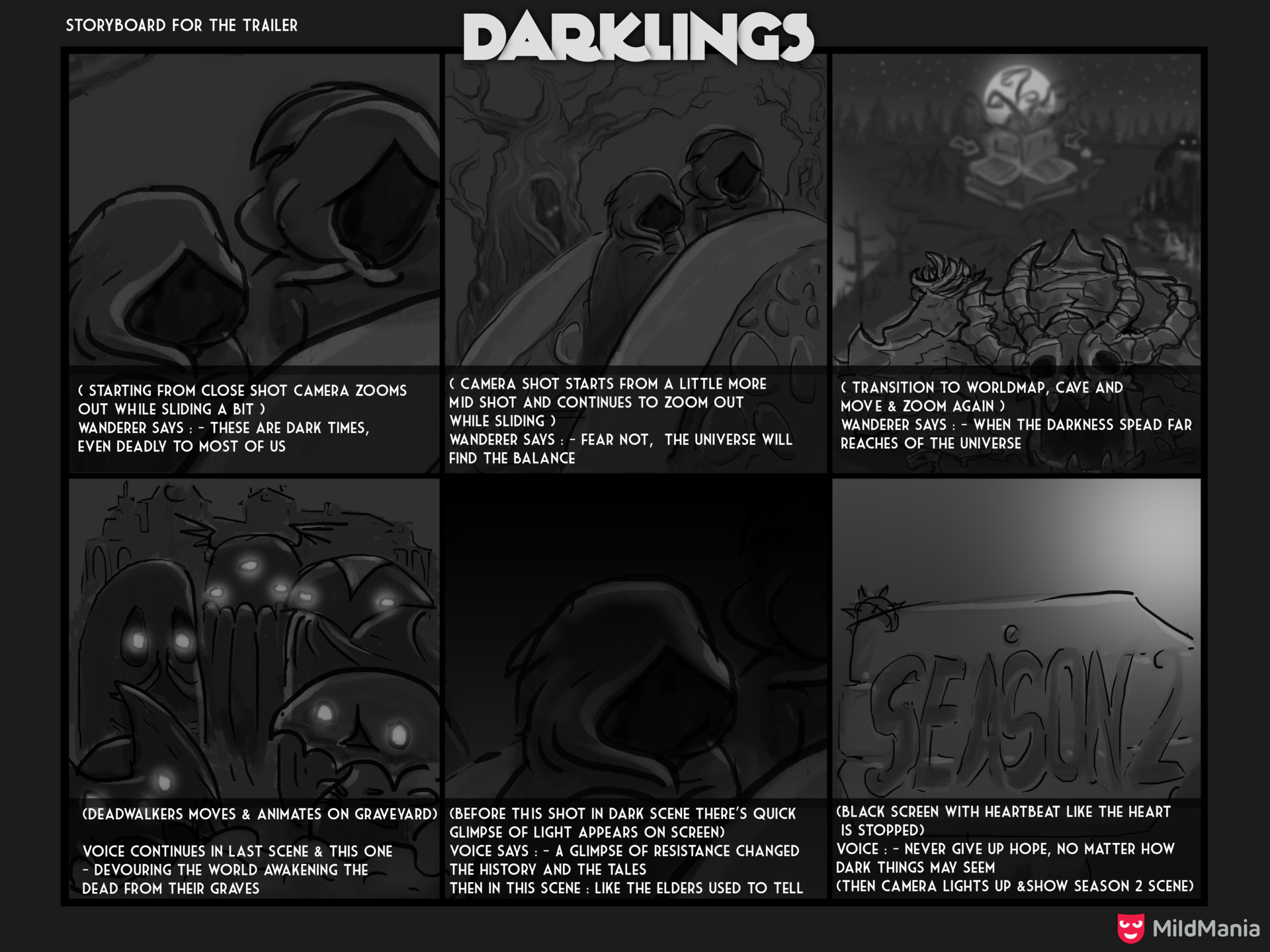
Our experience shows that without a storyboard, the end result is uncontrollable.
Does the video clip need a voice for the game? Our opinion - yes, we need it. The voice is too important a channel to influence the viewer to neglect. True, it’s easier to localize videos without a speaker to other languages (you don’t have to redo the entire animation to a new soundtrack that does not coincide with the original), but the savings here may not be worth the lost profit from reducing the effect of the video.
Is it worth it to save on a professional announcer and record the voice acting of an amateur? No, not worth it.
A professional announcer records his voice in the studio on expensive equipment with excellent sound insulation. His voice is always recorded smoothly, without failures in volume and frequency. The announcer constantly works with advertising and informational texts and his speech is delivered in such a way that it lacks or is very muffled by aspiration and parasitic sounds (clattering, whistling, hissing, etc.). Such a voice is easily processed and mixed with music and sounds.
Important: the voice acting is always recorded before the animation, and the animation is done only for the existing voice acting. To do the opposite is to waste time. If for some reason it’s not possible to record the speaker at once, then you can do it this way: first, a draft voice recording is recorded (on your own, on a karaoke microphone, through a primitive laptop sound card), animation is done for it, and only then the speaker reads the final voice acting like this so that it fully coincides with the draft. But in this case, the announcer will take 30-50% more for work.
Finally, the word CEP: voice acting in a foreign language should be recorded only with a native speaker.
A stage worthy of a separate article. This is where the main magic happens, turning the accumulation of still pictures into an emotional video.
Let's give some tips:
We write music from scratch for a specific project or buy royalty-free tracks on stocks: http://audiojungle.net/ , http://www.neosounds.com/ , http://www.premiumbeat.com/ .
How to choose a good track? Obviously, music should be appropriate for the video in terms of meaning and mood, and also there should not be any harsh sounds distracting the viewer. It’s very good when the track has a “pulse” and deep and clear bass.
All events in the video must be audible to ensure the integrity of the perception of the video. Make sure that the speaker’s voice does not overlap with the music in frequencies and at the same time is loud enough, but with a small level of compression.
Full-fledged localization of the video includes the translation of all the inscriptions on the screen, the removal of new gameplay videos on a localized version of the game, recording a new voice acting, fitting the animation of the video to the new voice acting. Depending on the complexity of the video, the cost of full localization can reach from 50 to 90% of the budget of the original video.
The budget option of localization is the translation of all the inscriptions on the screen and subtitles in a foreign language.
That's all, the video is ready. In-game video is embedded in the game. Trailers and teasers crawl on social networks, blogs, electronic media, where they attract potential players and incite interest in the game, as well as upload to the stores (we hope Apple will add the ability to post videos on the App Store in the near future).
If you have any questions about the video production process - write to us at [email protected] or leave your comments on this article.
About the author
Alconost localizes applications, games and sites in 60 languages. Native-language translators, linguistic testing, cloud platform with API, continuous localization, project managers 24/7, any format of string resources.
We also make advertising and training videos - for sites that sell, image, advertising, training, teasers, expliner, trailers for Google Play and the App Store.
Read more: https://alconost.com
Recently we at Alconost made several videos for games and while working on them we ran into repeated questions from customers: what to show in the video, whether to make the video with or without a voice, how inexpensive it is to translate the video into several languages, what source materials are needed how to make a video capture of the screen of a mobile device ... In order to answer these burning questions once and for all, we want to tell and show with concrete examples how we make videos for games.
Our experience will be useful both to those who are trying to make a video on their own, and to those who are going to outsource the creation of a video for their game.
So, to make a video for the game, you need to go the following way:
Select a roller type
The first thing we ask the client about is “why do you need a video?” Depending on the answer, we offer one of the types of video:
- A teaser clip . It does not show gameplay, does not say anything specific about the game, but creates interest in the game, teases the viewer.
Teaser for the dark and damn exciting toy Darklings 2 from Mildmania :
- In-game video . Used as an opening or final screensaver or cutscene. May be posted in the game review.
Opening screen saver for the game Lost In Reefs from Rumbic Studio :
- Video trailer showing the gameplay and features of the game. It is used wherever it can attract the attention of a potential gamer: in inapp advertising, on social networks and online media, even on television screens in shopping centers.
Trailer for the multiplayer version of the game LandGrabbers (for Android and iOs ) from Nevosoft :
Idea and scenario
The plot of the in-game video always follows the plot of the game, the video teaser gives rise to the same feelings and emotions as the game, and the video trailer shows the main feature of the game and gameplay from the first seconds.
When writing a script, we break the sheet into three columns: Scene task, Video sequence, and Speaker's speech.
The scenario of Lost in Reefs : The work on the script begins with filling column "challenge stage": for each scene we tezisno write why it is needed in the video. Examples are “the beginning of the video and the presentation of the game”, “the main catching chip”, “exciting gameplay”, “call action”. So we work out the sequence of scenes and create the plot skeleton of the script ... When only the “Scene Objective” column is filled out and the rest are empty, it is very easy to detect and correct the jambs in the narrative logic.
How detailed it is to describe the video sequence depends on the talent and feeling of the excellent video designer who will work on the project. We have guys who just need to write “the logo appears with cool animation” and give a reference, but there were a couple of cases when we had to meticulously paint “the appearance of an object through an increase in scale with a bounce effect and a decrease in opacity, movement with acceleration from the left edge to the center " etc.
Very important: the amount of narrator text in each scene should correspond to the number of events in the video sequence. We find the balance as follows:
2 announcer's words = 1 second.
One primary action on the screen = 1-2 seconds.
Source materials
Of course, we can do the whole schedule ourselves. But why waste time and a client’s budget if a lot of work has already been done when creating the game to draw characters, a game interface, backgrounds, levels, etc. It remains for us to take these sources (psd's or ai's, broken down into layers, three-dimensional models, etc.) and independently draw all the necessary graphics. It often happens that the graphics provided by the client are completely enough to create a video.
Sources of Darklings :
Sources Landgrabbers
By the way, we want to recommend a good application for recording video from the screen of iOS devices: Reflector (in trial mode, you can record video for up to 10 minutes in one session, which is more than enough for showing the gameplay in the video). For Android devices, we have not yet found the same convenient thing, we will be grateful for the advice in the comments.
Storyboard
The storyboard allows you to see what the video will be long before the end of the work.
Depending on the complexity of the video, the storyboard can be different: from a set of hand-drawn sketches to almost freeze frames from a future video. The more detailed the storyboard, the fewer unexpected comments from customers at later stages of work (which means less edits and lost time). We try to include all key frames in the video in the storyboard.
Storyboard Darklings :
Landgrabbers storyboard
Our experience shows that without a storyboard, the end result is uncontrollable.
Voice acting
Does the video clip need a voice for the game? Our opinion - yes, we need it. The voice is too important a channel to influence the viewer to neglect. True, it’s easier to localize videos without a speaker to other languages (you don’t have to redo the entire animation to a new soundtrack that does not coincide with the original), but the savings here may not be worth the lost profit from reducing the effect of the video.
Is it worth it to save on a professional announcer and record the voice acting of an amateur? No, not worth it.
A professional announcer records his voice in the studio on expensive equipment with excellent sound insulation. His voice is always recorded smoothly, without failures in volume and frequency. The announcer constantly works with advertising and informational texts and his speech is delivered in such a way that it lacks or is very muffled by aspiration and parasitic sounds (clattering, whistling, hissing, etc.). Such a voice is easily processed and mixed with music and sounds.
Important: the voice acting is always recorded before the animation, and the animation is done only for the existing voice acting. To do the opposite is to waste time. If for some reason it’s not possible to record the speaker at once, then you can do it this way: first, a draft voice recording is recorded (on your own, on a karaoke microphone, through a primitive laptop sound card), animation is done for it, and only then the speaker reads the final voice acting like this so that it fully coincides with the draft. But in this case, the announcer will take 30-50% more for work.
Finally, the word CEP: voice acting in a foreign language should be recorded only with a native speaker.
Animation
A stage worthy of a separate article. This is where the main magic happens, turning the accumulation of still pictures into an emotional video.
Let's give some tips:
- animation should be done to the beat of the music. Usually we give our video domains a metronome, under the click of which all events in the video are animated;
- animation must comply with 12 Disney rules ;
- the camera in the video should be live, not static. Even if only static objects are present in the frame (for example, the logo and site address), the camera should move a little, run into them, or sway almost imperceptibly, “breathe”.
Music and sounds
We write music from scratch for a specific project or buy royalty-free tracks on stocks: http://audiojungle.net/ , http://www.neosounds.com/ , http://www.premiumbeat.com/ .
How to choose a good track? Obviously, music should be appropriate for the video in terms of meaning and mood, and also there should not be any harsh sounds distracting the viewer. It’s very good when the track has a “pulse” and deep and clear bass.
All events in the video must be audible to ensure the integrity of the perception of the video. Make sure that the speaker’s voice does not overlap with the music in frequencies and at the same time is loud enough, but with a small level of compression.
Localization video
Full-fledged localization of the video includes the translation of all the inscriptions on the screen, the removal of new gameplay videos on a localized version of the game, recording a new voice acting, fitting the animation of the video to the new voice acting. Depending on the complexity of the video, the cost of full localization can reach from 50 to 90% of the budget of the original video.
The budget option of localization is the translation of all the inscriptions on the screen and subtitles in a foreign language.
All
That's all, the video is ready. In-game video is embedded in the game. Trailers and teasers crawl on social networks, blogs, electronic media, where they attract potential players and incite interest in the game, as well as upload to the stores (we hope Apple will add the ability to post videos on the App Store in the near future).
If you have any questions about the video production process - write to us at [email protected] or leave your comments on this article.
About the author
Alconost localizes applications, games and sites in 60 languages. Native-language translators, linguistic testing, cloud platform with API, continuous localization, project managers 24/7, any format of string resources.
We also make advertising and training videos - for sites that sell, image, advertising, training, teasers, expliner, trailers for Google Play and the App Store.
Read more: https://alconost.com