
NetLogo: For both adults and children
- Tutorial

Many complex systems can only be investigated by modeling. For systems consisting of a large number of independent objects, such as crowd behavior, the development of multicellular organisms, or military operations, agent modeling is most appropriate. There are many systems designed for this, for example, the Russian proprietary AnyLogic .
I want to talk about the NetLogo language , which has proven itself in education, but is also suitable for adult tasks.
Syntax
Logo syntax is minimalistic - a space-separated sequence of names and constants with a rare grouping using [] or (). [] are used to create lists and group commands in a block in most constructions, () are ordinary brackets for subexpressions. Names refer to built-in or programmer-defined entities - functions, variables
Commands (procedures) are declared
to имя [список имен аргументов]
  тело
end
Functions in NetLogo are called “reporters” and are declared slightly differently:
to-reporter имя [список имен аргументов]
 тело
 report возвращаемая величина
end
The compiler knows “arity” (“valency”) about each procedure or function and does not require using the grouping again. True, functions of higher orders may be mistaken - then he needs a hint in the form of parentheses.
Let us have the functions defined:
to-report inc [x]
 report x + 1endto-report add [x y]
  report x + y
end
Then you can write
addadd inc 1 inc 2 inc 3It works the same way
map inc [123](map add [123] [456])Agents
Agents come in three forms - turtles (turtle - how can they be without them), communications (link) and spots (patch - they are places in space). For turtles and relationships, you can specify a user-defined breed. Agents of the same type are combined into the corresponding set (agentset) - turtles, links and pathes. Representatives of the same breed are also combined into a set. A new breed is created by the team
breed [ninjas ninja]There is also a special agent - the observer.
The turtles are created with the create-turtles command (with the argument the number of turtles to be created), and then found by the turtle index function. The agent is “first class value”; if desired, it can be stored in a variable, but this is rarely required.
An agent or set of agents can be the context for a team. Executing commands in the context of agents is the main mechanism for working with them.
ask turtles [fd 1]ask patch 1713 [set pcolor pink]The breed can be set dynamically
ask turtle 1 [set bread ninjas]
ask ninja 1 [set pcolor black]
Variables
In the original Logo, a dynamic scope was implemented, which creates inconvenience and contradicts modern trends in the field of programming languages. NetLogo developers acted harshly - they forbade the creation of variables of the same name, the scope of which may intersect. This doesn’t add convenience to library developers, but it’s rather useful in teaching students. Yes, and sociologists and military experts in the development of models will make fewer mistakes :-).
The scope is static, which simplifies the use of higher-order functions.
Variables can be global, native to the type of agent or breed, formal arguments and local in the code block. The same variable name cannot refer to different classes of variables, but local variables in different blocks, including in the same function, can be called the same. The name of the local variable cannot coincide with the name of the argument of the function where it is defined or with the name of the global or agent variable.
Global variables are described
global [имя1 имя2 ...]turtles-own[имя3 имя4 ...]ninjas-own[имя5 имя6 ...]let имя7 начальное_значениеHigher Order Functions
Some standard functions, such as map, receive another function as one of the arguments. They can simply indicate the name of the function being passed or write a closure. A closure is a code enclosed in []. That this is a closure, not a list, the compiler guesses by context. The variables '?', '? 1', '? 2' and so on are used as formal parameters.
Using your higher-order functions is more complicated. You can assign a variable or pass another function a value function using the special task function, and call a function from a variable using runresult (or run for commands).
to test1 [f]
  show (runresult f 1)
  show (map f [234])
end
test1 (task [? + 2])
Personally, I consider this approach with separation of functions and variables that refer to functions to be unsuccessful, but it is implemented, for example, in Common Lisp, and has its own supporters.
Interface and Graphics
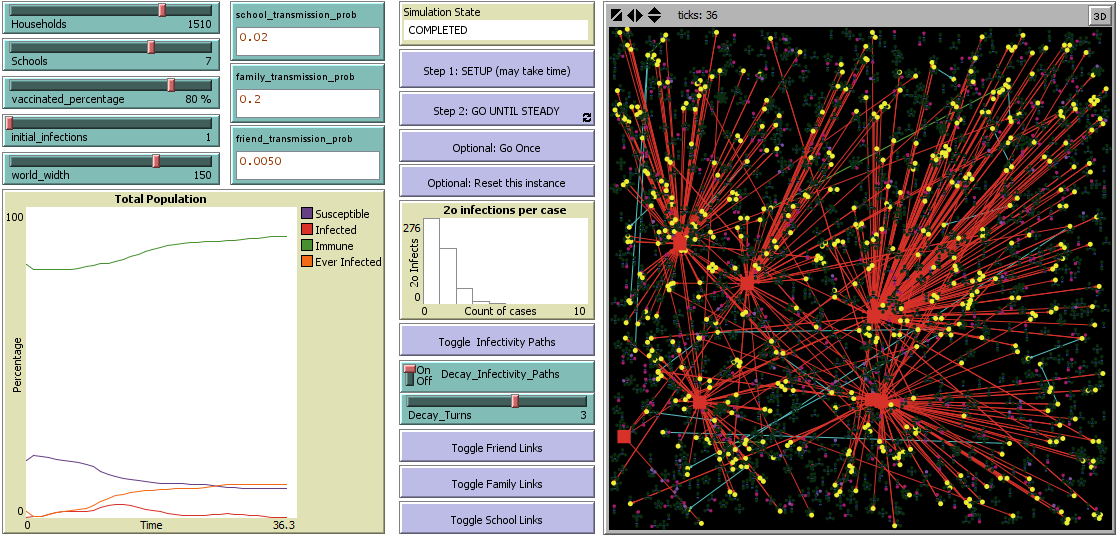
The program has three tabs (tabs): "interface", documentation, and code editor. In the tab “interface” there is a field of graphic objects (including an image of the world), a field of text output and REPL. In REPL, you can switch modes that specify in which context the commands being run are executed - “observer”, “turtles”, “spots” and “communications”. REPL is limited - you cannot describe variables, breeds, procedures and functions in it (they are created out of context), you will have to go to the code editor.
In the zone where the field with the world is drawn, you can create other graphic objects and interface elements with the “mouse” (by pressing the right button on an empty spot). When creating them, they need to specify names by which they can be accessed from the program. Programmatically, I have not found a way to generate graphic objects. In the file, these objects are saved in text form after the code, but in a form unsuitable for manual editing.
For example, if we create a “graph” with the name “plot1”, then the command
set-current-plot "Class Histogram"
histogram map [position ? [red green blue]] ([color] of turtles)Model library
NetLogo comes with an extensive library of models , from educational and entertaining to research. Some models can communicate with specialized hardware, such as GoGo board .
Access to the model to the model is carried out through the File menu. As a rule, the interface of models has Setup and Go buttons and to start them you need to click in this order. Setup initializes the model, after which its settings can be changed through the interface.