
Free virtualization - practical applicability
 No, I didn’t mean at all to say that this is a bad technology, on the contrary it is beautiful, but its implementations are very different. There are a lot of resources on the Internet devoted to this topic, and everyone considers it his duty to make a comparison, and even with a bunch of graphs and official complaints. Well, that means it's my duty. The whole difference is that my comparison will include those aspects that were significant for me (for example, forwarding USB devices to guest systems and the convenience of implementing a software router), and I’ll be too lazy to bring official tables and that means my comparison will be shorter, tied to one of the practical tasks. And most importantly, since the enterprise in which I work very sparingly for the development of IT infrastructure, the discussion will be held around free products. So, in the course of home and professional activities, I had to deal with systems such as VMWare vSphere, Microsoft Hyper-V, and KVM. Consider them in the order of my acquaintance:
VMWare vSphere (ESXi)
There has always been only a better opinion about VMWare products and this platform has become a favorite, but on one condition - the HCL (hardware compatibility list) compliance. That is, if the host hardware does not respond to HCL, then we can only hope that the controllers themselves will match those used in the HCL components and vSphere will have drivers for them. If not, then you will not see this platform on the host. This is the main minus of the platform, which follows from the main plus - it is complete. That is, you do not need to saw, plan, and run with a tambourine. If she gets up, then she gets up. That is, half a kick and ready for use in a production environment. It can be installed on a flash drive, connects almost all possible storage systems (local, NFS, iSCSI, FC).
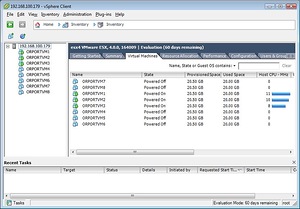
The correct hardware RAID understands without problems, the "wrong" does not understand in principle. Very powerful virtual network adapter management features. I don’t know what’s in the Nexus 1000 paid virtual switch, but for free - it’s completely L2 switch. In particular, my primary and secondary network needs are fulfilled with a bang, namely:
1) the main one is the network bridge (it seems to be called this functionality), that is, let the dedicated virtual interface work as if a wire is directly connected to it. I don’t know how best to explain this, in fact a quite expected function, for example, the gateway works like this, it is given an interface with connection to the provider, the vSphere is assigned a registered MAC using the vSphere virtual interface and the gateway receives the IP from this provider from IP provider, sets the PPPoE channel and that's it things like that.
2) auxiliary - L2 switch with support for tagged and untagged ports. Thanks to this, the gateway perfectly routes VLANs of the network, being connected to only one physical interface.
Well, for dessert - a full transfer of USB devices to guest systems (for example, USB hardware keys) and good free solutions for migration and backups. Veeam Backup & Replicate in the free edition even implements hot storage vMotion. The native conversion utility allows you to easily and easily convert images of physical machines and other virtual machines into working vSphere images. If we add to this the paid, but charming vmware workstation, which, being a very good second-level hypervisor, can connect to the vSphere host and manage its virtual systems, then the picture looms right. There are only two paybacks at the moment: HCL and RAID.
Microsoft Hyper-V Server
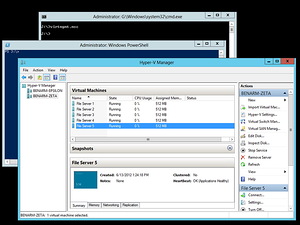 How much he knows according to official press releases. Gathering a home server, I certainly gave hope to this platform, because my platform did not get into HCL vmware. The first thing that caught my eye was a tambourine, and only a proprietary one in order to launch it. You can’t do without a “half-liter” or good leadership (by the way, the first acquaintance with vSphere took place without manuals, tambourines and tips, only on an intuitive level). Well, in order to make the initial post-installation setup somehow bearable, you have to use unofficial (amateur) utilities. Even after finding a good guide, I had to think for a long time why not a single network card is displayed among the possible interfaces, despite the drivers just installed. The solution was that until you insert the cable, The system does not display a physical network interface. The interface is very poor, the settings for virtual machines and the hypervisor are less, but judging by the advertisements there are more functions, they are simply more carefully hidden. Naturally, I started from the gateway and ... Hyper-V could not cope with network task # 1. Moreover, USB forwarding from the host to the guest system in version 3 is not yet possible, but there is no newer yet. But instead of recognizing this flaw, MS representatives in some resources point out that this feature is not yet available due to a number of technological limitations, and vmware has it implemented incorrectly - well done. Installing on a flash drive seems to be possible, but again only with a “half-liter”, and you can sleep too soon before the platform works. But the wrong RAID is not a hindrance to her. there are fewer settings for virtual machines and the hypervisor, but judging by the advertisements of the functions, they are simply more carefully hidden. Naturally, I started from the gateway and ... Hyper-V could not cope with network task # 1. Moreover, USB forwarding from the host to the guest system in version 3 is not yet possible, but there is no newer yet. But instead of recognizing this flaw, MS representatives in some resources point out that this feature is not yet available due to a number of technological limitations, and vmware has it implemented incorrectly - well done. Installing on a flash drive seems to be possible, but again only with a “half-liter”, and you can sleep too soon before the platform works. But the wrong RAID is not a hindrance to her. there are fewer settings for virtual machines and the hypervisor, but judging by the advertisements of the functions, they are simply more carefully hidden. Naturally, I started from the gateway and ... Hyper-V could not cope with network task # 1. Moreover, USB forwarding from the host to the guest system in version 3 is not yet possible, but there is no newer yet. But instead of recognizing this flaw, MS representatives in some resources point out that this feature is not yet available due to a number of technological limitations, and vmware has it implemented incorrectly - well done. Installing on a flash drive seems to be possible, but again only with a “half-liter”, and you can sleep too soon before the platform works. But the wrong RAID is not a hindrance to her. Naturally, I started from the gateway and ... Hyper-V could not cope with network task # 1. Moreover, USB forwarding from the host to the guest system in version 3 is not yet possible, but there is no newer yet. But instead of recognizing this flaw, MS representatives in some resources point out that this feature is not yet available due to a number of technological limitations, and vmware has it implemented incorrectly - well done. Installing on a flash drive seems to be possible, but again only with a “half-liter”, and you can sleep too soon before the platform works. But the wrong RAID is not a hindrance to her. Naturally, I started from the gateway and ... Hyper-V could not cope with network task # 1. Moreover, USB forwarding from the host to the guest system in version 3 is not yet possible, but there is no newer yet. But instead of recognizing this flaw, MS representatives in some resources point out that this feature is not yet available due to a number of technological limitations, and vmware has it implemented incorrectly - well done. Installing on a flash drive seems to be possible, but again only with a “half-liter”, and you can sleep too soon before the platform works. But the wrong RAID is not a hindrance to her. that this function is not yet available due to a number of technological limitations, and vmware has it implemented incorrectly - oh well done. Installing on a flash drive seems to be possible, but again only with a “half-liter”, and you can sleep too soon before the platform works. But the wrong RAID is not a hindrance to her. that this function is not yet available due to a number of technological limitations, and vmware has it implemented incorrectly - oh well done. Installing on a flash drive seems to be possible, but again only with a “half-liter”, and you can sleep too soon before the platform works. But the wrong RAID is not a hindrance to her.
So, what do we have in the bottom line? Omnivore with respect to hardware and omnivore with regard to RAID. Plus, quality Veeam utilities should work, but I could not verify this - I quickly decided to look for a replacement for it.
Kvm
Another vaunted platform. I read about its capabilities and could not resist the desire to try it out, especially since an omnivorous Hyper-V replacement was needed. And then I realized that this is just inverted vSphere in every sense. The first thing I came across was a lot of different deployment options for this platform. That is, it is assumed that a person should try all of them, analyze and make a conclusion as correct in his case. Somehow this is unusual in application to servers. In addition, I did not find official best practices for installation - really who is what. One claims that everything needs to be done manually through libvirt, the other - that it is enough to install VirtManager, and then everything will be done automatically, while the third states that it is better to roll ProxMox onto Debian. Total: the desire to try resulted in a study of the available deployment tools and the choice of the optimal one. These are, in my opinion, bare metal variations that do not require a pre-installed and prepared system - the package must be fitted, so to speak, “the suit must sit”. And from everything it turned out that the ProxMox and OpenNode distributions deserve attention. The first one on Debian, which is old and superficial, the second one on CentOS, which I use in more than one instance, I consider to be a synonym for stability and of course the successor to the RedHat way, from which I began my acquaintance with Linux. that attention is paid to the ProxMox and OpenNode distributions. The first one on Debian, which is old and superficial, the second one on CentOS, which I use in more than one instance, I consider to be a synonym for stability and of course the successor to the RedHat way, from which I began my acquaintance with Linux. that attention is paid to the ProxMox and OpenNode distributions. The first one on Debian, which is old and superficial, the second one on CentOS, which I use in more than one instance, I consider to be a synonym for stability and of course the successor to the RedHat way, from which I began my acquaintance with Linux.
Opennode
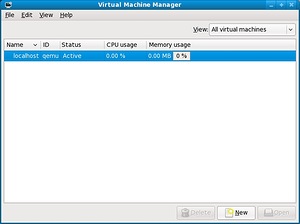
OpenNode already counted the 6th version of the release and therefore was perceived by me as a serious application for a platform for the production environment and even more so for the home. The installation presented a surprise - I could not go through the initial setup of the network interface in any way: I drive in all the settings, then the installer tries to apply them and gives an error that I don’t remember anymore. After many settings, I put the cable in the interface and ... here it is - the reason. Almost like in Hyper-V, the installer does not let you go further in configuring the network interface until you give it an active link. Oh, the times when RedHat was installed from three disks onto a computer around which there was no Internet and network anywhere in a radius of 2 kilometers were forgotten. Okay, put up with this, installed the system, launched the console UI, which fell out with an error when creating the storage. Okay, let's see the GUI, which is a VirtualManager on a server without X. Unusually, but it turns out there is a solution even under Windows. Download and install Xming (X server port), connect via SSH and run VirtualManager, which starts in our X port. Despite the fact that I usually do not pay attention to the drawing of interfaces of serious products, even this one I noted with the word “Poor”, and after all, the yard is still 2013 (it happened back in 2013). Okay, my eyes close to that calmly, we create a virtual machine in the standard storage (because the other is not created and falls out with an error), and at some point VirtualManager falls out with an error and does not start anymore. Rebooting does not help him. I think there are all kinds of manuals on how to manually finish libvirt, find the reason in the error logs,
Proxmox
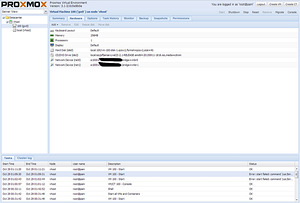
The 6th release of OpenNode did not make the impression. The last hope remains - ProxMox. Is there really only vSphere in this world with my Wishlist - then they can safely consider themselves monopolists. I put ProxMox, I did not check the stage with setting up the interface, since the link was already there, the installation went without problems. I had to suffer a bit with the reconfiguration of network interfaces - apparently bad knowledge of Debian affected. The first difference that catches your eye is that it does not use VirtualManager, but the web panel. It even makes me happy because I am starting to love more and more through web management. The configuration of the network interfaces is a bit tricky, but you can even figure it out intuitively. For some reason, reconfiguration did not give effect without a reboot. Minus, but so far bearable. I didn’t climb into the console for fixing it for 2 reasons: 1) Debian is still new to me 2) I look at the product, and in it all control is concentrated in the control panel, everything in the console is, let's say, “undocumented features”. In addition, without the "undocumented features" there is no support for networks in VLAN. Finally, I create a virtual machine, the installation image can be downloaded directly through the webmord, which is admired after Hyper-V and OpenNode (of course, it is in my favorite vSphere). MAC addresses are assigned to virtual adapters, I forwarded the connection to ISP into the virtual machine, I proceed with the installation and ... Java RE of the older version does not allow anything to be done, only the Error window pops up to ignore the security warnings. Will have to upgrade. Updated, connected to the console, but after a week this version of Java did not allow me to connect again, because a new version was released. My network test # 1 did not cause problems. The basic functions for managing virtual machines are quite suitable, the functionality for the vSphere alternative in this market is not bad, the possibilities for changing the hardware of the VM, the ways of virtualizing KVM and openVZ (containers). Statistics, backups, snapshots, support for LDAP / AD authorization, built-in databases, storage connection: RBD, iSCSI, NFS and others that I’m not aware of, updating and as I understand ready-made downloadable packages openvz virtual appliances. And now for a moment we recall that this is an add-on over Debian and then it becomes clear that if you connect a “half liter” and a tambourine here, it becomes possible to install on the wrong raid and even soft raid, delivery of the Spice desktop (I have not tried it yet, I can’t tell ), the functionality for the vSphere alternative in this market is not bad, the ability to change the hardware of the VM, the virtualization methods of KVM and openVZ (containers). Statistics, backups, snapshots, support for LDAP / AD authorization, built-in databases, storage connection: RBD, iSCSI, NFS and others that I’m not aware of, updating and as I understand ready-made downloadable packages openvz virtual appliances. And now for a moment we recall that this is an add-on over Debian and then it becomes clear that if you connect a “half liter” and a tambourine here, it becomes possible to install on the wrong raid and even soft raid, delivery of the Spice desktop (I have not tried it yet, I can’t tell ), the functionality for the vSphere alternative in this market is not bad, the ability to change the hardware of the VM, the virtualization methods of KVM and openVZ (containers). Statistics, backups, snapshots, support for LDAP / AD authorization, built-in databases, storage connection: RBD, iSCSI, NFS and others that I’m not aware of, updating and as I understand ready-made downloadable packages openvz virtual appliances. And now for a moment we recall that this is an add-on over Debian and then it becomes clear that if you connect a “half liter” and a tambourine here, it becomes possible to install on the wrong raid and even soft raid, delivery of the Spice desktop (I have not tried it yet, I can’t tell ), built-in databases, connection of storages: RBD, iSCSI, NFS and others, which I can’t hear, update and as I understand ready-made downloadable packages openvz virtual appliances. And now for a moment we recall that this is an add-on over Debian and then it becomes clear that if you connect a “half liter” and a tambourine here, it becomes possible to install on the wrong raid and even soft raid, delivery of the Spice desktop (I have not tried it yet, I can’t tell ), built-in databases, connection of storages: RBD, iSCSI, NFS and others that I can’t hear, update and, as I understand it, ready-made downloadable packages of openvz virtual appliances. And now for a moment we recall that this is an add-on over Debian and then it becomes clear that if you connect a “half liter” and a tambourine here, it becomes possible to install on the wrong raid and even soft raid, delivery of the Spice desktop (I have not tried it yet, I can’t tell ),forwarding USB devices from the host (unfortunately the address of the forwarded device changes after rebooting), forwarding PCI boards - and then a bummer was waiting for me - the processor does not support passthrough. As you can see, there are many opportunities, and with a dopilka even more. But to understand what will work out of this and what isn’t just for you. A kind of designer, with a good starting set and the ability to finish.
Finally my rating is:
1: VMWare vSphere
2: Top Mix: ProxMox
3: Hyper-V
Outsider: OpenNode.
PS: Of course, this is an amateur review and the criteria were tasks that were not of paramount importance to everyone. But on this side, products are rarely compared and choice becomes difficult.