
Save memory: Picasso vs UniversalImageLoader
Hi Android Developers!
I think each of us is faced with loading images by URL. The easiest way to solve this problem: use a ready-made third-party library. Typically, one such off-the-shelf solution is Universal Image Loader (UIL), Picasso. When I ask the developer why he chose this or that library, as a rule, I get different answers. For example, “Picasso / UIL has no problems with memory leaks”, or “Square do just the right thing”, or simply “Yes, I use UIL, it works - and good.”
So, I was wondering: which of these 2 libraries optimally uses memory? I am using UIL and have a problem with OutOfMemory on older devices. Perhaps Picasso is the cure?
So the idea for this benchmark came up.
Test purpose:Determine which library (UIL or Picasso) uses the device’s memory to the minimum.
Test cases:
- Download small images (240x240)
- Download large images (> 400px in any of the dimensions)
- Download large images and convert their size to ImageView dimensions
- Download small images and display them as a round image
- Download large images and display them in the RGB565 configuration. Test
execution technique:
As a list, use a GridView with a width of 2 columns. The adapter is configured separately for each test case. We give the adapter a list of pre-prepared URLs, thus creating the same testing conditions.
With a period of 1 second, the list automatically makes one pass down and then up in increments of 4 images. For each step, the memory used by the application is measured.
We measure the used memory in 3 stages for each test case:
- first run - with a clean application cache;
- second launch: without closing the application after the first pass;
- third launch - after re-opening the application without cleaning the cache.
At the end of the test case, I additionally wrote down the cache size, which is also important for older devices.
Benchmark sources can be found at
github.com/artemmanaenko/ImageLoadersTest . The project is compiled under Gradle.
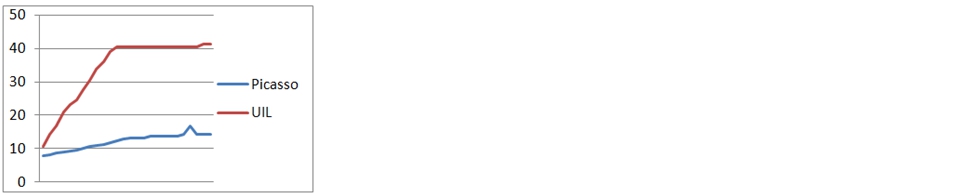
So, below are the results for each test case. Y axis - memory used by the application in MB. X axis - the time of the test case.
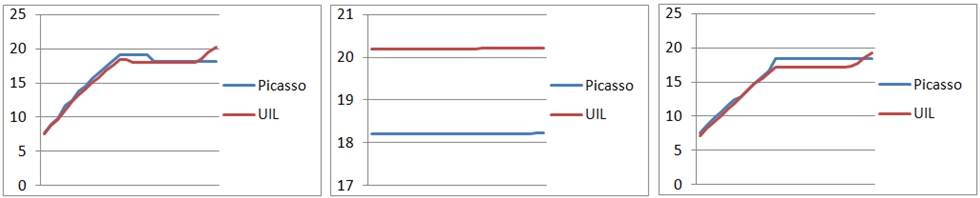
Cache size: Picasso = 1.39 Mb, UIL = 1.17 Mb
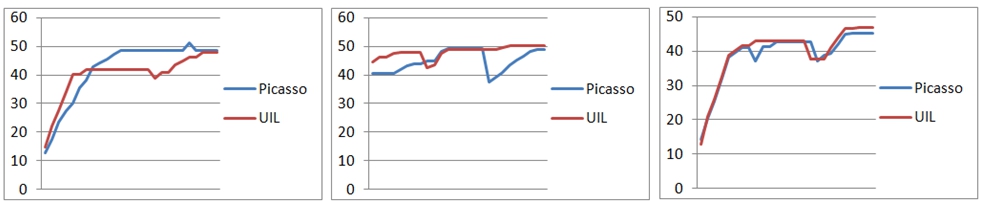
Cache size: Picasso = 3.67 Mb, UIL = 5.44 Mb

Cache size: Picasso = 3.67 Mb, UIL = 5.44 Mb

Cache size: Picasso = 1.39 Mb, UIL = 1.17 Mb
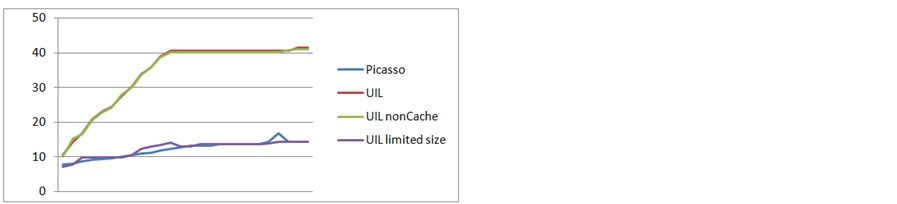
The results of the experiments with large pictures impressed me, and I decided that it was worth trying to configure the UIL. In order not to load the cache heavily with the cache, I tried to disable the cache in RAM at UIL. And, as an option, set the cacheable size of the picture - no more than half the screen.
Based on the experiment, I made the following conclusions:
I think each of us is faced with loading images by URL. The easiest way to solve this problem: use a ready-made third-party library. Typically, one such off-the-shelf solution is Universal Image Loader (UIL), Picasso. When I ask the developer why he chose this or that library, as a rule, I get different answers. For example, “Picasso / UIL has no problems with memory leaks”, or “Square do just the right thing”, or simply “Yes, I use UIL, it works - and good.”
So, I was wondering: which of these 2 libraries optimally uses memory? I am using UIL and have a problem with OutOfMemory on older devices. Perhaps Picasso is the cure?
So the idea for this benchmark came up.
Test purpose:Determine which library (UIL or Picasso) uses the device’s memory to the minimum.
Test cases:
- Download small images (240x240)
- Download large images (> 400px in any of the dimensions)
- Download large images and convert their size to ImageView dimensions
- Download small images and display them as a round image
- Download large images and display them in the RGB565 configuration. Test
execution technique:
As a list, use a GridView with a width of 2 columns. The adapter is configured separately for each test case. We give the adapter a list of pre-prepared URLs, thus creating the same testing conditions.
With a period of 1 second, the list automatically makes one pass down and then up in increments of 4 images. For each step, the memory used by the application is measured.
We measure the used memory in 3 stages for each test case:
- first run - with a clean application cache;
- second launch: without closing the application after the first pass;
- third launch - after re-opening the application without cleaning the cache.
At the end of the test case, I additionally wrote down the cache size, which is also important for older devices.
Benchmark sources can be found at
github.com/artemmanaenko/ImageLoadersTest . The project is compiled under Gradle.
So, below are the results for each test case. Y axis - memory used by the application in MB. X axis - the time of the test case.
Download small images
Cache size: Picasso = 1.39 Mb, UIL = 1.17 Mb
Download large images
Cache size: Picasso = 3.67 Mb, UIL = 5.44 Mb
Download large images with conversion to ImageView size
Cache size: Picasso = 3.67 Mb, UIL = 5.44 Mb
Download small images and crop them to a round picture
Cache size: Picasso = 1.39 Mb, UIL = 1.17 Mb
Download large images and display them in RGB565 configuration
The results of the experiments with large pictures impressed me, and I decided that it was worth trying to configure the UIL. In order not to load the cache heavily with the cache, I tried to disable the cache in RAM at UIL. And, as an option, set the cacheable size of the picture - no more than half the screen.
Based on the experiment, I made the following conclusions:
- If your lists work with small images (comparable to the size of ImageView) - the choice of library is not important for you. Picasso creates a slightly larger cache on disk, while using less RAM by about the same size.
- Picasso showed amazing results in managing memory while working with large images. UIL seems to be storing the original image in memory. Picasso stores the already converted image size. Therefore, Picasso has much less cache on the disk.
- UIL can work with the same efficiency as Picasso if it is additionally configured. For example, limit the size of the cache in memory. Or, as in one of the tests, manually limit the size of cached photos. The second method may not be suitable for use, since it sets the global configuration of ImageLoader.
- Working with round avatars is "cheaper" through Picasso. But, again, due to the fact that I manually called recycle () on the original Bitmap. You can do the same in the UIL by setting an overridden BitmapDisplayer.
- Picasso is extremely easy to use and already out of the box works with memory efficiently. This is how initialization and loading for libraries look like:Picasso
public class PicassoSquareFitAdapter extends BaseBenchmarkAdapter { public PicassoSquareFitAdapter(Context context, IUrlListContainer urlListContainer) { super(context, urlListContainer); } @Override protected void loadImage(ImageView imageView, String url) { Picasso.with(context).load(url).fit().into(imageView); } }Uilpublic class UILSquareFitAdapter extends BaseBenchmarkAdapter { private DisplayImageOptions options; public UILSquareFitAdapter(Context context, IUrlListContainer urlListContainer) { super(context, urlListContainer); ImageLoaderConfiguration config = ImageLoaderConfiguration.createDefault(context); ImageLoader.getInstance().init(config); options = new DisplayImageOptions.Builder() .imageScaleType(ImageScaleType.EXACTLY) .resetViewBeforeLoading(true) .cacheInMemory(true) .cacheOnDisc(true) .build(); } @Override protected void loadImage(ImageView imageView, String url) { ImageLoader.getInstance().displayImage(url, imageView, options); } } - Picasso also has a minus: image transformations and casting to RGB565 must be done in self-written classes.Round transformation
public class RoundTransformation implements Transformation { @Override public Bitmap transform(Bitmap source) { int size = Math.min(source.getWidth(), source.getHeight()); int x = (source.getWidth() - size) / 2; int y = (source.getHeight() - size) / 2; Bitmap squaredBitmap = Bitmap.createBitmap(source, x, y, size, size); if (squaredBitmap != source) { source.recycle(); } Bitmap bitmap = Bitmap.createBitmap(size, size, source.getConfig()); Canvas canvas = new Canvas(bitmap); Paint paint = new Paint(); BitmapShader shader = new BitmapShader(squaredBitmap, BitmapShader.TileMode.CLAMP, BitmapShader.TileMode.CLAMP); paint.setShader(shader); paint.setAntiAlias(true); float radius = size / 2f; canvas.drawCircle(radius, radius, radius, paint); squaredBitmap.recycle(); return bitmap; } @Override public String key() { return "circle"; } }Config565Transformationpublic class Config565Transformation implements Transformation { @Override public Bitmap transform(Bitmap source) { Bitmap resultBitmap = Bitmap.createBitmap( source.getWidth(), source.getHeight(), Bitmap.Config.RGB_565 ); Canvas canvas = new Canvas(resultBitmap); Paint paint = new Paint(); paint.setFilterBitmap(true); canvas.drawBitmap(source, 0, 0, paint); source.recycle(); return resultBitmap; } @Override public String key() { return "Config565Transformation"; } }
For myself, I concluded: projects need to be transferred to Picasso. In my case, this will solve the memory overrun problem. I hope this post will be useful to you too!