
Debt notification system, or another autoinformer
- Tutorial
In the last post we made a voice self-service system, now for the same client we are creating a debt notification system. By the condition of those tasks, the system should:
let's get started.
We will do it on the same XVB-VirtualPBX
Download from the site / yandex disk'a large tar.bz2 archive with a ready-to-use image for VMWare Player. And put the updates.
It does not make much sense to describe the installation process of this combine in the previous articles, it has been described, there is also detailed documentation .
We create a separate tenant for this task and write a dialing plan (in the default installation there is a ready-made example that we can fix for ourselves), in the end it will look something like this:
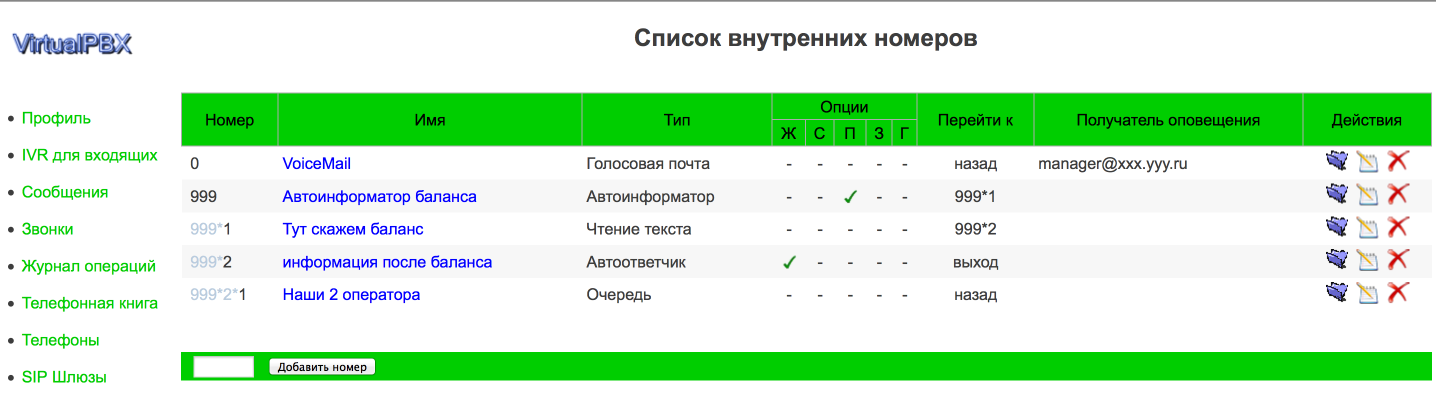
consider it all in more detail, start with extension 999 - this is actually the start of our auto-call.
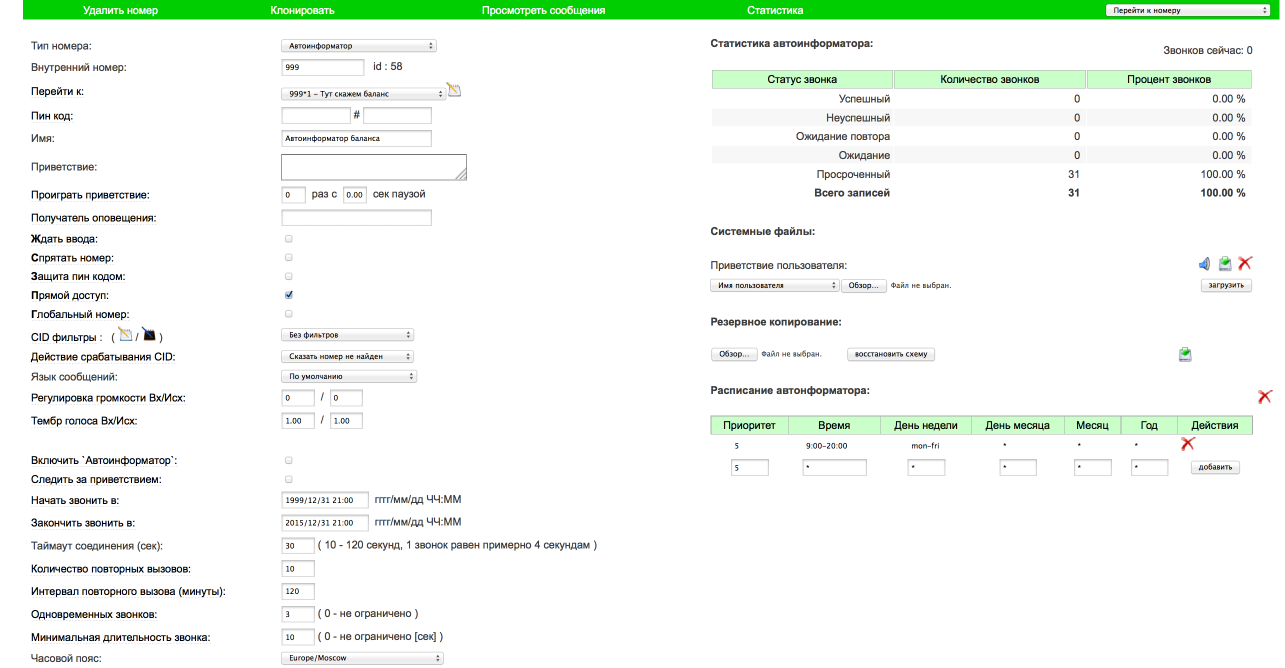
It looks a bit `cosmic`, we will analyze the main points:
in fact, the simplest dialer is ready, and after turning on the 'Turn on autoinformer' checkbox and loading the csv file with the phones, the system should start ringing. But, we need another pronunciation of balance, for this we make another internal number 999 * 1 and in 'Go to' in 999 we indicate this number.

Here are the key points:
So we have a call and read debt.
to give the user the opportunity to talk with the operator, add two more extension numbers:
999 * 2 - This is just a playback number in which we play the text 'pay as soon as possible' with the checkbox turned on, wait for input, if the user clicks here 1, the system will start calling the operator:

and 999 * 2 * 1- This is the turn itself with an internal sip phone and mobile.

On this virtual-pbx preparation itself is finished.
In order for all this disgrace to start calling, you must either add a SIP gateway to this tenant or make the correct routing in the asterisk configs, about where and how to edit it is written here .
Now a little magic about how the system finds out the balance:

for each client in the list one or several variables can be defined which we will use.
So as not to drive all hands, we pick up such a list in accounting in csv format:
everything is ready, after loading a new csv file, the system starts ringing according to the list
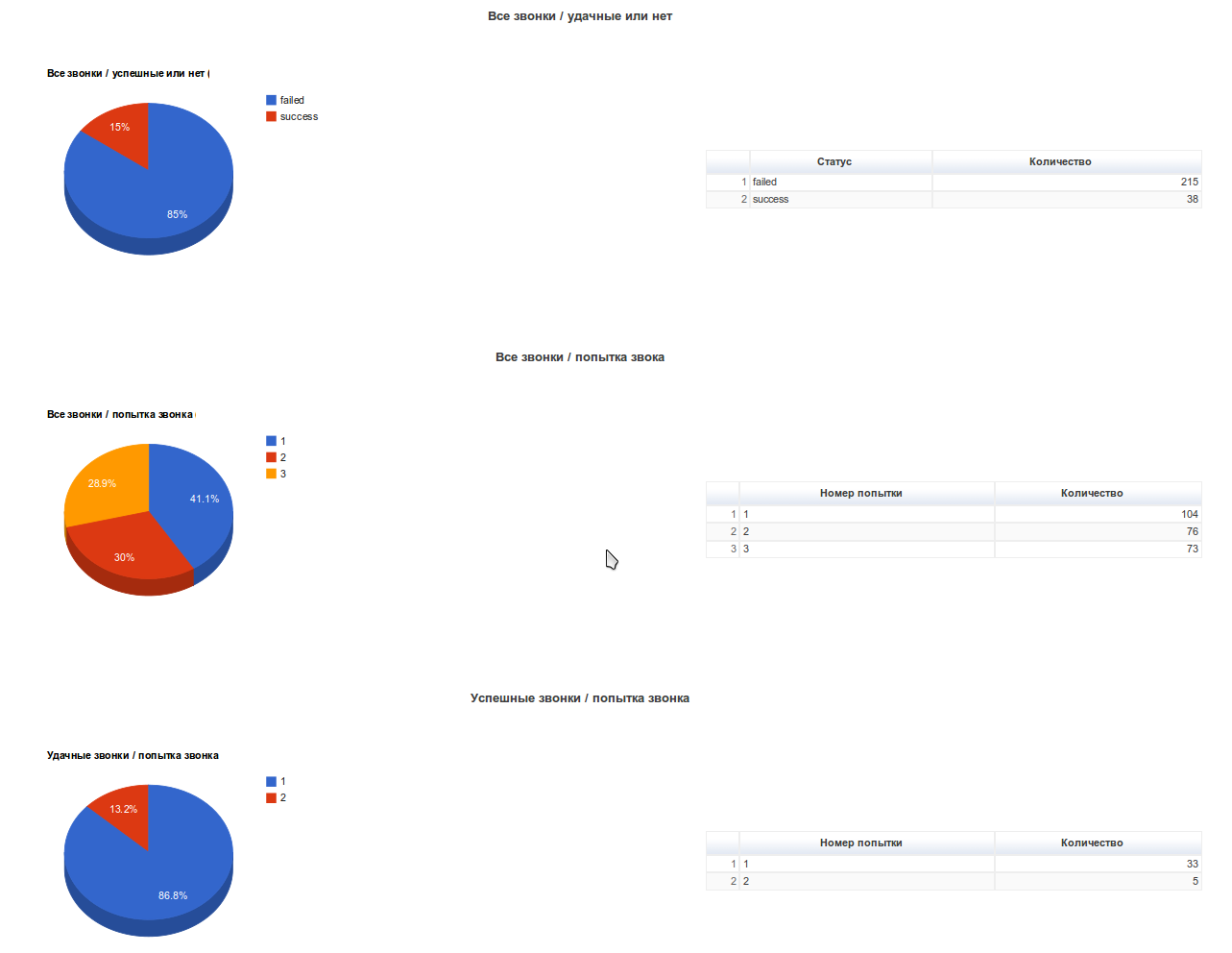
In principle, after a one-time setup, the client needs to download the latest csv files and see the statistics:
- Play pre-recorded file
- Speak personalized user debt
- Connect with the operator if the user wishes
- Have a web interface and statistics
let's get started.
We will do it on the same XVB-VirtualPBX
Download from the site / yandex disk'a large tar.bz2 archive with a ready-to-use image for VMWare Player. And put the updates.
It does not make much sense to describe the installation process of this combine in the previous articles, it has been described, there is also detailed documentation .
We create a separate tenant for this task and write a dialing plan (in the default installation there is a ready-made example that we can fix for ourselves), in the end it will look something like this:
consider it all in more detail, start with extension 999 - this is actually the start of our auto-call.
It looks a bit `cosmic`, we will analyze the main points:
- Set the type of number to autoinformer
- Upload our static file to 'User Greetings'
- Set the call schedule - from 9 a.m. to 8 p.m. from Monday to Friday
- Set the start and end dates of this company, if you constantly use this template, then put the end of 2030 for example
- We have only 5 lines, 3 of which we are ready to give to the informant
- We set the minimum duration of a successful call to 10 seconds, if the user listened to the message less than this time, then we do not consider the call successful
- set the number of repeated calls and the interval between them
in fact, the simplest dialer is ready, and after turning on the 'Turn on autoinformer' checkbox and loading the csv file with the phones, the system should start ringing. But, we need another pronunciation of balance, for this we make another internal number 999 * 1 and in 'Go to' in 999 we indicate this number.
Here are the key points:
- Type of number - reading text
- Text Type - Money
- The most important thing is the text, there we have a variable that will contain the balance of each specific client -% VAR: BALANCE% rub
So we have a call and read debt.
to give the user the opportunity to talk with the operator, add two more extension numbers:
999 * 2 - This is just a playback number in which we play the text 'pay as soon as possible' with the checkbox turned on, wait for input, if the user clicks here 1, the system will start calling the operator:
and 999 * 2 * 1- This is the turn itself with an internal sip phone and mobile.
On this virtual-pbx preparation itself is finished.
In order for all this disgrace to start calling, you must either add a SIP gateway to this tenant or make the correct routing in the asterisk configs, about where and how to edit it is written here .
Now a little magic about how the system finds out the balance:
for each client in the list one or several variables can be defined which we will use.
So as not to drive all hands, we pick up such a list in accounting in csv format:
"NAME", "PHONE_NUMBER", "USER_VARS"
"Igor Lipko", "17605632123; 79508881234", "BALANCE = -68.27"
"Ilya mihailov", "7760569623", "BALANCE = -525.19"
everything is ready, after loading a new csv file, the system starts ringing according to the list
- IVR starts with extension 999 in which we say the phrase "Hello, you are concerned about HOA XXX, your debt",
- go to number 999 * 1 - in which we read the balance,
- go to 999 * 2 - and ask to pay as soon as possible or enter 1 to contact the operator, or just hang up,
- if necessary, we connect the user with the operator for consultation
In principle, after a one-time setup, the client needs to download the latest csv files and see the statistics: