Solving CAPTCHA Major Issues
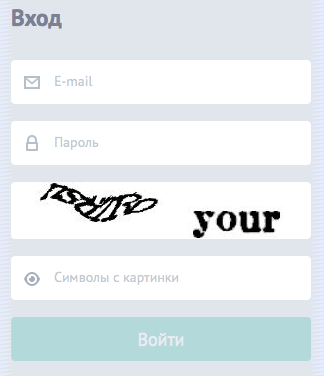
How often do you face the fact that you cannot enter the proposed captcha the first time? Now think about what difficulties a modern person who speaks with a computer “at you” may have? For him, the barrier in the form of reCAPTCHA becomes stronger than for the robot.
However, the difficulty of recognizing captcha by a person is not the most acute problem, as it might seem at first glance. Of course, we could close our eyes to this if the captcha really protected us from various automated recognition systems. But this is far from the case!
And I want to talk about a tool that solves these problems.
In order to create adequate protection for the CAPTCHA, you must first classify the methods for its recognition.
Automated captcha recognition
Currently, there are three main methods of automated recognition of captcha:
1. Using errors in the protection algorithm
This approach is aimed at finding logical errors (vulnerabilities) that allow you to correctly submit the form, without recognizing the captcha itself.
This is the easiest way to bypass protection, but it can be applied mainly only in simple home-made solutions.
The most popular mistake is to send the captcha verification code through the form or cookie fields in clear text, in base64, or in the md5 hash without salt.
It will not be difficult for an attacker to get it, even if he has to generate a rainbow-table in accordance with the CAPTCHA alphabet (only 5-digit letters of the Russian language or only 6-digit numbers, etc.) and make a comparison.
An error is also considered when the same captcha can be solved more than once. This applies mainly to cases in which the generated captcha identifier is valid for 5-10 minutes, but it does not have restrictions on the number of checks. Thereby giving an opportunity to an attacker who already knows the answer, to reuse the identifier of the unraveled captcha. You can use brute force with the same captcha identifier, which, ultimately, will lead to the desired result.
2. Auto recognition
There are three main ways to successfully automatically detect captcha:
I. Use off-line optical recognition (OCR)
This is the easiest approach that does not require special programming skills. Such programs are mainly distributed free of charge, and there are quite a lot of them: ocropus , cuneiform , tesseract , gocr , orcad and others.
The attacker only needs to transfer the captcha picture to such a program, where at the output he will receive the already recognized text. Typically, such software products have many fine-tuning options to make recognition more efficient.
It is to prevent recognition in this way that various distortions, twists, adding garbage, etc. are used.
In this case, the recognition percentage may be very small (only about 10%), but the attacker will still succeed.
II. Self-written scripts using the GD, ImageMagick and other libraries
Such scripts allow you to clear the picture of garbage, remove the background, align the text vertically, crop the picture, leaving only the text, remove multicolor, do color averaging, etc. In practice, the full recognition of such scripts is very difficult.
It is much more efficient to use such a script only for preliminary cleaning of the picture, leaving the parsing process to other methods.
III. Neural networks
It is neural networks that are of greatest interest now. For many, it still looks like some kind of magic.
Neural networks began to be used by attackers, in order to automatically recognize any captcha.
They train a neural network that is capable of recognizing with a high degree of probability even the most complex reCAPTCH .
There are many different libraries for different programming languages that are distributed free of charge. One such library, Fast Artificial Neural Network , was previously featured in Harker magazine .
3. Semi-automatic recognition using cheap human resources
There are many sites such as antigate.com, rucaptcha.com, captchabot.com, etc. that provide their customers with a profitable service. They receive from the client, in automatic mode, a picture with a captcha, and after a few (10-30) seconds give the correct answer, in their opinion. The percentage of successful recognition in this case is very high, about 90-95%.
It is worth noting that for an unprepared visitor this percentage is much lower.
The cost of such a service is approximately $ 1-3 for a correctly recognized 1000 captcha.
Imagine registering 1000 accounts in GMail, which will cost only 30 rubles!
You probably ask who will be engaged in manual recognition for such ridiculous money? These are citizens of the poorest countries of the world, such as: India, China, Vietnam, Pakistan, Cambodia, etc.
Of course, the first thing that comes to the mind of the creators of captcha is to introduce the Russian alphabet and completely exclude English.
Some even delete numbers. But as you know, these half measures are not able to give adequate protection and in the near future service owners will redirect traffic from such captchas only to those who can read Russian.
Others try to complicate the captcha themselves, impose various filters, distortions, garbage, etc., thinking that the robot recognizes them.
Thus, they complicate the reading and recognition of not only people involved in these services and all kinds of scripts, but also ordinary users, whose training is many times lower. All this begins to resemble modern medicine, which fights not with the causes of diseases, but only with their symptoms, as a result of which only the patient suffers.
The main consumers of such services are mainly large SEO-companies, and various types of information aggregators that automatically receive information about statistics for searching keywords, about positions in search results, search results themselves, etc. All kinds of spammers send messages to them on social networks, automatically register accounts in mail services, forums, etc.
In my opinion, the number of captcha recognition for spam purposes, although it is negative, is still not the main direction of selling such a service, being just the tip of the iceberg. While the iceberg itself, it is nothing more than providing access to consolidated information.
Here is an example. In our country, information on postal items (tracking) located on the territory of the Russian Federation can be obtained only on the state website Russian Post. A year ago, they added captcha to the shipment tracking form, which made it impossible to receive information on the items of interest automatically.
Now think about where the information on the items from these sites comes from , but already without captcha?
Confronting such services is not easy. Several factors contribute to this:
All without exception, service owners transferred responsibility for downloading the pictures themselves to their clients, which, in the end, will not allow calculating the IP addresses, their own or people who are engaged in the recognition itself, for subsequent blocking.
If the client of such a service has the necessary knowledge, then he can easily connect the proxy server database to bypass possible locks.
It is also worth noting that there was not a single service, including reCAPTCHA, able to effectively counter this.
Easy user recognition
The best solution for the user would be plain text in the picture, making it more difficult to use automatic recognition methods.
The transparency property of gif or png image formats comes to the rescue. It is necessary to make sure that when several parts of the picture are superimposed on each other, the user can see undistorted text. Any browser supports this feature, and even IE6.
Now let's complicate it a bit. First, create some transparent images, similar in size to the original, and spread out the original image pixel by pixel into these previously prepared layers. When viewing each individual layer, it will not be possible to say exactly what exactly is shown in the original picture. Automatically putting together such a solution is still just as easy.
Let's continue to complicate, and we will make our layers of random sizes and from random places in the original image.
Now we will take out all the information about the layers in a separate css-style file, which will describe the position of each layer relative to the upper left corner of the original image. However, we need to somehow identify the layers and distinguish them from each other. To do this, assign all the pictures random identifiers, and describe them.
An example of a generated html page:
...
...
...


 ...
...
Example css file /captcha/954f836a78de1d510d28ce70fa7b6a4a.css:
#ppaas-org-666ebb41ddda5d4ed6ca4a305ef26aa3 {position: absolute; z-index: 371; margin: 0px 0 0 2px;}
#ppaas-org-032a6f45b6215a130227c13d93d9243b {position: absolute; z-index: 138; margin: 1px 0 0 24px;}
#ppaas-org-1ab330864b702c47f0cb87f436624f04 {position: absolute; z-index: 321; margin: 0px 0 0 80px;}
#ppaas-org-d494ac99950d983bef6a5a396100d69a {position: absolute; z-index: 320; margin: 4px 0 0 3px;}
#ppaas-org-6316b3bc6d6f366eed48f32f6624b396 {position: absolute; z-index: 196; margin: 1px 0 0 74px;}
#ppaas-org-b22da7a9fc15987c5ae825e736591d03 {position: absolute; z-index: 92; margin: 0px 0 0 49px;}
#ppaas-org-048a808a9f2f6a88736c212f83c7a23a {position: absolute; z-index: 501; margin: 6px 0 0 11px;}
#ppaas-org-9416599dcb5540a858d9ed3eb8aaa6bd {position: absolute; z-index: 733; margin: 0px 0 0 7px;}
#ppaas-org-d7eb49d155684558196821fdb03c608d {position: absolute; z-index: 54; margin: 0px 0 0 0px;}
#ppaas-org-10c40dc3fbf7e1dc6a675cec03261105 {position: absolute; z-index: 634; margin: 3px 0 0 13px;}
#ppaas-org-69f1bac3c78d00bf529d8aa518c4a7c3 {position: absolute; z-index: 543; margin: 1px 0 0 38px;}
#ppaas-org-8041ac42a7f1d9fb21d959dd78fd0512 {position: absolute; z-index: 506; margin: 1px 0 0 44px;}
#ppaas-org-d812b3fd1537b3852e8645979c8ce531 {position: absolute; z-index: 67; margin: 0px 0 0 0px;}
#ppaas-org-7830d62c3f648536431ef1ef8522ff4e {position: absolute; z-index: 247; margin: 0px 0 0 20px;}
#ppaas-org-0bb897e2fde54b338eec83c27f913170 {position: absolute; z-index: 350; margin: 3px 0 0 2px;}
#ppaas-org-2d2a15cb75aa8fb806fc4c79c2fb559d {position: absolute; z-index: 149; margin: 3px 0 0 45px;}
#ppaas-org-1612c676e0333d9742913572ec60aee7 {position: absolute; z-index: 429; margin: 1px 0 0 33px;}
#ppaas-org-34fa4c5d386ddb7b4cf48ce59b9cdc8d {position: absolute; z-index: 404; margin: 1px 0 0 2px;}
#ppaas-org-e9747f4f8219bd8cb22d4592fbdfe677 {position: absolute; z-index: 153; margin: 2px 0 0 9px;}
In the future, this process can be complicated indefinitely - on extra layers draw extra pixels, on subsequent layers paint over them, etc.
Isn't it true that everything ingenious is simple ?!

Automated recognition protection
A big mistake, in my opinion, is blocking ip addresses that repeatedly entered captcha values incorrectly.
Anyone can enter incorrect values as many times as necessary, and this does not affect anything. CAPTCHA is just designed for such filtering.
Only those who have already indicated X with the correct values should be blocked. And unlock, if within N minutes this user no longer entered the correct values.
In other words, the ip-address of the site visitor who was noticed after entering X captcha correctly in the last N minutes should automatically be refused.
It is also worth noting that this approach begins to work effectively in the case of a single, centralized service.
An ideal solution is one in which such restrictions are not mandatory, and it is possible to change these parameters to suit your requirements.
Some of you will want to make restrictions for 1 captcha every 30 minutes, someone will want 5 captcha for 5 hours, and someone will prefer to disable the check altogether.
In the case of using such a restriction, it becomes absolutely irrelevant how the automated recognition of captcha occurs.
Any of them ceases to be an effective solution.
You probably ask: What prevents the use of a huge number of proxy servers?
All proxy servers are taken from free access, from the same sites around the world. The last time I had to use them, about 20,000 servers were really working, where 3,000 of them worked constantly.
The process of finding / creating your own proxy servers is difficult for most. This list includes those servers that were hacked by brute force, infected with viruses, etc. This is a specific niche that is really accessible to only a few.
If only one attacker would exclusively possess such a database of 20,000 IP addresses, he could claim to recognize 40,000 captcha for every hour.
This is 960,000 captcha per day - an excellent result!
Now imagine that all attackers fully or partially own this base. Its decentralized use will lead to a permanent denial of service for all of them.
Consider an example. You just used one ip-address for successful recognition of captcha in any way, and now you wait about half an hour so as not to get blocked, to make a second attempt. But it turns out, while you were waiting, someone else used this address to enter captcha on another resource of interest to him.
Such an attempt will turn him down, since this ip-address was already used by you a few minutes earlier. When you wait for the time to expire, you will recognize the captcha a second time, but you will be refused.
And so everything begins to go in a circle and to infinity.
Protection Privacy as a Service
Until that moment, it was just a theory. But you can look at how this works in practice - http://ppaas.org .
The service allows you to protect any text information, such as email addresses, phone numbers, etc.

UPD : Please read the post carefully, graphic design, this is just for easy reading, the main protection against automated recognition is different.
Thanks for attention. Together we will make this world a better place.