Identifiers for an inventory of IT equipment is easy and simple
- Tutorial
Good day to the venerable public.
A considerable part of my work is inventory accounting of equipment. I’ve been doing this for many years and in many companies, I’m doing it quite successfully, so I can share how to take the first steps so that this muddy process does not turn into a headache for the person who was assigned to it.
I'll start from afar: reading articles on inventory on the hub showed that there is terrible horror in the heads of my colleagues in the workshop, they don’t understand at what end to approach the task and, even worse, don’t understand which task is actually being solved.
For some reason, my dear colleagues believe that an inventory of it equipment should answer the question “what is the filling inside the computer?” Or something like that. To solve this problem, all kinds of systems like Aida are involved, completely wild methods of accounting and monitoring are conducted, and so on. and meanwhile, relations with accounting are deteriorating, equipment is lost, the admin is worn around the office with bulging eyes and cannot find anything.
Guys, I reveal a terrible secret: no one cares what is installed inside the computer. No one, absolutely no one is interested in the entire amount of slag that the information collectors give out; nobody is interested in what a regular admin stores in their account tables. Why? Because the business thinks in rubles, it does not care about megabytes and megahertz, because if the equipment is still in operation, its configuration is probably sufficient to solve the problems that are solved on it (and if not, then tracking and management configuration is definitely not carried out as part of the inventory process).
And here the question arises: what does the accountant expect from the IT department? The answer is simple, they are only interested in one thing: is there an item with inventory number ABC1234 in place? A slightly more advanced accountant may also be interested in whether the part number to which this number was assigned still corresponds to part number ABC1234? In other words, are they trying to give us the LG microwave for the HP EVA P6000 disk storage? Sometimes we are still worried about the question of whether the serial number previously known to us corresponds to a product with this inventory number - we will also solve this issue. It should also be understood that the said microwave from the mentioned disk storage from the point of view of the accountant differs precisely by the inventory number (well, there is still cost, depreciation, and so on, but, fortunately, this is no longer an IT headache). And this understanding of us leads to an additional bonus: with a flick of the wrist we can build excellent relationships not only with bookkeeping, but also with the unit that takes into account cabinets, tables and chairs, providing them with a convenient tool for work. By the way, at the same time we will solve another problem: facilitating the identification of equipment belonging to your company - this will help your colleagues from third-party organizations to easily determine who forgot the laptop in their meeting room.
When writing this text, I proceed from the assumption that your company already has some kind of software in which at least accounting keeps records of material values. Therefore, you at least have no problems getting a table of correspondence of descriptions of storage units to their inventory numbers. We will make it so that this information is clearly presented and can be easily used for inventory accounting of equipment.
Oh, and I also assume that you have Microsoft Office installed. We will do all the work in it.
So, our first step is to make the right inventory label.
The right inventory label is something that is usually not found anywhere. How do they make an inventory label, if at all? They write what is not needed, do not write what is needed, make it with an inappropriate tool (for example, the LetraTag ribbon printer is a cool thing, only it does not control the uniqueness of the input data and it is impossible to make a couple of thousand labels on it without errors. At least once, yes you do it.) The
correct inventory label, from my point of view, should contain:
1. Short name of the storage facility (so that no one would be tempted when leaving, for example, stick an inventory from an expensive laptop on a hole punch).
2. Actually, the inventory number of the object
3. Machine-readable inventory number - only the barcode is appropriate and sufficient here. I saw a proposal to encode information with a QR code, it’s terrible, and I’ll quickly explain why: this solution does not involve the rapid and massive entry of information into a computer. The barcode scanner is a USB keyboard from the point of view of the computer, reading the barcode sends to the computer a character sequence of encoded text, as if it were typed with your hands on the keyboard and pressing the Enter button. Accordingly, if you wish, you can go through the office with a laptop to which a bar-code scanner is connected, remove the code by code and get an inventory table at the output. If you use QR codes, this will not work. Well, you scan the code with the phone, well, you recognize, and then what?
4. Company logo
Now we will do it all, and we won’t spend a dime on software in order to make a really good thing.
To begin with, we get in the bookkeeping table with inventory numbers and a description of the positions. We are not embarrassed that there is a lot of text in the descriptions, we need it to understand what is at stake, but we will print our own on the labels.
Important: the fact that we received an inventory table from the accounting department in electronic form gives us a 100% guarantee that we will make labels with
obviously correct inventory numbers.
Equally important: make sure that the inventory numbers do not contain Cyrillic. If they contain - solve this issue until you have started to do the rest.
So, the initial form of the table (position descriptions are taken from real life, inventory numbers and the company logo are not, but it doesn’t matter): The
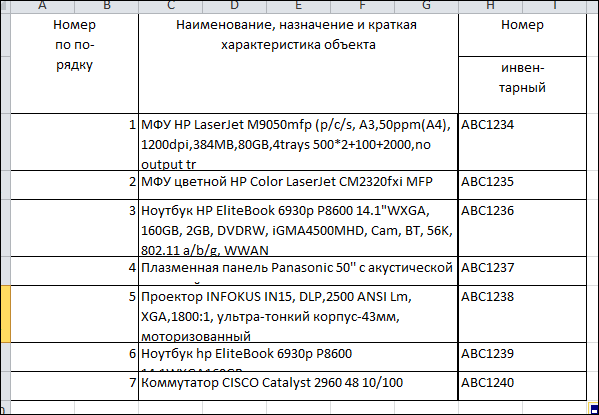
table is good, we will refine it. We ’ll introduce a few more columns:
Line 1 - here we enter the type of device (laptop, MFP, server, or whatever else you have)
Line 2 - here we enter the brand and model of the device (for example HP Elitebook 6930p)
Barcode - here we insert the barcode presentation of our inventory number. More about this below.
Sheet- no less important parameter. It is needed in order to easily find the desired label on the label sheet. If you decide to do everything from scratch according to my recipe, you will have a break in the sheets, on which there will be sorted labels in some way. The problem is that the equipment is scattered around the office in an absolutely chaotic way, and, approaching the next device, you are unlikely to want to shovel all your 50-60 sheets of 48 labels per sheet. Take care of yourself in advance, indicate on which sheet you have the label you need: the first 48 entries - sheet 1, from 49 to 96 - sheet 2 and so on. Sure, handle it.
The most important point is how to translate the inventory number into the barcode representation.
First, download from the site http://code128.narod.ru/a small archive in which we have the macro we need: http://code128.narod.ru/Barcode.zip , and unpack it.
We find the file with the font barcode.ttf and import the font into the system.
We find the beautiful Barcode.bas file - we need to drag it into the file with our inventory table: Alt-F11, File-> Import file ..., find and select Barcode.bas -> Open, Alt-F4
Hurray, the macro was imported into our table . We will use it.
The author of the macro offers a lot of options for encoding data into a barcode. Experience shows that the most suitable type of coding for our purposes is Code 128, because it allows you to encode Latin letters in upper and lower case, numbers and punctuation marks, while it is quite compact and easy to read by scanners.
The table at the time of its readiness (just in case, I show how to use the macro):
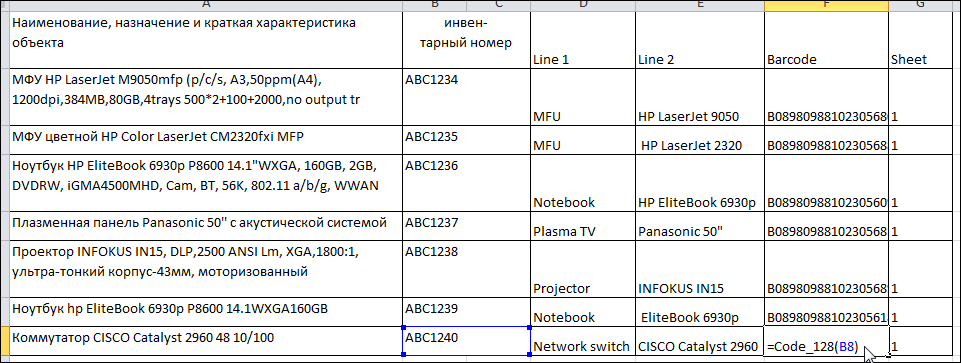
On this, in fact, the most dreary part of the event is over. Save the table, close Excel.
We quickly go to the site of the wonderful material producer Avery Zweckform and download the label generation program from this page: http://www.avery-zweckform.ru/download/avery-wizard-for-microsoft-office
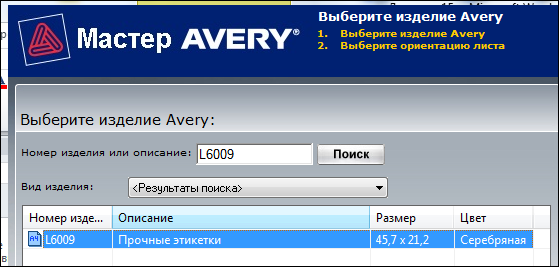
I almost forgot: at this point you should already have inventory labels at hand, on which we will all print. I use Avery L6009-20 labels, which I wish you. They have an optimal size (45.7 x 21.2 mm), they are durable, they adhere well and pass well through the laser printer. From my point of view, ideal. You can use other sizes, in this case, make the appropriate corrections when creating the layout.
So, Avery Wizard for Microsoft Office is installed, open MS Word, the Avery menu with a single button has already appeared in it:
Click it, launch the plug-in, click the obvious “Next”. In the label selection menu we find the sort L6009 that we need:
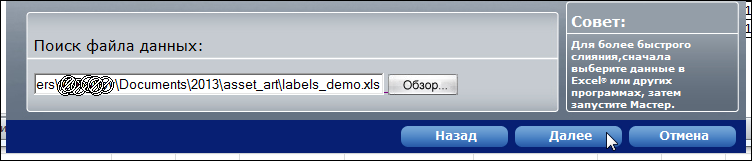
In the next window, select "Merge data from an existing file", click "Next".
In the next window, we find and select the Excel file we created, click "Next"
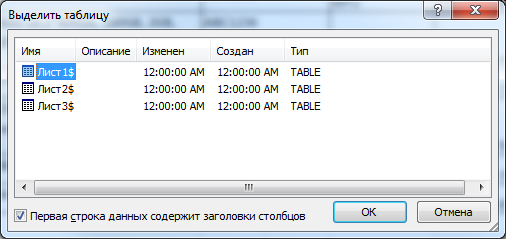
in the next window, select the obvious "Sheet1 $" or "Sheet1 $", do not forget to check the box that the first line contains the headers:
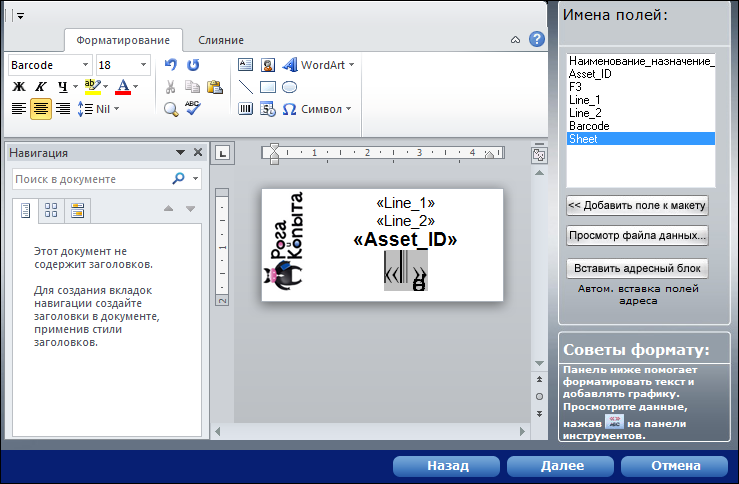
And as a result we get the window for typesetting the sticker. In fact, this is the same Microsoft Word window with almost all typesetting tools. In the right part of the layout window there is a list of table fields, a double click inserts the data field we need into the right place on the label.
To save time for typesetting, I will immediately give the optimal values:
The first line is the Line1 field: Arial font, font height 8pt.
The second line is the Line2 field: Arial font, font height 8pt.
The third line is inventory number: Arial font is bold, font height is 10pt.
The fourth line is the barcode representation of the inventory number. Font Barcode, font height 18pt. Please note that during layout this line looks awful. This should not be afraid, it should be so.
Left is full of space for the logo.
So, here is our layout:
And we are one step away from victory.
Click “Next”, click “Finish”, the plug-in will further destroy our data file and prepare label sheets.
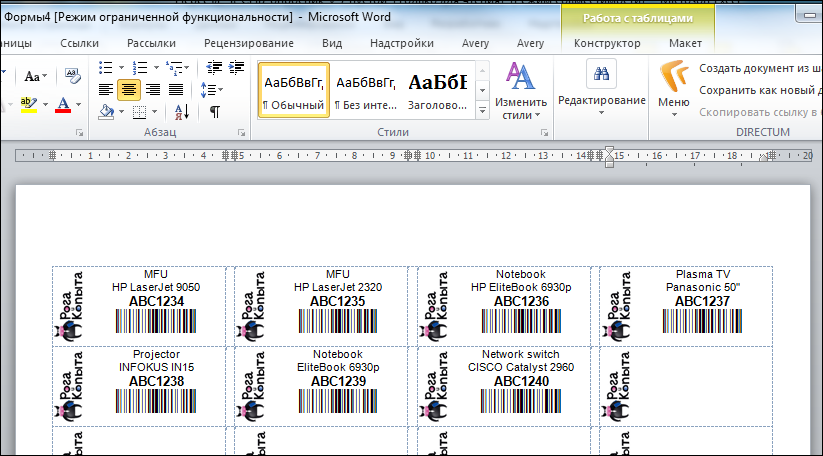
We print labels on the usual laser printer, we receive label sheets. Do not forget to number these sheets. If you want, you can do this by adding footers with a page number, if you don’t want to, write each sheet with a pen. You will make a footer - make sure that it does not move the contents down.
So here we have the labels:
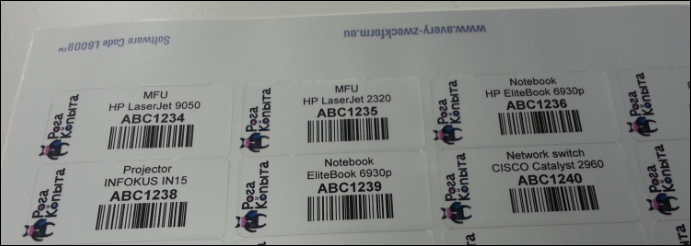
We stick on devices, enjoy the effect. We have just become the best friends of accountants, only they still do not know about it. Nonsense, they will find out when the inventory will be taken.
Yes, by the way: about where exactly to stick numbers. I use two options for myself: either so that the label is easily accessible, but not striking, or next to the nameplate with the brand and model of equipment, serial number and the like.
The first is convenient in that the inventory can be easily counted, the second is that you need to rotate the product less during its inventory: we read not only the inventory number, but also the factory number. Yes Yes. Not everyone knows, but almost all manufacturers duplicate the spelling of the serial number with a barcode, which greatly simplifies the life of the specialist responsible for inventory.
So, we have wonderful inventory labels, we pasted with them everything that we could reach in our organization, with the help of a barcode scanner, we established the correspondence of the inventory numbers to the factory numbers where it can be done. Are we well done? Yes. Can I stop? Yes, but you can do even better.
Now we can quickly inventory all office property, but we still cannot answer the question “where is what?”.
Let's make it possible.
We take up the office plan - we are interested in everything in general: how the workplaces are located, where are the print rooms, where are the storage rooms, where is what else.
Having taken the plan, we take a pencil and begin to number everything that we see. I use the following scheme for myself:
Location / Room / Place
Where:
Location - three-letter office abbreviation. For example, MSW - Moscow, SPB - Peter, NSK - Novosibirsk and so on.
Room - room number
Place - room number in the room. This may be the number of the table at which the employee sits, the number of the shelf in the warehouse, the number of the cabinet, and so on.
As a result, we get something like MSW / 123 / 15A
The resulting numbers are summarized in the Excel nameplate - it will contain only four columns:
Address - workplace address
Barcode - barcode-representation of the address
Comment - text commentary for yourself. In this field I write the name of the employee, if it comes to the address of the workplace and other comments, if required by the circumstances.
Sheet - the number of the label sheet, we have already passed this.
Now, having a prepared plate in Excel, we form the labels. I won’t overload the story with pictures, I’ll just tell the recipe:
Label format: Avery Zweckform white sticker No. 3659 (97x42.3mm)
Location and format of the label:
1. The first line is the company logo
2. The second line is a description of the type of place (workplace, warehouse, storage room, etc.) Arial font, font height 11pt.
3. The third line is the identifier of the workstation (this is MSW / 123 / 15A ). Font Arial, bold, font height 14pt.
4. The fourth line is the barcode representation of the place identifier. Encoding Type CODE128. Font - Barcode, font height 18pt.
5. The fifth line is the contact information for the IT support service.
Have you noticed?
Our employees right before our eyes got a telephone and an email address for helpdesk, and almost for free. And now no one can say that he did not know where to call - we took care.
And at the same time, we numbered all the jobs, and now any employee can explain where he is without resorting to sign language, the HR service will be able to give us applications for organizing jobs for new workers, without resorting to stories about “this is through the table from Lyubochki ”, and the new helpdesk employee will not wander around the office in search of whoever called him, he will simply ask for the number of the workplace and look at the floor plan to understand where he should go.
I intentionally do not talk about what software to use to collect and analyze data. It can be Access, and Excel, and the 1C accounting module, and anything else.
Everything that we have just done can be integrated into any existing asset management system.
After the initial data entry, if we have not already done so, we get a table in which there is a correspondence of the inventory number, factory number, installation address, full name of the user - this is enough to confidently talk with accountants and answer their tricky questions.
In the future, you just need to keep the information up to date. The task is not difficult.
And, in summary:
1. For management accounting, the filling of computers and the characteristics of peripherals do not matter at all. Only the inventory number, the full name of the materially responsible person, the location and, optionally, the serial number of the product are relevant.
2. Barcodes rule. Everything else does not steer. From barcodes, the Code128 encoding rules.
3. If something can be encoded, it needs to be encoded.
4. To get professionally made labels, you just need to buy labels. No need to buy software.
5. The barcode scanner speeds up work thousands of times. Even the cheapest.
6. Provided that you have kept the inventory sheet up to date, you can carry out the annual inventory at almost the speed with which you are able to move around the office. You will no longer have to dictate inventory numbers aloud and hammer them into your computer with your hands.
This year I conducted an inventory. Over 9000 positions - everything was found, the work took two days to go around and a couple of days to find what was not found right away, like laptops in homes and in locked cabinets, equipment in technological rooms, etc.
In general, I am satisfied.
Which I wish you too.
A considerable part of my work is inventory accounting of equipment. I’ve been doing this for many years and in many companies, I’m doing it quite successfully, so I can share how to take the first steps so that this muddy process does not turn into a headache for the person who was assigned to it.
I'll start from afar: reading articles on inventory on the hub showed that there is terrible horror in the heads of my colleagues in the workshop, they don’t understand at what end to approach the task and, even worse, don’t understand which task is actually being solved.
For some reason, my dear colleagues believe that an inventory of it equipment should answer the question “what is the filling inside the computer?” Or something like that. To solve this problem, all kinds of systems like Aida are involved, completely wild methods of accounting and monitoring are conducted, and so on. and meanwhile, relations with accounting are deteriorating, equipment is lost, the admin is worn around the office with bulging eyes and cannot find anything.
Guys, I reveal a terrible secret: no one cares what is installed inside the computer. No one, absolutely no one is interested in the entire amount of slag that the information collectors give out; nobody is interested in what a regular admin stores in their account tables. Why? Because the business thinks in rubles, it does not care about megabytes and megahertz, because if the equipment is still in operation, its configuration is probably sufficient to solve the problems that are solved on it (and if not, then tracking and management configuration is definitely not carried out as part of the inventory process).
And here the question arises: what does the accountant expect from the IT department? The answer is simple, they are only interested in one thing: is there an item with inventory number ABC1234 in place? A slightly more advanced accountant may also be interested in whether the part number to which this number was assigned still corresponds to part number ABC1234? In other words, are they trying to give us the LG microwave for the HP EVA P6000 disk storage? Sometimes we are still worried about the question of whether the serial number previously known to us corresponds to a product with this inventory number - we will also solve this issue. It should also be understood that the said microwave from the mentioned disk storage from the point of view of the accountant differs precisely by the inventory number (well, there is still cost, depreciation, and so on, but, fortunately, this is no longer an IT headache). And this understanding of us leads to an additional bonus: with a flick of the wrist we can build excellent relationships not only with bookkeeping, but also with the unit that takes into account cabinets, tables and chairs, providing them with a convenient tool for work. By the way, at the same time we will solve another problem: facilitating the identification of equipment belonging to your company - this will help your colleagues from third-party organizations to easily determine who forgot the laptop in their meeting room.
When writing this text, I proceed from the assumption that your company already has some kind of software in which at least accounting keeps records of material values. Therefore, you at least have no problems getting a table of correspondence of descriptions of storage units to their inventory numbers. We will make it so that this information is clearly presented and can be easily used for inventory accounting of equipment.
Oh, and I also assume that you have Microsoft Office installed. We will do all the work in it.
So, our first step is to make the right inventory label.
The right inventory label is something that is usually not found anywhere. How do they make an inventory label, if at all? They write what is not needed, do not write what is needed, make it with an inappropriate tool (for example, the LetraTag ribbon printer is a cool thing, only it does not control the uniqueness of the input data and it is impossible to make a couple of thousand labels on it without errors. At least once, yes you do it.) The
correct inventory label, from my point of view, should contain:
1. Short name of the storage facility (so that no one would be tempted when leaving, for example, stick an inventory from an expensive laptop on a hole punch).
2. Actually, the inventory number of the object
3. Machine-readable inventory number - only the barcode is appropriate and sufficient here. I saw a proposal to encode information with a QR code, it’s terrible, and I’ll quickly explain why: this solution does not involve the rapid and massive entry of information into a computer. The barcode scanner is a USB keyboard from the point of view of the computer, reading the barcode sends to the computer a character sequence of encoded text, as if it were typed with your hands on the keyboard and pressing the Enter button. Accordingly, if you wish, you can go through the office with a laptop to which a bar-code scanner is connected, remove the code by code and get an inventory table at the output. If you use QR codes, this will not work. Well, you scan the code with the phone, well, you recognize, and then what?
4. Company logo
Now we will do it all, and we won’t spend a dime on software in order to make a really good thing.
To begin with, we get in the bookkeeping table with inventory numbers and a description of the positions. We are not embarrassed that there is a lot of text in the descriptions, we need it to understand what is at stake, but we will print our own on the labels.
Important: the fact that we received an inventory table from the accounting department in electronic form gives us a 100% guarantee that we will make labels with
obviously correct inventory numbers.
Equally important: make sure that the inventory numbers do not contain Cyrillic. If they contain - solve this issue until you have started to do the rest.
So, the initial form of the table (position descriptions are taken from real life, inventory numbers and the company logo are not, but it doesn’t matter): The
table is good, we will refine it. We ’ll introduce a few more columns:
Line 1 - here we enter the type of device (laptop, MFP, server, or whatever else you have)
Line 2 - here we enter the brand and model of the device (for example HP Elitebook 6930p)
Barcode - here we insert the barcode presentation of our inventory number. More about this below.
Sheet- no less important parameter. It is needed in order to easily find the desired label on the label sheet. If you decide to do everything from scratch according to my recipe, you will have a break in the sheets, on which there will be sorted labels in some way. The problem is that the equipment is scattered around the office in an absolutely chaotic way, and, approaching the next device, you are unlikely to want to shovel all your 50-60 sheets of 48 labels per sheet. Take care of yourself in advance, indicate on which sheet you have the label you need: the first 48 entries - sheet 1, from 49 to 96 - sheet 2 and so on. Sure, handle it.
The most important point is how to translate the inventory number into the barcode representation.
First, download from the site http://code128.narod.ru/a small archive in which we have the macro we need: http://code128.narod.ru/Barcode.zip , and unpack it.
We find the file with the font barcode.ttf and import the font into the system.
We find the beautiful Barcode.bas file - we need to drag it into the file with our inventory table: Alt-F11, File-> Import file ..., find and select Barcode.bas -> Open, Alt-F4
Hurray, the macro was imported into our table . We will use it.
The author of the macro offers a lot of options for encoding data into a barcode. Experience shows that the most suitable type of coding for our purposes is Code 128, because it allows you to encode Latin letters in upper and lower case, numbers and punctuation marks, while it is quite compact and easy to read by scanners.
The table at the time of its readiness (just in case, I show how to use the macro):
On this, in fact, the most dreary part of the event is over. Save the table, close Excel.
We quickly go to the site of the wonderful material producer Avery Zweckform and download the label generation program from this page: http://www.avery-zweckform.ru/download/avery-wizard-for-microsoft-office
I almost forgot: at this point you should already have inventory labels at hand, on which we will all print. I use Avery L6009-20 labels, which I wish you. They have an optimal size (45.7 x 21.2 mm), they are durable, they adhere well and pass well through the laser printer. From my point of view, ideal. You can use other sizes, in this case, make the appropriate corrections when creating the layout.
So, Avery Wizard for Microsoft Office is installed, open MS Word, the Avery menu with a single button has already appeared in it:
Click it, launch the plug-in, click the obvious “Next”. In the label selection menu we find the sort L6009 that we need:
In the next window, select "Merge data from an existing file", click "Next".
In the next window, we find and select the Excel file we created, click "Next"
in the next window, select the obvious "Sheet1 $" or "Sheet1 $", do not forget to check the box that the first line contains the headers:
And as a result we get the window for typesetting the sticker. In fact, this is the same Microsoft Word window with almost all typesetting tools. In the right part of the layout window there is a list of table fields, a double click inserts the data field we need into the right place on the label.
To save time for typesetting, I will immediately give the optimal values:
The first line is the Line1 field: Arial font, font height 8pt.
The second line is the Line2 field: Arial font, font height 8pt.
The third line is inventory number: Arial font is bold, font height is 10pt.
The fourth line is the barcode representation of the inventory number. Font Barcode, font height 18pt. Please note that during layout this line looks awful. This should not be afraid, it should be so.
Left is full of space for the logo.
So, here is our layout:
And we are one step away from victory.
Click “Next”, click “Finish”, the plug-in will further destroy our data file and prepare label sheets.
We print labels on the usual laser printer, we receive label sheets. Do not forget to number these sheets. If you want, you can do this by adding footers with a page number, if you don’t want to, write each sheet with a pen. You will make a footer - make sure that it does not move the contents down.
So here we have the labels:
We stick on devices, enjoy the effect. We have just become the best friends of accountants, only they still do not know about it. Nonsense, they will find out when the inventory will be taken.
Yes, by the way: about where exactly to stick numbers. I use two options for myself: either so that the label is easily accessible, but not striking, or next to the nameplate with the brand and model of equipment, serial number and the like.
The first is convenient in that the inventory can be easily counted, the second is that you need to rotate the product less during its inventory: we read not only the inventory number, but also the factory number. Yes Yes. Not everyone knows, but almost all manufacturers duplicate the spelling of the serial number with a barcode, which greatly simplifies the life of the specialist responsible for inventory.
So, we have wonderful inventory labels, we pasted with them everything that we could reach in our organization, with the help of a barcode scanner, we established the correspondence of the inventory numbers to the factory numbers where it can be done. Are we well done? Yes. Can I stop? Yes, but you can do even better.
Now we can quickly inventory all office property, but we still cannot answer the question “where is what?”.
Let's make it possible.
We take up the office plan - we are interested in everything in general: how the workplaces are located, where are the print rooms, where are the storage rooms, where is what else.
Having taken the plan, we take a pencil and begin to number everything that we see. I use the following scheme for myself:
Location / Room / Place
Where:
Location - three-letter office abbreviation. For example, MSW - Moscow, SPB - Peter, NSK - Novosibirsk and so on.
Room - room number
Place - room number in the room. This may be the number of the table at which the employee sits, the number of the shelf in the warehouse, the number of the cabinet, and so on.
As a result, we get something like MSW / 123 / 15A
The resulting numbers are summarized in the Excel nameplate - it will contain only four columns:
Address - workplace address
Barcode - barcode-representation of the address
Comment - text commentary for yourself. In this field I write the name of the employee, if it comes to the address of the workplace and other comments, if required by the circumstances.
Sheet - the number of the label sheet, we have already passed this.
Now, having a prepared plate in Excel, we form the labels. I won’t overload the story with pictures, I’ll just tell the recipe:
Label format: Avery Zweckform white sticker No. 3659 (97x42.3mm)
Location and format of the label:
1. The first line is the company logo
2. The second line is a description of the type of place (workplace, warehouse, storage room, etc.) Arial font, font height 11pt.
3. The third line is the identifier of the workstation (this is MSW / 123 / 15A ). Font Arial, bold, font height 14pt.
4. The fourth line is the barcode representation of the place identifier. Encoding Type CODE128. Font - Barcode, font height 18pt.
5. The fifth line is the contact information for the IT support service.
Have you noticed?
Our employees right before our eyes got a telephone and an email address for helpdesk, and almost for free. And now no one can say that he did not know where to call - we took care.
And at the same time, we numbered all the jobs, and now any employee can explain where he is without resorting to sign language, the HR service will be able to give us applications for organizing jobs for new workers, without resorting to stories about “this is through the table from Lyubochki ”, and the new helpdesk employee will not wander around the office in search of whoever called him, he will simply ask for the number of the workplace and look at the floor plan to understand where he should go.
I intentionally do not talk about what software to use to collect and analyze data. It can be Access, and Excel, and the 1C accounting module, and anything else.
Everything that we have just done can be integrated into any existing asset management system.
After the initial data entry, if we have not already done so, we get a table in which there is a correspondence of the inventory number, factory number, installation address, full name of the user - this is enough to confidently talk with accountants and answer their tricky questions.
In the future, you just need to keep the information up to date. The task is not difficult.
And, in summary:
1. For management accounting, the filling of computers and the characteristics of peripherals do not matter at all. Only the inventory number, the full name of the materially responsible person, the location and, optionally, the serial number of the product are relevant.
2. Barcodes rule. Everything else does not steer. From barcodes, the Code128 encoding rules.
3. If something can be encoded, it needs to be encoded.
4. To get professionally made labels, you just need to buy labels. No need to buy software.
5. The barcode scanner speeds up work thousands of times. Even the cheapest.
6. Provided that you have kept the inventory sheet up to date, you can carry out the annual inventory at almost the speed with which you are able to move around the office. You will no longer have to dictate inventory numbers aloud and hammer them into your computer with your hands.
This year I conducted an inventory. Over 9000 positions - everything was found, the work took two days to go around and a couple of days to find what was not found right away, like laptops in homes and in locked cabinets, equipment in technological rooms, etc.
In general, I am satisfied.
Which I wish you too.