 December 19, 2013 at 09:13
Simulate a kettle in Wind River Simics
- Transfer
Translator’s note: I present to the venerable public an article by Jakob Engblom, in which he demonstrates the introduction of an “analog” device in a generally discrete simulator. I myself also use and develop models for Simics, but from a slightly different perspective, which is why I rarely see the final fruits of all activities. Therefore, I was very interested to know what my colleagues from Wind River were doing, and then I wanted to share with you. For those who find the topic of full-platform simulation or specifically Simics interesting, I recommend paying attention to the latest issue of Intel Technology Journal Simics Unleashed - Applications of Virtual Platforms . I can also tell about Simics in more detail and on Habré in the subsequent posts. Waiting for your comments!
Embedded computing rarely works in isolation. While personal computers and consumer electronics can usually work independently with relatively infrequent human intervention, most embedded computers work closely with the world around them. They “feel” it, execute control algorithms, read sensor readings, use all kinds of actuators in order to change the external environment. They are active participants in the continuously evolving cyber-physical reality. The simulation of such systems cannot be limited to the model of an isolated digital computer - you have to add part of the physical world to it. The following Youtube video demonstrates how this can be done with Wind River Simics.
Also available are several commercials published by NASA (National Aero Space Agency) demonstrating how Simics is involved in a truly full- platform simulation in the Global Precipitation Measurement project .
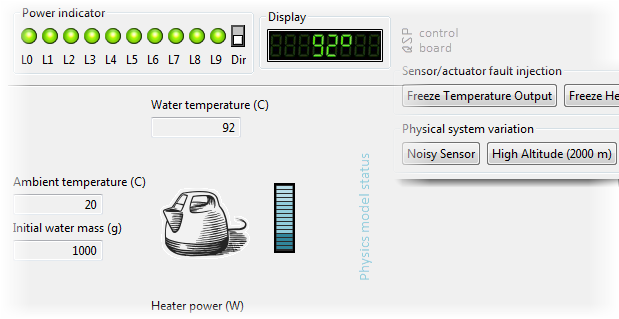
For the video above, the following configuration was recreated.

Key elements: control console, board with installed VxWorks OS and control application, water heater (kettle). The control is carried out with the help of an actuator that changes the power supplied to the heating element in the kettle. The program makes decisions based on the readings of the current water temperature measured by a thermometer. The thermometer and heater are connected to analog-to-digital (ADC) and digital-to-analog (DAC) transducers, respectively, which are located on the board of the embedded computer. Details of how device simulations generally work in Simics are described in another post.. The control program has access only to the ADC and DAC, as is the case in real systems. Modeling of physical processes is done inside Simics; it is implemented using the built-in Python interpreter and the Simics API.

Due to the fact that the physical model is introduced inside the simulation, it becomes possible to turn time around, inspect the state of its parts and control it through the Simics graphical interface. An additional feature not shown in the video is setting breakpoints on events in the simulation, such as boiling water or burning the kettle (I apologize for the spoiler). In practice, such a scheme is quite often implemented: a physical model is executed outside of Simics in an already written third-party program, and then some connector is written between it and Simics, inside which the digital part of the model is represented. In this demo physical system, the so-called a system panel located next to the display of the control computer, and a panel that allows to artificially initiate errors (i.e., carry out fault injection).

Note: Starting with version 4.8, the default Simics interface is based on Eclipse.
Some of the capabilities of the fault injection mechanism are demonstrated in the video; this configuration also allows you to explore some other scenarios. The model of the physical system is written so that it is possible to introduce noise into the temperature sensor so that it reports distorted values, or even freeze its readings. You can change the height of the kettle above sea level, and this affects the boiling point of water. The heater can be fixed at some power. All this allows testing the reliability of software in the presence of the possibility of a variety of problems, without the need to search for boundary conditions using analytical methods or modifying real equipment (i.e. a teapot).
NASA Simulator and Simics
In practice, Simics users can put giant systems representing physical, mechanical, and control algorithms inside the simulation. These simulations are often also huge, executed on dozens of different host systems and connected using specialized middleware. Using the APIs provided by Simics Extension Builder, it is possible to integrate Simics with almost any third-party system.
A notable example of this integration is the work published by NASA ( NASA IV&V Success Story on Youtube). In the NASA Go-Sim installation ( another videoon Youtube) a combination of a control computer simulated by Simics and a proprietary design for modeling physical processes was used. 1553 and Spacewire buses were used to connect the sensors and actuators of the spacecraft with the control computer. At the same time, messages passing through them can be intercepted and modified in order to test the reliability of the software in the presence of interference ( another video ).
To learn more about how Simics can help you model your system, visit simics.com or www.windriver.com/products/simics . Other Simics videos are available on the Wind River YouTube channel: www.youtube.com/user/windriverchannel .









