 September 23, 2013 at 19:53
Connect Communigate Pro with PSTN gateways and SIP providers
- Tutorial
- Recovery mode
Despite the fact that a significant part of people are increasingly using Internet services instead of telephones or faxes, a telephone line will be an obligatory element of the office for a long time. Therefore, for any SIP / PBX solution, it is important to know how to connect a PSTN (PSTN) gateway to it.
In this post we will analyze:
- Connecting a local PSTN gateway
- Connecting a SIP provider as a second “gateway” for cheaper international calls
- Routing outgoing calls between gateways
PSTN gateways are usually fairly standard SIP devices. But due to the features of classic telephone networks, users may experience problems connecting directly to the device:
- The PSNT network uses the E.164 address format (for example +7901234567) and not account @ domain as in SIP
- Outgoing calls require authentication in most cases.
- Not all gateways support call transfer.
- Some PSTN gateways and SIP providers are configured to work with a separate SIP device and require periodic REGISTER requests to redirect incoming calls to it
To solve these problems, Communigate Pro has two PBX applications designed to send and receive calls from gateways - gatewaycaller and gatewayincomming. In addition, the pbx application, which implements the functions of an auto-secretary, is a popular application for receiving calls from PSTN networks.
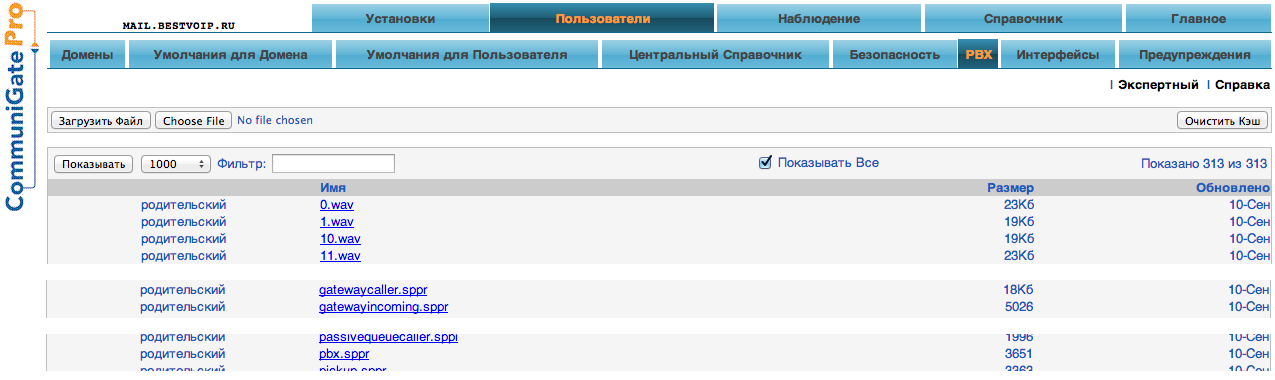
The PBX application on the Communigate Pro server is a CG / PL interpreted program that can act as a B2BUA. The texts of standard programs are open and can be found on the Users-> PBX page:
In this article, a deep understanding of the operation of PBX applications is not needed, we will just use them and you only need to be able to run them.
The main way to launch applications is to redirect a signal (for example, SIP INVITE) to an address of the form “appName # account @ domain” using a rule or in a router.
The basics of how PBX applications work in Communigate Pro can be found in a previous post .
Receive calls from the PSTN gateway
Most modern gateways can be configured so that incoming calls are sent to the SIP device, in our case, CGPro. For routing inside CGPro, we use the routing table (in the WebAdmin interface Settings-> Router).
Suppose a gateway sends an incoming call with a SIP field To: [email protected] (gateway.company.dom is a dummy domain, it is used only for routing calls from the gateway), then such a record in the router
<[email protected]> = pbx#pbx@localhost
Sends all calls from the telephone network to the voice menu of the auto-secretary.
Some gateway models have another mode of receiving calls from the PSTN network. When calling from PSTN to the SIP PBX, the caller is sent a long beep (as with a simple pick-up) and he needs to dial the number of a specific user for further connection.
Of course, such functionality is usually needed only in the absence of a full IVR and, in principle, it is better to disable it.
But in this case, you can configure convenient routing. The To: field of the call has the format [email protected], where "nnn" is the dialed numbers.
;звонки на адрес (3 цифры)@gateway.company.dom уходят в gatewayincomming,
;цифры передаются в приложение в качестве параметра
<(3d)@gateway.company.dom> = gatewayincomming{*}#pbx@localhost
;все остальные звонки идут в IVR
<*@gateway.company.dom> = pbx#pbx@localhost
Receiving calls from a SIP provider
SIP providers and some old \ simple PSTN gateways require SIP registration to send incoming calls to the device. In this case, on the CGPro side, you need to select the user who will receive calls (usually this is a pbx account, since by default all incoming calls from this user will go to IVR). And configure him RSIP:
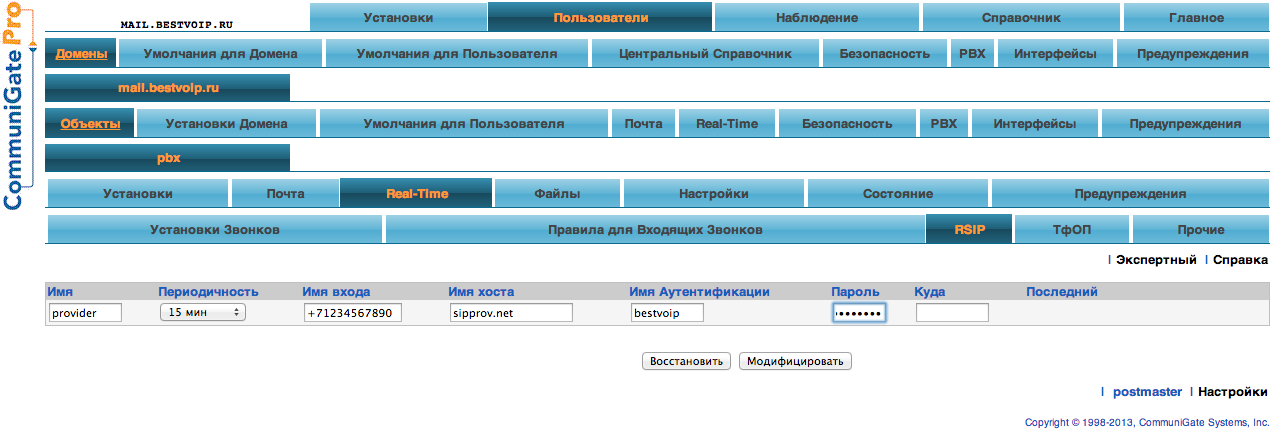
RSIP settings are exactly the same as the settings of a regular SIP client.
Outgoing calls
Routing outgoing calls can be very difficult. For greater clarity, consider a simplified situation:
- If the number starts with 7 and consists of 11 digits, we route the PSTN gateway 10.1.1.1
- If the number starts with 1 and consists of 11 digits, we route to the (fictional) SIP provider sipprov.net
- Both services require authentication
First of all, we will add authentication settings on both gateways for all accounts on the server:

Since there are several gateways, each setting is written as a settings dictionary, where the key is the name of the gateway. "$" in the CallerID field is substituted for the account name.
Router entries with this task setting and authentication settings look like this:
Signal:<7(10d)@*>=gatewaycaller{+7*,gwru}#pbx
Signal:<1(10d)@*>=gatewaycaller{+1*,gwus}#pbx
Let us explain the operation of these settings using the example of a call to Russia.
Let's say the user dialed the number 7 (123) 456-78-90.
When applying the recording, the router will highlight the last 10 digits, add +7 as the first characters (a telephone in E.164 format, understandable to any PSTN network operator) and pass the resulting number as the first parameter to the gatewaycaller application.
After that, the gatewaycaller looks at the PSTN settings of the caller and looks for a group of settings with the key "gwru", which was transferred to the program as the second parameter.
Writing PSTN settings in the form of account settings allows, on the one hand, to quickly change settings for most (by default), on the other hand, allows each user to have their own set of gateways.
Brief Summary
Of course, all possible options for configuring PSTN gateways and the corresponding Communigate Pro server settings cannot be considered in a short article, but I tried to cover all the basic and standard cases.
Test platform for learning CommuniGate Pro: www.bestvoip.ru









