
XenApp: moving servers to a new domain
Formulation of the problem:
Transfer XenApp 6 and XenApp 6.5 servers and farms to a different domain.
Lyrical digression
The task itself is absolutely not difficult, given that there is a special article on the developer's site. But this article does not provide an answer on how to change the properties of all published applications. Doing it manually with a large number of published applications is still fun. Therefore, in this article I will try to combine information scattered on the Internet and try to warn you of possible problems.
Go
Before changing a domain, you need to understand that all published applications will remain with information about users from the old domain. If there are 5 or 10 such applications, it will not be difficult for us to manually change the properties of all applications. But if the number of published applications exceeds one hundred, then you need to think about some kind of automation of this process. So, for starters, we export all published applications. I got all the information from here (English). All the work for us will be done by a PS-script written by Kevin McLeman. In order for the script to work, we need the Citrix XenApp PowerShell SDK:
- For XenApp 6 and 6.5: download
- Install the Citrix XenApp PowerShell SDK. After installation, the Citrix snap-ins for PowerShell will be available to us.
- Open PowerShell and execute:
Add-PSSnapin Citrix.*
Get-PSSnapin Citrix.*
It should look like this:
- Run the downloaded script with the following parameters:
Where c: \ test.csv is the path and file name where the applications will be exported.XAApps.ps1 -CSV “c:\Test.csv” -Export -WorkerGroups -Servers
The –WorkerGroups parameter instructs the script to export information about Worker Groups as well.
By analogy, the –Servers parameter forces the script to export information about servers.
After running the script, you can lean back and relax, the process is not quick. In my case, 150 applications were exported for about half an hour. - After the process of exporting published applications has ended, open the Citrix Access Management Console, the Administrators tab, add the local administrator
- We open the console from the local administrator
- Disable the ability to log in to the server
- Change the domain in which the server is located
- Reboot the server
- Login as local administrator
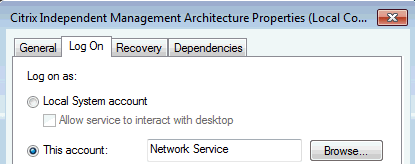
- We open the services, find the Citrix Independent Management Architecture service and reregister it so that it starts on behalf of the Network Service (you need to make the password field empty), as indicated in the screenshot:
- We open the console from the local administrator
- Add to Domain Admins
- Delete all published applications
- Remove all servers from the farm
- Change the domain on the servers and enter them back into the farm
- We open the file created in step three with any editor and replace (ctrl-h) the users of the old domain with the new one (in my case, the users were the domain group roam \ vin_medical_qa, and became slslab \ vin_medical_qa); As you can imagine, in this file you can change everything you need, since the file is a typical CSV, all values are separated by commas, the values of each column are described in the first line. Save changes
- Open PowerShell and execute:
Add-PSSnapin Citrix.* Get-PSSnapin Citrix.* - Run the script from the third paragraph with the following parameters:
Where c: \ test.csv is the path and file name created in clause 16.XAApps.ps1 -CSV “c:\Test.csv” –Import
Fortunately, import is much faster than export. Therefore, in a minute or two all your applications will appear with new properties.
Possible rake
When you copy applications from one server to several, you need to ensure that BrowserName for applications with the same name is different.
List of references:
- How to Change the Server and Server Farm's Domain Membership
- Export and Import XenApp Published Resources with PowerShell
PS: Now I realized how hard it is to write articles, given that this is my first experience, don’t kick too hard. Any questions and suggestions are welcome.