 August 6, 2013 at 16:40
Webstorm plugin and auto-add-on
I would like to share a simple way to add the missing auto-add-on to the IDEA IDE family. In our case, to WebStorm or PhpStrom.
We have a require.js library on the front of our project. And when working with it, you need to specify the paths to certain files to add them depending. Unfortunately, the paths to these files have to be written by hand or copied in parts.
And I thought that this should be fixed, and add auto-completion of the path to the files.
After that, I started looking for information on how to write plugins for Idea and remembered an article by the zenden2k habrayuzer in which he talked about how to make a plug-in for link resolution for kohana. Before reading my article, you must definitely read it.
Having decided that link resolution is also very useful functionality, I first wrote a plugin for this.
When writing the plugin, I ran into the problem of the lack of a PSI structure for javascript files in Idea Community Edition, and without it it was not possible to determine the structure of the JS file, which is needed to determine the necessary element for link resolution. I had to install Idea Ultimate EAP. In Idea UT, you need to install a plug-in for Javascript, and then in the PSI Viewer (Tools -> View PSI Structure) the choice of PSI structure for Javascript files will be available.
Also, since JetBrains rolled out openapi for PHP and JS from the time of writing that article, I have used binding to a specific PSI JSLiteralExpression element. My PsiReferenceContributor began to look like this:
As you can see, instead of PsiElement.class, I already used JSLiteralExpression.class specifically, so that I would not have to process all the elements in a row.
But in order to use openapi, you need to connect it in the plugin project in idea. To do this, go to Project Structure, select Libraries there. We click on + above the central column, select Java and in the file selection window that opens, select the file "/path_to_webstrom/plugins/JavaScriptLanguage/lib/javascript-openapi.jar":
Then go to Modules, open the Dependencies tab, and there, against javascript-openapi, specify Scope as Provided:
After these manipulations, the IDE will prompt the names of classes and other things that are included in openapi for javascript.
It was also necessary to change the PsiReferenceProvider, saving it from reflection, it turned out something like this:
Next, you need to implement the method responsible for resolving this link.
And here I got a plug connected with very mean information about writing plugins for idea. The fact is that initially I had a desire to start searching for files from directories marked as "Resource Root", but alas, I could not find how to get such directories. Therefore, I decided to take the path to the directory from the settings, for which I implemented the settings page as described in the zenden2k article , so I will not repeat it.
After we found out the directory in which we need to search for files along the way, everything was simple. The VirtualFile class has a findFileByRelativePath method that takes a path string as input and looks for whether the file exists on the given path and if yes, then returns it as an instance of the VirtualFile class. So you had to take the string value from PsiElement, cut out the excess, add the missing one and check if such a file exists. If it exists, then simply return the link to it as an instance of PsiElement. The resolve method looks like this:
Having done this, I got permission to link and it was possible to start implementing auto-completion.
In idea, there are two ways to implement auto-completion. The first simple one is to implement the getVariants method of the PsiReference interface, and the second advanced one is to use the CompletionContributor. I tried both methods, but I did not find any advantages in the CompletionContributor for myself, so I settled on using the first method.
For auto-completion, we need to return a list of elements in the form of an array. It can be an array with strings, LoookupElement or PsiElement.
In the beginning I tried to return the rows. But then a surprise awaited me. The fact is that idea inserts lines with slashes after the last slash the entire line. Moreover, if you issue a string with only a value after the slash, then idea does not perceive this string as suitable for auto-completion. This behavior is not entirely clear to me. And I could not find information on how to correctly make auto-completion of lines with slashes or as an option with paths for files.
For this I did it my way.
In order to control the insertion of the value yourself, you need to implement the InsertHandler interface and perform the necessary actions in the handleInsert method in it. And to use it, you need to return not just a string, but a LookupElement, in which we need the InsertHandler we need.
So I extended the LookupElement class like this:
The InsertHandler implementation looks like this:
The essence of the handleInsert method is that we take a lookupElement to get the PsiElement for which it was shown and selected, from PsiElement we get its location in the file and replace the entire length of the line with the text from lookupElement.path. Of course this is not the best way, but unfortunately I could not find another.
After that I did a search for all matching files, and returned them as an array of LookupElement.
Here is a complete listing of RequirejsReference:
I highlighted the file search method separately, since it is recursive, and also highlighted the file filtering method, since only html is needed for templates, and js files are needed for the rest. Also, when pasting, templates are inserted along with the tpl! Prefix, and js files are inserted without the js extension.
UPD :
In the comments, the VISTALL user suggested that creating your own LookupElement descendant class was superfluous. Instead, you can use LookupElementBuilder, which allows you to specify which insertHandler to use and which PsiElement it refers to.
To use LookupElementBuilder, I changed the RequirejsReference :: getVariants method, as follows:
In order for the generated LookupElement to know which PsiElement it belongs to, it is enough to call the create method, passing the PsiElement as the first parameter and the second line to be used for auto-completion as the second parameter.
I also changed RequirejsInsertHandler :: handleInsert itself like this:
I removed the lookupElement type check from it and used the methods to get the PsiElement and the replacement string.
After these manipulations, the RequirejsLookupElement class is no longer needed.
UPD 2 :
The plugin is slightly finished and posted on github: github.com/Fedott/WebStormRequireJsPlugin The
same plugin is now available in the official jetbrains repository: plugins.jetbrains.com/plugin/7337
Wishlist can be sent to write on github or here.
That's all.
There are questions or tips on how best to implement, I will be glad to read them.
We have a require.js library on the front of our project. And when working with it, you need to specify the paths to certain files to add them depending. Unfortunately, the paths to these files have to be written by hand or copied in parts.
And I thought that this should be fixed, and add auto-completion of the path to the files.
After that, I started looking for information on how to write plugins for Idea and remembered an article by the zenden2k habrayuzer in which he talked about how to make a plug-in for link resolution for kohana. Before reading my article, you must definitely read it.
Having decided that link resolution is also very useful functionality, I first wrote a plugin for this.
When writing the plugin, I ran into the problem of the lack of a PSI structure for javascript files in Idea Community Edition, and without it it was not possible to determine the structure of the JS file, which is needed to determine the necessary element for link resolution. I had to install Idea Ultimate EAP. In Idea UT, you need to install a plug-in for Javascript, and then in the PSI Viewer (Tools -> View PSI Structure) the choice of PSI structure for Javascript files will be available.
Screenshot
Also, since JetBrains rolled out openapi for PHP and JS from the time of writing that article, I have used binding to a specific PSI JSLiteralExpression element. My PsiReferenceContributor began to look like this:
RequirejsPsiReferenceContributor.java
package requirejs;
import com.intellij.lang.javascript.psi.JSLiteralExpression;
import com.intellij.patterns.StandardPatterns;
import com.intellij.psi.PsiReferenceContributor;
import com.intellij.psi.PsiReferenceRegistrar;
public class RequirejsPsiReferenceContributor extends PsiReferenceContributor {
    @Override
    public void registerReferenceProviders(PsiReferenceRegistrar psiReferenceRegistrar) {
        RequirejsPsiReferenceProvider provider = new RequirejsPsiReferenceProvider();
        psiReferenceRegistrar.registerReferenceProvider(StandardPatterns.instanceOf(JSLiteralExpression.class), provider);
    }
}
As you can see, instead of PsiElement.class, I already used JSLiteralExpression.class specifically, so that I would not have to process all the elements in a row.
But in order to use openapi, you need to connect it in the plugin project in idea. To do this, go to Project Structure, select Libraries there. We click on + above the central column, select Java and in the file selection window that opens, select the file "/path_to_webstrom/plugins/JavaScriptLanguage/lib/javascript-openapi.jar":
Screenshot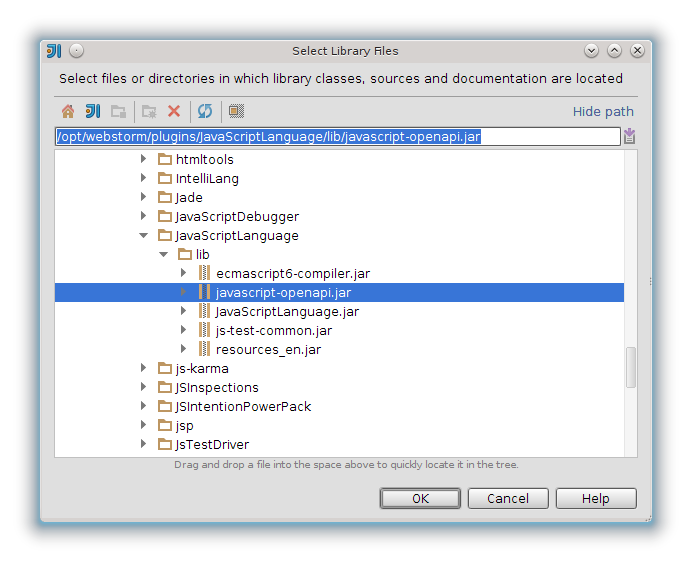
Then go to Modules, open the Dependencies tab, and there, against javascript-openapi, specify Scope as Provided:
Screenshot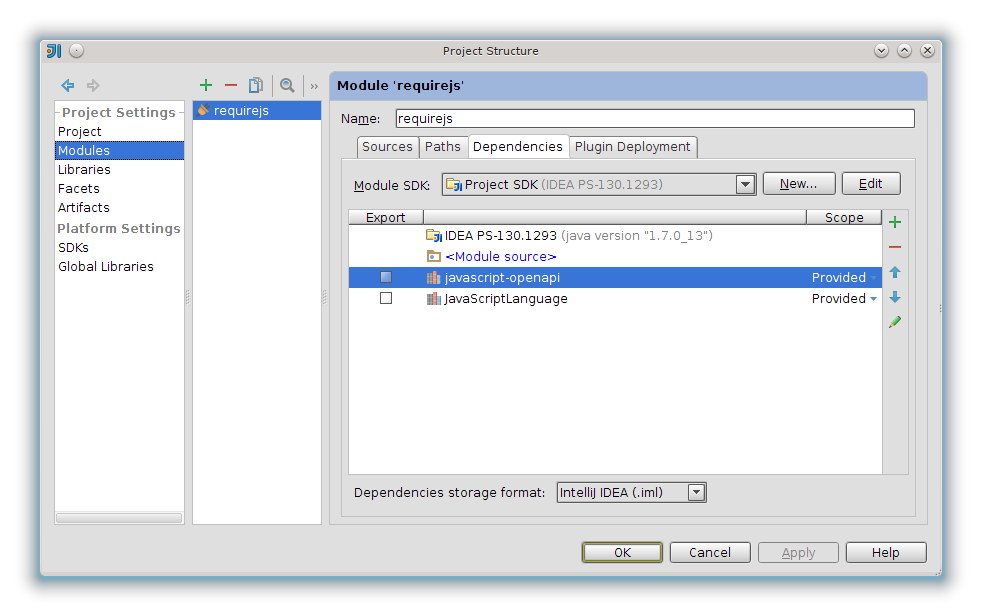
After these manipulations, the IDE will prompt the names of classes and other things that are included in openapi for javascript.
It was also necessary to change the PsiReferenceProvider, saving it from reflection, it turned out something like this:
RequirejsPsiReferenceProvider.java
package requirejs;
import com.intellij.ide.util.PropertiesComponent;
import com.intellij.lang.javascript.psi.JSCallExpression;
import com.intellij.openapi.project.Project;
import com.intellij.openapi.util.TextRange;
import com.intellij.openapi.vfs.VirtualFile;
import com.intellij.psi.PsiElement;
import com.intellij.psi.PsiReference;
import com.intellij.psi.PsiReferenceProvider;
import com.intellij.util.ProcessingContext;
import org.jetbrains.annotations.NotNull;
public class RequirejsPsiReferenceProvider extends PsiReferenceProvider {
    @NotNull
    @Override
    public PsiReference[] getReferencesByElement(@NotNull PsiElement psiElement, @NotNull ProcessingContext processingContext) {
        Project project = psiElement.getProject();
        PropertiesComponent properties = PropertiesComponent.getInstance(project);
        String webDirPrefString = properties.getValue("web_dir", "webfront/web");
        VirtualFile webDir = project.getBaseDir().findFileByRelativePath(webDirPrefString);
        if (webDir == null) {
            return PsiReference.EMPTY_ARRAY;
        }
        try {
            String path = psiElement.getText();
            if (isRequireCall(psiElement)) {
                PsiReference ref = new RequirejsReference(psiElement, new TextRange(1, path.length() - 1), project, webDir);
                return new PsiReference[] {ref};
            }
        } catch (Exception ignored) {}
        return new PsiReference[0];
    }
    public static boolean isRequireCall(PsiElement element) {
        PsiElement prevEl = element.getParent();
        if (prevEl != null) {
            prevEl = prevEl.getParent();
        }
        if (prevEl != null) {
            if (prevEl instanceof JSCallExpression) {
                try {
                    if (prevEl.getChildren().length > 1) {
                        if (prevEl.getChildren()[0].getText().toLowerCase().equals("require")) {
                            return true;
                        }
                    }
                } catch (Exception ignored) {}
            }
        }
        return false;
    }
}
Next, you need to implement the method responsible for resolving this link.
And here I got a plug connected with very mean information about writing plugins for idea. The fact is that initially I had a desire to start searching for files from directories marked as "Resource Root", but alas, I could not find how to get such directories. Therefore, I decided to take the path to the directory from the settings, for which I implemented the settings page as described in the zenden2k article , so I will not repeat it.
After we found out the directory in which we need to search for files along the way, everything was simple. The VirtualFile class has a findFileByRelativePath method that takes a path string as input and looks for whether the file exists on the given path and if yes, then returns it as an instance of the VirtualFile class. So you had to take the string value from PsiElement, cut out the excess, add the missing one and check if such a file exists. If it exists, then simply return the link to it as an instance of PsiElement. The resolve method looks like this:
RequirejsReverence.java::resolve ()
    @Nullable
    @Override
    public PsiElement resolve() {
        String path = element.getText();
        path = path.replace("'", "").replace("\"", "");
        if (path.startsWith("tpl!")) {
            path = path.replace("tpl!", "");
        } else {
            path = path.concat(".js");
        }
        if (path.startsWith("./")) {
            path = path.replaceFirst(
                    ".",
                    element
                            .getContainingFile()
                            .getVirtualFile()
                            .getParent()
                            .getPath()
                            .replace(webDir.getPath(), "")
            );
        }
        VirtualFile targetFile = webDir.findFileByRelativePath(path);
        if (targetFile != null) {
            return PsiManager.getInstance(project).findFile(targetFile);
        }
        return null;
    }
Having done this, I got permission to link and it was possible to start implementing auto-completion.
In idea, there are two ways to implement auto-completion. The first simple one is to implement the getVariants method of the PsiReference interface, and the second advanced one is to use the CompletionContributor. I tried both methods, but I did not find any advantages in the CompletionContributor for myself, so I settled on using the first method.
For auto-completion, we need to return a list of elements in the form of an array. It can be an array with strings, LoookupElement or PsiElement.
In the beginning I tried to return the rows. But then a surprise awaited me. The fact is that idea inserts lines with slashes after the last slash the entire line. Moreover, if you issue a string with only a value after the slash, then idea does not perceive this string as suitable for auto-completion. This behavior is not entirely clear to me. And I could not find information on how to correctly make auto-completion of lines with slashes or as an option with paths for files.
For this I did it my way.
In order to control the insertion of the value yourself, you need to implement the InsertHandler interface and perform the necessary actions in the handleInsert method in it. And to use it, you need to return not just a string, but a LookupElement, in which we need the InsertHandler we need.
So I extended the LookupElement class like this:
RequirejsLookupElement.java
package requirejs;
import com.intellij.codeInsight.completion.InsertHandler;
import com.intellij.codeInsight.completion.InsertionContext;
import com.intellij.codeInsight.lookup.LookupElement;
import com.intellij.psi.PsiElement;
import org.jetbrains.annotations.NotNull;
public class RequirejsLookupElement extends LookupElement {
    String path;
    PsiElement element;
    private InsertHandler insertHandler = null;
    public RequirejsLookupElement(String path, InsertHandler insertHandler, PsiElement element) {
        this.path = path;
        this.insertHandler = insertHandler;
        this.element = element;
    }
    public void handleInsert(InsertionContext context) {
        if (this.insertHandler != null) {
            this.insertHandler.handleInsert(context, this);
        }
    }
    @NotNull
    @Override
    public String getLookupString() {
        return path;
    }
}
The InsertHandler implementation looks like this:
RequirejsInsertHandler.java
package requirejs;
import com.intellij.codeInsight.completion.InsertHandler;
import com.intellij.codeInsight.completion.InsertionContext;
import com.intellij.codeInsight.lookup.LookupElement;
public class RequirejsInsertHandler implements InsertHandler {
    private static final RequirejsInsertHandler instance = new RequirejsInsertHandler();
    @Override
    public void handleInsert(InsertionContext insertionContext, LookupElement lookupElement) {
        if (lookupElement instanceof RequirejsLookupElement) {
            insertionContext.getDocument().replaceString(
                    ((RequirejsLookupElement) lookupElement).element.getTextOffset() + 1,
                    insertionContext.getTailOffset(),
                    ((RequirejsLookupElement) lookupElement).path
            );
        }
    }
    public static RequirejsInsertHandler getInstance() {
        return instance;
    }
}
The essence of the handleInsert method is that we take a lookupElement to get the PsiElement for which it was shown and selected, from PsiElement we get its location in the file and replace the entire length of the line with the text from lookupElement.path. Of course this is not the best way, but unfortunately I could not find another.
After that I did a search for all matching files, and returned them as an array of LookupElement.
Here is a complete listing of RequirejsReference:
RequirejsReference.java
package requirejs;
import com.intellij.codeInsight.lookup.LookupElement;
import com.intellij.openapi.project.Project;
import com.intellij.openapi.util.TextRange;
import com.intellij.openapi.vfs.VirtualFile;
import com.intellij.openapi.vfs.newvfs.impl.VirtualDirectoryImpl;
import com.intellij.openapi.vfs.newvfs.impl.VirtualFileImpl;
import com.intellij.psi.PsiElement;
import com.intellij.psi.PsiManager;
import com.intellij.psi.PsiReference;
import com.intellij.util.IncorrectOperationException;
import org.jetbrains.annotations.NotNull;
import org.jetbrains.annotations.Nullable;
import java.util.ArrayList;
public class RequirejsReference implements PsiReference {
    PsiElement element;
    TextRange textRange;
    Project project;
    VirtualFile webDir;
    public RequirejsReference(PsiElement element, TextRange textRange, Project project, VirtualFile webDir) {
        this.element = element;
        this.textRange = textRange;
        this.project = project;
        this.webDir = webDir;
    }
    @Override
    public PsiElement getElement() {
        return this.element;
    }
    @Nullable
    @Override
    public PsiElement resolve() {
        String path = element.getText();
        path = path.replace("'", "").replace("\"", "");
        if (path.startsWith("tpl!")) {
            path = path.replace("tpl!", "");
        } else {
            path = path.concat(".js");
        }
        if (path.startsWith("./")) {
            path = path.replaceFirst(
                    ".",
                    element
                            .getContainingFile()
                            .getVirtualFile()
                            .getParent()
                            .getPath()
                            .replace(webDir.getPath(), "")
            );
        }
        VirtualFile targetFile = webDir.findFileByRelativePath(path);
        if (targetFile != null) {
            return PsiManager.getInstance(project).findFile(targetFile);
        }
        return null;
    }
    @Override
    public String toString() {
        return getCanonicalText();
    }
    @Override
    public boolean isSoft() {
        return false;
    }
    @NotNull
    @Override
    public Object[] getVariants() {
        ArrayList files = filterFiles(this.element);
        ArrayList completionResultSet = new ArrayList();
        for (int i = 0; i < files.size(); i++) {
            completionResultSet.add(
                    new RequirejsLookupElement(
                            files.get(i),
                            RequirejsInsertHandler.getInstance(),
                            this.element
                    )
            );
        }
        return completionResultSet.toArray();
    }
    protected ArrayList getAllFilesInDirectory(VirtualFile directory) {
        ArrayList files = new ArrayList();
        VirtualFile[] childrens = directory.getChildren();
        if (childrens.length != 0) {
            for (int i = 0; i < childrens.length; i++) {
                if (childrens[i] instanceof VirtualDirectoryImpl) {
                    files.addAll(getAllFilesInDirectory(childrens[i]));
                } else if (childrens[i] instanceof VirtualFileImpl) {
                    files.add(childrens[i].getPath().replace(webDir.getPath() + "/", ""));
                }
            }
        }
        return files;
    }
    protected ArrayList filterFiles (PsiElement element) {
        String value = element.getText().replace("'", "").replace("\"", "").replace("IntellijIdeaRulezzz ", "");
        Boolean tpl = value.startsWith("tpl!");
        String valuePath = value.replaceFirst("tpl!", "");
        ArrayList allFiles = getAllFilesInDirectory(webDir);
        ArrayList trueFiles = new ArrayList();
        String file;
        for (int i = 0; i < allFiles.size(); i++) {
            file = allFiles.get(i);
            if (file.startsWith(valuePath)) {
                if (tpl && file.endsWith(".html")) {
                    trueFiles.add("tpl!" + file);
                } else if (file.endsWith(".js")) {
                    trueFiles.add(file.replace(".js", ""));
                }
            }
        }
        return trueFiles;
    }
    @Override
    public boolean isReferenceTo(PsiElement psiElement) {
        return false;
    }
    @Override
    public PsiElement bindToElement(@NotNull PsiElement psiElement) throws IncorrectOperationException {
        throw new IncorrectOperationException();
    }
    @Override
    public PsiElement handleElementRename(String s) throws IncorrectOperationException {
        throw new IncorrectOperationException();
    }
    @Override
    public TextRange getRangeInElement() {
        return textRange;
    }
    @NotNull
    @Override
    public String getCanonicalText() {
        return element.getText();
    }
}
I highlighted the file search method separately, since it is recursive, and also highlighted the file filtering method, since only html is needed for templates, and js files are needed for the rest. Also, when pasting, templates are inserted along with the tpl! Prefix, and js files are inserted without the js extension.
UPD :
In the comments, the VISTALL user suggested that creating your own LookupElement descendant class was superfluous. Instead, you can use LookupElementBuilder, which allows you to specify which insertHandler to use and which PsiElement it refers to.
To use LookupElementBuilder, I changed the RequirejsReference :: getVariants method, as follows:
RequirejsReference :: getVariants
    @NotNull
    @Override
    public Object[] getVariants() {
        ArrayList files = filterFiles(element);
        ArrayList completionResultSet = new ArrayList();
        for (int i = 0; i < files.size(); i++) {
            completionResultSet.add(
                    LookupElementBuilder
                            .create(element, files.get(i))
                            .withInsertHandler(
                                    RequirejsInsertHandler.getInstance()
                            )
            );
        }
        return completionResultSet.toArray();
    }
In order for the generated LookupElement to know which PsiElement it belongs to, it is enough to call the create method, passing the PsiElement as the first parameter and the second line to be used for auto-completion as the second parameter.
I also changed RequirejsInsertHandler :: handleInsert itself like this:
RequirejsInsertHandler :: handleInsert
    @Override
    public void handleInsert(InsertionContext insertionContext, LookupElement lookupElement) {
        insertionContext.getDocument().replaceString(
                lookupElement.getPsiElement().getTextOffset() + 1,
                insertionContext.getTailOffset(),
                lookupElement.getLookupString()
        );
    }
I removed the lookupElement type check from it and used the methods to get the PsiElement and the replacement string.
After these manipulations, the RequirejsLookupElement class is no longer needed.
UPD 2 :
The plugin is slightly finished and posted on github: github.com/Fedott/WebStormRequireJsPlugin The
same plugin is now available in the official jetbrains repository: plugins.jetbrains.com/plugin/7337
Wishlist can be sent to write on github or here.
That's all.
There are questions or tips on how best to implement, I will be glad to read them.









