 July 18, 2013 at 12:46
Part 2. How to connect a smartphone to a car - get to practice
After we were theoretically savvy (see Part 1 ) and already imagine what it costs and what you should not expect from connecting a smartphone to your car, we can proceed to practice.
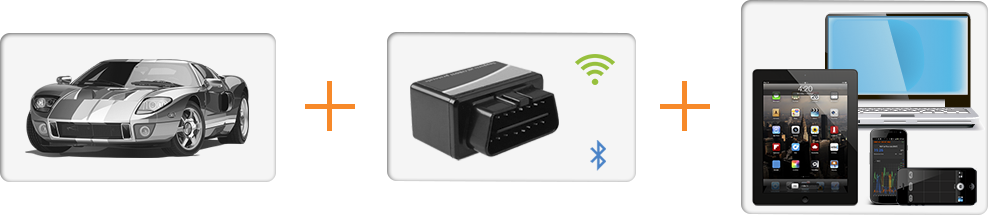
To begin with, for a successful auto diagnosis, the presence of 3 devices is important:
1. Car
2. Adapter
3. Mobile device (laptop, PC, smartphone)
So, you have a car and you want to know whether it is possible, and if possible, with what help to connect to your car.
The presence of a diagnostic connector (DLC) , the main function of which is to connect the diagnostic scanner to the control units, automatically assumes the ability to connect to the vehicle's on-board computer from the outside, including from a smartphone using the appropriate adapter. But as mentioned in the previous part of the many different DLC connectors and proprietary protocols, we will only consider the OBD-II standards set , especially since most modern cars comply with this standard.
And so, the first question: Does my car meet the OBD-II standard?
Prerequisites may be:
If the cars were manufactured for other markets: the CIS, Asia, Africa, etc., then it is more difficult to establish a clear date and guarantees for OBD-II support. You also need to remember that some manufacturers could support the standard in earlier models of their cars.
The next step may be to find the appropriate sticker under the hood of the car.
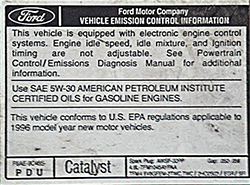
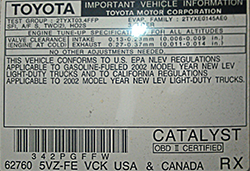
The sticker should contain information about compliance with the standard and may contain the abbreviations OBD-II, EOBD or JOBD. It may look different, here are some of the possible options.

Regardless of the success of the search in the previous steps, it is time to find the diagnostic connector itself. If the machine complies with OBD-II, then the connector will certainly be found and you can connect to it for further research. If there is still no confidence in compatibility, then the presence and shape of the connector can serve as an additional key to solving the mystery of the DLC.
We are looking for a 16-pin trapezoidal diagnostic connector, such as in the figure.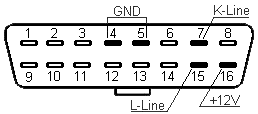 The DLC connector must comply with SAE J1962 standards. According to these standards, the DLC connector is required to occupy a certain central position in the car. It should be within 16 inches (40 cm) of the steering wheel. The manufacturer can place the DLC in one of eight locations designated by the EPA. Each connector pin has its own purpose.
In accordance with the standard, the diagnostic connector should be located near the steering column, most often below the torpedo to the left, right, or directly under the steering column. However, there are also exotic cases:
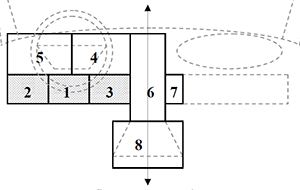 behind the panel on the front side of the torpedo, behind the hinged drawer near the driver's door, etc., there are 8 possible locations, we tried to illustrate with pictures with arrows and tips where you can look for the connector.
1. On the driver's side, under the instrument panel, in the area under the steering column: Skoda Octavia Tour, 2008, Volkswagen Transporter 2002.
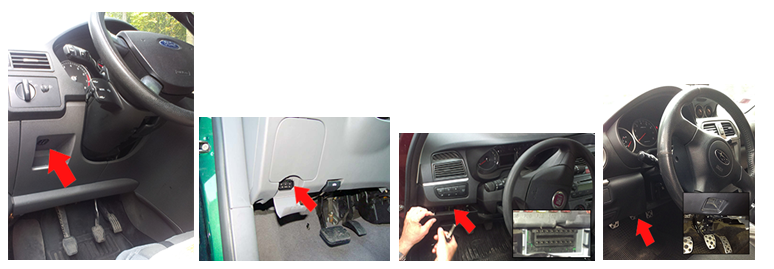
2. On the driver's side, under the instrument panel, in the area between the driver's door and the steering column - Ford Focus C-Max, 2006; Ford Focus (USA) 2001, Fiat Linea, 2008; Subaru, Impreza WRX, 2005.
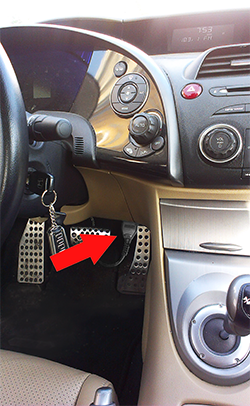
3. On the driver’s side, under the instrument panel, between the steering column and the center console. Also, the connector can be located on the console itself from the driver's side. 2009 Honda Civic
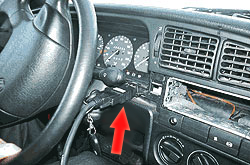
4. On the driver’s side, in the dashboard area, between the steering column and the Volkswagen Passat center console 1996 ...
5. On the driver’s side, in the dashboard area, between the driver’s door and the 2001 BWM X5 center console.
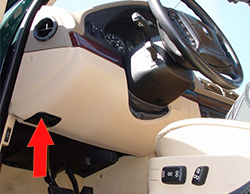
6. The center console, on a vertical surface (radio, heating control panel, etc.). Access to the diagnostic socket can be closed by an ashtray, coin box, cup holder, etc. Honda Accord (USA) 1997
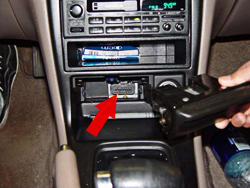
7. On the passenger side, on the center console of Honda Shuttle 1996 onwards ...
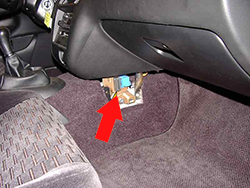
8. The center console, on a horizontal surface Volvo 850 95-97g.v ..
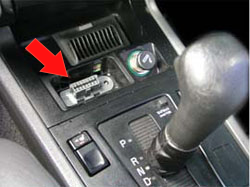

Possible search results:
The next item is the choice of adapter, which can also differ both in the type of connection to a computer / smartphone (USB, Bluetooth, Wi-Fi) and in circuitry, and, as a result, in the command interface. As such, the OBD-II commands are unified, but since OBD-II combines several different signaling protocols, complete uniformity is not obtained.
The adapter itself provides automatic or software control over the type and parameters of the connection. A smartphone or computer connects to the adapter through a wired or wireless connection and receives high-level commands. The execution of the relevant commands involves either changing the settings of the adapter itself, or relaying OBD-II commands to the on-board computer of the car in accordance with the settings of the adapter.
The vast majority of modern adapters are based on the ELM327 microcontroller , pirated copies of the earlier ELM327, or the STN1110 microcontroller(compatible with ELM327 at the command level). As mentioned above, wireless (Bluetooth, Wi-Fi Direct) or wired (USB, RS232) can be used to communicate with a computer or smartphone. In all cases, we are talking about a serial connection over the above interfaces. The choice of a specific type of interface depends on the capabilities of supporting this interface with your computer or smartphone.

Consider the types of devices in order:
Computers. In a laptop, as a rule, there are all interfaces and the choice is determined by the price, ease of connection, the ability to use the adapter with other devices, as well as software support for this type of interface.
iPhone & iPad The only available connection option (apart from the exotic in the form of a specialized cable or certified Bluetooth adapters) is a Wi-Fi Direct connection, since access to the Bluetooth connection using the standard API is limited and does not allow you to establish the required type of connection with the adapter.
AndroidThe most common option is a Bluetooth adapter. Wi-Fi Direct can be supported either on "rooted" devices, or on versions of Android 4.x, also on some devices there may be nuances with hardware support for Wi-Fi Direct. If your mobile device supports a USB-host port, then there is a connection option and a USB adapter.
Windows CE, Windows Mobile, Windows Phone. Windows CE and Windows Mobile devices are quite open in terms of low-level hardware interfaces, respectively, if there is a physical interface in the device, it will be possible to connect to it. The most commonly used Bluetooth adapter.
Windows Phone devices of versions 7.x do not have the necessary access to Bluetooth and Wi-Fi at the standard API level. Implementing interaction with the adapter on these devices is problematic.
Windows Phone 8.x has received the necessary level of support for working with Bluetooth adapters.
Blackberry. Interoperability with Bluetooth adapters is possible.
Symbian Interoperability with Bluetooth adapters is possible.
From the above we can conclude: Bluetooth adapters are more universal, in terms of supported devices, but if you need to connect from Apple devices, you need to look for Wi-Fi Direct adapters.
Bole less understood interfaces. Now, I think, many may be interested in the question of choosing a microcontroller (ELM327, ELM327 clone, STN1110), since prices can vary by more than an order of $ 5-7 to $ 100 or more per device.
ELM327 is the original development and product of ELM Electronics . Actual versions 1.3a, 1.4b and brand new 2.0. The cost of solutions based on the original ELM327 is usually around $ 100, since the cost of the microcontrollers themselves is $ 15- $ 25.
Clones ELM327- Most often, Chinese microcontrollers copying one of the early "unprotected" variants of the ELM327. They can be designated as versions of the original controllers 1.3a, 1.4b, and non-existing 1.4a, 1.5, 1.5a or v2.1. The cost of such adapters starts at about $ 5 for bluetooth and USB solutions, and with $ 15 for Wi-Fi.
STN1110 - Development by OBD Solutions. Independent development team-compatible with ELM327. It has some advanced features, in particular, the declared availability of great features (compared to ELM327) when working with non-OBD-II teams. The data reading speed is also significantly higher (2-4 times) compared to ELM327 versions 1.x. Compare with version ELM327 2.0 the opportunity has not yet presented itself. The cost of such an adapter (we know only one OBDLink MX ) is $ 150.
Finally, Conclusions!From our point of view, in 90% of cases, the capabilities of cheap ELM327 clones are enough to connect to a car and solve simple problems: diagnosing a car, reading and analyzing dynamic parameters and their relationships, resetting errors, etc. The use of more expensive adapters is justified in cases where you can accurately imagine what you need from the adapter and what capabilities you lack in clones.
The question of purchasing the selected adapter remains open. Depending on your choice of the Bluetooth, Wi-Fi, USB interface, enter one of the phrases “ELM327 Bluetooth”, “ELM327 Wi-Fi” or “ELM327 USB” in the search bar of your favorite search engine and select the delivery option that suits you - local sellers or Global internet sites like eBay or AliExpress.
We wish you success in finding a diagnostic connector and choosing the best adapter! In the meantime, you are busy searching, we are preparing the next article in which we will introduce you to affordable software solutions and show how to read data from the car's on-board computer in practice.
P.S.
Hurrah! Available continued - Part 3. How to connect a smartphone to a car - read the data
To begin with, for a successful auto diagnosis, the presence of 3 devices is important:
1. Car
2. Adapter
3. Mobile device (laptop, PC, smartphone)
Car
So, you have a car and you want to know whether it is possible, and if possible, with what help to connect to your car.
The presence of a diagnostic connector (DLC) , the main function of which is to connect the diagnostic scanner to the control units, automatically assumes the ability to connect to the vehicle's on-board computer from the outside, including from a smartphone using the appropriate adapter. But as mentioned in the previous part of the many different DLC connectors and proprietary protocols, we will only consider the OBD-II standards set , especially since most modern cars comply with this standard.
And so, the first question: Does my car meet the OBD-II standard?
Prerequisites may be:
- the car was produced for the US market (OBD-II) after 1996.
- the car was produced for the EU market (EOBD), gasoline after 2001, diesel after 2004
- the car was produced for the Japanese market (JOBD) after 2004.
If the cars were manufactured for other markets: the CIS, Asia, Africa, etc., then it is more difficult to establish a clear date and guarantees for OBD-II support. You also need to remember that some manufacturers could support the standard in earlier models of their cars.
The next step may be to find the appropriate sticker under the hood of the car.
The sticker should contain information about compliance with the standard and may contain the abbreviations OBD-II, EOBD or JOBD. It may look different, here are some of the possible options.
Regardless of the success of the search in the previous steps, it is time to find the diagnostic connector itself. If the machine complies with OBD-II, then the connector will certainly be found and you can connect to it for further research. If there is still no confidence in compatibility, then the presence and shape of the connector can serve as an additional key to solving the mystery of the DLC.
We are looking for a 16-pin trapezoidal diagnostic connector, such as in the figure.
The DLC connector must comply with SAE J1962 standards. According to these standards, the DLC connector is required to occupy a certain central position in the car. It should be within 16 inches (40 cm) of the steering wheel. The manufacturer can place the DLC in one of eight locations designated by the EPA. Each connector pin has its own purpose.In accordance with the standard, the diagnostic connector should be located near the steering column, most often below the torpedo to the left, right, or directly under the steering column. However, there are also exotic cases:
behind the panel on the front side of the torpedo, behind the hinged drawer near the driver's door, etc., there are 8 possible locations, we tried to illustrate with pictures with arrows and tips where you can look for the connector. 1. On the driver's side, under the instrument panel, in the area under the steering column: Skoda Octavia Tour, 2008, Volkswagen Transporter 2002.
2. On the driver's side, under the instrument panel, in the area between the driver's door and the steering column - Ford Focus C-Max, 2006; Ford Focus (USA) 2001, Fiat Linea, 2008; Subaru, Impreza WRX, 2005.
3. On the driver’s side, under the instrument panel, between the steering column and the center console. Also, the connector can be located on the console itself from the driver's side. 2009 Honda Civic
4. On the driver’s side, in the dashboard area, between the steering column and the Volkswagen Passat center console 1996 ...
5. On the driver’s side, in the dashboard area, between the driver’s door and the 2001 BWM X5 center console.
6. The center console, on a vertical surface (radio, heating control panel, etc.). Access to the diagnostic socket can be closed by an ashtray, coin box, cup holder, etc. Honda Accord (USA) 1997
7. On the passenger side, on the center console of Honda Shuttle 1996 onwards ...
8. The center console, on a horizontal surface Volvo 850 95-97g.v ..
Possible search results:
- the connector was found, but it does not look like the one shown in the picture: rectangular / square / round, it does not have 16 contacts, etc. The chances of connecting are small enough, even if you find out the correspondence of the contacts to the OBD-II wiring and you can solder (buy) the adapter, the probability that the protocols will be fully compatible is small. In this case, it is worth continuing only if you are well prepared in terms of the compatibility of signal and logic protocols and their “dialects”.
- There is a connector and it is fully consistent with the description of OBD-II. The chances of a successful connection are greatly increased. You can additionally ask at automobile forums where car owners of similar models share their experience.
Adapter
The next item is the choice of adapter, which can also differ both in the type of connection to a computer / smartphone (USB, Bluetooth, Wi-Fi) and in circuitry, and, as a result, in the command interface. As such, the OBD-II commands are unified, but since OBD-II combines several different signaling protocols, complete uniformity is not obtained.
- First, various physical lines (contacts), K-Line, L-Line ... can be used to transmit information.
- Secondly, transmission frequencies can vary significantly from 4.8 to 500 kbaud.
- Thirdly, the rules for the formation of auxiliary information: headers and endings of packets may differ.
The adapter itself provides automatic or software control over the type and parameters of the connection. A smartphone or computer connects to the adapter through a wired or wireless connection and receives high-level commands. The execution of the relevant commands involves either changing the settings of the adapter itself, or relaying OBD-II commands to the on-board computer of the car in accordance with the settings of the adapter.
The vast majority of modern adapters are based on the ELM327 microcontroller , pirated copies of the earlier ELM327, or the STN1110 microcontroller(compatible with ELM327 at the command level). As mentioned above, wireless (Bluetooth, Wi-Fi Direct) or wired (USB, RS232) can be used to communicate with a computer or smartphone. In all cases, we are talking about a serial connection over the above interfaces. The choice of a specific type of interface depends on the capabilities of supporting this interface with your computer or smartphone.
Mobile device
(laptop, PC, smartphone, etc.)Consider the types of devices in order:
Computers. In a laptop, as a rule, there are all interfaces and the choice is determined by the price, ease of connection, the ability to use the adapter with other devices, as well as software support for this type of interface.
iPhone & iPad The only available connection option (apart from the exotic in the form of a specialized cable or certified Bluetooth adapters) is a Wi-Fi Direct connection, since access to the Bluetooth connection using the standard API is limited and does not allow you to establish the required type of connection with the adapter.
AndroidThe most common option is a Bluetooth adapter. Wi-Fi Direct can be supported either on "rooted" devices, or on versions of Android 4.x, also on some devices there may be nuances with hardware support for Wi-Fi Direct. If your mobile device supports a USB-host port, then there is a connection option and a USB adapter.
Windows CE, Windows Mobile, Windows Phone. Windows CE and Windows Mobile devices are quite open in terms of low-level hardware interfaces, respectively, if there is a physical interface in the device, it will be possible to connect to it. The most commonly used Bluetooth adapter.
Windows Phone devices of versions 7.x do not have the necessary access to Bluetooth and Wi-Fi at the standard API level. Implementing interaction with the adapter on these devices is problematic.
Windows Phone 8.x has received the necessary level of support for working with Bluetooth adapters.
Blackberry. Interoperability with Bluetooth adapters is possible.
Symbian Interoperability with Bluetooth adapters is possible.
From the above we can conclude: Bluetooth adapters are more universal, in terms of supported devices, but if you need to connect from Apple devices, you need to look for Wi-Fi Direct adapters.
Bole less understood interfaces. Now, I think, many may be interested in the question of choosing a microcontroller (ELM327, ELM327 clone, STN1110), since prices can vary by more than an order of $ 5-7 to $ 100 or more per device.
ELM327 is the original development and product of ELM Electronics . Actual versions 1.3a, 1.4b and brand new 2.0. The cost of solutions based on the original ELM327 is usually around $ 100, since the cost of the microcontrollers themselves is $ 15- $ 25.
Clones ELM327- Most often, Chinese microcontrollers copying one of the early "unprotected" variants of the ELM327. They can be designated as versions of the original controllers 1.3a, 1.4b, and non-existing 1.4a, 1.5, 1.5a or v2.1. The cost of such adapters starts at about $ 5 for bluetooth and USB solutions, and with $ 15 for Wi-Fi.
STN1110 - Development by OBD Solutions. Independent development team-compatible with ELM327. It has some advanced features, in particular, the declared availability of great features (compared to ELM327) when working with non-OBD-II teams. The data reading speed is also significantly higher (2-4 times) compared to ELM327 versions 1.x. Compare with version ELM327 2.0 the opportunity has not yet presented itself. The cost of such an adapter (we know only one OBDLink MX ) is $ 150.
Finally, Conclusions!From our point of view, in 90% of cases, the capabilities of cheap ELM327 clones are enough to connect to a car and solve simple problems: diagnosing a car, reading and analyzing dynamic parameters and their relationships, resetting errors, etc. The use of more expensive adapters is justified in cases where you can accurately imagine what you need from the adapter and what capabilities you lack in clones.
The question of purchasing the selected adapter remains open. Depending on your choice of the Bluetooth, Wi-Fi, USB interface, enter one of the phrases “ELM327 Bluetooth”, “ELM327 Wi-Fi” or “ELM327 USB” in the search bar of your favorite search engine and select the delivery option that suits you - local sellers or Global internet sites like eBay or AliExpress.
We wish you success in finding a diagnostic connector and choosing the best adapter! In the meantime, you are busy searching, we are preparing the next article in which we will introduce you to affordable software solutions and show how to read data from the car's on-board computer in practice.
P.S.
Hurrah! Available continued - Part 3. How to connect a smartphone to a car - read the data









