July 1, 2013 at 20:09
Weekdays rdp or about humble RDCMan put in a word
Hello, Habr! This post was written solely to shed light on the program that was undeservedly lost in the wilds of Microsoft, and not to review all its features. There will not even be a download link. But first things first.
The emoxam habitor post inspired thoughts about the convenience of remote server management. And in particular, they are running Windows Server. For * nix systems I use the old woman putty and I don’t like the idea of a mega-combine. But this, of course, is a purely personal opinion. Frankly, I used to be quite lazy and used the standard remote desktop client ala mstsc.exe. But moving to another company, with the number of servers an order of magnitude larger, the endless windows of the terminals began to tire.
Programs like Radmin and DWNTUinstall their modules / services on each computer that needs to be managed. And I wanted something native (i.e., working via rdp protocol), as well as free. I will not list the monsteroid combines and simple programs that have been tested, I will also refrain from listing their pluses and minuses, which are worthy.
I also want to dwell on the program that I stumbled upon by accident. This lightweight (less than 800 Kb) and, as it turned out, a very convenient program does not require setting hundreds of parameters, does not support skins and does not require a separate database for storing connection parameters. But it fulfills its main mission perfectly. Her name is Remote Desktop Connection Manager or rdcm or RDCMan, as Microsoft calls her. The latest version dates from 2010, but this does not affect the functionality. I checked it in work with both 2000 and 2008R2 servers (since 2012 there was no opportunity to test yet). In addition to the standard set of functions such as storing and substituting login / password, favorites, etc. etc. the program has its own highlight, or rather three.
What is missing is the function of adding servers through network scanning.
The main factor that prompted me to write this article is that the program is little known, rarely anyone uses it, and from my point of view it is not deserved. None of my colleagues have heard of this. Of course not an indicator, but still. We bypassed it on Wikipedia . You can find rdcm on the English version of the Microsoft website. If interested, search by full name.
Thanks for attention.
Foreword
The emoxam habitor post inspired thoughts about the convenience of remote server management. And in particular, they are running Windows Server. For * nix systems I use the old woman putty and I don’t like the idea of a mega-combine. But this, of course, is a purely personal opinion. Frankly, I used to be quite lazy and used the standard remote desktop client ala mstsc.exe. But moving to another company, with the number of servers an order of magnitude larger, the endless windows of the terminals began to tire.
Programs like Radmin and DWNTUinstall their modules / services on each computer that needs to be managed. And I wanted something native (i.e., working via rdp protocol), as well as free. I will not list the monsteroid combines and simple programs that have been tested, I will also refrain from listing their pluses and minuses, which are worthy.
Random find
I also want to dwell on the program that I stumbled upon by accident. This lightweight (less than 800 Kb) and, as it turned out, a very convenient program does not require setting hundreds of parameters, does not support skins and does not require a separate database for storing connection parameters. But it fulfills its main mission perfectly. Her name is Remote Desktop Connection Manager or rdcm or RDCMan, as Microsoft calls her. The latest version dates from 2010, but this does not affect the functionality. I checked it in work with both 2000 and 2008R2 servers (since 2012 there was no opportunity to test yet). In addition to the standard set of functions such as storing and substituting login / password, favorites, etc. etc. the program has its own highlight, or rather three.
- The ability to connect to the console. This is very useful for me, because the company strictly complies with the licensing policy; therefore, the terminal service is not installed on every server. By default, Windows Server allows two simultaneous remote desktop connections. The same function allows you to "raise" the limit to three. Yes, yes, it is in the standard client, but not all competitors.
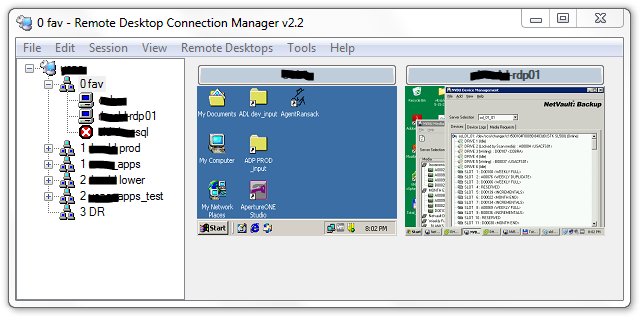
- Interactive thumbnails of open connections, updated in real time. Those. You can not only observe what is happening on several servers at the same time, but also click, for example, OK in the pop-up window, right in the thumbnail. Not a key function, of course, but not seen by competitors.
- A tree view of the list of servers and open connections. It takes a little getting used to and it turns out to be much more convenient than tabs. Again IMHO, therefore in third place.
What is missing is the function of adding servers through network scanning.
Unknown to anyone
The main factor that prompted me to write this article is that the program is little known, rarely anyone uses it, and from my point of view it is not deserved. None of my colleagues have heard of this. Of course not an indicator, but still. We bypassed it on Wikipedia . You can find rdcm on the English version of the Microsoft website. If interested, search by full name.
Thanks for attention.