
 June 25, 2013 at 10:56
An inside look at search query hints at Evernote
Posted by Zeesha Currimbhoy, Senior Data Products Engineer at Evernote

After joining Evernote, the first thing I did was work on thinking through and implementing automatic search prompts in Evernote for Mac.
Here's what it looks like now:
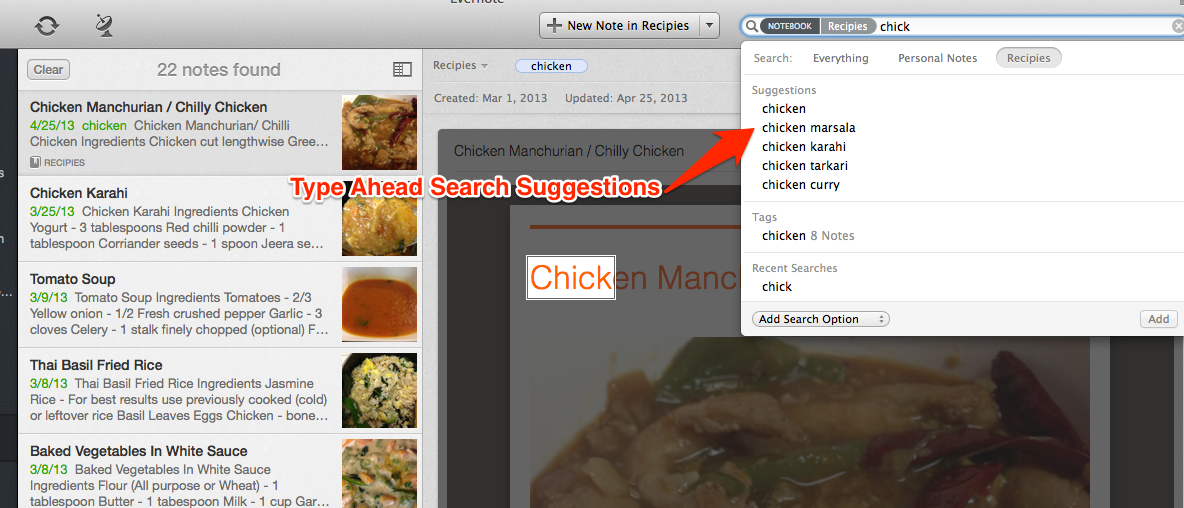
Most of us occasionally encounter the fact that we cannot accurately formulate a query, being one on one with the search line and the blinking cursor. To solve this problem, we have added dynamic search suggestions, offered as you type, which are formed on the basis of the user's notes.
In this article I want to touch on some features of the implementation of search tips in Evernote.
For many of us, search hints have become an integral part of everyday life. It’s not so easy to remember what Google search was like before the tips. Despite the fact that they got wide distribution not so long ago, we already instinctively expect a drop-down list of suitable query options from any search string that we see.
So similar in appearance, the hints of various services actually work in different ways. Google is building options from its ever-growing database of search queries. So the user is prompted with options that other people often looked for before him, but these options may not be familiar to him at all. However, this model works well for web search, which should find the most diverse information around the world.
In the case of a search in Evernote, we are talking about our own information. In the Evernote search results, you see the data that you once added, and we use it to generate tips. We are dealing with an isolated set of notes and cannot supplement them with data of unauthorized users. Thus, while many other services are talking about the Big Data problem, Evernote is facing millions and millions of small data problems. Each data set, like every user, is unique.
Another difference is the type of content that we use to form hints. Many services that support search hints offer discrete query options from a finite (albeit large) set - these can be previously entered search queries, people, companies, etc. In Evernote, hints can be extracted from any content, both structured and and no, which is present in any of your notes and in any language. The system determines the relevance of prompts for the user by analyzing the content of the notes themselves.
We are working on a cross-platform service and try to make Evernote users equally comfortable working on all the devices they like. Therefore, we had to make a difficult decision when choosing a platform for implementing prompts at the very beginning, choosing whether to create a system on the server side in order to have the potential to immediately use it on all clients, or to start with a native implementation in a single client. We chose the second option and started with the Mac for several reasons.
The three main components that underlie this functionality are the index of terms, the creation of prompts and their extraction.
Index of terms
Search tips are stored in an inverted index, separate from the main search index. We considered the possibility of using the search index itself, but we found that although theoretically it can be taken as a basis, it is too focused on the search for individual keywords, and the output gives very poor quality hints.
So in our index, we linked each term to a list of notes that contain it.
Create tooltips
The mechanism of search hints begins to work even before the user starts typing in the search bar. Each time you create, modify, or delete notes, we generate a list of potential hints from the title, tags, and contents of the note, which are then sorted into the inverted index.
It works as follows.
We start by finding individual words in the text of a note. Words go through a series of filters that normalize text (for example, lowercase, eliminate diacritics) and remove stop words (too common). The filtered words can then be further grouped into phrases that may be relevant to a particular text. Finally, words and phrases that have passed filters are serialized as index entries.
At this step, you must also take into account the features of some languages. For example, Chinese and Japanese do not use spaces to separate words from each other. Therefore, it is necessary to apply more complex algorithms for finding word boundaries. This problem becomes even more interesting (and more difficult), considering that the note may contain entries in several languages at once.
And of course, the whole process should take place in the background, using currently unoccupied system resources, and not interfere with the user.
Retrieving Hints
We are ready to search - what is happening now? When the user begins to enter text in the search string, the tooltip extraction system primarily determines the set of notes that fall into the input query by context and satisfy the combination of notebooks and labels that the user is looking for. Then, the entered part of the search query is searched in the hint index to get a set of possible phrase endings. Finally, we filter out all endings that do not fit into contextually relevant notes.
Then we evaluate each hint and rank it by relevance according to a special formula based on TF-IDF . The most highly rated tips go to the finals, where very similar tips (for example, “ice skate” and “ice skating”) are combined.
In many ways, this component is the most complex, but it must also be the fastest, since it is required to give the user the result in less than a second. Therefore, in terms of performance, we paid special attention to this part of the hint system.
If you are working with Evernote for Mac and have not tried this feature yet, I would really like you to work with it and tell about your impressions.
In the future, we will add this functionality to some other Evernote clients.
After joining Evernote, the first thing I did was work on thinking through and implementing automatic search prompts in Evernote for Mac.
Here's what it looks like now:
Most of us occasionally encounter the fact that we cannot accurately formulate a query, being one on one with the search line and the blinking cursor. To solve this problem, we have added dynamic search suggestions, offered as you type, which are formed on the basis of the user's notes.
In this article I want to touch on some features of the implementation of search tips in Evernote.
How are Evernote search tips different from any other?
For many of us, search hints have become an integral part of everyday life. It’s not so easy to remember what Google search was like before the tips. Despite the fact that they got wide distribution not so long ago, we already instinctively expect a drop-down list of suitable query options from any search string that we see.
So similar in appearance, the hints of various services actually work in different ways. Google is building options from its ever-growing database of search queries. So the user is prompted with options that other people often looked for before him, but these options may not be familiar to him at all. However, this model works well for web search, which should find the most diverse information around the world.
In the case of a search in Evernote, we are talking about our own information. In the Evernote search results, you see the data that you once added, and we use it to generate tips. We are dealing with an isolated set of notes and cannot supplement them with data of unauthorized users. Thus, while many other services are talking about the Big Data problem, Evernote is facing millions and millions of small data problems. Each data set, like every user, is unique.
Another difference is the type of content that we use to form hints. Many services that support search hints offer discrete query options from a finite (albeit large) set - these can be previously entered search queries, people, companies, etc. In Evernote, hints can be extracted from any content, both structured and and no, which is present in any of your notes and in any language. The system determines the relevance of prompts for the user by analyzing the content of the notes themselves.
Choosing an Implementation Platform
We are working on a cross-platform service and try to make Evernote users equally comfortable working on all the devices they like. Therefore, we had to make a difficult decision when choosing a platform for implementing prompts at the very beginning, choosing whether to create a system on the server side in order to have the potential to immediately use it on all clients, or to start with a native implementation in a single client. We chose the second option and started with the Mac for several reasons.
- We wanted search hints, like other search functionality, to be available offline.
- We wanted to take advantage of the platform. Mac OS offers an impressive set of linguistic APIs that we could use to accomplish the task.
- We wanted to ensure productivity and user experience, even if it meant that we would have to take more work on ourselves.
Details
The three main components that underlie this functionality are the index of terms, the creation of prompts and their extraction.
Index of terms
Search tips are stored in an inverted index, separate from the main search index. We considered the possibility of using the search index itself, but we found that although theoretically it can be taken as a basis, it is too focused on the search for individual keywords, and the output gives very poor quality hints.
So in our index, we linked each term to a list of notes that contain it.
Create tooltips
The mechanism of search hints begins to work even before the user starts typing in the search bar. Each time you create, modify, or delete notes, we generate a list of potential hints from the title, tags, and contents of the note, which are then sorted into the inverted index.
It works as follows.
We start by finding individual words in the text of a note. Words go through a series of filters that normalize text (for example, lowercase, eliminate diacritics) and remove stop words (too common). The filtered words can then be further grouped into phrases that may be relevant to a particular text. Finally, words and phrases that have passed filters are serialized as index entries.
At this step, you must also take into account the features of some languages. For example, Chinese and Japanese do not use spaces to separate words from each other. Therefore, it is necessary to apply more complex algorithms for finding word boundaries. This problem becomes even more interesting (and more difficult), considering that the note may contain entries in several languages at once.
And of course, the whole process should take place in the background, using currently unoccupied system resources, and not interfere with the user.
Retrieving Hints
We are ready to search - what is happening now? When the user begins to enter text in the search string, the tooltip extraction system primarily determines the set of notes that fall into the input query by context and satisfy the combination of notebooks and labels that the user is looking for. Then, the entered part of the search query is searched in the hint index to get a set of possible phrase endings. Finally, we filter out all endings that do not fit into contextually relevant notes.
Then we evaluate each hint and rank it by relevance according to a special formula based on TF-IDF . The most highly rated tips go to the finals, where very similar tips (for example, “ice skate” and “ice skating”) are combined.
In many ways, this component is the most complex, but it must also be the fastest, since it is required to give the user the result in less than a second. Therefore, in terms of performance, we paid special attention to this part of the hint system.
What's next
If you are working with Evernote for Mac and have not tried this feature yet, I would really like you to work with it and tell about your impressions.
In the future, we will add this functionality to some other Evernote clients.