
Distributed Audio Player on Odroid U2
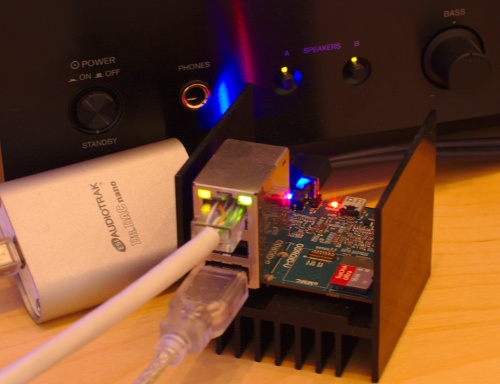
Once I noticed that I spend a lot of time in the kitchen, where the sound from the speakers located in the room does not reach well. And then I wanted to make a good silent player, capable of simultaneously playing music in several rooms. Of course, the problem could be solved by simply turning the volume control, but this method was discarded as inhumane in relation to the neighbors. Another important point was that I wanted to use the same speakers to output sound from a computer. Why do I need several sets of speakers in one room?
The post turned out to be quite long, because I tried to pay attention to the reasons for which I chose this or that solution.
Iron
- HiFi speakers and amplifier - complete set for each room. All devices in the room must use them.
- USB sound card
- Ethernet is a good old reliable and predictable data transmission medium. The best solution if you can lay several cables.
- NAS - music needs to be stored somewhere. Flash cards are good, but their volume is not enough to store loseless music, so the HDD remains. But the hard drives are noisy, so they have a place in the far corner on the mezzanine or in the pantry. In addition, a normal NAS will have a gigabit port, and on all small ARM boards, 100 megabit.
Software
Synchronous playback
There are very few programs that can play sound synchronously. Our ear can distinguish the slightest deviations and we begin to hear an echo. The pleasure is as much as from the announcements of arriving trains through the speakerphone at the train station in the outback. A good result is shown by two sound systems: jack and PulseAudio . They say squeezebox is still working pretty well . I also tried mplayer and vlc, but I couldn’t get acceptable synchronization from them. Vlc copes well with the video stream if you use RTP multicast , but the sound has a noticeable echo. And with video on demand there is no synchronization at all, since each client receives a separate stream. Mplayer just terribly slows down if you enable udp synchronization.
So, if there is no need to display video synchronously, then jack or PulseAudio are a good choice due to their flexibility. If you need a video ... let me know if there is anything really working.
Jack vs PulseAudio
After a long search, it turned out that there was no struggle between them: they were written for completely different purposes. I do not need very short delays and tremendous flexibility in switching streams during work in order to listen to music. But I want to load less CPU and not to drive packets on a network if nothing is reproduced. All I need to do is turn on and off predefined outputs. Therefore, in my case, PulseAudio is the preferred choice.
Pulseseudio
Hint: The first thing to do is set up the clock correctly. If they are poorly synchronized between devices, strange bugs may occur. Therefore, everywhere you need to install ntpd.
There are several ways to set up synchronized playback. You can use module-combine-sink in conjunction with module-tunnel-sink, or you can use broadcast rtp streams. I chose module-combine-sink, as it gives significantly less cutoff. But it does not work via WiFi, and rtp can be and will be. But I do not like WiFi, I like posting.
Another subtlety is that PulseAudio can work either as a system-wide daemon, or for each user separately. The latter is the preferred solution., mainly due to security reasons, for example, so that users can not disconnect or redirect other people's flows. But if we are talking about a client without X11, then only the system mode remains. And security problems ... so it’s exactly what I need: a common sound server for several trusted users.
If you have chosen systenny mode, then do not forget to add yourself to the pulse-access group . The configuration files are located in the / etc / pulse / directory. For system mode, this is system.pa , and for user default.pa .
Output devices
These are devices to which amplifiers are connected. They need to be allowed remote access, so add module-native-protocol-tcp to the config:
load-module module-native-protocol-tcp auth-ip-acl=127.0.0.1;192.168.0.0/16Input devices
On the device from which the sound stream will go, it is necessary to configure remote outputs. For each output device (except for local outputs), add the following lines:
load-module module-tunnel-sink server=Now you need to learn how to dynamically turn them on and off. PulseAudio sends data even to muted channels, but it does not send to suspended outputs. In order not to turn off the sound output for all applications, we will create intermediate outputs for each real output:
load-module module-combine-sink sink_name=kitchen_mpd slaves=tunnel-sink.u2k.home
load-module module-combine-sink sink_name=hall_mpd slaves=alsa_output.usb-ESI_Audiotechnik_GmbH_Dr._DAC_nano-01-nano.analog-stereo
And finally, combine these outputs into one:
load-module module-combine-sink sink_name=mpd_sink slaves=kitchen_mpd,hall_mpd
Now, after restarting PulseAudio, you can turn individual outputs on and off with commands of the form:
# Выключить
pactl suspend-sink hall_mpd 1
# Включить
pactl suspend-sink hall_mpd 0
Hurrah! A custom output that synchronously plays sound through multiple output devices connected over the network is ready.
Playing music
Now you need to connect some player to this output. I chose MPD, as it can be remotely controlled from almost any device. This is convenient when you listen to music in the kitchen, and the computer is in the room. The setup is very simple:
audio_output {
        type            "pulse"
        name            "Pulse"
        server          "u2.home"               # optional
        sink            "mpd_sink"
}
But if you have several outputs, you also want to control them through the MPD interface. I wrote a small hack for MPD that allows you to do this. This is a modified NullOutput that executes arbitrary commands on and off. It remains to configure these outputs to the corresponding pactl calls and hide the main (first) output with another small hack.
audio_output {
        type            "exec"
        name            "Зал"
        enable          "pactl suspend-sink hall_mpd 0"
        disable         "pactl suspend-sink hall_mpd 1"
}
audio_output {
        type            "exec"
        name            "Кухня"
        enable          "/usr/bin/pactl suspend-sink kitchen_mpd 0"
        disable         "/usr/bin/pactl suspend-sink kitchen_mpd 1"
}
Sharing
On a desktop computer, I registered in /etc/pulse/client.conf
default-server = u2.homeAs a result, all applications communicate directly with the remote sound server. It works flawlessly.
Problems
The main problem I had to face was insecurity. If the network connection is lost, PulseAudio deletes the corresponding outputs and does not recreate them. You have to restart manually.
Another problem is that the output status in MPD and PulseAudio may not match. You have to press the button once again to turn the sound on or off.
Advantages
I can listen to music at breakfast and dinner. Moreover, the music is well audible in most of the apartment and does not play quietly or loudly. If desired, individual zones can be disabled. Managing it is easy and simple. In general, the cat approves:

PS A specific combination of dr. DAC nano and odroid U2 are not very successful. With a high probability, this sound card will only work through a USB hub due to the insufficient capacitance of the capacitor on VBUS in U2.