May 22, 2013 at 14:52
Learn the principles of interaction between Ubuntu Touch and Android

Hi, Habr.
A couple of months ago I was porting Ubuntu Touch to the Allwinner A10 platform,
in the process I took notes for myself. Now, in my opinion, they are still relevant until Ubuntu Touch finally moved to its Mir graphic server and so on.
This article will help interested people find a starting point from which to begin a close acquaintance with UT.
The presentation style is far from technical, but if you do not mind, then I
invite you to cat.
Introduction
What is libhybris
libhybris is an interlayer that allows loading libraries from Bionic userspace into Glibc userspace , replacing some characters with options from Glibc on the fly. Simply put, this solution allows you to use proprietary libraries for Android in Linux-space. The greatest benefit, of course, is the ability to use proprietary GPU drivers built by the manufacturer only for Android.
What is surfaceflinger
surfaceflinger is a native android service, a composite manager of graphic layers.
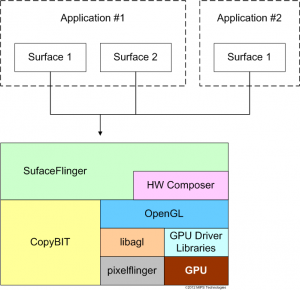
More about Binder IPC and SurfaceFlinger:
- http://www.opersys.com/downloads/inside-androids-ui-130530.pdf
- http://0xlab.org/~jserv/android-binder-ipc.pdf
- dpolishuk shared an excellent document - Android Binder
Ubuntu touch
Ubuntu Touch Developer Preview itself is based on Android, it borrows the necessary services for working with hardware. A general overview of the dependency can be found here - Ubuntu Touch Porting or in a note on OpenNet .
As the base operating system, the usual Android JB 4.2 is used, or rather CyagenMod-10.1 (the repository of CM subprojects is phablet.ubuntu.com/gitweb ). Everything connected with dalvik and java has been removed from it - only the native part consisting of system services and HAL is left. If you wish, you can use AOSP 4.1, but be prepared to adapt to the native API from 4.1, it is not covered by any documentation or, moreover, specification, and changes from release to release.
UT components are located in chroot, the uchroot self-written utility is used , excerpt:
static int ubuntum(void *a) {
    /* Chroot */
    chroot("/data/ubuntu");
    chdir("/");
    /* Set basic env variables */
    char *const envp[8] = {
        "container=aal",
        "PATH=/usr/local/sbin:/usr/local/bin:/usr/sbin:/usr/bin:/sbin:/bin",
        "SHELL=/bin/bash",
        "HOME=/root",
        "USER=root",
        "USERNAME=root",
        "LOGNAME=root",
        NULL
    };
    /* Exec shell */
    execle("/sbin/init", "/sbin/init", "--verbose", NULL, envp);
    return 0;
}
For interaction between the Android environment and the chroot environment of Ubuntu, the libhybris mechanism is used.

Ubuntu Touch Components
Soup from various UT components can be seen in the ~ phablet-team lanchpad repository .
We are interested in the following two components that are responsible for the platform on Android devices:
Download the latest source code:
bzr branch lp:platform-api
bzr branch lp:qtubuntu
Ubuntu Platform API
Ubuntu platform API is a low-level API for performing basic operations using the capabilities of the platform (Android).
Examples of methods:
- ubuntu_application_ui_show_surface
- ubuntu_application_ui_hide_surface
- ubuntu_application_ui_move_surface_to
- ubuntu_application_ui_resize_surface_to
We learn from the doc / mainpage.md documentation file that the platform-api source tree can be divided into two parts:
- include - abstract declaration platform API
- android - platform API implementation for Android (I would clarify - for Android 4.2)
And the only thing a third-party developer can rely on when working with this API is the headers from
the includes / ubuntu / application directory , and everything else expects to change over time.
From the debian / control file we learn that:
Package: libplatform-api1-hybris
Depends: libhybris
Description:
Hybris implementation of the Platform API (runtime)
This package provides the hybris implementation of the Platform API.
The produced library should be used via libhybris, to communicate with the
Android userspace, which is where the Ubuntu Application Manager lives.
Yeah, that means, judging by android / hybris / Android.mk , the platform API implementation is assembled as a libubuntu_application_api library with a link with native android libs and is placed in android userspace:
LOCAL_SRC_FILES := \
    ubuntu_application_api_for_hybris.cpp \
    ubuntu_application_gps_for_hybris.cpp \
    ubuntu_application_sensors_for_hybris.cpp \
    ../default/default_ubuntu_application_sensor.cpp \
    ../default/default_ubuntu_application_ui.cpp \
    ../default/default_ubuntu_ui.cpp \
    application_manager.cpp
LOCAL_MODULE := libubuntu_application_api
LOCAL_SHARED_LIBRARIES := \
    libandroidfw \
    libbinder \
    libutils \
    libgui \
    libEGL \
    libGLESv2 \
    libhardware \
    libhardware_legacy
The platform-api / src / android directory was left unattended , we will consider it in detail. Judging by the presence of the CMakeLists.txt file, the assembly is already underway for glibc.
There is one single file with the code - ubuntu_application_api.cpp , having looked in which we will see:
extern void *android_dlopen(const char *filename, int flag);
extern void *android_dlsym(void *handle, const char *symbol);
struct Bridge {
    static const char* path_to_library() {
        return "/system/lib/libubuntu_application_api.so";
    }
    Bridge() : lib_handle(android_dlopen(path_to_library(), RTLD_LAZY)) {
        assert(lib_handle && "Error loading ubuntu_application_api");
    }
.......
    void* resolve_symbol(const char* symbol) const {
        return android_dlsym(lib_handle, symbol);
    }
    void* lib_handle;
};
#define IMPLEMENT_VOID_FUNCTION3(symbol, arg1, arg2, arg3)      \
    void symbol(arg1 _1, arg2 _2, arg3 _3) {                    \
        static void (*f)(arg1, arg2, arg3) = NULL;              \
        DLSYM(&f, #symbol);                                     \
        f(_1, _2, _3); }
.......
IMPLEMENT_VOID_FUNCTION2(ubuntu_application_ui_init, int, char**);
IMPLEMENT_FUNCTION0(StageHint, ubuntu_application_ui_setup_get_stage_hint);
IMPLEMENT_FUNCTION0(FormFactorHint, ubuntu_application_ui_setup_get_form_factor_hint);
IMPLEMENT_VOID_FUNCTION1(ubuntu_application_ui_start_a_new_session, SessionCredentials*);
IMPLEMENT_VOID_FUNCTION2(ubuntu_application_ui_set_clipboard_content, void*, size_t);
.......
So, to avoid confusion:
- libubuntu_application_api.so - a library under bionic, lives in android userspace;
- libubuntu_application_api.so - a library under glibc, lives in linux userpace (chroot), loads characters from the first via libhybris.
The developers decided to reduce the entropy of the universe by creating libraries of the same name.
If you look at their debate over the naming of the merge-153874 discussion components , then your ears will fade.
Ubuntu application manager
In platform-api / android / hybris, in addition to the Ubuntu platform API implementation, there are sources of ubuntuappmanager - the Ubuntu application service, it lives in android userspace and, judging by Android.mk , actively uses libubuntu_application_api and communicates via Android with Binder IPC services.
LOCAL_SRC_FILES:= \
    application_manager.cpp \
    default_application_manager.cpp \
LOCAL_MODULE:= ubuntuappmanager
LOCAL_MODULE_TAGS := optional
LOCAL_SHARED_LIBRARIES := \
    libbinder \
    libinput \
    libgui \
    libskia \
    libandroidfw \
    libutils \
    libEGL \
    libGLESv2 \
    libubuntu_application_api
It solves a bunch of application and session management tasks, a quick look at default_application_manager.h :
    void update_app_lists();
    void binderDied(const android::wp& who);
    void register_a_surface(...);
    void request_fullscreen(...);
    int get_session_pid(const android::sp& session);
    void focus_running_session_with_id(int id);
    void unfocus_running_sessions();
    int32_t query_snapshot_layer_for_session_with_id(int id);
    android::IApplicationManagerSession::SurfaceProperties query_surface_properties_for_session_id(int id);
    void switch_focused_application_locked(size_t index_of_next_focused_app);
    void switch_focus_to_next_application_locked();
    void kill_focused_application_locked();
    void start_a_new_session(
        int32_t session_type,
        int32_t stage_hint,
        const android::String8& app_name,
        const android::String8& desktop_file,
        const android::sp& session,
        int fd);
QtUbuntu
We deal with the part of UT responsible for the interaction between the Ubuntu platform API and Qt / QML applications.
If you are not familiar with Qt Platform Abstraction , then, in short, this is an opportunity to abstract from the platform on which Qt applications are launched using specially written QPA plugins.
The QPA plugin implements basic methods like createPlatformWindow, and then the Qt application, when it wants to create a window, uses the createPlatformWindow symbol from the abstraction plugin and doesn’t blow where it went from there.
In this case, we will be dealing with a QPA plugin for working with the Ubuntu application API.
~/ubuntu/qtubuntu $ tree
.
├── qtubuntu.pro
├── src
│   ├── modules
│   │   ├── application   <------------------ QML plugin для общения с
│   │   │   ├── application.cc               | Ubuntu Application Manager
│   │   │   ├── application.h                | из QtQuick
│   │   │   ├── application.pro              |
│   │   │   ├── application_image.cc         |
│   │   │   ├── application_image.h          |
│   │   │   ├── application_list_model.cc    |
│   │   │   ├── application_list_model.h     |
│   │   │   ├── application_manager.cc       |
│   │   │   ├── application_manager.h        |
│   │   │   ├── application_window.cc        |
│   │   │   ├── application_window.h         |
│   │   │   ├── input_filter_area.cc         |
│   │   │   ├── input_filter_area.h          |
│   │   │   ├── logging.h                    |
│   │   │   ├── plugin.cc                    |
│   │   │   └── qmldir                       |
│   │   ├── ----------------------------------
│   │   └── modules.pro
│   ├── platforms
│   │   ├── base
│   │   ├── platforms.pro
│   │   └── ubuntu   <-------------- QPA платформа абстракции
│   │         ├── clipboard.cc
│   │         ├── clipboard.h
│   │         ├── input.cc
│   │         ├── input.h
│   │         ├── integration.cc <-- здесь реализован `createPlatformWindow` например
│   │         ├── integration.h
│   │         ├── main.cc
│   │         ├── screen.cc
│   │         ├── screen.h
│   │         ├── ubuntu.json
│   │         ├── ubuntu.pro
│   │         ├── window.cc
│   │         └── window.h
│   └── src.pro
└── tests
Judging by the contents of ubuntu.pro , the platform links to the glibc version of libubuntu_application_api.so.
We will pay attention to the following method calls from the platform API set used in integration.cc and window.cc :
#include
ubuntu_application_ui_start_a_new_session(&credentials);
ubuntu_application_ui_destroy_surface(surface_);
ubuntu_application_ui_create_surface(&surface_, "QUbuntuWindow", geometry.width(), geometry.height(), static_cast(role), flags, eventCallback, this);
ubuntu_application_ui_move_surface_to(surface_, geometry.x(), geometry.y());
ubuntu_application_ui_request_fullscreen_for_surface(surface_);
ubuntu_application_ui_move_surface_to(surface_, rect.x(), rect.y());
ubuntu_application_ui_resize_surface_to(surface_, rect.width(), rect.height());
ubuntu_application_ui_request_fullscreen_for_surface(surface_);
ubuntu_application_ui_show_surface(surface_);
ubuntu_application_ui_hide_surface(surface_);
Now it’s clear that when our Qt application wants to create a window, it will call the method from the QPA of the qubuntu platform - QUbuntuIntegration :: createPlatformWindow from the integration.cc file :
QPlatformWindow* QUbuntuIntegration::createPlatformWindow(QWindow* window) {
.......
  // Create the window.
  QPlatformWindow* platformWindow = new QUbuntuWindow(.......);
.......
}
Looking to QUbuntuWindow Designer file window.cc , we find the call QUbuntuWindow method :: createWindow ():
void QUbuntuWindow::createWindow() {
.......
  ubuntu_application_ui_create_surface(
      &surface_, "QUbuntuWindow", geometry.width(), geometry.height(),
      static_cast(role), flags, eventCallback, this);
.......
  ubuntu_application_ui_move_surface_to(surface_, geometry.x(), geometry.y());
.......
}
This is extremely stripped-down code, but the essence is clear - calls are made to the Ubuntu platform API, which we have implemented in the glibc version of libubuntu_application_api.so, which, in fact, is a bridge to the bionic version of libubuntu_application_api.so, the code of which lies in platform- api / android .
Are we jumping?
Jumping with grep to the desired file, we get to platform-api / android / default / default_ubuntu_application_ui.cpp :
// Это в ubuntu_application_ui_create_surface
  ubuntu::application::ui::Surface::Ptr surface = session->create_surface(props,
         ubuntu::application::ui::input::Listener::Ptr(new CallbackEventListener(cb, ctx)));
// Это в ubuntu_application_ui_move_surface_to
  auto s = static_cast*>(surface);
  s->value->move_to(x, y);
It remains for us to open the matryoshka and find how ubuntu :: application :: ui :: Session and, accordingly, ubuntu :: application :: ui :: Surface are implemented. And they are implemented in this file - ubuntu_application_api_for_hybris.cpp :
namespace android {
.......
struct Session : public ubuntu::application::ui::Session, public UbuntuSurface::Observer {
   .......
    Session(.....) {
    ......
    ubuntu::application::ui::Surface::Ptr create_surface(
        const ubuntu::application::ui::SurfaceProperties& props,
        const ubuntu::application::ui::input::Listener::Ptr& listener) {
        .......
        // О, а вот и вызов конструктора. Осталось только перемотать вверх и найти реализацию UbuntuSurface
        UbuntuSurface* surface = new UbuntuSurface(client, client_channel, looper,
            props, listener,this);
         .......
         // 100% это наш клиент, теперь нужно смотреть UbuntuSurface
         return ubuntu::application::ui::Surface::Ptr(surface);
         .......
Rewind, find UbuntuSurface:
struct UbuntuSurface : public ubuntu::application::ui::Surface {
    .......
    UbuntuSurface(const sp& client, .......)
    : ubuntu::application::ui::Surface(listener)
    {
        // Вот это место - прямое обращение к Android API
        surface_control = client->createSurface(
                              String8(props.title),
                              props.width,
                              props.height,
                              PIXEL_FORMAT_RGBA_8888,
                              props.flags & .......);
        surface = surface_control->getSurface();
        .......
We get an object of type android :: SurfaceControl, which is the result of a call to android :: SurfaceComposerClient () -> createSurface ().
All calls to android :: SurfaceComposerClient ( frameworks / native / libs / gui / Surface.cpp ) pass through it , such as resizing, moving, changing the order of layers, and so on.
Coming back down the chain, we understand what actually happens when we launch the next Qt application with the QPA platform Ubuntu.

Conclusion
At this point, I have to stop myself, because, in my opinion, the principle of interaction between Ubuntu Touch and Android discussed above is self-sufficient. Further considerations may already go in isolation from all of the above. The issues of interaction between qmlscene and ubuntuappmanager, the principle of input control using the SurfaceFlinger and InputDispatcher services, and other questions from the corners of this broad topic remained unaddressed. But this is a completely different story.
A week later the phone will arrive on Firefox OS, gut it ...