May 8, 2013 at
 We explore the game with an arcade machine, part 1
Ugh, here they’re unbanning me on a hub, and I have a great article for you, so hello everyone!

Ever wonder what is in arcade machines? What OS, what technologies are used to develop games? How are they protected from copying and modification? If yes, then welcome to this topic.
So what is inside our machine?
We, of course, are primarily interested in the computer.
There are several revisions of the internals of the latest version of the computer:
Motherboard : Gigabyte GA-945GCM-S2L / Asrock G41M-S3
Graphics : Geforce 8400GS / Geforce 9300GS
Memory : DDR2 / DDR3 512 MB
Processor : Intel Celeron
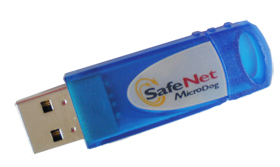
The game itself is located on the hard drive. Includes SafeNet MicroDog USB dongle .
Where to start? Naturally, with the removal of the hard drive dump. This is done in Linux with one command:
And we go to drink tea, because it will take 10-15 minutes. Winchesters are used on 160 and 250 gigabytes.
Never do anything on a running hard drive! You always need to use an image!
The image is taken. Let's run cfdisk on it.
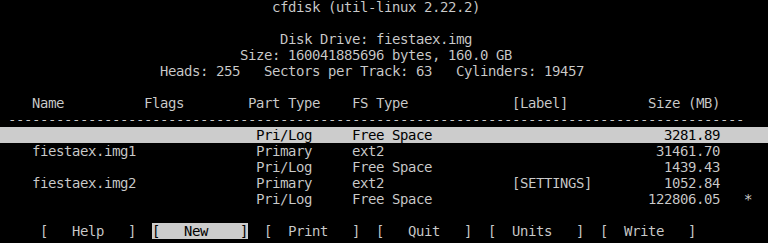
What do we see? Two partitions with the ext2 file system, and suspiciously a lot of unallocated space at the beginning of the disk. The file system can immediately lead to the idea that there is something UNIX-like inside, with high probability it is, of course, Linux.
Let's run it in a virtual machine. I love qemu , so I use it.
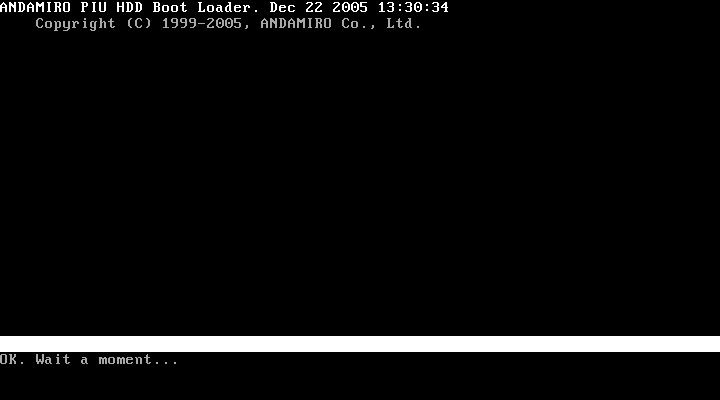
And nothing more. Then either qemu fails with an error like:
either just freezes. Honestly, I knew that this game has a binding to a hard drive, and it became obvious that the algorithm is quite simple and does not use data integrity checking, but immediately transfers control to the decrypted data, and in the case of a virtual machine, just to garbage.
Further, I, rather for the sake of interest, rather than waiting for some discoveries, decided to see what lies on those two sections with the ext2 file system. And here is what:
Well, all the data in section 1, except for the “x” file, is ordinary data, or it is encrypted. Only one “x” somehow stands out from this mass - it is a shared library, which is probably loaded by the game (in fact, not).
What next? Well, they climbed into the hard drive itself.
(Instead of “X” there was the name of the manufacturer and the name of the game. I removed them so that this topic would not be googled by these data. If you want, to find out what was there, I did not change the HEX data.)
What is this? I explain.
At 0-1BE, the MBR bootloader is located, the simplest one that loads the stage2 bootloader from the first disk that finds it, starting at 400. The most interesting line is located at 300-32F, very similar to the serial number of the hard drive, firmware version and model. But what is there to guess, it is;)
I went the easy way: I did not disassemble the algorithm of the stage2-bootloader, but just added a little code to qemu so that it took the hard drive data from the environment variables DRIVE_MODEL, DRIVE_SERIAL and DRIVE_VERSION. Also, qemu allows you to dump the memory of the guest machine, which will be useful to us.
It was possible to determine the correctness of data decryption purely visually: if the kernel was successfully unpacked and started, then the cursor will appear on the screen at the moment, if the file system was unpacked correctly, the virtual machine’s screen will blink, and the X will try to start.
As a Linuxoid, I immediately tried to switch to another console using the Alt + FN combinations, and I succeeded: on the second console, there was an X output.
The image in qemu was successfully launched, already good, so what next? We need to somehow get the file system. Surely, initrd or initramfs is loaded with the kernel, in which either all the necessary files are located, or which decrypts and connects rootfs. What to do? Let's go back to our memory dump and go through it with the wonderful BinWalk utility :
Oh, there are so many things!
In fact, all LZMA responses are false because he does not have a magic number, half of the ELFs are also fake. But CramFS with 235 files is very similar to real, and, with high probability, it is used as initrd.
Retrieving the correct CramFS from memory is easy. After CramFS lies on your hard drive in the form of a file, we will try to unpack it. I used cramfs-2.0 from the firmware-mod-kit package .
Well, what did you expect? Thought everything would be so simple?
If we patch the checksum check in cramfsck, we can “successfully” unzip the file system:
That's all, it seems, you think? Text files like /etc/init.d/run seem to be normal. But no executable file and no library are launched. At first I thought that the game uses either a modified kernel or a modified libc. I patched executable files, looked how approximately they differ from hello world, tk. all of them either ended with a segmentation fault , or, even worse, with illegal hardware instruction .
Compiled a reference "hello world", because from the very beginning, with a call to __libc_start_main, it flew somewhere in the wrong direction. Then he sinned on relocks, because some were as if beaten, and I suggested that perhaps the modification was in it, but no, after editing the relocks, the game, although it began to try to start, was not the case. I thought about it for about 3 days. I came to the conclusion that the executable files somehow beat in CramFS, and the text files remain in their original form. And he was right!
Because I had the original CramFS on hand, and remembering that I can get to the OS console in a virtual machine just by pressing Alt + F2, I decided to try replacing the original /etc/init.d/run, replacing the xinit call with / bin / sh . But we need to somehow push the modified CramFS back into the image. Looking for the line “Compressed RamFS” in the image of the hard drive, I was somewhat surprised that it is unencrypted! Only, of course, not just like that, but with the "padding", the entire file on the hard drive is divided into blocks of 32KB of data and 512 bytes of void. Well, that seems to be no problem!
It just so happened that I changed not only /etc/init.d/run, but also /etc/init.d/once, commenting out the mount_tab, mountrd and usbdaemon calls, and somehow didn’t really pay attention to the loop in the call mount_tab.
So, we edited /etc/init.d/run, assembled CramFS, wrote it to the image, and-and-and-and-over! ... nothing. Okay, I collected the FS with the original /etc/init.d/run, and began to look for differences in the files. As it turned out, there were a lot of them, I tried for a long time to understand what was the matter, it turns out that cramfs-2.0 from firmware-mod-kit collects a little differently. Well, I downloaded the usual cramfs-tools from the repositories, collected them, and suddenly I saw that, in addition to the checksum, the last byte of the files is different. The original file has 0x80, and the one I collected, of course, has 0x00. Surprised by this state of affairs, he replaced the last byte in his file, put it in the image of the hard drive and URA! The image started with my modified FS, and I got the console. Copying files didn’t create any complexity, the startup files now really ran on my linux system,
Having a quick look at mount_tab, mountrd and usbdaemon in IDA PRO, at that time I was sure that mount_tab just mounted the file system in the right places (those two partitions on the hard drive, the first in / mnt / game, and the second in / SETTINGS), mountrd scans AGP and PCI buses, decrypts, loads into memory and mounts in / usr / lib one of the files “p”, “i” or “u”, located on the first section, which contains drivers for the video card, and usbdaemon provides work with USB dongle via UNIX sockets.
I’m sitting, examining the launch file of the game, which I pulled out by copying, and my suspicions began to creep in. It’s somehow not like that, there is no mention of the version of the game that I’m exploring, and in general, somehow, something is not right. I realized that this file belongs to a different version of the game, and suggested that, apparently, after checking the USB dongle, he takes and decrypts another file from somewhere. Everything turned out to be much funnier.
Remember that loop when calling mount_tab? At the first start, it really just mounts the file systems, but at the next start it reads from the hard drive a certain amount of data from the offset 0x1F80200 or 0x2080200, depending on the header at the first offset, decrypts this data, and directly replaces the CramFS game launch file with correct. I really liked this move! I was furious, but at the same time, proud of the resourcefulness of the developers.
The article turned out to be somewhat crumpled and consists rather of my thoughts, guesses and observations. I hope it was interesting to read. Part 2 will be purely technical, and possibly will include parsing the game's file system and untying the game from the USB dongle.
Here is the video for you, finally.
Greetings to

Please do not write the name of the game in the comments so that it does not google. Thanks!
Introduction
Ever wonder what is in arcade machines? What OS, what technologies are used to develop games? How are they protected from copying and modification? If yes, then welcome to this topic.
Insides
So what is inside our machine?
- Normal x86 computer with PIUIO and JAMMA board
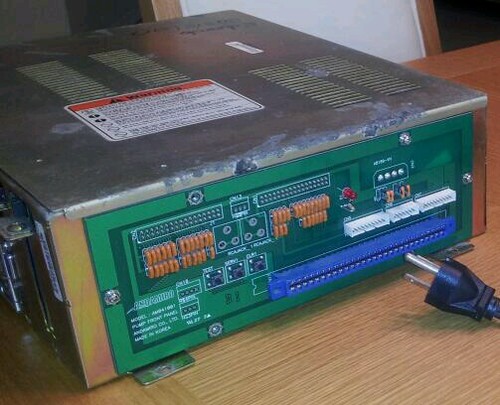
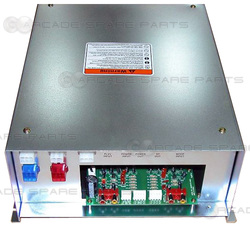
- Amplifier, crossover and equalizer
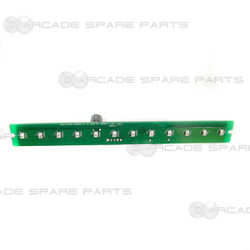
- LED panel
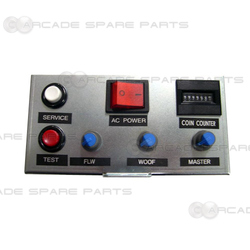
- Control panel with buttons "TEST", "SERVICE" and equalizer knobs
- LCD or CRT screen
We, of course, are primarily interested in the computer.
There are several revisions of the internals of the latest version of the computer:
Motherboard : Gigabyte GA-945GCM-S2L / Asrock G41M-S3
Graphics : Geforce 8400GS / Geforce 9300GS
Memory : DDR2 / DDR3 512 MB
Processor : Intel Celeron
The game itself is located on the hard drive. Includes SafeNet MicroDog USB dongle .
Study
Where to start? Naturally, with the removal of the hard drive dump. This is done in Linux with one command:
dd if=/dev/sdX of=./dump.bin bs=1MAnd we go to drink tea, because it will take 10-15 minutes. Winchesters are used on 160 and 250 gigabytes.
Never do anything on a running hard drive! You always need to use an image!
The image is taken. Let's run cfdisk on it.
What do we see? Two partitions with the ext2 file system, and suspiciously a lot of unallocated space at the beginning of the disk. The file system can immediately lead to the idea that there is something UNIX-like inside, with high probability it is, of course, Linux.
Let's run it in a virtual machine. I love qemu , so I use it.
And nothing more. Then either qemu fails with an error like:
qemu: fatal: Trying to execute code outside RAM or ROM at 0xa5ff00d8either just freezes. Honestly, I knew that this game has a binding to a hard drive, and it became obvious that the algorithm is quite simple and does not use data integrity checking, but immediately transfers control to the decrypted data, and in the case of a virtual machine, just to garbage.
Further, I, rather for the sake of interest, rather than waiting for some discoveries, decided to see what lies on those two sections with the ext2 file system. And here is what:
Раздел 1
├── [4.0K]  game
│   └── [ 25G]  _00000.BIN
├── [4.3M]  i
├── [ 16K]  lost+found
├── [   0]  n
├── [8.5M]  p
├── [7.8M]  u
└── [ 22M]  x
game/_00000.BIN: data
i:               data
n:               empty
p:               data
u:               data
x:               ELF 32-bit LSB  shared object, Intel 80386, version 1 (SYSV), dynamically linked, stripped
Раздел 2:
├── [ 16K]  lost+found
└── [144K]  PIUFESTAEX.INI
Well, all the data in section 1, except for the “x” file, is ordinary data, or it is encrypted. Only one “x” somehow stands out from this mass - it is a shared library, which is probably loaded by the game (in fact, not).
What next? Well, they climbed into the hard drive itself.
00000000  fa 33 c0 8e d0 bc 00 7c  8b f4 50 07 50 1f fb fc  |.3.....|..P.P...|
00000010  bf 00 06 b9 00 01 f3 a5  ea 1d 06 00 00 b6 00 b9  |................|
00000020  02 00 bf 05 00 bb 00 07  b8 01 02 57 cd 13 5f 73  |...........W.._s|
00000030  0c 33 c0 cd 13 4f 75 ed  be 8a 06 eb 3b b9 03 00  |.3...Ou.....;...|
00000040  bf 05 00 bb 00 20 53 07  bb 00 00 b8 20 02 57 cd  |..... S..... .W.|
00000050  13 5f 73 0c 33 c0 cd 13  4f 75 e8 be 8a 06 eb 18  |._s.3...Ou......|
00000060  b9 ff 3f be 00 08 33 ff  ad 83 e6 bf 26 33 05 ab  |..?...3.....&3..|
00000070  49 75 f5 ea 00 00 00 20  ac 3c 00 74 0b 56 bb 07  |Iu..... .<.t.V..|
00000080  00 b4 0e cd 10 5e eb f0  eb fe 44 69 73 6b 20 49  |.....^....Disk I|
00000090  2f 4f 20 45 72 72 6f 72  00 00 00 00 00 00 00 00  |/O Error........|
000000a0  00 00 00 00 00 00 00 00  00 00 00 00 00 00 00 00  |................|
*
00000180  28 43 29 32 30 30 34 20  41 4e 44 41 4d 49 52 4f  |(C)2004 XXXXXXXX|
00000190  00 00 00 00 00 00 00 00  00 00 00 00 00 00 00 00  |................|
*
000001b0  00 00 00 00 00 00 00 00  9b f6 31 c9 00 00 00 00  |..........1.....|
000001c0  41 8f 83 fe ff ff cf ce  61 00 b1 a1 a9 03 00 fe  |A.......a.......|
000001d0  ff ff 83 fe ff ff 6f 56  36 04 80 60 1f 00 00 00  |......oV6..`....|
000001e0  00 00 00 00 00 00 00 00  00 00 00 00 00 00 00 00  |................|
000001f0  00 00 00 00 00 00 00 00  00 00 00 00 00 00 55 aa  |..............U.|
00000200  50 75 6d 70 20 49 74 20  55 70 3a 20 46 69 65 73  |Xxxx Xx Xx: Xxxx|
00000210  74 61 45 78 00 00 00 00  00 00 00 00 00 00 00 00  |xxXx............|
00000220  00 00 00 00 00 00 00 00  00 00 00 00 00 00 00 00  |................|
*
00000300  20 20 20 20 20 20 20 20  20 20 20 20 36 56 4d 51  |            6VMQ|
00000310  57 54 34 37 43 43 34 36  20 20 20 20 53 54 33 31  |WT47CC46    ST31|
00000320  36 30 33 31 38 41 53 20  20 20 20 20 20 20 20 20  |60318AS         |
00000330  20 20 20 20 20 20 20 20  20 20 20 20 20 20 20 20  |                |
00000340  00 00 00 00 00 00 00 00  00 00 00 00 00 00 00 00  |................|
*
00000400  0e a8 36 bd 22 ac ea 0e  a9 36 bb 22 82 66 80 70  |..6."....6.".f.p|
00000410  dc 7a 36 37 c8 5d 18 36  ae fa 83 3a 74 d8 35 29  |.z67.].6...:t.5)|
00000420  11 b9 2d 25 1f c8 7d 10  07 c8 7d 21 81 34 07 ae  |..-%..}...}!.4..|
...
(Instead of “X” there was the name of the manufacturer and the name of the game. I removed them so that this topic would not be googled by these data. If you want, to find out what was there, I did not change the HEX data.)
What is this? I explain.
At 0-1BE, the MBR bootloader is located, the simplest one that loads the stage2 bootloader from the first disk that finds it, starting at 400. The most interesting line is located at 300-32F, very similar to the serial number of the hard drive, firmware version and model. But what is there to guess, it is;)
| Description | Data |
| Serial Number (20 bytes) | (12 spaces) 6VMQWT47 |
| Firmware version (8 bytes) | CC46 (4 spaces) |
| Model Name (40 bytes) | ST3160318AS (29 spaces) |
valdikss@valaptop:~/ % DRIVE_SERIAL="            6VMQWT47" DRIVE_VERSION="CC46    " DRIVE_MODEL="ST3160318AS" qemu-system-i386 disk.img -monitor stdio
QEMU 1.4.1 monitor - type 'help' for more information
(qemu) dump-guest-memory mem.bin
(qemu) quit
It was possible to determine the correctness of data decryption purely visually: if the kernel was successfully unpacked and started, then the cursor will appear on the screen at the moment, if the file system was unpacked correctly, the virtual machine’s screen will blink, and the X will try to start.
As a Linuxoid, I immediately tried to switch to another console using the Alt + FN combinations, and I succeeded: on the second console, there was an X output.
The image in qemu was successfully launched, already good, so what next? We need to somehow get the file system. Surely, initrd or initramfs is loaded with the kernel, in which either all the necessary files are located, or which decrypts and connects rootfs. What to do? Let's go back to our memory dump and go through it with the wonderful BinWalk utility :
DECIMAL         HEX             DESCRIPTION
-------------------------------------------------------------------------------------------------------------------
0               0x0             ELF 32-bit LSB core file Intel 80386, version 1 (SYSV)
141888          0x22A40         Copyright string: " 1999-2003 XXXXXXXXxxx"
1649782         0x192C76        CramFS filesystem, little endian size 279239 CRC 0x42c70000, edition 20, 141723904 blocks, 1589959 files
3848752         0x3ABA30        CramFS filesystem, little endian size 4947968 version #2 sorted_dirs CRC 0x9c99ddde, edition 0, 2433 blocks, 235 files
17648271        0x10D4A8F       mcrypt 2.2 encrypted data, algorithm: blowfish-448, mode: CBC, keymode: 8bit
17752783        0x10EE2CF       mcrypt 2.2 encrypted data, algorithm: blowfish-448, mode: CBC, keymode: 8bit
17773455        0x10F338F       mcrypt 2.2 encrypted data, algorithm: blowfish-448, mode: CBC, keymode: 8bit
17966760        0x11226A8       Copyright string: " (C) 1996-2009 the UPX Team. All Rights Reserved. $l Rights Reserved. $"
18179243        0x11564AB       Copyright string: " (C) 2009 Free Software Foundation, Inc.ion, Inc."
18236316        0x116439C       ELF 32-bit LSB shared object, Intel 80386, version 1 (SYSV)
18261064        0x116A448       LZMA compressed data, properties: 0xBD, dictionary size: 16777216 bytes, uncompressed size: 33554432 bytes
18261104        0x116A470       LZMA compressed data, properties: 0xB8, dictionary size: 16777216 bytes, uncompressed size: 33554432 bytes
21033884        0x140F39C       ELF 32-bit LSB executable, Intel 80386, version 1 (SYSV)
21061669        0x1416025       ELF 32-bit LSB no file type, no machine, (GNU/Linux)
21088103        0x141C767       ELF
21152544        0x142C320       LZMA compressed data, properties: 0x6C, dictionary size: 16777216 bytes, uncompressed size: 838860800 bytes
21435292        0x147139C       ELF 32-bit LSB shared object, Intel 80386, version 1 (SYSV)
21525404        0x148739C       ELF 32-bit LSB shared object, Intel 80386, version 1 (SYSV)
21537692        0x148A39C       ELF 32-bit LSB relocatable, Intel 80386, version 1 (SYSV)
21554076        0x148E39C       ELF 32-bit LSB shared object, Intel 80386, version 1 (SYSV)
21615281        0x149D2B1       Copyright string: " (C) 2006 Free Software Foundation, Inc.ion, Inc."
21672860        0x14AB39C       ELF 32-bit LSB shared object, Intel 80386, version 1 (SYSV)
21926836        0x14E93B4       ELF 32-bit LSB relocatable, Intel 80386, version 1 (SYSV)
110031566       0x68EF2CE       gzip compressed data, was "cursor.pcf", from Unix, last modified: Fri Feb 13 07:15:31 2004
116417852       0x6F0653C       CramFS filesystem, little endian size 4947968 version #2 CRC 0x86f06160, edition 16777216, 18 blocks, 0 files
121710143       0x741263F       LZMA compressed data, properties: 0x87, dictionary size: 1048576 bytes, uncompressed size: 256 bytes
121721756       0x741539C       ELF 32-bit LSB shared object, Intel 80386, version 1 (SYSV)
122005647       0x745A88F       LZMA compressed data, properties: 0x87, dictionary size: 1048576 bytes, uncompressed size: 256 bytes
122594740       0x74EA5B4       LZMA compressed data, properties: 0x7E, dictionary size: 16777216 bytes, uncompressed size: 33554432 bytes
122614684       0x74EF39C       CramFS filesystem, little endian size 4947968 version #2 sorted_dirs CRC 0x9c99ddde, edition 0, 2433 blocks, 235 files
129803164       0x7BCA39C       CramFS filesystem, little endian size 4947968 version #2 sorted_dirs CRC 0x9c99ddde, edition 0, 2433 blocks, 235 files
Oh, there are so many things!
In fact, all LZMA responses are false because he does not have a magic number, half of the ELFs are also fake. But CramFS with 235 files is very similar to real, and, with high probability, it is used as initrd.
Retrieving the correct CramFS from memory is easy. After CramFS lies on your hard drive in the form of a file, we will try to unpack it. I used cramfs-2.0 from the firmware-mod-kit package .
valdikss@valaptop:~/ % cramfsck -x root cram1.bin
cramfsck: crc error
Well, what did you expect? Thought everything would be so simple?
If we patch the checksum check in cramfsck, we can “successfully” unzip the file system:
File system tree
├── [4.0K]  bin
│   ├── [   7]  ash -> busybox
│   ├── [130K]  busybox
│   ├── [   7]  cat -> busybox
│   ├── [   7]  chmod -> busybox
│   ├── [   7]  cp -> busybox
│   ├── [   7]  df -> busybox
│   ├── [   7]  dnsdomainname -> busybox
│   ├── [   7]  echo -> busybox
│   ├── [   7]  false -> busybox
│   ├── [   7]  hostname -> busybox
│   ├── [   7]  kill -> busybox
│   ├── [   7]  ln -> busybox
│   ├── [   7]  ls -> busybox
│   ├── [   7]  mkdir -> busybox
│   ├── [   7]  mknod -> busybox
│   ├── [   7]  mount -> busybox
│   ├── [   7]  mv -> busybox
│   ├── [   7]  netstat -> busybox
│   ├── [   7]  ping -> busybox
│   ├── [   7]  ps -> busybox
│   ├── [   7]  pwd -> busybox
│   ├── [   7]  rm -> busybox
│   ├── [   7]  sh -> busybox
│   ├── [   7]  sleep -> busybox
│   ├── [   7]  sync -> busybox
│   ├── [   7]  true -> busybox
│   ├── [   7]  umount -> busybox
│   ├── [   7]  uname -> busybox
│   └── [   7]  vi -> busybox
├── [4.0K]  dev
│   ├── [   0]  console
│   ├── [   0]  null
│   ├── [   0]  tty1
│   └── [   0]  tty2
├── [4.0K]  etc
│   ├── [4.0K]  init.d
│   │   ├── [  90]  mnttab
│   │   ├── [ 754]  once
│   │   ├── [ 412]  rcS
│   │   └── [ 244]  run
│   ├── [ 151]  inittab
│   └── [4.0K]  X11
│       └── [  23]  xorg.conf -> /usr/lib/xorg/xorg.conf
├── [4.0K]  lib
│   ├── [111K]  ld-2.10.1.so
│   ├── [  12]  ld-linux.so.2 -> ld-2.10.1.so
...
│   ├── [ 78K]  libz.so.1.2.3
│   └── [4.0K]  modules
│       └── [ 25K]  atkbd.ko
├── [4.0K]  mnt
│   ├── [4.0K]  0
│   │   └── [   0]  invalid
│   ├── [4.0K]  1
│   │   └── [   0]  invalid
│   └── [4.0K]  hd
├── [1.1M]  piu
├── [4.0K]  proc
├── [4.0K]  sbin
│   ├── [  14]  halt -> ../bin/busybox
│   ├── [  14]  ifconfig -> ../bin/busybox
│   ├── [  14]  init -> ../bin/busybox
│   ├── [  14]  insmod -> ../bin/busybox
│   ├── [  14]  lsmod -> ../bin/busybox
│   ├── [  14]  mdev -> ../bin/busybox
│   ├── [  14]  poweroff -> ../bin/busybox
│   ├── [  14]  reboot -> ../bin/busybox
│   └── [  14]  route -> ../bin/busybox
├── [4.0K]  SETTINGS
├── [4.0K]  sys
├── [   4]  tmp -> /var
├── [4.0K]  usr
│   ├── [4.0K]  bin
│   │   ├── [ 18K]  amixer
│   │   ├── [  17]  du -> ../../bin/busybox
│   │   ├── [  17]  env -> ../../bin/busybox
│   │   ├── [  17]  free -> ../../bin/busybox
│   │   ├── [  17]  less -> ../../bin/busybox
│   │   ├── [4.4K]  mountrd
│   │   ├── [4.6K]  mount_tab
│   │   ├── [  17]  telnet -> ../../bin/busybox
│   │   ├── [ 25K]  usbdaemon
│   │   ├── [   4]  X -> Xorg
│   │   ├── [ 14K]  xinit
│   │   └── [1.7M]  Xorg
│   ├── [4.0K]  lib
│   ├── [4.0K]  sbin
│   │   └── [  17]  setlogcons -> ../../bin/busybox
│   ├── [4.0K]  share
│   │   ├── [4.0K]  alsa
│   │   │   ├── [8.8K]  alsa.conf
│   │   │   ├── [4.0K]  cards
│   │   │   │   ├── [ 669]  AACI.conf
│   │   │   │   ├── [ 687]  aliases.alisp
│...
│   │   │   │   ├── [ 839]  VXPocket.conf
│   │   │   │   └── [1.3K]  YMF744.conf
│   │   │   ├── [4.0K]  init
│   │   │   │   ├── [1.8K]  00main
│   │   │   │   ├── [6.9K]  default
│   │   │   │   ├── [1.4K]  hda
│   │   │   │   ├── [ 391]  help
│   │   │   │   ├── [ 932]  info
│   │   │   │   └── [ 11K]  test
│   │   │   └── [4.0K]  pcm
│   │   │       ├── [ 805]  center_lfe.conf
...
│   │   │       └── [ 978]  surround71.conf
│   │   └── [4.0K]  X11
│   │       └── [4.0K]  xkb
│   │           ├── [4.0K]  compiled
│   │           │   └── [ 11K]  server.xkm
│   │           └── [4.0K]  rules
│   │               ├── [ 34K]  base
│   │               ├── [ 31K]  evdev
│   │               └── [   4]  xorg -> base
│   └── [   4]  var -> /var
└── [4.0K]  var
That's all, it seems, you think? Text files like /etc/init.d/run seem to be normal. But no executable file and no library are launched. At first I thought that the game uses either a modified kernel or a modified libc. I patched executable files, looked how approximately they differ from hello world, tk. all of them either ended with a segmentation fault , or, even worse, with illegal hardware instruction .
Compiled a reference "hello world", because from the very beginning, with a call to __libc_start_main, it flew somewhere in the wrong direction. Then he sinned on relocks, because some were as if beaten, and I suggested that perhaps the modification was in it, but no, after editing the relocks, the game, although it began to try to start, was not the case. I thought about it for about 3 days. I came to the conclusion that the executable files somehow beat in CramFS, and the text files remain in their original form. And he was right!
/etc/init.d/run
echo run
export __GL_SYNC_TO_VBLANK=1
export force_s3tc_enable=true
export LD_LIBRARY_PATH=/lib:/usr/lib:/mnt/hd/lib
cd /mnt/hd/game
xinit /piu /mnt/hd/game/ -- -br -quiet -logverbose 0 -verbose 0 -depth 24 -audit 0 -bs -tst -xinerama
#/bin/sh
/etc/init.d/once
until /usr/bin/mount_tab /etc/init.d/mnttab; do sleep 1; done
/usr/bin/mountrd
insmod /usr/lib/modules/nvidia.ko
insmod /usr/lib/modules/drm.ko
insmod /usr/lib/modules/fb.ko
insmod /usr/lib/modules/font.ko
insmod /usr/lib/modules/softcursor.ko
insmod /usr/lib/modules/bitblit.ko
insmod /usr/lib/modules/fbcon.ko
insmod /usr/lib/modules/drm_kms_helper.ko
insmod /usr/lib/modules/cfbcopyarea.ko
insmod /usr/lib/modules/cfbimgblt.ko
insmod /usr/lib/modules/cfbfillrect.ko
insmod /usr/lib/modules/i915.ko
mkdir /dev/dri
ln -s /dev/card0 /dev/dri/card0
/usr/bin/usbdaemon
amixer set Master 80% unmute
amixer set PCM 75% unmute
amixer set Front 90% unmute
insmod /lib/modules/atkbd.ko
/etc/init.d/run
setlogcons 2
mount -n -t tmpfs -o size=128k var /var
mkdir /var/log
mkdir /var/run
mkdir /var/run/microdog
mount -t sysfs sysfs /sys
mount -t proc proc /proc
mount -t usbfs none /proc/bus/usb
mount -t tmpfs mdev /dev
mkdir /dev/pts
mount -t devpts devpts /dev/pts
echo /sbin/mdev > /proc/sys/kernel/hotplug
mdev -s
mkdir /dev/snd
cp -a /dev/controlC* /dev/snd
cp -a /dev/pcmC* /dev/snd
cp -a /dev/timer /dev/snd
Because I had the original CramFS on hand, and remembering that I can get to the OS console in a virtual machine just by pressing Alt + F2, I decided to try replacing the original /etc/init.d/run, replacing the xinit call with / bin / sh . But we need to somehow push the modified CramFS back into the image. Looking for the line “Compressed RamFS” in the image of the hard drive, I was somewhat surprised that it is unencrypted! Only, of course, not just like that, but with the "padding", the entire file on the hard drive is divided into blocks of 32KB of data and 512 bytes of void. Well, that seems to be no problem!
It just so happened that I changed not only /etc/init.d/run, but also /etc/init.d/once, commenting out the mount_tab, mountrd and usbdaemon calls, and somehow didn’t really pay attention to the loop in the call mount_tab.
So, we edited /etc/init.d/run, assembled CramFS, wrote it to the image, and-and-and-and-over! ... nothing. Okay, I collected the FS with the original /etc/init.d/run, and began to look for differences in the files. As it turned out, there were a lot of them, I tried for a long time to understand what was the matter, it turns out that cramfs-2.0 from firmware-mod-kit collects a little differently. Well, I downloaded the usual cramfs-tools from the repositories, collected them, and suddenly I saw that, in addition to the checksum, the last byte of the files is different. The original file has 0x80, and the one I collected, of course, has 0x00. Surprised by this state of affairs, he replaced the last byte in his file, put it in the image of the hard drive and URA! The image started with my modified FS, and I got the console. Copying files didn’t create any complexity, the startup files now really ran on my linux system,
Having a quick look at mount_tab, mountrd and usbdaemon in IDA PRO, at that time I was sure that mount_tab just mounted the file system in the right places (those two partitions on the hard drive, the first in / mnt / game, and the second in / SETTINGS), mountrd scans AGP and PCI buses, decrypts, loads into memory and mounts in / usr / lib one of the files “p”, “i” or “u”, located on the first section, which contains drivers for the video card, and usbdaemon provides work with USB dongle via UNIX sockets.
False joy
I’m sitting, examining the launch file of the game, which I pulled out by copying, and my suspicions began to creep in. It’s somehow not like that, there is no mention of the version of the game that I’m exploring, and in general, somehow, something is not right. I realized that this file belongs to a different version of the game, and suggested that, apparently, after checking the USB dongle, he takes and decrypts another file from somewhere. Everything turned out to be much funnier.
Remember that loop when calling mount_tab? At the first start, it really just mounts the file systems, but at the next start it reads from the hard drive a certain amount of data from the offset 0x1F80200 or 0x2080200, depending on the header at the first offset, decrypts this data, and directly replaces the CramFS game launch file with correct. I really liked this move! I was furious, but at the same time, proud of the resourcefulness of the developers.
Conclusion
The article turned out to be somewhat crumpled and consists rather of my thoughts, guesses and observations. I hope it was interesting to read. Part 2 will be purely technical, and possibly will include parsing the game's file system and untying the game from the USB dongle.
Here is the video for you, finally.
Greetings to
Please do not write the name of the game in the comments so that it does not google. Thanks!