April 18, 2013 at 14:07
Like I did Quake in the browser
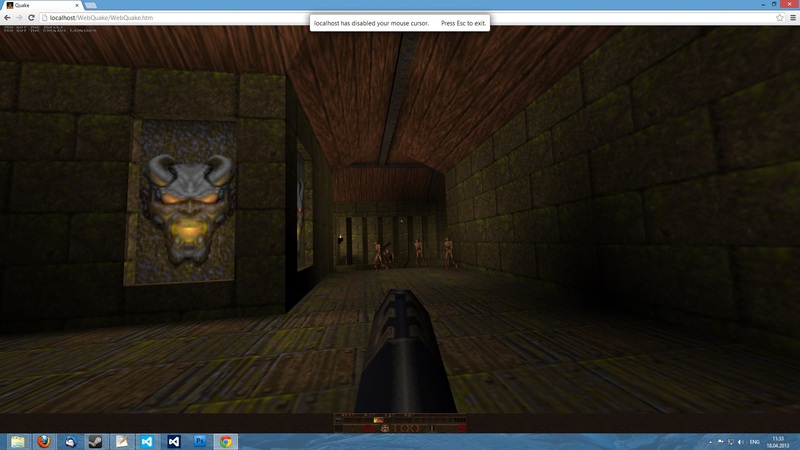
2 months ago, I posted on GitHub the first beta build of WebQuake , the port of the first Quake running in a browser via WebGL.
In this post I would like to tell you about the details of the development and implementation of the engine: how the graphics are made, how the sound works, and so on.
How it all started
I started developing WebQuake in its current form in September 2012. But the idea came to me long before that.
The first time I decided to do something similar in the summer of 2011, when I was not thinking anything in JavaScript. Then I made the port “by eye”, without looking at the Quake code, and made only a small piece of the game menu. In that version, I worked with binary data through strings (and in the floating point parser I used Math.pow in general and stored bits in a string of characters 0 and 1). It is very good that a misunderstanding of the nature of working with buffers and shaders in WebGL saved the world from such a stream of vomit.
Then, for the sake of direct access to files, I wanted to make WebQuake a desktop application. He began to choose between HTA and XUL. But not one of them supports WebGL. Therefore, I also refused this idea.
I ended up switching to pure HTML5.
Development
6 months have passed from the beginning to the first beta. If my memory serves me right, it took Google 2 months to create GWT Quake 2 , but Google did the three of them and they had a base in the form of Jake2, and I copied all the code manually.
Manual rewriting was chosen due to the fact that it’s easier for me to customize the code to the general principle of the entire engine, to make the engine independent of the size of the browser window, and some areas (like graphics) in the browser do not work at all like in the original Quake.
But this approach also has disadvantages. Sometimes I got typos, and because of the wrong operator I got it twice (the first time I was sliding along the walls at a frantic speed because of && instead of ||, and the second there were terrible twitches in a network game because of! == instead of ===) , I had to spend 3 weeks digging up the entire system.
Because of typos, the beta releases turned out to be extremely buggy, and it was clear that I released this too early. In general, I originally planned to release it in March-April, but since it was more or less possible to play back then, I decided to lay out the port in February.
Subsystems
Now let's move on to the details of the engine itself.
Graphics
Graphics rendering is, of course, implemented through WebGL.
But WebQuake cannot be called a GLQuake port. Almost the entire graphics subsystem has been rewritten from scratch.
The main difference between WebQuake and GLQuake is the use of shaders and buffers instead of a fixed set of OpenGL functions. In WebQuake, shaders are used everywhere, for each type of object: BSP model, polygonal model, player, sprite, particle, sky - your own shader is written.
Through shaders, effects were returned that were present in DOS Quake / WinQuake, but removed from GLQuake due to limitations of older versions of OpenGL, for example, textures with illuminated areas and bright light.
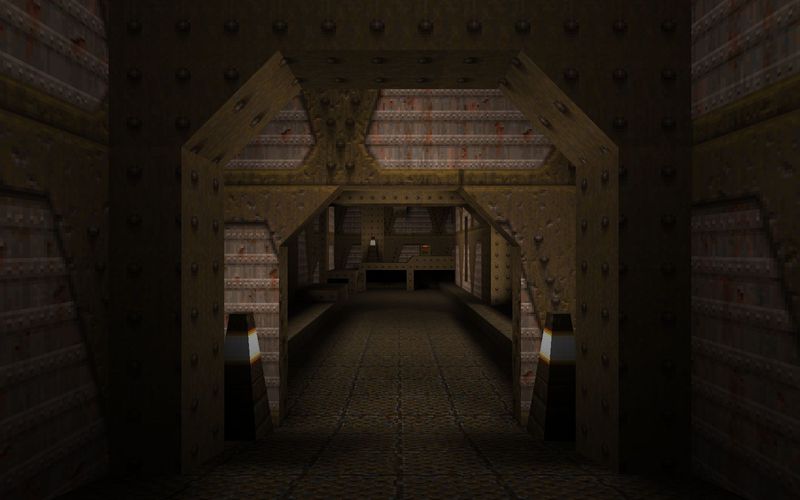
Start of E1M1 in GLQuake. The lights are off.

The same place in WebQuake.
Some features of the Quake engine allowed me to improve graphics performance. For example, since the polygon can be lit at the same time by only 4 dynamic light sources, and the lighting maps are black and white, it was possible to vectorize the world rendering through color channels of one texture. The world’s pixel shader in the port looks like this:
precision mediump float;
uniform float uGamma;
uniform sampler2D tTexture;
uniform sampler2D tLightmap;
uniform sampler2D tDlight;
uniform sampler2D tLightStyle;
varying vec4 vTexCoord;
varying vec4 vLightStyle;
void main(void)
{
	vec4 texture = texture2D(tTexture, vTexCoord.xy);
	gl_FragColor = vec4(texture.rgb *
		mix(1.0, dot(texture2D(tLightmap, vTexCoord.zw), vec4(
			texture2D(tLightStyle, vec2(vLightStyle.x, 0.0)).a,
			texture2D(tLightStyle, vec2(vLightStyle.y, 0.0)).a,
			texture2D(tLightStyle, vec2(vLightStyle.z, 0.0)).a,
			texture2D(tLightStyle, vec2(vLightStyle.w, 0.0)).a)
		* 43.828125) + texture2D(tDlight, vTexCoord.zw).a, texture.a), 1.0);
	gl_FragColor.r = pow(gl_FragColor.r, uGamma);
	gl_FragColor.g = pow(gl_FragColor.g, uGamma);
	gl_FragColor.b = pow(gl_FragColor.b, uGamma);
}
As you can see, dot is used here for a slightly unusual task for him - multiplying 4 lightmaps by their current brightness for a given light source, which is in the 64x1 texture as values from 0 to 25 or from 0.0 to 0.0980392.
The sky, terribly broken in GLQuake, here is made in the form of a flattened sphere drawn around the entire level through hacks with depth testing, unlike GLQuake, which splits polygons with the sky texture into many small ones and distorts them in strange ways, leading to bad effects and waves when moving.
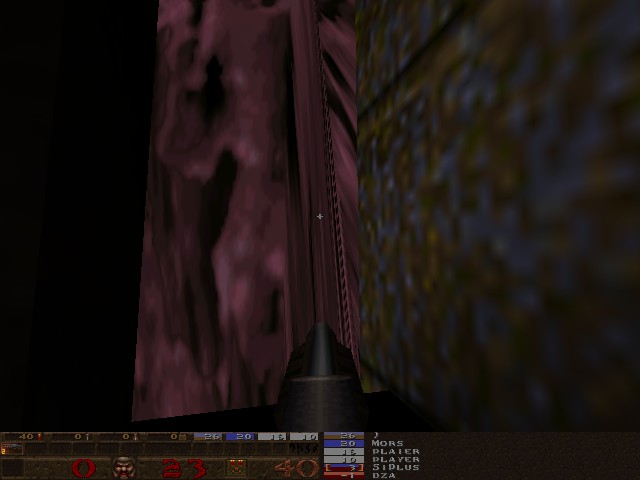
Sky in GLQuake.
Two-dimensional images are also drawn through WebGL (via quad with a length of 1, multiplied in the vertex shader). It was originally planned to use 2D Canvas for this, but at high resolution FPS dropped to 15.
Also, unlike the original Quake (and GWT Quake 2), WebQuake does not depend on the size of the browser window. For this, the so-called Hor + vert + FOV is also used, which I wrote about earlier on Habrahabr.
Sound
Sound is implemented in two ways at once.
By default, the Web Audio API is used, which supports stereo sound and smooth sound repetition.
If the browser does not support the Web Audio API, HTML5 Audio is turned on, but the sound in this case is single-channel and repeats with some delay.
In early beta releases, only HTML5 Audio was used, but because of this, Chrome crashed first on Android, Linux and Mac, and then on Windows, so Web Audio support was added.
Music is also present, but it is not played from disk, but from OGG files on the server via HTML5.
Online game
Since the browser cannot be a WebSocket server, it was not possible to make a listen server.
A dedicated server runs through Node.js and uses most of WebQuake's code.
The dedicated server supports both WebSockets and UDP, so WebQuake servers can be played through a regular Quake client (not QuakeWorld). Perhaps in the future I will write a proxy to connect to existing Quake regular servers.
Information about the server can be requested both by HTTP requests to the same address and port on which the server is running (data is returned in JSON format), or by existing methods via UDP.
Control
Mouse support currently only works in Chrome. Despite the fact that Firefox also has a pointer lock, it requires a full-screen mode for the canvas itself, which creates some inconvenience for the player and the developer.
File system
Access to files is done through synchronous XMLHttpRequest.
Yes, synchronous XHR may be “not fashionable,” but it is implemented much easier without leading to a callback hell, and perhaps even more pleasant for the user than to see temporary textures like those used in GWT Quake 2.
During loading, (at least in Firefox), the “loading” picture appears in the middle of the screen, so the player understands that the download is in progress.
Saves, settings, and demos are recorded in Local Storage. Saves located in Local Storage can be deleted with the Delete button in the boot / save menu.
Unlike GWT Quake 2, WebQuake does not require file conversion and can download files directly from .pak's (via HTTP 1.1 Range), which means that there is full mod support.
Performance
I tested WebQuake on different devices and browsers.
What was somewhat surprising was that acceptable performance (I don’t know how many FPS, but not less than 30) could be achieved even on the phone (LG Optimus L9) through the beta version of Chrome, even though the walls are black (I don’t know the exact reason this, besides dynamic lighting works).
On my previous computer, WebQuake worked at maximum 60 FPS, unlike 5-10 FPS in GWT Quake 2. During development, I implicitly took into account GWT Quake 2 errors , for example, I used ArrayBuffer / Typed Arrays / DataView where I could, and maybe this helped to achieve high speed.
What huge brakes were on was on an old computer with an NVIDIA GeForce 5200 and on a Samsung N130 netbook. On the ASUS Transformer Pad, the TF300T runs pretty smoothly.