 March 27, 2013 at 23:03
FightCode: Tank Wars in JavaScript
- Tutorial
FightCode is an online game for programmers, built in the image of the classic Robocode . JavaScript is used to program tanks, all battles take place directly in the browser, and the code editor on the site has a built-in “sandbox”, which allows you to see in real time the effect of code changes. Unlike many other similar games, the creators did a good job on the design - the playing field and the whole site as a whole look attractive and bright.
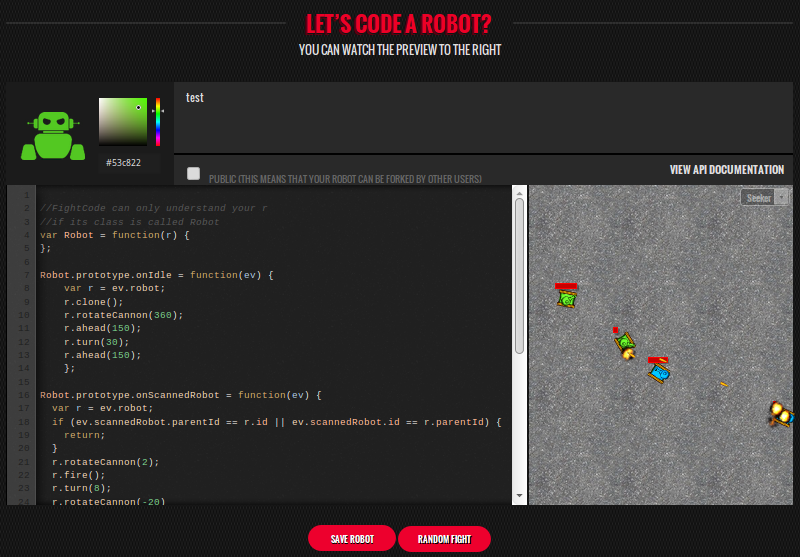
All this makes FightCode one of the best options for beginners in similar games or for learning programming. The project is quite young, and despite the fact that almost 9,000 players are registered on the site, it’s possible to break into the first hundred ratings without much effort. A system of battles with random opponents is very conveniently organized - from all available robots those whose rating is close to yours are automatically selected. Points are counted according to the Elo system - a victory over a stronger opponent gives much more points than over a weak one.
Each participant can have any number of robots. Creating a new robot begins with a primitive template that does not do almost any meaningful action. Adding handlers of key events, such as collisions or hits of an enemy shell, you can give the robot a set of “unconditioned reflexes” that will make its behavior more appropriate and serve as a starting point for further development.
First, a few words about the game world and the rules of the game. Robots are fighting on a flat rectangular field. The game world is two-dimensional, so there are no flights or short missions here. Tanks play one on one, but each player can create a “clone” of his tank, which has less health and dies if his parent is killed.
Tanks can move forward and backward, turn around, rotate the turret and shoot. There is no separate radar, as in Robocode. The main game loop is set in the event handler "
The default robot code looks like this:
First of all, we will teach our robot not to lose the target after the first shot. The robot’s rate of fire is limited, so it manages to rotate the tower between shots a few degrees and lose sight of the target. Therefore, make him twist the tower a little left and right. At the same time, this will not miss the moving target:
Now our robot is able to keep the target. Before moving on, let's connect some magic. The robot has two magic tricks in stock: it can create its own clone and for a while become invisible to the enemy. We will create a clone right away - excess firepower and a distracting target for the enemy are useful from the very beginning of the game:
The next step is to teach the robot not to shoot at his own. By default, he shoots at everything that catches his eye, including his own clone or parent. To wean him from this, you need to check who is in front of us before shooting. This is done using the properties
Now let's make our robot a little more mobile and teach him to shoot in motion. The easiest way is to move in a circle during shooting. Entry-level robots do not know how to fire ahead of schedule, so when turning circles, we will miss most of the enemy shells by ourselves, regardless of which side they are shooting at us with. To do this, after each shot, slightly turn the robot body and drive forward a little:
And one more nuance - the event
Instead of driving back and forth in the same place, we’ll make the tank move actively around the field. This will help to avoid situations when we are in one corner, the enemy in another, shells fly through the entire field and almost never hit. We will move forward all the time, and not by 100, but by 150 units. In addition, we will slightly change the course to be less predictable:
The final touches - in order not to get stuck, having stumbled upon a wall or another tank, we will write collision event handlers. In order not to shoot down the sight, if we encountered during the shooting, and not lose time on the turn, we will just drive back a little. As a rule, this is enough, because the robot spins most of the time and will not rest several times in the same place, and if it does, this is a pretty good maneuver of evading enemy shells:
Our entry-level robot is ready! He is still very stupid, but there are only about 40 lines of code in it. At the same time, he behaves on the battlefield quite aggressively and agilely, never gets stuck and does not go in cycles, and quite confidently defeats all test robots from the sandbox. In a real battle, if he is lucky, he can beat an opponent with a rating of 1700. All values of angles and distances in the code are selected empirically.
All this makes FightCode one of the best options for beginners in similar games or for learning programming. The project is quite young, and despite the fact that almost 9,000 players are registered on the site, it’s possible to break into the first hundred ratings without much effort. A system of battles with random opponents is very conveniently organized - from all available robots those whose rating is close to yours are automatically selected. Points are counted according to the Elo system - a victory over a stronger opponent gives much more points than over a weak one.
Each participant can have any number of robots. Creating a new robot begins with a primitive template that does not do almost any meaningful action. Adding handlers of key events, such as collisions or hits of an enemy shell, you can give the robot a set of “unconditioned reflexes” that will make its behavior more appropriate and serve as a starting point for further development.
First, a few words about the game world and the rules of the game. Robots are fighting on a flat rectangular field. The game world is two-dimensional, so there are no flights or short missions here. Tanks play one on one, but each player can create a “clone” of his tank, which has less health and dies if his parent is killed.
Tanks can move forward and backward, turn around, rotate the turret and shoot. There is no separate radar, as in Robocode. The main game loop is set in the event handler "
onIdle". When a tank enters the field of view of the tower, the event " onScannedRobot" occurs , in a collision with a wall - " onWallCollision", and so on (a full description of the API is on the site). The default robot code looks like this:
var Robot = function(robot) {
};
Robot.prototype.onIdle = function(ev) {
    var robot = ev.robot;       // получаем текущий экземпляр робота
    robot.ahead(100);           // проходим сто единиц вперёд
    robot.rotateCannon(360);    // осматриваемся
    robot.back(100);            // проходим сто единиц назад
    robot.rotateCannon(360);    // снова осматриваемся
};
// Стреляем во всё, что шевелится
Robot.prototype.onScannedRobot = function(ev) {
    var robot = ev.robot;
    robot.fire();
};
First of all, we will teach our robot not to lose the target after the first shot. The robot’s rate of fire is limited, so it manages to rotate the tower between shots a few degrees and lose sight of the target. Therefore, make him twist the tower a little left and right. At the same time, this will not miss the moving target:
Robot.prototype.onScannedRobot = function(ev) {
    var r = ev.robot;     // сокращаем robot до r, так как это имя нам придётся набирать буквально в каждой строке
    r.fire();
    r.rotateCannon(10);   // 10 градусов вправо
    r.rotateCannon(-20);  // 20 влево
};
Now our robot is able to keep the target. Before moving on, let's connect some magic. The robot has two magic tricks in stock: it can create its own clone and for a while become invisible to the enemy. We will create a clone right away - excess firepower and a distracting target for the enemy are useful from the very beginning of the game:
Robot.prototype.onIdle = function(ev) {
    var r = ev.robot;
    r.clone();       // этот метод создаёт клона
    r.rotateCannon(360);
...
// как только нас засекли - включаем маскировку
Robot.prototype.onHitByBullet = function(ev) {
    var r = ev.robot;
    r.disappear();
...
The next step is to teach the robot not to shoot at his own. By default, he shoots at everything that catches his eye, including his own clone or parent. To wean him from this, you need to check who is in front of us before shooting. This is done using the properties
idand parentId:Robot.prototype.onScannedRobot = function(ev) {
var r = ev.robot;
// Если мы видим собственный клон или своего родителя, то выходим, ничего не делая
if (ev.scannedRobot.parentId == r.id || ev.scannedRobot.id == r.parentId) {
return;
}
r.fire();
...
Now let's make our robot a little more mobile and teach him to shoot in motion. The easiest way is to move in a circle during shooting. Entry-level robots do not know how to fire ahead of schedule, so when turning circles, we will miss most of the enemy shells by ourselves, regardless of which side they are shooting at us with. To do this, after each shot, slightly turn the robot body and drive forward a little:
Robot.prototype.onScannedRobot = function(ev) {
  var r = ev.robot;
  if (ev.scannedRobot.parentId == r.id || ev.scannedRobot.id == r.parentId) {
    return;
  };
  r.fire();
  r.turn(10);               // вместо башни теперь поворачиваем весь танк
  r.rotateCannon(-20);
  r.ahead(15);              // проезжаем чуть-чуть вперёд
};
And one more nuance - the event
onScannedRobotoccurs as soon as the "radar beam" intersects with the edge of the enemy tank. Since most of the time we turn the tower to the right, the shells fly to the left edge of the target and often fly by. To beat more precisely, before the shot we will turn the tower a couple of degrees to the right:Robot.prototype.onScannedRobot = function(ev) {
var r = ev.robot;
if (ev.scannedRobot.parentId == r.id || ev.scannedRobot.id == r.parentId) {
return;
}
r.rotateCannon(2); // пара градусов вправо
r.fire();
r.turn(8); // 10 минус 2 градуса вправо
r.rotateCannon(-20)
r.ahead(15);
};
Instead of driving back and forth in the same place, we’ll make the tank move actively around the field. This will help to avoid situations when we are in one corner, the enemy in another, shells fly through the entire field and almost never hit. We will move forward all the time, and not by 100, but by 150 units. In addition, we will slightly change the course to be less predictable:
Robot.prototype.onIdle = function(ev) {
    var r = ev.robot;
    r.clone();
    r.rotateCannon(360);
    r.ahead(150);
    r.turn(30);
    r.ahead(150);
};
The final touches - in order not to get stuck, having stumbled upon a wall or another tank, we will write collision event handlers. In order not to shoot down the sight, if we encountered during the shooting, and not lose time on the turn, we will just drive back a little. As a rule, this is enough, because the robot spins most of the time and will not rest several times in the same place, and if it does, this is a pretty good maneuver of evading enemy shells:
Robot.prototype.onWallCollision = function(ev) {
    var r = ev.robot;
    r.back(50);
};
Robot.prototype.onRobotCollision = function(ev) {
    var r = ev.robot;
    r.back(30);
};
Our entry-level robot is ready! He is still very stupid, but there are only about 40 lines of code in it. At the same time, he behaves on the battlefield quite aggressively and agilely, never gets stuck and does not go in cycles, and quite confidently defeats all test robots from the sandbox. In a real battle, if he is lucky, he can beat an opponent with a rating of 1700. All values of angles and distances in the code are selected empirically.
Full code of our robot
//FightCode can only understand your robot
//if its class is called Robot
var Robot = function(r) {
};
Robot.prototype.onIdle = function(ev) {
    var r = ev.robot;
    r.clone();
    r.rotateCannon(360);
    r.ahead(150);
    r.turn(30);
    r.ahead(150);
};
Robot.prototype.onScannedRobot = function(ev) {
    var r = ev.robot;
    if (ev.scannedRobot.parentId == r.id || ev.scannedRobot.id == r.parentId) {
        return;
    };
    r.rotateCannon(2);
    r.fire();
    r.turn(8);
    r.rotateCannon(-20);
    r.ahead(15);
};
Robot.prototype.onHitByBullet = function(ev) {
    var r = ev.robot;
    r.disappear();
};
Robot.prototype.onWallCollision = function(ev) {
    var r = ev.robot;
    r.back(50);
};
Robot.prototype.onRobotCollision = function(ev) {
    var r = ev.robot;
    r.back(30);
};









