February 27, 2013 at 17:14
DMARC: protect your newsletter from fakes
Have you encountered a problem that letters from your service are falsified in order to extort a password or other confidential data? Every day, thousands of spam, phishing, and fraudulent emails that cybercriminals disguise as messages from well-known services try to break through to users.
Such letters cause damage to the recipients, which ultimately affects the reputation of both respectable services themselves and mail providers.
Now we give the services that conduct their mailings, the opportunity to protect themselves from such fakes with the help of DMARC technology (dmarc.org), which we supported first among the major mail services in RuNet.
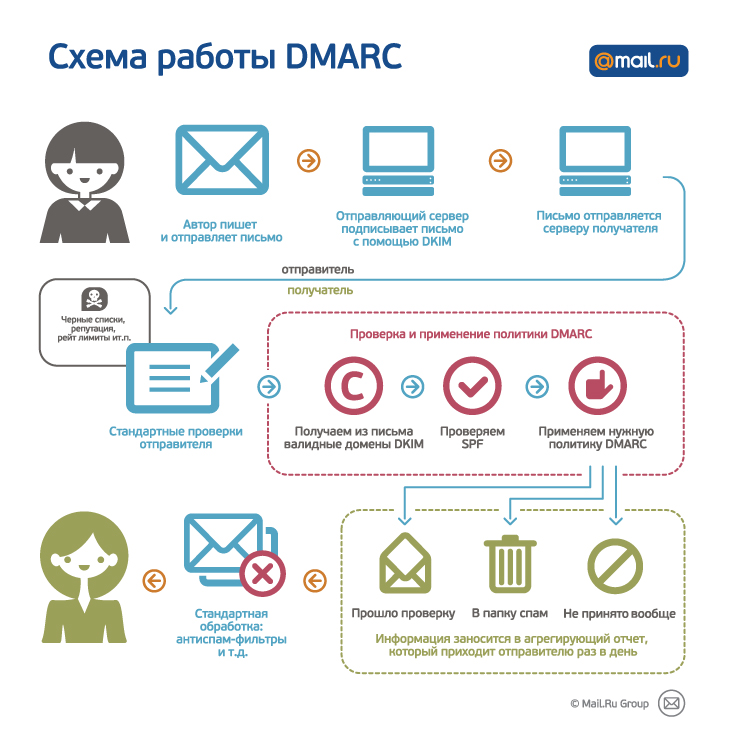
The essence of the technology is simple: you, as the owner of the domain from which the mailing is conducted, can register in your domain’s DNS a policy that determines what to do with letters that are considered fake.
Letters can be skipped, put in the Spam folder or not accepted at all by the mail server.
For this technology to work, you need to configure SPF for your domain and sign each letter with a DKIM signature. In this case, the DKIM domain must match the domain in the From header.
Upon receipt of the letter, our server will check the validity of SPF and DKIM. If the verification of both DKIM and SPF fails, the DMARC policy of your domain will be applied to the letter.
The first thing to do is decide how DMARC will be implemented. We recommend that you do this not immediately, but gradually:
This step-by-step approach will allow you to identify problems with the DKIM signature, if any, in time and fix them before the policy is 100% deployed.
To enable the DMARC policy, you need to place a new TXT record of the form in the DNS records of your site:
In this form, a record means that all fake letters should be skipped, and reports should be sent to the [email protected] mailbox; exampledomain.com needs to be replaced with your domain.
If you want to receive reports on a domain that does not match the DMARC domain, you need to place a TXT record for a special kind of mail domain. Let's say your domain with DMARC is exampledomain.com, and you want to receive reports on the domain test.ru. In this case, add a TXT record of the form:
At the moment, we support sending only aggregated reports. Sending samples that fail verification will be launched later.
Daily aggregated reports come in XML format from [email protected].
Below is an example of a report that 20 emails were sent from one IP address, and all of them passed the test.
There are many ready-made tools that make processing these reports more convenient. You can find them on the DMARC website: http://www.dmarc.org/resources.html .
For more information on setting up DMARC, see the help at http://help.mail.ru/mail-help/postmaster/dmarc . Include and comment - we will be grateful for questions, comments and ideas.
Denis Anikin,
Technical Director of Mail.Ru Mail
Such letters cause damage to the recipients, which ultimately affects the reputation of both respectable services themselves and mail providers.
Now we give the services that conduct their mailings, the opportunity to protect themselves from such fakes with the help of DMARC technology (dmarc.org), which we supported first among the major mail services in RuNet.
How DMARC Works
The essence of the technology is simple: you, as the owner of the domain from which the mailing is conducted, can register in your domain’s DNS a policy that determines what to do with letters that are considered fake.
Letters can be skipped, put in the Spam folder or not accepted at all by the mail server.
For this technology to work, you need to configure SPF for your domain and sign each letter with a DKIM signature. In this case, the DKIM domain must match the domain in the From header.
Upon receipt of the letter, our server will check the validity of SPF and DKIM. If the verification of both DKIM and SPF fails, the DMARC policy of your domain will be applied to the letter.
I already want. What should I do?
The first thing to do is decide how DMARC will be implemented. We recommend that you do this not immediately, but gradually:
- First, enable only receiving reports and skip all letters. This is necessary to ensure that all letters are correctly signed.
- Next, you can enable the application of the policy only for some small percentage of traffic using the pct option
- If there are no problems in the reports, you can enable the policy 100%
This step-by-step approach will allow you to identify problems with the DKIM signature, if any, in time and fix them before the policy is 100% deployed.
To enable the DMARC policy, you need to place a new TXT record of the form in the DNS records of your site:
_dmarc.exampledomain.ru. 3600 IN TXT "v=DMARC1; p=none; rua=mailto:[email protected] " In this form, a record means that all fake letters should be skipped, and reports should be sent to the [email protected] mailbox; exampledomain.com needs to be replaced with your domain.
If you want to receive reports on a domain that does not match the DMARC domain, you need to place a TXT record for a special kind of mail domain. Let's say your domain with DMARC is exampledomain.com, and you want to receive reports on the domain test.ru. In this case, add a TXT record of the form:
exampledomain.ru._report._dmarc.test.ru. 3600 IN TXT "v=DMARC1"At the moment, we support sending only aggregated reports. Sending samples that fail verification will be launched later.
What does the report look like?
Daily aggregated reports come in XML format from [email protected].
Below is an example of a report that 20 emails were sent from one IP address, and all of them passed the test.
1361304000 1361390400 [email protected] http://corp.mail.ru/en Mail.Ru 1361304000874948 r r adan.ru none
100 none adan.ru pass adan.ru pass adan.ru 20 none pass pass 176.9.9.172 |
There are many ready-made tools that make processing these reports more convenient. You can find them on the DMARC website: http://www.dmarc.org/resources.html .
What's next?
For more information on setting up DMARC, see the help at http://help.mail.ru/mail-help/postmaster/dmarc . Include and comment - we will be grateful for questions, comments and ideas.
Denis Anikin,
Technical Director of Mail.Ru Mail