Cross-browser customization of the system scrollbar
The problem of placing continuous content of arbitrary volume on a screen, or window, of fixed size, has existed for several decades. About the same amount there is a better solution to this problem: the GUI element is a scrollbar.
Under the cut, you can find out how the scroll in 2GIS Online will work in the near future.
The system scroll mechanism is implemented at the level of the basic capabilities of the operating system, so we can say with confidence that it is always better than js emulation: it is more productive, works independently of JavaScript and implements all the necessary "features" of the system for different types of devices.
The design of the system scrollbar, especially Windows under version 8, is capable of disfiguring a significant part of Internet sites. The fact that not everyone agrees with this is confirmed by the fact that there are a large number of solutions that programmatically change the system scrollbar to custom .
Now in 2GIS Online (and, accordingly, in the 2GIS API ) we use FleXcroll: it emulates the scroll mechanism and does not suit us for a number of reasons:
- It is not a cross-platform solution (in particular, it works poorly on a Mac)
- Like any emulator in principle, it has performance problems
- It does not have a built-in caption locking mechanism.
All these factors made us think about two issues:
- Is there a ready-made solution for us, or is it necessary to create our own?
- Is it possible, in principle, to maintain the system mechanism of the scroll, but completely replace its design?
We formed the basic requirements for a solution that should change the visual representation of a scrollbar:
- The system mechanism of the scroll must be preserved: only its design is subject to correction.
- The total size of all dependencies should be minimized. In the ideal case, they should not be at all. The size of the solution itself should be minimized.
- There should be a mechanism for fixing content headers when they go beyond the field of view, or a simple interface for adding such a mechanism (see below for more on this item).
Limitations
At the time of writing, more or less flexible customization of the scrollbar using CSS is possible only in browsers using the webkit engine. Scrollbar colors can be changed in Internet Explorer. In other browsers, support for customizing scrollbars via CSS is completely absent. This is partly due to the tough w3c position :
There are just some things that CSS should not do, full stop.
Existing solutions
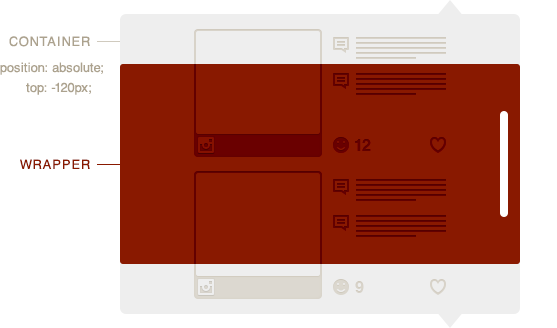
Of that large number of js libraries, more than half replace the native scroll mechanism. This means that for the wrapper, the overflow property is set to hidden, and the nested container with the content we need changes its absolute position when generating events related to the scroll (for example, mousewheel). Such solutions include: jScrollPane , Scrollbar Paper , jQuery Custom Scrollbar plugin , FleXcroll , Tiny Scrollbar and many others.
With this approach, two fundamental shortcomings arise immediately: the lack of cross-browser compatibility and the lack of cross-platform. The fact is that the interface of events generated by user actions, by which the user scrolls something, differs significantly from browser to browser: from the point of view of standards, this is a real mess. Moreover, the sequence and logic of "throwing" events is seriously different between platforms. For example, trackpad on the Mac platform when scrolling generate Wheel events with a higher frequency than a regular mouse wheel, which leads to too fast scrolling in a number of such solutions.
It is these shortcomings of scroll emulation that led us to formulate the first point of the requirements.
Many solutions are initially positioned as plugins for jQuery. In a situation where we use jQuery in parts, there is a problem of saving traffic. The problem grows significantly if the plugin has a dependency on a much more heavyweight jQuery UI. This applies, for example, to ShortScroll and Vertical Scroll. And also from a number of other libraries: for example, one of the few jQuery plugins that retain the native scroll mechanism, Scrollbars, depends on 4 plugins: event.drag, resize, mousehold and mousewheel with a total weight of more than 10 kb.
The third point of the requirements is not satisfied by any of the solutions we found.
Own decision
The solution has two main tasks: 1) hide the system scrollbar and 2) display the custom scrollbar.
For simplicity, we will consider only a vertical scrollbar - in our case, as in most others, we only need it. In addition, it saves the amount of output code. For the case with a horizontal scrollbar, the argument expands by analogy.
To start, let's build an html structure:
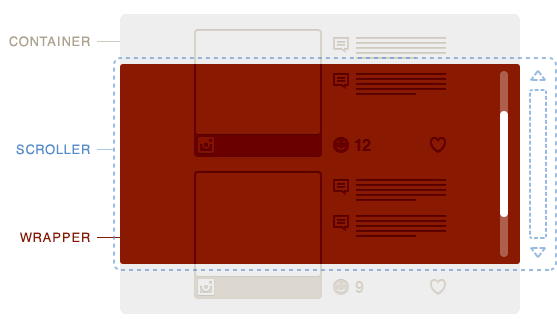
where container is, in fact, what we want to scroll; scroller - a block in which container does not fit in height, but it has the overflow-y: scroll property set, which leads to the appearance of a system scrollbar at its right border; wrapper - a window with a width slightly smaller than that of scroller and the overflow: hidden property. The width is less than exactly the width of the scroller.
Unfortunately, with CSS, it’s not possible to know the exact width of a system scrollbar. For example, the option with setting the width of 125% for scroller and 80% for container does not work, in which, it would seem, the widths of container and wrapper should exactly match. You can make scroller obviously wider, and set wrapper and container to the same width, but this method is not suitable for rubber typesetting and generates a bug in webkit browsers (see below).
We introduce js variables:
var wrapper = document.getElementById('wrapper'),
scroller = document.getElementById('scroller'),
container = document.getElementById('container');
Now we can calculate the width of the system scrollbar: scroller.offsetWidth is the width of the scroller, including border, padding, as well as the system scrollbar. If we zero out the border and padding using CSS and subtract scroller.clientWidth, we get the desired scrollbar width in pixels.
In webkit browsers, there is a feature that makes elements scroll when selecting text in them in the horizontal direction, even with overflow-x: hidden. That is, the scroller begins to move horizontally inside the smaller wrapper, as a result of which the system scrollbar hidden by us is exposed. Fortunately, in webkit browsers, and only in them, we can reset the width of the scrollbar using CSS, after which the widths of all three blocks will exactly coincide and there will simply be no space for horizontal scroll:
.scroller::-webkit-scrollbar {
    width: 0;
}
Now draw and position a custom scrollbar. To do this, we minimize the complexity of the html structure for 1 element, which will be fully responsible for the visual representation of the scrollbar:
It is important to note here that for our task we did not need to draw up and down buttons, as well as the underlying track. However, there are no restrictions for their implementation.
When implementing the drag of the drawn custom scrollbar, the main thing is to prohibit the selection of text inside the scrollable content. To do this, just make such a bind:
function dontStartSelect() {
	return false;
}
function selection(on) {
	if (on) {
		$(document).on('selectstart', dontStartSelect);
	} else {
		$(document).off('selectstart', dontStartSelect);
	}
}
event(bar, 'mousedown', function(e) {
	e.preventDefault();
	selection(false); // Disable text selection in IE8
});
event(document, 'mouseup blur', function() {
	selection(true); // Enable text selection in IE8
});
As you can see, most of the code is needed for the IE8 browser, which, unfortunately, cannot yet be discounted. Please note that the reset of the “pressed” state of the mouse should occur not only when the mouse button is released, but also when the page loses focus (blur).
Sticky headers
Some elements inside the container should always be visible to the user. For example, it may be the headings of sections of an article, when clicked on (this is an additional functionality that goes beyond the solution), the content would be “rewound” to the clicked heading.
Neither absolute (relative to the scroller) nor relative (relative to its initial positions) heading positioning in its pure form is suitable in this case. The first is because of the clogging of the content surrounding the headline and the corresponding jerks when scrolling; the second is due to native fatal transitions in the Internet Explorer browser for scrolling, which lead to a trembling of all recorded headers.
In this regard, the html structure had to be further complicated by wrapping all the headers in wrappers, the task of which is to save space under the headers when they are pulled out of the stream during fixation by absolute positioning. In principle, a similar result can be achieved by selecting negative margins for the headings and sections to which they relate - then you can do without heading wrappers.
For each scroll for each heading, it is necessary to check the condition:
scroller.scrollTop - H[i].offsetTop > Sum(H[j].offsetHeight, j=0..i-1)
scroller.scrollTop - H[i].offsetTop < scroller.clientHeight - Sum(H[j].offsetHeight, j=i..n-1)
where H is an array of header elements; i is the header number, varies in the range from 0 to n-1; scroller.scrollTop - virtual distance from the upper border of the container to the upper border of the visible part of the container; H [i] .offsetTop - distance from the upper border of the container to the upper border of the header H [i].
The fulfillment of both conditions means that the header i is somewhere in the visible region, does not conflict with other headers in position, and its fixation is not required. Violation of the first condition means that the heading is trying to hide from above, and the second - from below. In both cases, fixation is required.
Throwing mousewheel event
In webkit browsers, we encountered an unpleasant bug: the mousewheel event did not forward from the fixed headers up to the scroller. This created the effect of a break (sudden termination) of the scroll when a fixed title falls under the cursor (for example, as a result of the same scroll). That is, the user spins the mouse wheel, the heading falls under the cursor, is fixed, and, suddenly, the scroll stops working (more precisely, the whole page starts to scroll).
Fortunately, in webkit browsers (and we only needed to access them) there is such an opportunity:
$(headers).on('mousewheel', function(e) {
	var evt = document.createEvent('WheelEvent');
	evt.initWebKitWheelEvent(e.originalEvent.wheelDeltaX, e.originalEvent.wheelDeltaY);
	scroller.dispatchEvent(evt); // Пробрасываем событие на scroller
	e.preventDefault(); // Останавливаем скролл страницы
});
Of course, this is an abridged version of the code: it is necessary to check the availability of the corresponding functions and the type of event so as not to generate errors in other browsers.
Example
To minimize the amount of js code and dependencies, an approach was used in which the library is not a jQuery plugin, although it uses it by default.
For example, in the simplest case (without fixing the headers), initialization looks like this:
baron($('.wrapper'), {
	scroller: '.scroller',
	container: '.container',
	bar: '.scroller__bar'
});
And $ ('. Wrapper') can be an array of html objects - each of them is initialized.
If you want to fix the headers, restrict the top position of the scrollbar, and use jQuery alternatives, the initialization is a little complicated:
baron($('.test_advanced'), {
	scroller: '.scroller',
	container: '.container',
	bar: '.scroller__bar',
	barOnCls: '.scroller__bar_state_on', // Класс, навешиваемый скроллбару, когда он должен быть видимым
	barTop: 40, // Ограничитель позиции скроллбара сверху
	header: '.header__title',
	hFixCls: 'header__title_state_fixed', // Класс, навешиваемый зафиксированным заголовкам
	selector: qwery, // Селектор
	event: function(elem, event, func, off) { // Менеджер событий
		if (off) {
			bean.off(elem, event, func);
		} else {
			bean.on(elem, event, func);
		}
	},
	dom: bonzo // Библиотека для работы с DOM
});
I had to make a wrapper for the event manager, since its interface is different in different libraries. In principle, you can wrap native functions like addEventListener and abandon the specialized event manager.
Testing
The testing involved current versions of the Chrome, Firefox, Opera, Safari and Internet Explorer (IE) browsers on the Windows, Mac and iOs platforms (of course, only existing browser versions were tested :)). In addition, IE9 and IE8 were tested. All tests on all browsers pass fine.
The peculiarity of the solution proposed in this article is that even in case of some errors in JavaScript, the scroll will still work, since it is systemic, therefore only browsers of older versions of Android and Opera Mini fall into the risk category, in which the system scroll on elements not implemented, or poorly implemented.
Total
The proposed solution allows you to save the system scroll mechanism, replace its design, completely abandon hard dependencies on other libraries, and fit into 998 bytes of compressed code (minified and compressed gzip). In addition to this, there is a mechanism for fixing any elements of scrollable content (for example, headers).
The disadvantages include the lack of a horizontal scrollbar and controls for vertical control.
The solution code can be downloaded from Github .
Demo .
The implementation of this decision is scheduled for early March.