January 28, 2013 at 19:54
Configuring Multiple Postfix Instances on a Single Server
- Tutorial
I want to share with you one of the options for setting up and using Postfix, when we have several IPs from which you can deliver letters.
The task was approximately like this. It is necessary to configure on the same server with two interfaces, Postfix with different queues for different external IPs. Example in the picture.
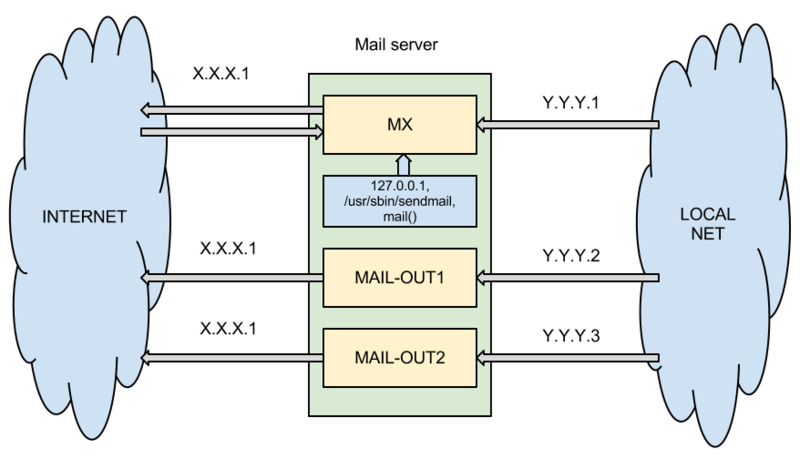
Please welcome, to whom this topic of interest is.
Given:
Task:
Solution:
For convenience, we come up with hostnames for IP, I use the notation for the purpose:
For normal operation, you should take care of DNS, one will receive mail and all postfixes will send mail, for them you should register PTR and SPF records, this is how the direct and reverse RRs for example.com will look like:
Before doing instances, you need to change the settings of the main postfix, how to configure postfix for MX to work, a lot has been written, therefore I will focus on the main points, edit /etc/postfix/main.cf : Leave
only ipv4 and set the necessary ip, message processing
Forcibly send letters from one IP and assign HELO to it
We deliver letters only from our internal network and our IP:
We accept mail for our domain:
The main Postfix is ready. We create our instances. We will need 2 additional instances that will be configured only for sending letters, the standard one will receive local mail, and it will also be MX for the domain example.com.
Customize instances. The configuration files will be in / etc / postfix-mail-out2 and postfix-mail-out3, respectively. Open /etc/postfix-mail-out2/main.cf . We register HELO, external and internal IP:
Since additional instances will only deal with sending mail, it is necessary to prohibit local delivery and register where relay is possible:
To be able to transfer mail from one physical server to another in the local network, you need to add another transport, let's call it lrelay. We do this in master.cf of each instance. Add the line:
It will be possible to transfer from one server to another through transport_maps . We write in each instance:
For example, so that all letters from mail-out1 are forwarded to mail-out2. In / etc / postfix-mail-out1 / transport add the line:
The second instance is configured in the same way, only the IP changes.
After configuration, you need to activate the instances:
And restart postfix:
Restarting, starting and stopping individual instances can be done through postmulti:
Check who is running and who is not:
Now we have 3 separate queues that you can customize as you wish.
For my main postfix and additional instances, dkim and domainkey daemons are launched that sign outgoing emails.
For each instance, you can configure any filters and connect everything you need, spamassin, gerylist, etc.
How and why such a configuration can be used:
Some useful links for setting up Postfix:
PS What is the work of the service without statistics. In this regard, he wrote an extension for Cacti that will collect statistics from each instance for the number of letters in queues through SNMP. I will write this in a separate post.
Ask questions, I will be glad to help.
The task was approximately like this. It is necessary to configure on the same server with two interfaces, Postfix with different queues for different external IPs. Example in the picture.
Please welcome, to whom this topic of interest is.
Given:
- Debian server
- eth0, eth0: 1, eth0: 2 - an external interface with aliases
- xxx1, xxx2, xxx3
- eth1, eth1: 1, eth1: 2 - internal interface with aliases
- yyy1, yyy2, yyy3
- eth0, eth0: 1, eth0: 2 - an external interface with aliases
- Postfix 2.9.x
- Domain - example.com
Task:
- Mapping internal and external IP with individual queues and the ability to customize. Everything that comes to be sent to a specific internal interface must go through a predefined external interface
- localhost (sendmail, mail ()) -> xxx1
- yyy1 -> xxx1
- yyy2 -> xxx2
- yyy3 -> xxx3
- Example.com incoming mail (MX) is accepted per IP
- xxx1
- Mail delivery from domain users + sasl authentication
- xxx1 -> xxx1
Solution:
For convenience, we come up with hostnames for IP, I use the notation for the purpose:
- yyy1 - mx.example.com
- yyy2 - mail-out2.example.com
- yyy3 - mail-out3.example.com
- xxx1 - mx.local
- xxx2 - mail-out2.local
- xxx3 - mail-out3.local
For normal operation, you should take care of DNS, one will receive mail and all postfixes will send mail, for them you should register PTR and SPF records, this is how the direct and reverse RRs for example.com will look like:
	example.com. IN MX 0 mx.example.com.
	mx.example.com. IN A xxx1
	mail-out2.example.com. IN A xxx2
	mail-out3.example.com. IN A xxx3
	example.com. IN TXT "v = spf1 ip4: xxx2 ip4: xxx4 mx -all"
	1.xxx.in-addr.arpa. IN PTR mx.example.com.
	2.xxx.in-addr.arpa. IN PTR mail-out2.example.com.
	3.xxx.in-addr.arpa. IN PTR mail-out3.example.com.
Before doing instances, you need to change the settings of the main postfix, how to configure postfix for MX to work, a lot has been written, therefore I will focus on the main points, edit /etc/postfix/main.cf : Leave
only ipv4 and set the necessary ip, message processing
		inet_interfaces = xxx1, yyy1, 127.0.0.1
		inet_protocols = ipv4
Forcibly send letters from one IP and assign HELO to it
		smtp_bind_address = xxx1
		smtp_helo_name = mx.example.com
		myhostname = mx.example.com
We deliver letters only from our internal network and our IP:
mynetworks = xxx1, xxx2, xxx3, yyy0 / 24
We accept mail for our domain:
mydestination = example.com, * .example.com, localhost
The main Postfix is ready. We create our instances. We will need 2 additional instances that will be configured only for sending letters, the standard one will receive local mail, and it will also be MX for the domain example.com.
		# postmulti -e init
		# postmulti -I postfix-mail-out2 -G out-only -e create
		# postmulti -I postfix-mail-out3 -G out-only -e create
Customize instances. The configuration files will be in / etc / postfix-mail-out2 and postfix-mail-out3, respectively. Open /etc/postfix-mail-out2/main.cf . We register HELO, external and internal IP:
		myhostname = mail-out2.example.com
		smtp_bind_address = xxx2
		smtp_helo_name = mail-out2.example.com
		inet_protocols = ipv4
		inet_interfaces = xxx2, yyy2
Since additional instances will only deal with sending mail, it is necessary to prohibit local delivery and register where relay is possible:
		mydestination =
		alias_maps =
		alias_database =
		local_recipient_maps =
		local_transport = error: 5.1.1 Mailbox unavailable
		mynetworks = / etc / postfix / mynetworks
To be able to transfer mail from one physical server to another in the local network, you need to add another transport, let's call it lrelay. We do this in master.cf of each instance. Add the line:
		lrelay unix - - - - - smtp
					    -o smtp_bind_address = yyy2
It will be possible to transfer from one server to another through transport_maps . We write in each instance:
transport_maps = hash: / etc / postfix-mail-out1 / transport
For example, so that all letters from mail-out1 are forwarded to mail-out2. In / etc / postfix-mail-out1 / transport add the line:
* lrelay: yyy3
The second instance is configured in the same way, only the IP changes.
After configuration, you need to activate the instances:
		# postmulti -i postfix-mail-out2 -e enable
		# postmulti -i postfix-mail-out3 -e enable
And restart postfix:
# /etc/init.d/postfix restart
Restarting, starting and stopping individual instances can be done through postmulti:
		# postmulti -i postfix-mail-out2 -p start / stop
		# postmulti -i postfix-mail-out3 -p start / stop
Check who is running and who is not:
		# postfix status
		postfix / postfix-script: the Postfix mail system is running: PID: 762
		postfix-mail-out2 / postfix-script: the Postfix mail system is running: PID: 114
		postfix-mail-out3 / postfix-script: the Postfix mail system is running: PID: 149
Now we have 3 separate queues that you can customize as you wish.
For my main postfix and additional instances, dkim and domainkey daemons are launched that sign outgoing emails.
For each instance, you can configure any filters and connect everything you need, spamassin, gerylist, etc.
How and why such a configuration can be used:
- bulk mailing, you can have many IPs on one server from which mailing is conducted with individual settings
- high performance
- often large mail services limit the reception of letters by IP, having at their disposal a few can improve the delivery of more letters
- virtual mail secure hosting
- for each domain you can configure your own copy
- complex processing of letters at the server level
- for example, internal correspondence is processed without filters
- external correspondence is processed more strictly, spam, grays and sheets, for example
Some useful links for setting up Postfix:
- OpenDKIM + Postfix = just
- DKIM + Postfix = just
- Antispam with postfix + spamassassin
- Protecting mail server users from spammers are a few steps that will help you send spammers away
PS What is the work of the service without statistics. In this regard, he wrote an extension for Cacti that will collect statistics from each instance for the number of letters in queues through SNMP. I will write this in a separate post.
Ask questions, I will be glad to help.