 November 21, 2012 at 15:35
How to withdraw WebMoney Z using an ePayService card

In the last article, we introduced you to our ePayService MasterCard card program and the service as a whole. Today we want to talk about the wmz withdrawal method that is available to every ePayService client. If you periodically encounter this quest, welcome to cat.
Historically, one of the most popular ways to pay for freelancers in the CIS countries is WebMoney Transfer
Starter inventory
1. Active WebMoney Participant Identifier (WMID).
2. Active account in the ePayService system with a rating of 2 or higher . An account with a rating of 2 or higher can be obtained by completing the verification procedure.
3. Active ePayService MasterCard . The ePayService card is available absolutely free of charge to any ePayService client with an account rating of 2 or higher. Clients with a rating of account 1 can receive a card by completing the verification procedure.
Walkthrough
1. Log in to your account in the settlement system Online.ePayService . Login is performed after authorization by SMS or QR code.
2. Click on the link "Replenishment WebMoney Z".
Screenshot 1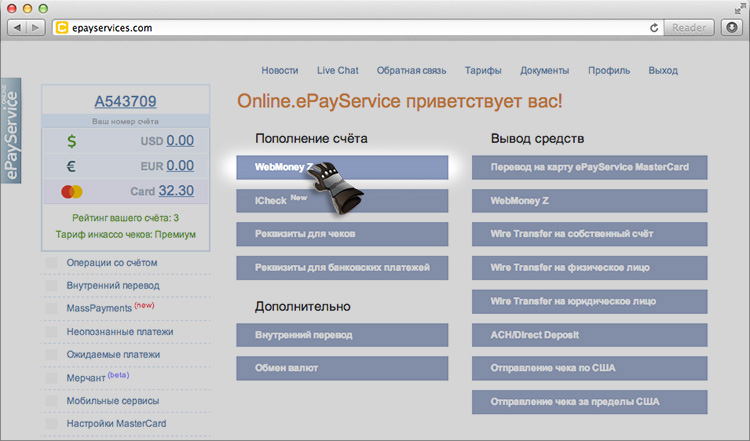
3. Enter the desired amount, after which the system redirects us to WebMoney Merchant.
Screenshot 2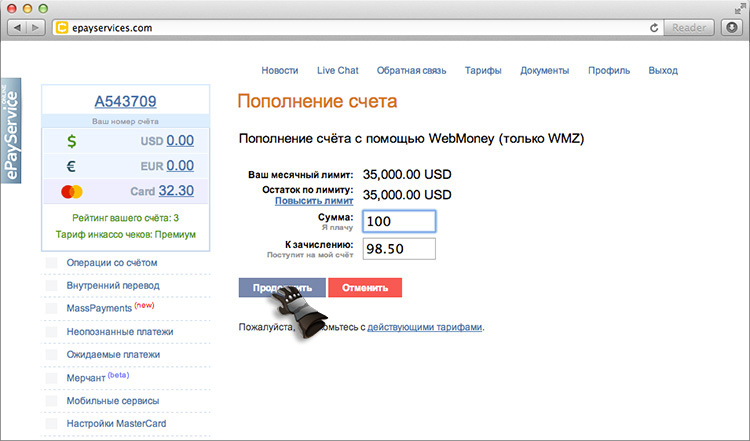
4. We go through the authorization procedure in the WebMoney system, confirm your payment.
5. The hardest part is behind - the ePayService account has been replenished.
Screenshot 3
Further, we have two options: withdraw all funds to the card here and now, returning to the main screen of your account in ePayService. Or replenish your card as needed through the ePayService app for Android and iOs .

I think everyone knows what to do with the card after replenishment, but just in case, I will list the main ways to use it:
1. Pay for purchases and services in stores, restaurants, cash desks, etc. (no commission);
2. Cash out through any ATM working with the MasterCard system (commission 1.5 USD for one withdrawal);
3. Pay for purchases in online stores (no commission).
FAQ
How much do I lose on commissions when replenishing an ePayService card with a transfer from WebMoney?
We do not charge a fee for replenishing an ePayService card, so in this case your losses will be: 1.5% for replenishing an account in ePayService + 0.8% for a transaction in the WebMoney system. Total 2.3% for a safe and quick way to cash out your earnings.
How much money can I withdraw through an ATM per day?
The standard limit for withdrawing funds through an ATM from an ePayService MasterCard allows you to withdraw up to 10,000 USD per day and up to 300,000 USD per month. The same limits apply for purchases in stores and the Internet.
Is wmz input limited to my ePayService account?
The standard limit for entering wmz into the system for all customers is 35,000 USD per month. However, at any time you can request an increase in this limit to the size you need through the form inside your account.
Can I withdraw funds from your card in rubles / hryvnias?
Yes, you can withdraw funds in any national currency, including euros, rubles, hryvnias, etc. The main currency of the card is US dollar.
How long does the whole process of transferring funds from WebMoney to ePayService take?
All operations to replenish an account in ePayService for wmz and replenish an ePayService MasterCard occur instantly, in real time.
Can I replenish the card and make purchases through PayPal?
Yes, our card can be linked to PayPal for online purchases.









