Configure SIP-I / SIP-T Trunk Using Yate

Good afternoon, colleagues.
I’m not good at expressing my thoughts in writing (and not my native Russian language), but I’ll try to describe my method of setting up this type of trunk.
It so happened that our local telecom began to give PSTN access to other VoIP providers only through the SIP-I protocol. Those who managed to connect via E1 / SS7 are lucky (or maybe not), but new ones have to get out of it somehow: some buy expensive softswitches, others are looking for cheaper, or even free options. We went the second way. If you wonder how it all ended, welcome to cat.
Introduction
SIP-I and SIP-T are two very similar technologies for the interaction of ISUP and SIP networks. In particular, they provide methods for transporting specific ISUP parameters through a SIP-based network so that calls initiated and terminated in ISUP networks can easily pass through a SIP network without loss of information.
SIP-T was developed by IETF - the same office that developed SIP itself. Around the same time, the latest version of SIP was developed (mid-2002). This protocol is described in RFC 3372, RFC 3398, RFC 3578 and RFC 3204.
SIP-I was developed by the guys from ITU in the 2004th year and uses most of the designs defined in SIP-T. It is described in ITU-T Q.1912.5.
Both protocols describe methods for mapping messages, parameters, and error codes between SIP and ISUP. They are also fully compatible with a conventional SIP-based network.
SIP-I differs from SIP-T in that it uses many IETF standards and drafts, and it is much richer in the parameters that it allows you to transfer. SIP-I contains not only the basic parameters of the call, but also allows you to use the parameters of additional services, such as CLIP and CLIR.
At the moment, in the communication options SoftSwitch - SoftSwitch, SIP-T is more common. For example, in CDMA2000, it is used for interaction between MSCs. SIP-I is considered as an option for interaction between SoftSwitch and regular networks in 3GPP.
In order not to burden you with a dry theory, I will show how the dump of such a call looks in WireShark:
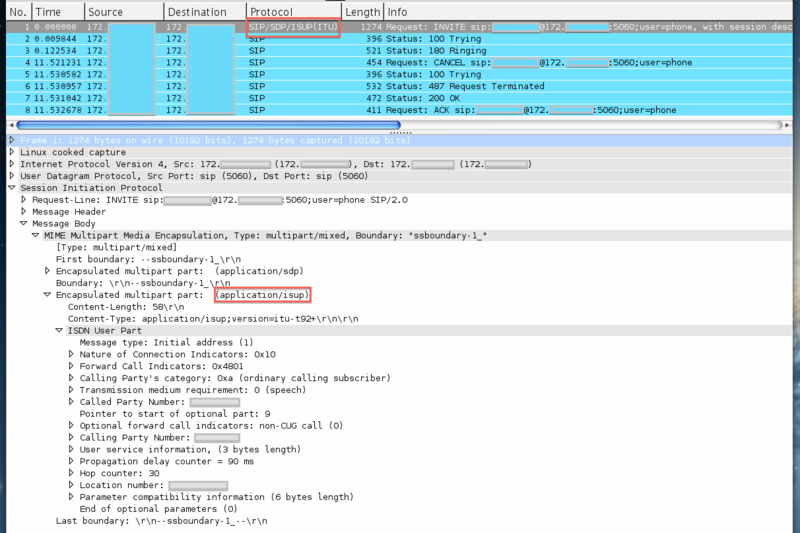
As you can see in the Message Body, the "application / isup" section was added where all ISUP fields were encapsulated in turn.
Customization
On the Internet, there is very little information on how to configure these protocols, but you will not find real examples in the afternoon with fire. We pretty thoroughly approached this business and came across Yate .
Yate positions itself as a new generation telephone engine. It is difficult to somehow distinguish it by class, since it knows everything. It was written by Romanian programmers from Null Team. There are several articles on the habr about him, but there he is used in other solutions.
Pros:
1. It is written in C ++.
2. The modular structure.
3. There are modules for all occasions.
4. Allows you to write configuration in different programming languages: php, perl, python, javascript.
Minuses:
1. Very little documentation. For example, I had to read the source code completely to fully understand the principles of its work. By the way, people complain about this in the mailing list, but as one wise man said: “Yate has documentation, and it is very good, just written in C ++.”
I will not describe the installation process and initial setup. They can be found on the project website and on the Habr . I will describe only the main points for our softswitch to understand SIP-I / SIP-T.
And so that Yate can encode and decode fields from "application / isup", you need to include the following parameter in the ysipchan.conf file:
[sip-t]
isup=enable
After that, with an incoming call from the telecom, in the standard Yate messages, the isup fields will appear as in the example below. We can already use these fields for routing and billing.
Sniffed 'call.preroute' time=1350892372.716302
  thread=0x7f017c011600 'Call Router'
  data=(nil)
  retval='(null)'
  param['id'] = 'sip/4'
  param['module'] = 'sip'
  param['status'] = 'incoming'
  param['address'] = '172.xxx.xxx.xxx:5060'
  param['billid'] = '1350892357-3'
  param['answered'] = 'false'
  param['callid'] = 'sip/SBCxdl85tuup8zxylqx8xbcdp5pcvtbtpw8@SoftX3000/zxzlwuzt-CC-23/'
  param['message-prefix'] = 'isup.'
  param['isup.protocol-type'] = 'itu-t92+'
  param['isup.protocol-type'] = 'itu-t'
  param['isup.message-type'] = 'IAM'
  param['isup.NatureOfConnectionIndicators'] = '0sat,cont-check-none,echodev'
  param['isup.ForwardCallIndicators'] = 'national,e2e-none,interworking,isup-notreq,sccp-none'
  param['isup.CallingPartyCategory'] = 'ordinary'
  param['isup.TransmissionMediumRequirement'] = '3.1khz-audio'
  param['isup.CalledPartyNumber'] = 'xxxxxxxxx'
  param['isup.CalledPartyNumber.nature'] = 'subscriber'
  param['isup.CalledPartyNumber.plan'] = 'isdn'
  param['isup.CalledPartyNumber.inn'] = 'false'
  param['isup.OptionalForwardCallIndicators'] = 'non-CUG'
  param['isup.CallingPartyNumber'] = 'xxxxxxxxx'
  param['isup.CallingPartyNumber.nature'] = 'national'
  param['isup.CallingPartyNumber.plan'] = 'isdn'
  param['isup.CallingPartyNumber.complete'] = 'true'
  param['isup.CallingPartyNumber.restrict'] = 'allowed'
  param['isup.CallingPartyNumber.screened'] = 'network-provided'
  param['isup.PropagationDelayCounter'] = '0'
  param['isup.LocationNumber'] = ''
  param['isup.LocationNumber.nature'] = '0'
  param['isup.LocationNumber.plan'] = 'unknown'
  param['isup.LocationNumber.inn'] = 'true'
  param['isup.LocationNumber.restrict'] = 'unavailable'
  param['isup.LocationNumber.screened'] = 'network-provided'
  param['isup.ParameterCompatInformation.PropagationDelayCounter'] = 'transit,cnf,discard-param,nopass-param'
  param['isup.ParameterCompatInformation.EchoControlInformation'] = 'transit,nopass-param'
  param['isup.ParameterCompatInformation'] = '31 d4 37 c0'
  param['isup.parameters-unhandled-cnf'] = 'PropagationDelayCounter'
  param['caller'] = 'xxxxxxxxx'
  param['called'] = 'xxxxxxxxx'
  param['ip_transport'] = 'UDP'
  param['newcall'] = 'true'
  param['domain'] = '172.xxx.xxx.xxx'
  param['device'] = 'Huawei SoftX3000 V300R010'
  param['username'] = ''
  param['xsip_nonce_age'] = '0'
  param['antiloop'] = '19'
  param['ip_host'] = '172.xxx.xxx.xxx'
  param['ip_port'] = '5060'
  param['ip_transport'] = 'UDP'
  param['sip_uri'] = 'sip:[email protected]:5060;user=phone'
  param['sip_from'] = 'sip:[email protected];user=phone'
  param['sip_to'] = ''
  param['sip_callid'] = 'SBCxdl85tuup8zxylqx8xbcdp5pcvtbtpw8@SoftX3000'
  param['device'] = 'Huawei SoftX3000 V300R010'
  param['sip_allow'] = 'INVITE,ACK,OPTIONS,BYE,CANCEL,REGISTER,INFO,PRACK,SUBSCRIBE,NOTIFY,UPDATE,MESSAGE,REFER'
  param['sip_supported'] = '100rel'
  param['sip_user-agent'] = 'Huawei SoftX3000 V300R010'
  param['sip_privacy'] = 'none'
  param['sip_p-charging-vector'] = 'icid-value=0a.0a.00.0a-2012102210555100;orig-ioi=www.huawei.com;icid-generated-at=172.xxx.xxx.xxx'
  param['sip_p-asserted-identity'] = ''
  param['sip_contact'] = ''
  param['sip_content-type'] = 'multipart/mixed;boundary=ssboundary-1_'
  param['rtp_addr'] = '172.xxx.xxx.xxx'
  param['media'] = 'yes'
  param['formats'] = 'alaw,mulaw'
  param['transport'] = 'RTP/AVP'
  param['rtp_rfc2833'] = 'false'
  param['rtp_port'] = '40016'
  param['rtp_forward'] = 'possible'
An outgoing call from us looks like this (regexroute.conf):
; Контекст определенный на этапе preroute
[PSTN]
; Выставляем параметры для всех звонков попавших в данный контекст.
 .*=;osip_P-Asserted-Identity=;\
        message-prefix=isup.;\
        isup.message-type=IAM;\
        isup.protocol-type=itu-t92+;\
        isup.NatureOfConnectionIndicators=echodev;\
        isup.CallingPartyCategory=ordinary;\
        isup.ForwardCallIndicators=national,e2e-none,interworking,isup-notreq,sccp-none;\
        isup.TransmissionMediumRequirement=3.1khz-audio;\
        isup.CalledPartyNumber=${called};\
        isup.CalledPartyNumber.nature=national;\
        isup.CalledPartyNumber.plan=isdn;\
        isup.CalledPartyNumber.inn=false;\
        isup.CallingPartyNumber=${caller};\
        isup.CallingPartyNumber.nature=national;\
        isup.CallingPartyNumber.plan=isdn;\
        isup.CallingPartyNumber.complete=true;\
        isup.CallingPartyNumber.restrict=allowed;\
        isup.CallingPartyNumber.screened=network-provided
; Уже сама маршрутизация
.*=sip/sip:${called}@172.xxx.xxx.xxx
That's all. Now all SIP invites from us come with the ISUP fields in Message Body.
If the reputable community has questions, I will be happy to answer. We ate a dog on Yate and were able to understand many of the nuances.









