Introducing the Caché SQL Gateway for Creating Federated Systems or Multibases
In complex complex systems, the question often arises of integrating data from different sources.
Such systems are called integrated, federated, or multibases .
In Caché DBMS, such integration is carried out using a special gateway ( Caché SQL Gateway ), which uses ODBC / JDBC connections to external data sources. Moreover, in this case, the source can be understood not only as a DBMS, since there are JDBC / ODBC drivers for MS Excel, DBF, text files, image files, WMI, etc.
Briefly, how to use the Caché SQL Gateway :
As mentioned above, you can use either ODBC or JDBC driver to connect to an external data source. Consider both options.
For ODBC, you must first configure system DSNs:
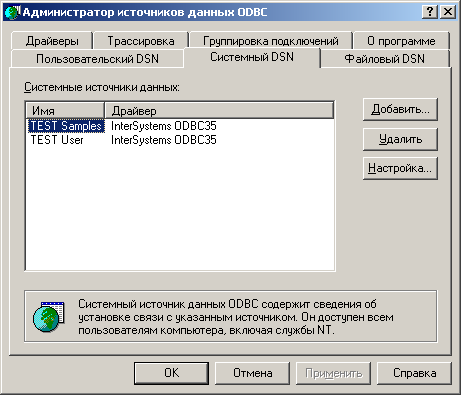
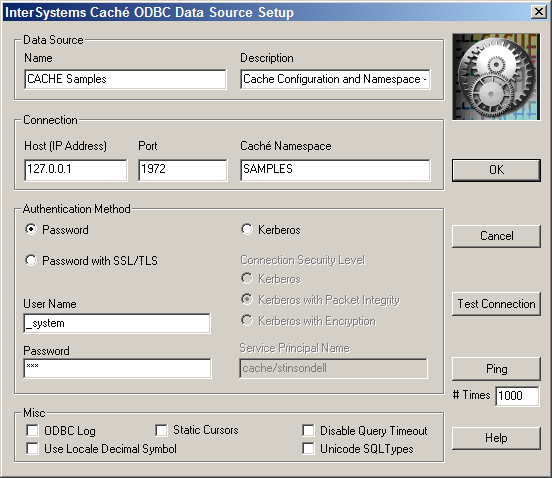
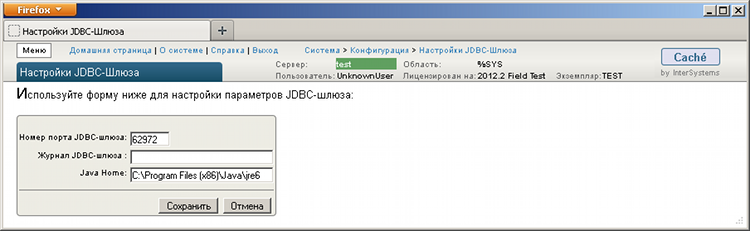
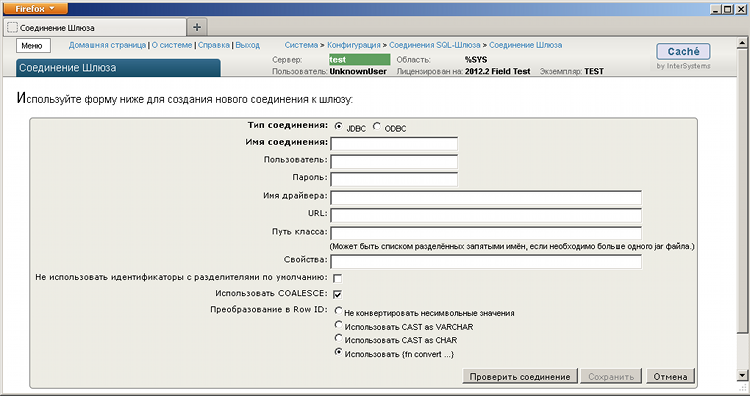
For JDBC , the path to the Java virtual machine (hereinafter all pictures are clickable): Next, in SMP, you need to create connections for the Caché SQL Gateway of the desired type ( JDBC or ODBC ), on which these or those settings will depend . Here you can check the newly created connection: Then, using the Wizard for Linking Tables or Procedures , you need to create the necessary virtual tables or XP:

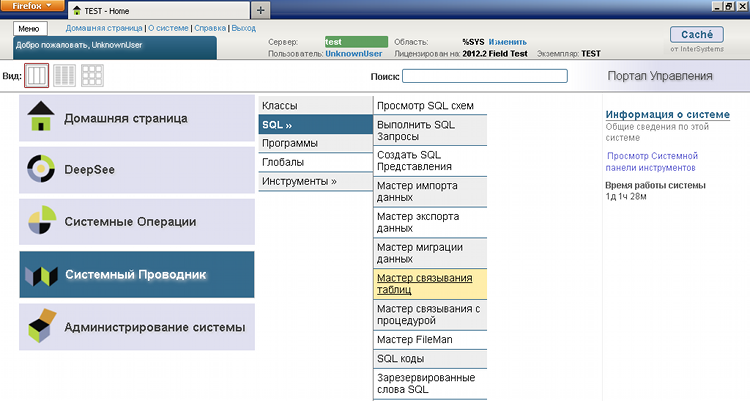
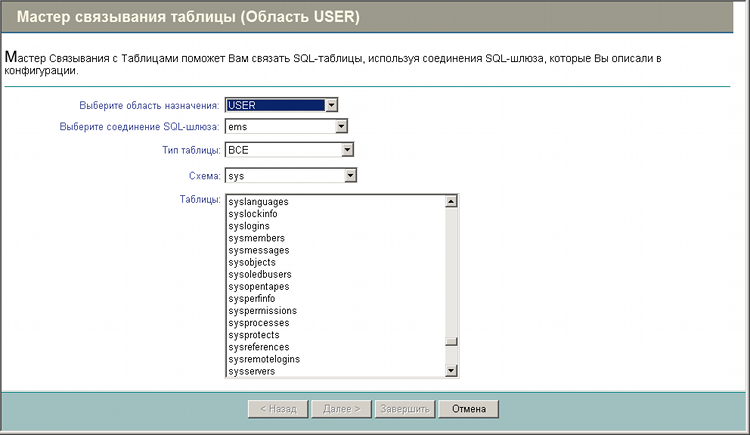
The wizard will ask for each table its new name, new names for each of the fields, primary key, etc. In most cases, you can leave all names by default, but there are situations when some of these identifiers are reserved words of the Caché DBMS.
An example of a generated virtual class for an external job_titles table:
Class dbo.jobtitles Extends% Library.Persistent [ClassType = persistent, Not ProcedureBlock, SqlRowIdPrivate, SqlTableName = job_titles, StorageStrategy = GSQLStorage]
{
Parameter CONNECTION = "ems, NOCREATE;
Parameter EXTDBNAME = "Microsoft SQL Server";
Parameter EXTERNALTABLENAME = "dbo.job_titles";
Property INTERETHNICVALUE As% String (EXTERNALSQLNAME = "INTERETHNIC_VALUE", EXTERNALSQLTYPE = 12, MAXLEN = 50) [Required, SqlColumnNumber = 5, SqlFieldName = INTERETHNIC_VALUE];
Property INTERNATIONALVALUE As% String (EXTERNALSQLNAME = "INTERNATIONAL_VALUE", EXTERNALSQLTYPE = 12, MAXLEN = 50) [Required, SqlColumnNumber = 4, SqlFieldName = INTERNATIONAL_VALUE];
Property NATIONALVALUE As% String (EXTERNALSQLNAME = "NATIONAL_VALUE", EXTERNALSQLTYPE = 12, MAXLEN = 50) [Required, SqlColumnNumber = 6, SqlFieldName = NATIONAL_VALUE];
Property id As% Integer (EXTERNALSQLNAME = "id", EXTERNALSQLTYPE = 4) [Required, SqlColumnNumber = 2, SqlFieldName = id];
Property priority As% Integer (EXTERNALSQLNAME = "priority", EXTERNALSQLTYPE = 4) [Required, SqlColumnNumber = 3, SqlFieldName = priority];
Index MainIndex On id [IdKey, PrimaryKey];
}
That's it, now you can, connecting to Caché using any ODBC / JDBC client (see one of the previous articles ), see all tables and procedures, both internal and external; and the difference between them is immediately difficult to determine.
Well, of course, you can insert / delete / modify data using the native SQL syntax of various DBMSs.
The Caché SQL Gateway engine can also be used for DeepSee embedded business intelligence , but that's another topic.
In addition to creating related tables, you can work with external data programmatically:
Example ODBC software access using a system DSN:
set db = ## class (% SQLGatewayConnection).% New ()
set res = db.Connect ("DSNName", "username", "password")
set rs = ## class (% ResultSet).% New ("% DynamicQueryGW: SQLGW")
do rs.Prepare ("SELECT * FROM users WHERE id =?" ,, db)
do rs.Execute (46)
while rs.Next () {
for i = 1: 1: rs.GetColumnCount () {
write rs.GetData (i)
if i '= rs.GetColumnCount () {
write ","
} else {
write!
}
}
}
do db.Disconnect ()
In this case, you no longer need to create connections for the Caché SQL Gatewaybecause "DSNName" is the DSN name defined in the OC itself.
The example above demonstrates the so-called high-level access to work with ODBC using the % ResultSet and % DynamicQueryGW classes , but low-level access is also possible. In this case, only the methods of the % SQLGatewayConnection class are used .
The following is an example of a query to an external table using low-level access. This query selects all fields from the INFO table of an external ODBC source (with the name DSNName ) for which the value of the field is Age = 21, and the value of the Name field starts with the letter "D".
set db = ## class (% SQLGatewayConnection).% New ()
// make a connection
do db.Connect ("DSNName", "sa", "pwd")
// create a new command
set sc = db.AllocateStatement (.Stat)
// prepare the request
set sc = db.Prepare (Stat, " SELECT * FROM INFO WHERE Age =? AND Name LIKE? ")
// preparation of parameters
set sc = db.BindParameters (Stat, $ listbuild (1,1), $ listbuild (4,12), $ listbuild (4,50) , $ listbuild (0,0), $ listbuild (4,50))
set sc = db.SetParameter (Stat, $ listbuild (21), 1)
set sc = db.SetParameter (Stat, $ listbuild ("D%" ), 2)
// execute the request
set sc = db.Execute (Stat)
for {
quit: 'db.Fetch (Stat)
set sc = db.GetOneRow (Stat, .Row)
for j = 1: 1: $ listlength ( Row) write $ listget (row,j) _ ""
write!
}
// deleting the
set sc = db.DropStatement (Stat) command
// breaking the connection
set sc = db.Disconnect ()
So, let's take a closer look at this example.
• To connect to an ODBC data source (DSN), use the Connect (DSN, User, Password) method :
set db = ## class (% SQLGatewayConnection).% New ()
// establish a connection
do db.Connect ("DSNName", "sa", "pwd")
• To disconnect, use the Disconnect () method :
set sc = db.Disconnect ()
• Before executing the request, you must first create the Statement command . To create a command, use the AllocateStatement () method, the Handle argument to the AllocateStatement () method is passed by reference (you need to put a dot “.” before the argument name):
set sc = db.AllocateStatement (.Stat)
• DropStatement () method is used to delete the command :
set sc = db.DropStatement (Stat )
• Before executing the query, it must be "prepared", for which the Prepare (Stat, sql) method is used . The created command and the sql-query string are passed as arguments to the method. It is possible to execute queries with parameters, then the "?" Signs are put in the sql line instead of the parameters:
// prepare the
set sc = db.Prepare (Stat, "SELECT * FROM INFO WHERE Age =? AND Name LIKE?")
• If an sql query with parameters is transmitted, then these parameters must be prepared and assigned certain values to them. To prepare the parameters, the BindParameters () method is used . Arguments of the BindParameters () method :
• All arguments to the BindParameters () method , starting from the second, are of type % List and must be passed as arguments to the $ listbuild () function . If there are several parameters in the request, then the arguments $ listbuild () are passed values separated by commas corresponding to each parameter in the order they appear in the query string, for example:
set sc = db.BindParameters (Stat, $ listbuild (1,1), $ listbuild (4,12), $ listbuild (4,50), $ listbuild (0,0), $ listbuild (4,50))
or
#include% occODBC; do not forget to connect the necessary files with macros
set sc = db.BindParameters (
Stat,
$ listbuild ($$$ SQLPARAMINPUT, $$$ SQLPARAMINPUT),
$ listbuild ($$$ ODBCTYPEinteger, $$$ ODBCTYPEvarchar),
$ listbuild (4,50),
$ listbuild (0,0),
$ listbuild (4,50)
)
• Assigning a value to a parameter is performed using the SetParameter (Stat, $ listbuild (val), Numb) method . The following arguments are passed to the SetParameter () method :
• The SetParameter () method is called separately for each parameter passed:
set sc = db.SetParameter (Stat, $ listbuild (21), 1)
set sc = db.SetParameter (Stat, $ listbuild ("D%"), 2)
• To execute the request, the Execute (Stat) method is used , to which the created command is passed as an argument:
set sc = db.Execute (Stat)
Such systems are called integrated, federated, or multibases .
In Caché DBMS, such integration is carried out using a special gateway ( Caché SQL Gateway ), which uses ODBC / JDBC connections to external data sources. Moreover, in this case, the source can be understood not only as a DBMS, since there are JDBC / ODBC drivers for MS Excel, DBF, text files, image files, WMI, etc.
Briefly, how to use the Caché SQL Gateway :
- in the System Management Portal ( SMP ), create the connection of the desired type by specifying the connection string, login, password, etc. Here you can check the created connection;
- using the Linking Wizard, connect the required tables and / or procedures to Caché from an external DBMS using the connection from the step above. In this case, no data is copied anywhere, but only special virtual classes are created, they are also tables;
- Now, having connected to the area - a logical database in terms of Caché - you will see tables, views, stored procedures (XP) from external sources in it: Oracle, DB2, MSSQL, MySQL, Excel, DBF, CSV, etc.
- further you can work with these tables / HP in both directions, as if they were physically in Caché.
Note: anticipating questions about supporting heterogeneous queries to different data sources, I hasten to notice the presence of some restrictions in queries.
In other words, the JOIN between tables from Oracle and MSSQL will fail.
These restrictions apply only to so-called linked tables. If you use the Migration of Structures and Data Wizard instead of the Binding Wizard , then there will be no such restrictions.
Creating Linked Tables
As mentioned above, you can use either ODBC or JDBC driver to connect to an external data source. Consider both options.
For ODBC, you must first configure system DSNs:
For JDBC , the path to the Java virtual machine (hereinafter all pictures are clickable): Next, in SMP, you need to create connections for the Caché SQL Gateway of the desired type ( JDBC or ODBC ), on which these or those settings will depend . Here you can check the newly created connection: Then, using the Wizard for Linking Tables or Procedures , you need to create the necessary virtual tables or XP:
The wizard will ask for each table its new name, new names for each of the fields, primary key, etc. In most cases, you can leave all names by default, but there are situations when some of these identifiers are reserved words of the Caché DBMS.
An example of a generated virtual class for an external job_titles table:
Class dbo.jobtitles Extends% Library.Persistent [ClassType = persistent, Not ProcedureBlock, SqlRowIdPrivate, SqlTableName = job_titles, StorageStrategy = GSQLStorage]
{
Parameter CONNECTION = "ems, NOCREATE;
Parameter EXTDBNAME = "Microsoft SQL Server";
Parameter EXTERNALTABLENAME = "dbo.job_titles";
Property INTERETHNICVALUE As% String (EXTERNALSQLNAME = "INTERETHNIC_VALUE", EXTERNALSQLTYPE = 12, MAXLEN = 50) [Required, SqlColumnNumber = 5, SqlFieldName = INTERETHNIC_VALUE];
Property INTERNATIONALVALUE As% String (EXTERNALSQLNAME = "INTERNATIONAL_VALUE", EXTERNALSQLTYPE = 12, MAXLEN = 50) [Required, SqlColumnNumber = 4, SqlFieldName = INTERNATIONAL_VALUE];
Property NATIONALVALUE As% String (EXTERNALSQLNAME = "NATIONAL_VALUE", EXTERNALSQLTYPE = 12, MAXLEN = 50) [Required, SqlColumnNumber = 6, SqlFieldName = NATIONAL_VALUE];
Property id As% Integer (EXTERNALSQLNAME = "id", EXTERNALSQLTYPE = 4) [Required, SqlColumnNumber = 2, SqlFieldName = id];
Property priority As% Integer (EXTERNALSQLNAME = "priority", EXTERNALSQLTYPE = 4) [Required, SqlColumnNumber = 3, SqlFieldName = priority];
Index MainIndex On id [IdKey, PrimaryKey];
}
Note: if necessary, you can supplement the code of the generated class with some goodies from Caché - methods of the class and / or object, calculated by fields, superclasses, XR - which are not in the original tables.
But you should not forget that when you regenerate related tables / XP, all your additional code will be lost.
That's it, now you can, connecting to Caché using any ODBC / JDBC client (see one of the previous articles ), see all tables and procedures, both internal and external; and the difference between them is immediately difficult to determine.
Well, of course, you can insert / delete / modify data using the native SQL syntax of various DBMSs.
The Caché SQL Gateway engine can also be used for DeepSee embedded business intelligence , but that's another topic.
Alternative use case
Once this technology helped my colleagues working with other DBMSs (not Caché). Two new employees came to us to work and they needed access to several different databases on different servers.
Since the paper on opening access to the necessary servers for them “wandered” around the cabinets, and the deadlines were running out, I offered them, with the consent of my management, a temporary option with Caché: fortunately, they used some kind of framework like Hibernate, and I had access to the right ones to servers. Created an area in Caché, added the necessary tables from the necessary databases, gave them the necessary rights.
Then they connected through Caché, acting here as a proxy DBMS, to one virtual database and worked in this way with their tables from disparate databases. Colleagues did not even have to install drivers for their DBMS.
Since the paper on opening access to the necessary servers for them “wandered” around the cabinets, and the deadlines were running out, I offered them, with the consent of my management, a temporary option with Caché: fortunately, they used some kind of framework like Hibernate, and I had access to the right ones to servers. Created an area in Caché, added the necessary tables from the necessary databases, gave them the necessary rights.
Then they connected through Caché, acting here as a proxy DBMS, to one virtual database and worked in this way with their tables from disparate databases. Colleagues did not even have to install drivers for their DBMS.
Programmatic Access to External Data
In addition to creating related tables, you can work with external data programmatically:
Example ODBC software access using a system DSN:
set db = ## class (% SQLGatewayConnection).% New ()
set res = db.Connect ("DSNName", "username", "password")
set rs = ## class (% ResultSet).% New ("% DynamicQueryGW: SQLGW")
do rs.Prepare ("SELECT * FROM users WHERE id =?" ,, db)
do rs.Execute (46)
while rs.Next () {
for i = 1: 1: rs.GetColumnCount () {
write rs.GetData (i)
if i '= rs.GetColumnCount () {
write ","
} else {
write!
}
}
}
do db.Disconnect ()
In this case, you no longer need to create connections for the Caché SQL Gatewaybecause "DSNName" is the DSN name defined in the OC itself.
The example above demonstrates the so-called high-level access to work with ODBC using the % ResultSet and % DynamicQueryGW classes , but low-level access is also possible. In this case, only the methods of the % SQLGatewayConnection class are used .
The following is an example of a query to an external table using low-level access. This query selects all fields from the INFO table of an external ODBC source (with the name DSNName ) for which the value of the field is Age = 21, and the value of the Name field starts with the letter "D".
set db = ## class (% SQLGatewayConnection).% New ()
// make a connection
do db.Connect ("DSNName", "sa", "pwd")
// create a new command
set sc = db.AllocateStatement (.Stat)
// prepare the request
set sc = db.Prepare (Stat, " SELECT * FROM INFO WHERE Age =? AND Name LIKE? ")
// preparation of parameters
set sc = db.BindParameters (Stat, $ listbuild (1,1), $ listbuild (4,12), $ listbuild (4,50) , $ listbuild (0,0), $ listbuild (4,50))
set sc = db.SetParameter (Stat, $ listbuild (21), 1)
set sc = db.SetParameter (Stat, $ listbuild ("D%" ), 2)
// execute the request
set sc = db.Execute (Stat)
for {
quit: 'db.Fetch (Stat)
set sc = db.GetOneRow (Stat, .Row)
for j = 1: 1: $ listlength ( Row) write $ listget (row,j) _ ""
write!
}
// deleting the
set sc = db.DropStatement (Stat) command
// breaking the connection
set sc = db.Disconnect ()
So, let's take a closer look at this example.
• To connect to an ODBC data source (DSN), use the Connect (DSN, User, Password) method :
set db = ## class (% SQLGatewayConnection).% New ()
// establish a connection
do db.Connect ("DSNName", "sa", "pwd")
• To disconnect, use the Disconnect () method :
set sc = db.Disconnect ()
• Before executing the request, you must first create the Statement command . To create a command, use the AllocateStatement () method, the Handle argument to the AllocateStatement () method is passed by reference (you need to put a dot “.” before the argument name):
set sc = db.AllocateStatement (.Stat)
• DropStatement () method is used to delete the command :
set sc = db.DropStatement (Stat )
• Before executing the query, it must be "prepared", for which the Prepare (Stat, sql) method is used . The created command and the sql-query string are passed as arguments to the method. It is possible to execute queries with parameters, then the "?" Signs are put in the sql line instead of the parameters:
// prepare the
set sc = db.Prepare (Stat, "SELECT * FROM INFO WHERE Age =? AND Name LIKE?")
• If an sql query with parameters is transmitted, then these parameters must be prepared and assigned certain values to them. To prepare the parameters, the BindParameters () method is used . Arguments of the BindParameters () method :
- created team;
- types of parameters: 1 - in (input), 2-in / out (input / output), 4-out (output, ...);
- List of ODBC data types (for example: 4-INTEGER, 9-DATE, 12-VARCHAR, 8-DOUBLE, ...);
- buffer sizes in bytes;
- the number of characters after the period (only for Decimal and Float);
- list of data type lengths in bytes.
• All arguments to the BindParameters () method , starting from the second, are of type % List and must be passed as arguments to the $ listbuild () function . If there are several parameters in the request, then the arguments $ listbuild () are passed values separated by commas corresponding to each parameter in the order they appear in the query string, for example:
set sc = db.BindParameters (Stat, $ listbuild (1,1), $ listbuild (4,12), $ listbuild (4,50), $ listbuild (0,0), $ listbuild (4,50))
or
#include% occODBC; do not forget to connect the necessary files with macros
set sc = db.BindParameters (
Stat,
$ listbuild ($$$ SQLPARAMINPUT, $$$ SQLPARAMINPUT),
$ listbuild ($$$ ODBCTYPEinteger, $$$ ODBCTYPEvarchar),
$ listbuild (4,50),
$ listbuild (0,0),
$ listbuild (4,50)
)
Note: in the code presented initially, numeric identifiers of parameter types are used. In real code, it is better to use macros from the % occODBC.inc or % msql.inc files , for example:
- $$$ GetOdbcTypeNumber ("INTEGER") or $$$ ODBCTYPEinteger will return 4;
- $$$ SQLPARAMINPUT will return 1 (input);
- $$$ SQLPARAMINPUTOUTPUT will return 2 (input / output);
- $$$ SQLPARAMOUTPUT will return 4 (output);
- etc.
A complete list of macros can be found in the corresponding files, using, for example, Caché Studio .
• Assigning a value to a parameter is performed using the SetParameter (Stat, $ listbuild (val), Numb) method . The following arguments are passed to the SetParameter () method :
- created team;
- parameter value as an argument to the function $ listbuild () ;
- serial number of the parameter in the query string.
• The SetParameter () method is called separately for each parameter passed:
set sc = db.SetParameter (Stat, $ listbuild (21), 1)
set sc = db.SetParameter (Stat, $ listbuild ("D%"), 2)
• To execute the request, the Execute (Stat) method is used , to which the created command is passed as an argument:
set sc = db.Execute (Stat)
Note: additional examples on programmatic access to external data using JDBC / ODBC can be found in the source code of the % UnitTest.JDBCSQL and % UnitTest.ODBCSQL classes, respectively.









