 July 31, 2012 at 00:31
DPAPI on the fingers
Hello, harazhiteli!

Back in December last year, I first came across the Data Protection Application Programming Interface (DPAPI for short). Then I learned how to store logins / passwords in the Chrome browser . I promised that I would sign this system in detail and on my fingers. It's no good lying, so welcome to the cut!
I'll start with the basics of what DPAPI is, why it was created and who needs it. And then I’ll tell you how it works.
Information security problems have long touched everyone, and Microsoft was no exception, office PCs, home systems, servers - all, to one degree or another, required protection from the wrong hands.
Storing data in open form was already, at a minimum, not solid. Therefore, with the release of Windows 2000, the world saw a nascent and raw version of DPAPI. Its main purpose is to protect stored passwords and confidential information on a computer. Moreover, in such a way that the owner of this data (user) does not even know about the existence of protection, and this data was not available to the cracker. The ideology of the system has not changed since then. Algorithms changed, holes closed, but the essence was the same.
As a result, a full-fledged security system appeared in which secret data was available exclusively to the user-owner and to no one else.
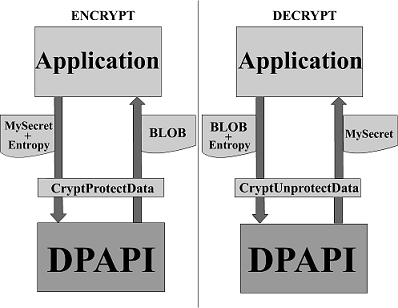
This is how the trivial scheme of working with DPAPI looks.
The application accesses the OS by setting the parameters Mysecret (string / bytes that need to be classified) and Entropy (entropy, about it a little later. This parameter is optional).
The output is BLOB.
BLOB - B inary L arge OB ject. Decryption is a backronym. This is essentially an array of binary data. "Big and shapeless."
This BLOB is a kind of container in which the data necessary for decryption, as well as the cipher itself, are contained in an open form. The application saves it (for example, it’s the same Chrome that recorded this BLOB as an array of bytes in one of the fields of the SQLITE database), and later, if necessary, decrypts it (the second half of the scheme).
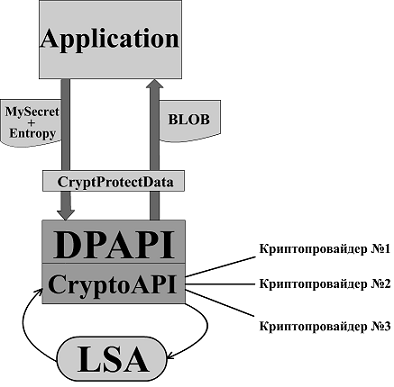
This is how the same scheme looks, but in more detail.
A cryptographic provider is a set of algorithms for hashing, encryption, key exchange and digital signature in the form of a module. For example, in Russia there are our GOST algorithms and a cryptographic provider that combines them, so if you give it to the system, then instead of the standard AES, SHA, RSA, our GOSTs will be used. All this is configured in the registry. It follows that DPAPI itself does not make any difference with which algorithms to work, they change “like gloves”, which makes the system universal.
About LSA and CryptoAPI I will answer with a quote from Wikipedia:
All the most interesting happens in the bowels of the LSA, mortals have nothing to do there, so it is almost impossible to influence the operation of this process.
Now let's talk directly about the encryption / decryption scheme.
In fact, these are just 3 functions:
1) Opening the master key
2) Encryption
3) Decryption
It does not matter what we want to do - encrypt or decrypt - first you need to open the master key.
A master key (hereinafter referred to as MK ) is an encryption key for a symmetric encryption algorithm (by default in Windows 7 it is AES). It is also a BLOB in which there is open (ID, algorithms ..) and closed (key itself) information.
MK is the most important part of the system, so it is under reliable protection.
Here the developers have a dilemma. How to make sure that the user doesn’t get by entering passwords (USB keys), but at the same time protect the master key somehow? Obviously, for this it is necessary to take the "personal" and unique information of the system. That is, this is the user password for logging in to the system. After logging into the system, the LSA stores this password and, upon request, CryptoAPI issues it.
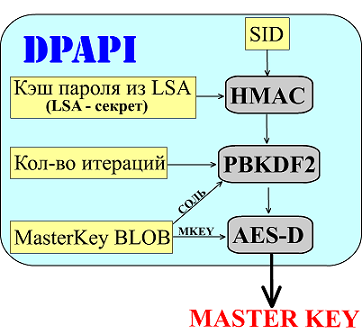
This, in fact, is a key decryption scheme.
SID is a unique security identifier.
The password cache from LSA is the cache of your login password; if it is not, then null is taken.
Then the
HMAC settings are read (short for hash-based message authentication code, message identification hash code).
Simply put, this is the same hash function that even works on the basis of the same MD5, SHA ... Only to get the hash, you also need a password, that is, instead of 1 parameter, there are 2.
PBKDF2 - Password-Based Key Derivation Function. Password-based key generation standard. Uses a pseudo-random function to obtain keys. The key length is not limited. In fact, this is a “complication” of the hashing algorithm. If the same SHA256 is calculated in fractions of a second, then with its help the calculation will drag on to 0.1 second. An important parameter here is the number of iterations. On my computer, there are 17400 by default. The more there are, the longer the algorithm runs, the more difficult the selection. If you do not delve into the details of the algorithm, you can imagine that it performs the SHA256 algorithm 17,400 times.
SHA (SHA (SHA ... SHA (string)) ...)
This takes time, and since SHA claims to be a mythological unidirectional function, the output will be unique.
0.1 seconds is nothing when the algorithm is executed 1 time (from the user's point of view), but it is a nightmare to iterate over.
MasterKey BLOB is just data with an encrypted key, but it also stores open data that is readable by the system, such as salt, master key ID and other service parameters.
As a result, at the output we get our key.
Now let's start encryption.
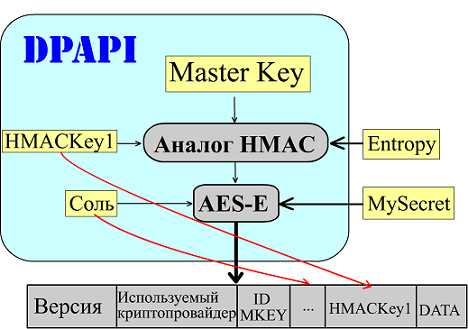
Everything is already quite simple here, first the key, HMACKEY1 (randomly generated by the system) and the entropy you entered (just a little more, and I will tell you more about it) are fed to the HMAC algorithm analogue (now it already has 3 input parameters). Received data is a private key for encrypted data. Salt is also randomly generated. All this data is used when creating a BLOB, which will already be returned to the program to request encryption.
Decryption is similar.

Here, all the necessary data is read from the BLOB itself. At the exit, we get our secret.
The master key blob has a lot of information that is open for reading. DPAPI version, its ID, various flags, MK size, salt, number of iterations, hashing algorithm, encryption.
BLOB'e with encrypted data is also a lot of information. Again, the version used by the cryptographic provider, ID MK, which was used for encryption, description and even signature (hash amount).
Separately, I want to note such a thing as CredHistory .

Credential History. At first glance - an unnecessary thing, but it happens.
Suppose you change your password. From the point of view of the algorithm - your master key has become inaccessible. There is nothing to decrypt! But this nuance is thought out. The system will re-encrypt the master key. But this process is time-consuming ... There can be many keys wizards, and you need to re-encrypt them all (by default, a new one is generated every 90 days to increase security, and already encrypted data is tied to a specific key). Therefore, Microsoft created this algorithm. The previous password is not forgotten ... It is encrypted with the current password and saved on the stack. Therefore, if suddenly the system could not decrypt the master key, then it is in no hurry to give up. Using the current password, she decrypts the first entry in CredHist. And he tries to decrypt the masterkey again with the received password. Not? Using this password, she will decrypt the next password in the chain. The process will continue until until the passwords run out in the chain, or the master key is decrypted. How can it happen that MK is not decrypted? For example, if you used third-party software to force a password reset. Typically, such software does not trigger “re-encryption” of DPAPI keys. So after such a procedure, you lose all your passwords saved by this system. But if you change the password after that to that which is in CredHist, then all passwords will come to life.
Imagine that guests with a child came to you. The child took - and changed the password. Using a third-party utility, you reset the password. All your secret data became inaccessible to you, but after you returned your previous password, and the data is again with you. If the password was reset by a floppy disk to reset the password, then here the system starts reindexing. Incidentally, the RSA system is used to reset the password on a floppy disk. The public key for encryption and the cipher itself are stored in the registry, and the private key on a diskette. When changing the password, the new password is encrypted with the public key and overwritten.
Now we can talk about entropy. If you understand the principle of the system, it became obvious to you that any data encrypted without entropy (or with the same entropy) can be easily decrypted by any application running from the same user. That is, the information is publicly available within the user's domain. Entropy, in essence, is the password for specific encrypted data. Set the entropy, and no software on your computer without the knowledge of this parameter can decrypt the BLOB.
Microsoft set an interesting example of the use of entropy in IE. Passwords with logins are stored in the registry there. The key name is the hash from the link that the authorization passes through, and the contents are encrypted data. So this link is entropy. That is, even intercepting this data and having an open master key, you will have to sort out the links, and, as a result, owning all the data, you will most likely not be able to fully reveal the stolen data.
The scheme is as follows:
1) The link mysite.ru/login.php opens.
2) IE takes a hash from this link.
3) IE searches among the key names for a name that matches the given hash.
4) Using the contents of the key (BLOB) and the link, as entropy, IE opens information with logins and passwords.
If on point 3 no matches were found, then this means that the user has not entered anything on this page yet.
I want to convey my gratitude to the Passcape project and, in particular, to the project administrator, who with pleasure (hopefully) answered all my questions about DPAPI. Their application “Windows Password Recovery”, as far as I know, is unique, it fully emulates the work of DPAPI.
Thank you very much for your attention, I will be happy to answer your questions.
Back in December last year, I first came across the Data Protection Application Programming Interface (DPAPI for short). Then I learned how to store logins / passwords in the Chrome browser . I promised that I would sign this system in detail and on my fingers. It's no good lying, so welcome to the cut!
I'll start with the basics of what DPAPI is, why it was created and who needs it. And then I’ll tell you how it works.
Briefly about the main thing
Information security problems have long touched everyone, and Microsoft was no exception, office PCs, home systems, servers - all, to one degree or another, required protection from the wrong hands.
Storing data in open form was already, at a minimum, not solid. Therefore, with the release of Windows 2000, the world saw a nascent and raw version of DPAPI. Its main purpose is to protect stored passwords and confidential information on a computer. Moreover, in such a way that the owner of this data (user) does not even know about the existence of protection, and this data was not available to the cracker. The ideology of the system has not changed since then. Algorithms changed, holes closed, but the essence was the same.
As a result, a full-fledged security system appeared in which secret data was available exclusively to the user-owner and to no one else.
Principle of operation
This is how the trivial scheme of working with DPAPI looks.
The application accesses the OS by setting the parameters Mysecret (string / bytes that need to be classified) and Entropy (entropy, about it a little later. This parameter is optional).
The output is BLOB.
BLOB - B inary L arge OB ject. Decryption is a backronym. This is essentially an array of binary data. "Big and shapeless."
This BLOB is a kind of container in which the data necessary for decryption, as well as the cipher itself, are contained in an open form. The application saves it (for example, it’s the same Chrome that recorded this BLOB as an array of bytes in one of the fields of the SQLITE database), and later, if necessary, decrypts it (the second half of the scheme).
This is how the same scheme looks, but in more detail.
A cryptographic provider is a set of algorithms for hashing, encryption, key exchange and digital signature in the form of a module. For example, in Russia there are our GOST algorithms and a cryptographic provider that combines them, so if you give it to the system, then instead of the standard AES, SHA, RSA, our GOSTs will be used. All this is configured in the registry. It follows that DPAPI itself does not make any difference with which algorithms to work, they change “like gloves”, which makes the system universal.
About LSA and CryptoAPI I will answer with a quote from Wikipedia:
The Local Security Authority Subsystem Service (LSASS) authentication server is part of the Windows operating system that is responsible for authorizing local users of an individual computer. The service is critical, since without it, logging in to the system for local users (not registered in the domain) is impossible in principle.
CryptoAPI is an application programming interface that provides Windows application developers with a standard set of functions for working with a cryptographic provider. It is part of Microsoft operating systems. Most CryptoAPI features have been supported since Windows 2000.
All the most interesting happens in the bowels of the LSA, mortals have nothing to do there, so it is almost impossible to influence the operation of this process.
Farther into the forest
Now let's talk directly about the encryption / decryption scheme.
In fact, these are just 3 functions:
1) Opening the master key
2) Encryption
3) Decryption
It does not matter what we want to do - encrypt or decrypt - first you need to open the master key.
A master key (hereinafter referred to as MK ) is an encryption key for a symmetric encryption algorithm (by default in Windows 7 it is AES). It is also a BLOB in which there is open (ID, algorithms ..) and closed (key itself) information.
MK is the most important part of the system, so it is under reliable protection.
Here the developers have a dilemma. How to make sure that the user doesn’t get by entering passwords (USB keys), but at the same time protect the master key somehow? Obviously, for this it is necessary to take the "personal" and unique information of the system. That is, this is the user password for logging in to the system. After logging into the system, the LSA stores this password and, upon request, CryptoAPI issues it.
This, in fact, is a key decryption scheme.
SID is a unique security identifier.
The password cache from LSA is the cache of your login password; if it is not, then null is taken.
Then the
HMAC settings are read (short for hash-based message authentication code, message identification hash code).
Simply put, this is the same hash function that even works on the basis of the same MD5, SHA ... Only to get the hash, you also need a password, that is, instead of 1 parameter, there are 2.
PBKDF2 - Password-Based Key Derivation Function. Password-based key generation standard. Uses a pseudo-random function to obtain keys. The key length is not limited. In fact, this is a “complication” of the hashing algorithm. If the same SHA256 is calculated in fractions of a second, then with its help the calculation will drag on to 0.1 second. An important parameter here is the number of iterations. On my computer, there are 17400 by default. The more there are, the longer the algorithm runs, the more difficult the selection. If you do not delve into the details of the algorithm, you can imagine that it performs the SHA256 algorithm 17,400 times.
SHA (SHA (SHA ... SHA (string)) ...)
This takes time, and since SHA claims to be a mythological unidirectional function, the output will be unique.
0.1 seconds is nothing when the algorithm is executed 1 time (from the user's point of view), but it is a nightmare to iterate over.
MasterKey BLOB is just data with an encrypted key, but it also stores open data that is readable by the system, such as salt, master key ID and other service parameters.
As a result, at the output we get our key.
Now let's start encryption.
Everything is already quite simple here, first the key, HMACKEY1 (randomly generated by the system) and the entropy you entered (just a little more, and I will tell you more about it) are fed to the HMAC algorithm analogue (now it already has 3 input parameters). Received data is a private key for encrypted data. Salt is also randomly generated. All this data is used when creating a BLOB, which will already be returned to the program to request encryption.
Decryption is similar.
Here, all the necessary data is read from the BLOB itself. At the exit, we get our secret.
The master key blob has a lot of information that is open for reading. DPAPI version, its ID, various flags, MK size, salt, number of iterations, hashing algorithm, encryption.
BLOB'e with encrypted data is also a lot of information. Again, the version used by the cryptographic provider, ID MK, which was used for encryption, description and even signature (hash amount).
"Back to the beginning"
Separately, I want to note such a thing as CredHistory .
Credential History. At first glance - an unnecessary thing, but it happens.
Suppose you change your password. From the point of view of the algorithm - your master key has become inaccessible. There is nothing to decrypt! But this nuance is thought out. The system will re-encrypt the master key. But this process is time-consuming ... There can be many keys wizards, and you need to re-encrypt them all (by default, a new one is generated every 90 days to increase security, and already encrypted data is tied to a specific key). Therefore, Microsoft created this algorithm. The previous password is not forgotten ... It is encrypted with the current password and saved on the stack. Therefore, if suddenly the system could not decrypt the master key, then it is in no hurry to give up. Using the current password, she decrypts the first entry in CredHist. And he tries to decrypt the masterkey again with the received password. Not? Using this password, she will decrypt the next password in the chain. The process will continue until until the passwords run out in the chain, or the master key is decrypted. How can it happen that MK is not decrypted? For example, if you used third-party software to force a password reset. Typically, such software does not trigger “re-encryption” of DPAPI keys. So after such a procedure, you lose all your passwords saved by this system. But if you change the password after that to that which is in CredHist, then all passwords will come to life.
Imagine that guests with a child came to you. The child took - and changed the password. Using a third-party utility, you reset the password. All your secret data became inaccessible to you, but after you returned your previous password, and the data is again with you. If the password was reset by a floppy disk to reset the password, then here the system starts reindexing. Incidentally, the RSA system is used to reset the password on a floppy disk. The public key for encryption and the cipher itself are stored in the registry, and the private key on a diskette. When changing the password, the new password is encrypted with the public key and overwritten.
Entropy
Now we can talk about entropy. If you understand the principle of the system, it became obvious to you that any data encrypted without entropy (or with the same entropy) can be easily decrypted by any application running from the same user. That is, the information is publicly available within the user's domain. Entropy, in essence, is the password for specific encrypted data. Set the entropy, and no software on your computer without the knowledge of this parameter can decrypt the BLOB.
Microsoft set an interesting example of the use of entropy in IE. Passwords with logins are stored in the registry there. The key name is the hash from the link that the authorization passes through, and the contents are encrypted data. So this link is entropy. That is, even intercepting this data and having an open master key, you will have to sort out the links, and, as a result, owning all the data, you will most likely not be able to fully reveal the stolen data.
The scheme is as follows:
1) The link mysite.ru/login.php opens.
2) IE takes a hash from this link.
3) IE searches among the key names for a name that matches the given hash.
4) Using the contents of the key (BLOB) and the link, as entropy, IE opens information with logins and passwords.
If on point 3 no matches were found, then this means that the user has not entered anything on this page yet.
I want to convey my gratitude to the Passcape project and, in particular, to the project administrator, who with pleasure (hopefully) answered all my questions about DPAPI. Their application “Windows Password Recovery”, as far as I know, is unique, it fully emulates the work of DPAPI.
Thank you very much for your attention, I will be happy to answer your questions.









