 July 8, 2012 at 13:36
Reverse Engineering the Hogs of War Part 1

Motivation
In connection with the vacation spoiled by the local authorities, you have to take your time with something interesting. For example, to treat an old toy, the jambs of which do not allow you to play normally on modern OSs, or change several bytes to get different extra-features just for fun. The subject will be a game from the distant 2000 called Hogs of War. If anyone does not know, then this is a turn-based strategy, where you are given a team of pigs, with which you must conquer the world no less. During the game, depending on the results, you can modify each piglet, for example, increasing it in rank. In 2009, Atari announced the continuation of the game in the form of HOW2 development, but according to recent reports, the project was canceled due to lack of funding. Nothing good.
The purpose of this part: fixing a bug in which the entire desktop is locked if appcrash has occurred for any reason and preparing the application for work in screen mode to simplify debugging.
I want to warn everyone: you do all of the following at your own peril and risk. The author is not liable for any kind of losses incurred as a result of the reproduction of the described actions. All described actions were performed by the author’s cat.
Instruments
For debugging, IDA, MSDN, ida_patcher, DxWnd were used. About more and more further.
Training
So, there is no experience with such debugging, so at first you will have to do everything on an intuitive level. First, open the binary file in the debugger, and this is warhogs.exe. Possible cause of the bug: the application simply cannot start correctly in a different way, or it cannot function correctly. In the debugger, we go over the imported functions somehow related to Windows windows, meeting there, of course, CreateWindowEx, as well as EnableWindow. If the first call is transparent, although it occurs several times, then the second is perhaps alarming. We go to the call point of the EnableWindow function (there are 2 in total) and see the following code:
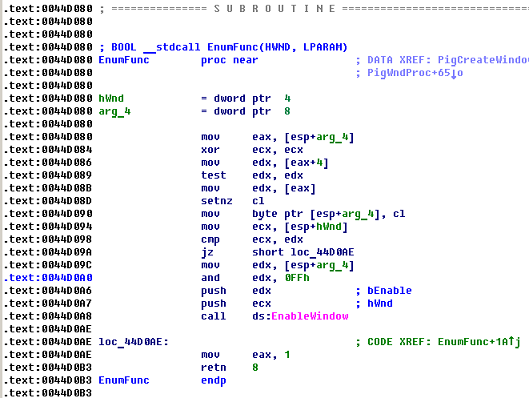
We are interested in the following commands:
.text: 0044D0A0 and edx, 0FFh
.text: 0044D0A6 push edx; bEnable
.text: 0044D0A7 push ecx; hWnd
.text: 0044D0A8 call ds: EnableWindow
Which prompts that for some windows this function is called in the form of EnableWindow (TRUE, ...) ;, and for some EnableWindow (FALSE, ...) ;. We jump up the dependencies (it is better to name the functions in the logic of which you are completely sure) and find that the EnumFunc function is used as a callback function when EnumWindows is called, followed by a call to the SystemParametersInfo function with code 0x61. A short google makes it possible to find out that in this way the authors tried to turn off the Alt-Tab combination. We are not interested in this, so we treat bytes at the offset .text + 0x0044D0A0, we correct the instruction and edx, 0FFh to or edx, 0FFh, which will allow calling the EnableWindow function always with the first parameter not equal to zero. The second reference to the EnableWindow function occurs when the application is closed, which indicates that the authors restore the truce after doing the business. Nothing is right here.
Of course, I want to immediately apply the patch and look at the result, but it wasn’t there! First you’ll have to generate a diff file that looks like this:
This difference file has been created by IDA Pro
warhogs.exe
0004C4A1: E2 CA
Then you need to apply the patch to the executable file with a third-party utility. This is done using the compiled source ida_patcher.c. The options for the resulting console application are as follows: -i
We start the application, try Alt-Tab, it switches, but warhogs.exe immediately goes to appcrash. In principle, it is not surprising why they piled so many crutches in the code. But there is a nice bonus, now after appcrash the desktop is not locked, you can safely continue to work!
Now you need to make the application run in screen mode. After a little study of the information, 2 ways were found to perform the following steps: 1 - changing the application code (changing the code for working with Direct3D 7), and 2 - using a third-party application called DxWnd, which will allow forcibly launch warhogs.exe in screen mode.
We choose the second way, because he is simpler. DxWnd intercepts calls to Direct3D.
We try - it turns out! Switching between windows is painless, warhogs works stably in screen mode, IDA quietly debugs warhogs.exe step by step. Everything is ready for deepening into the inside of the engine, which









