We are writing an application on GTK + using the C ++ and GTKMM library
Epigraph
Once my wife asked me to write her a simple little program that can calculate the area of figures, perimeters, and other parameters if there is sufficient data. For example, you need the area of a triangle, its sides are indicated. Enter the sides, press the button and get the area. Or only the side and two corners are indicated. In general, any data sufficient to calculate the rest.
It is worth noting that for the past 5 years I have only been a web developer, mainly PHP, although of course sometimes something needs to be done in ruby and perl. In general, the language is not a problem for me, the main thing is to understand the meaning of the processes in the computer, and then at least Assembler (once even engaged in disassembling and a little patching of applications for Windows). But still, when I wrote desktop applications, I don’t remember anymore. But then I decided to write a desktop one so that my wife would be comfortable using it in the absence of the Internet and there was no need to put a web server with PHP on her laptop. In addition, I have long wanted to try myself in using the C ++ language. Well. My wife is on a Linux Ubuntu laptop. The graphics system is Unity, based on Gnome3. Where Gnome is, there is GTK +.
And so it was decided to write a desktop application for Linux using Gtk +. Interesting? Welcome to cat!
Understanding the GTK + Library
It is worth noting that most libraries and applications on Linux are executed using a procedural approach. My object-oriented thinking is so ingrained that without the full use of OOP, I am terribly not comfortable. I decided to wrap the GTK + calls functions in my custom classes. Clear business, I made it absolutely unprofessional, without use of constructions specific to C ++. Needless to say, Straustrup was read less than half, and my whole OOP comes from where I started using it - from PHP. Ugly, but it worked. It was easier to draw elements, display a window, process events. But still not that. Having implemented the application in this way, I left it for a year. Froze. But suddenly I came across the GTKMM library - the official C ++ - interface for the GTK + GUI library. And so I took this abandoned application and started converting it. Of course, I threw out the basic self-written classes, since I replaced them with GTKMM classes. Here is my experience in exploring this wonderful library, I want to share with you, my dear readers. So let's get started.
I apologize right away that I will omit the creation of the interface of our application at the beginning, although I believe that it is from creating the appearance (more precisely, the location of the controls on the form in order to revive them in the future), but still the application was written and rendered in the first version occurred by calling certain functions. Now it was decided to use GtkBuilder, but more on that later.
Point of entry
The entry point to a C ++ application is a function
main(). In our application, it will load GtkBuilderour form from a file, display it and start the application’s message processing cycle. Initialize the application
Glib::RefPtr app = Gtk::Application::create(argc, argv, "org.apmpc.geometry");
Next we will create our form
builder = Gtk::Builder::create_from_file(UI_FILE);
We bind the form to the class - the handler (the class uses its own, which is an inheritor from
Gtk::Window, so we will use the method get_widget_derived.builder->get_widget_derived("MainWindow", appwindow);
For reference, if you want to describe handlers as functions and do not want to create classes for a small application, small form, or for religious reasons, you can use the class object
Gtk::Window, as indicated in the documentation, in which case the method will be used get_widget. Well, the final point is to start the application message loop
return app->run(*appwindow);
application
Late, but still a little more detailed I will describe the components of the application. It consists of two forms. The first is the main window. It has buttons for shapes.
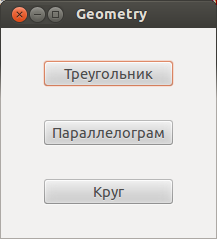
Click on the button - select the shape. Next, the second form opens - the figure window.
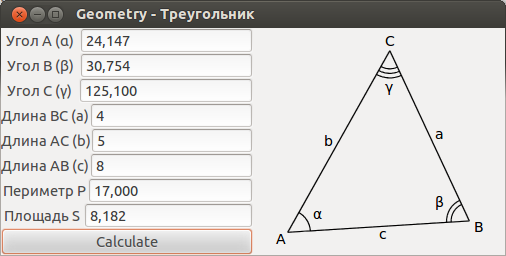
On the left are the input fields for the values and the result, on the right - the selected figure. The design took into account the expansion of functionality, adding shapes, so the shape selection buttons are created when the main window starts.
The MainWindow class inherited from is created for the main form window
Gtk::Window. In the constructor of this class, the creation of shape buttons occurs. A repository of button pointers is a vector m_pvShapeButtons.m_pvShapeButtons.push_back(new Gtk::Button(CShape::getShapeName(i+1)));
Each button on an event is
clickedhung a methodMainWindow::onShapeButtonClick(int iShape)m_pvShapeButtons.at(i)->signal_clicked().connect(
sigc::bind (sigc::mem_fun( *this,
&MainWindow::onShapeButtonClick), (i+1) ) );
I need to pass the shape index to the clicked event handling method, since there is a single shape processing class
CShape. It contains information about other classes of shapes that are inherited from the class CShape. They already have information about the fields for entering data, the names of these fields and formulas for calculation. Well, do not forget to attach the button to the container and display
m_pShapeButtonBox->pack_end(*m_pvShapeButtons.at(i));
m_pvShapeButtons.at(i)->show();
When you click on the button, we open another window. By index, we determine the shape and display the fields for data entry. The input field consists of three parts - a container
Gtk::Boxcontaining a label Gtk::Labelfor displaying the name of the input field and a field for entering text Gtk::Entry. All this was decided to combine in one class with the name CEditBox. It will also contain the methods necessary for input and output of data with type conversion. 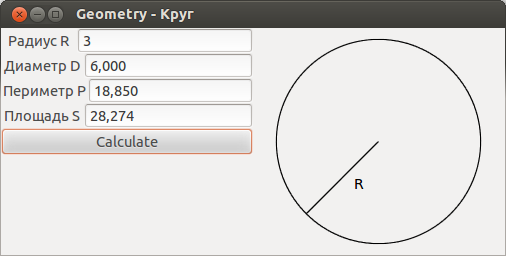
In the ShapeWindow constructor, create the required amount
CEditBoxfor the selected shape. We draw the figure on the right side of the window where the class object is located CCanvas, which is inherited from Gtk::DrawingArea. Rendering occurs by event onDraw. Information about the figure is contained in the figure class. The draw class method of the shape class calls class methodsCCanvas for drawing graphic primitives (Lines, circles, text)Conclusion
That's all I would like to report about my first GTK + application using GTKMM, and indeed in C ++. All code is on github . Further plans are to make the implementation of calculating the area of the parallelogram, add the ability to collect the debian package and put it on ppa. I will be glad to answer all questions and comments on this article.
UPD Corrected the functional approach to the procedural one. As it turned out, the phrase functional approach, or rather functional programming, is used in cases when functions are calculated in mathematical understanding, and not functions as subprograms, as I thought initially. For example, languages that use a functional approach: LISP, Erlang, Scala. C and C ++ are procedural languages.









