Happy hacking keyboard
Preamble
The keyboard and mouse on the desktop are constantly fighting for closeness to the owner. This leads to the fact that the mouse pushes the keyboard, resting against its lower right corner. The keyboard leaves to the left, as if typing is needed not for me, but for my neighbor. Conversely, when you need to print, the mouse leaves the fighting position.
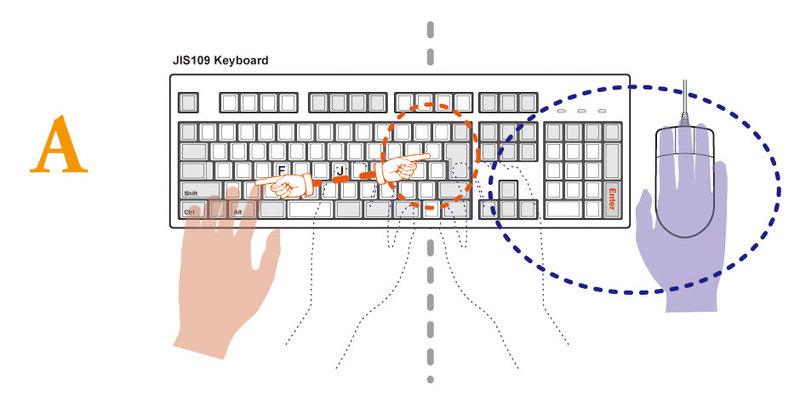
I was tired of these battles, and I decided it was time to find some compact replacement for the standard 104-button keyboard.
There were few requirements: convenient, reliable, matte (for some reason, marketers decided that consumers like gloss and began to mold it on an industrial scale for everything that concerns a consumer finger). And mechanical.
Immersion
I plunged into readings, carefully read the original article about mechanical keyboards . There I stumbled for the first time on a happy hacking keyboard, but it seemed to me nothing more than cool at that time, and I continued to search. First I liked the Cherry G84-4100, but then I also took a look. Well, there’s a mess in the bottom row.
In parallel, a lot of new things emerged about the history of the appearance of various function keys and keyboard shortcuts, about why vim uses hjkl and esc, and which octopus wrote emacs. By that time, my pickiness had turned into perfectionism, and I was convinced that if you take it, then the best. And then again hhkb caught my eye ...
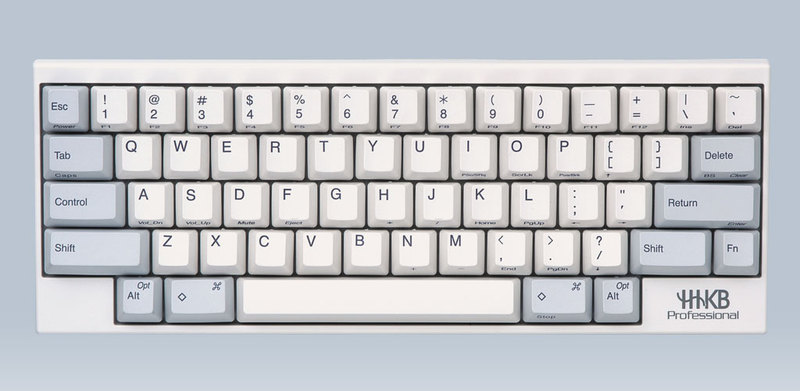
Having carefully studied the location of the keys, I realized that Control in place of Caps Lock is more convenient than at the bottom left (the left little finger has already thanked me), that the absence of arrows is not fatal (at worst, they are emulated, as well as jumping over a document ) The Delete / Backspace key directly above the Enter key turned out to be a good find. Plus, I always liked the ANSI layout more than the others.
At first glance, “trimming” up to 60 keys looks ridiculous. Okay, you can live with emulated f1-f12, and arrows? And PgUp, PgDown ??? But then you think about how often you use the f1 button, or the right windows-key. Or the notorious menu key. Not so often, or never at all. You have what you need. For the rest, there is the fn key.
I would like to say one more thing about the layout. The creators of the keyboard were clearly nostalgic for the terminals of the mid-70s and the first staffers of that time.


This is the layout of the ADM-3A terminal . It was the dominant terminal at the Department of Computer Engineering at the University of California at Berkeley, so many key combinations on UNIX, and in particular the designation of the home directory with a tilde, were invented either while working on this terminal, or taking into account its layout.
The back of the keyboard carries two surprises, one of which I found very useful. These are DIP switches and a mini-USB port, which is used to connect the keyboard to a computer, and, as a bonus, two ordinary USB ports (with a power limit of 100 mA).
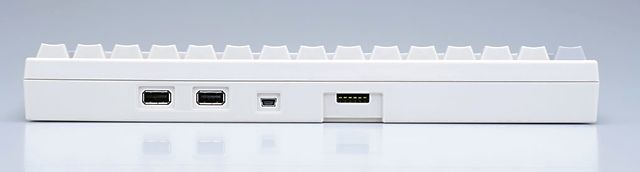
I liked the solution with mini-USB, because when you use the instrument at home and at work, you get a real Plug and Play with a minimum of time costs, just get the second wire!
Using 6 switches, you can change keyboard modes:
| SW1 | SW2 | Keyboard mode |
| Off | Off | HHKB Mode |
| ON | Off | Lite mode |
| Off | ON | Macintosh mode |
| ON | ON | N / a |
| Dip switch | Key / function | SW OFF | SW ON |
| SW3 | Delete key | Delete | Backspace |
| SW4 | Left meta key | Meta | Fn |
| SW5 | Alt Key / Meta | Alt = Alt, Meta = Meta | Meta = Alt, Alt = Meta |
| SW6 | Wake up | Disabled | Enabled |
 ) / Mod4. To do this, you need to enable the mac mode, then delete turns into a backspace, and the OS starts to respond to the coveted buttons, well, for convenience, changed Alt and Meta with the 5th switch. In Mac mode, at the same time, some additional functions such as volume up / down are available, which work in the same Ubunt without any additional gestures, and for Mac there is a driver.
 As for the type of keyboard, it is built on Topre switches, which are considered the best on the market.
The keys themselves are made of high-quality plastic PBT (Polybutylene Terephtalate), all but a space (ABS, Acrylonitrile Butadiene Styrene).
What is affected by the type of plastic is written in detail here . In short, PBT is more resistant to “polishing” and deformation, and a gap made of ABS, with intensive use, after a while will begin to shine like cat's eggs. (To be honest, it even differs slightly from other keys in texture and shade) Then the shiny one can either be changed or sandblasted.
Symbols on the keys are applied by sublimation.
There are several keyboard options: white, black, with inscriptions on the keys, without them, and the same Type-S options, that is, quiet (the whole difference is that they put on a small gasket on the cylinder on which the key is mounted, which and suppresses the blow of one part of the switch on the other. For pleasure you need to overpay almost 200 bucks, but it's not worth it, in my opinion. Besides, you can implement such simple silencing yourself).
Purchase
A price of 300 bucks per keyboard usually triggers a “300 bucks? For the keyboard ??? " But there is an old one, like the world, that says that a product costs as much as a buyer is willing to pay for it. Here everyone convinces himself. For me, this is a convenient universal tool, and a fetish, and a story, and just an unusual toy. After all, every man has his own toys, right?
You can buy either in the States or at home - in Japan .
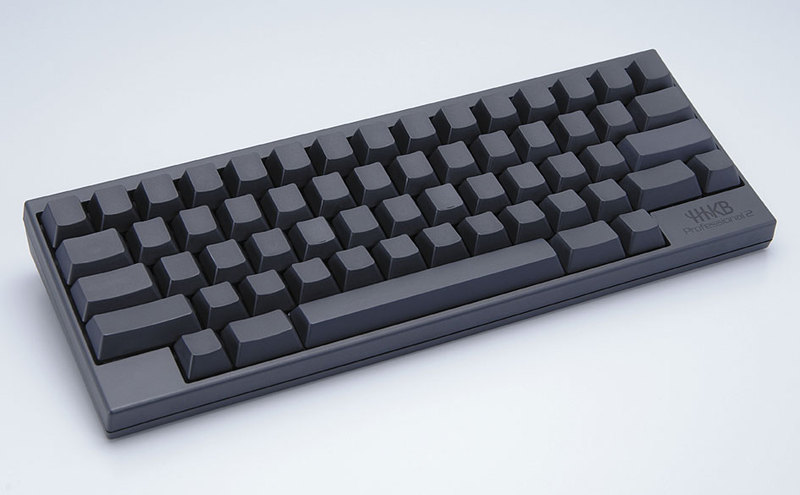
I chose the black (actually smoky gray) version without inscriptions and did not fail. The interesting thing is, until you have a keyboard without inscriptions in your hands, such as Das Keyboard, you’re afraid that you can print on it, because even typing blindly, you sometimes peep. It turned out fears were in vain.
To summarize
The battles on the table finally ended, each instrument took its place, and does not interfere with each other. The keyboard does not dangle left and right, and the mouse has no reason to butt it.

Big keys behave perfectly, their course is soft and accurate. You get used to backspace right above Enter, very quickly, but for the time being you are reflexively looking for the letter ё in place of Esc. The keyboard feels great with a laptop, only the direct mini-USB plug needs to be changed to a corner ... In general, you quickly get on it, and working with other keyboards becomes uncomfortable, especially for laptops, where, in my opinion, no one thinks about ergonomics .
One of the creators and inspirers of this keyboard, Eiichi Wada, an honorary professor at the University of Tokyo, says the PC is today a consumable item, and the keyboard is like a horse saddle ((の 鞍). You change horses, and leave the saddle because you are related to it, and your body is used to it. I liked that philosophy. (I immediately remembered that at cyber games tournaments everyone comes with their own mice and carpets.) Although it is not necessarily the saddle that may be the creation of Eiichi Wada. It may be Mitsumi Classic ...
The idea of a super-compact keyboard is widespread in narrow circles. There are a lot of options for the so-called tenkeyless keyboards, which simply have a digital block cut off, the same Topre, Filco, Leopold, have the IBM SSK, which is produced by Unicomp.
From direct analogues and competitors, you can consider KBC Poker .
Remember one thing: if you decide to buy such a keyboard cleanly, you will quickly be disappointed in it, because nevertheless it is inconvenient for the average user. If for yourself, thoughtfully, you will not regret it.
By the way, hello to you from two distinguished gentlemen.











