 April 3, 2012 at 11:36
Overview of Direct Attached Storage CFI-B4043JDGG
I recently learned about an interesting class of DAS (Direct Attached
Storage) devices .

This is a NAS that does not have its own operating
system on board, but allows you to create a hardware RAID array of 2-8
disks. I admit that if before that I didn’t have a NAS, I would
doubt that such a device could be in demand at all.
It is not clear why it is better than an ordinary portable hard drive. But
it turned out that in certain circumstances, DAS is exactly what you
need.
Before that, I wrote a review of Synology DiskStation DS211, a very worthy NAS
with a bunch of features and twists, but if you have your own full-fledged
a file, a web, or something else there is a server that you
administer yourself (like me), then NAS is somehow not needed. After all, he is imprisoned “everything
works out of the box” - and putting some kind of software on it is a whole
problem. Therefore, Diskstation was donated by iBear , and I began to settle in with
DAS CFI-B4043JDGG, because without knowing it, I already
used its prototype :

As you can see in the picture, DAS is just what I really needed.
Firstly, I could finally assemble hard
drives that do not fit into the system unit into a civil box, and secondly, instead of a bunch of wires,
use one USB-3 or eSATA. The data transfer rate
can reach up to 300 megabytes per second.
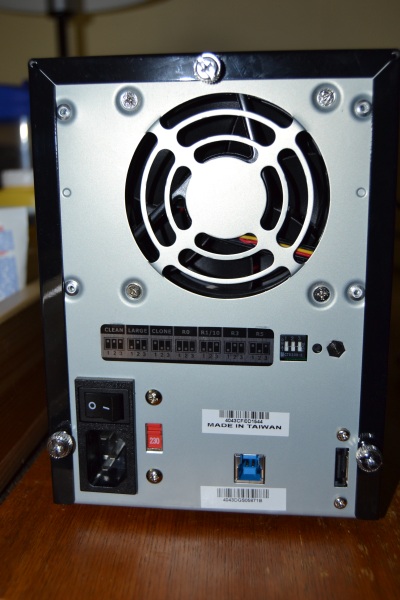
I have such a pretty standard picture:
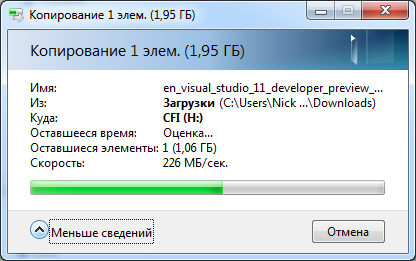
I already said that DAS is essentially a hardware raid.
Raid configuration was done simply by 5 points:

As you can see, it is done using three switches. Possible
configurations:
Branded by CFI:
And of course the classics:
R0, R1 / 10, R3 and R5.
Honestly, I still could not understand why I could use
Large instead of R0, and Clone generally has some strange mode, if there are
two disks , then R1 is it, and if it is 4, then R5 is already asked.
Clean mode is useful if DAS is used as a box for hard drives.
After selecting the mode, holding the reset for five seconds, turn on the power, and the device will
configure the raid according to the position of the switches. In this case, all
information from the hard drives will be erased. Then you need to mount the
device as a disk in the operating system and enjoy. Fast,
clear and no hemorrhoids.

The device has one plus: it is a stable, very fast and easy to
configure hardware raid. Real unix-style:
Exactly one function is executed, but it is simple and high-quality.
Due to its simplicity, I could not find any cons, again due to the
simplicity of the device. There is really one wish, it would be very cool
if the creators came up with a system for converting software
mdadm-raids for use in this box. I had to
transfer the contents of my software raid to the device.
DAS SCFI will ideally stand next to some nettop such as Acer
Aspire Revo or something similar under the table or in the pantry (like mine).
Russian website: www.cfi-rus.ru Manufacturer
website: www.chyangfun.com/products_stroage.html
Buy through Yandex.Market: market.yandex.ru/search.xml?text=CFI-B4043JDGG&hid=91018&srnum=16
Storage) devices .
This is a NAS that does not have its own operating
system on board, but allows you to create a hardware RAID array of 2-8
disks. I admit that if before that I didn’t have a NAS, I would
doubt that such a device could be in demand at all.
It is not clear why it is better than an ordinary portable hard drive. But
it turned out that in certain circumstances, DAS is exactly what you
need.
Before that, I wrote a review of Synology DiskStation DS211, a very worthy NAS
with a bunch of features and twists, but if you have your own full-fledged
a file, a web, or something else there is a server that you
administer yourself (like me), then NAS is somehow not needed. After all, he is imprisoned “everything
works out of the box” - and putting some kind of software on it is a whole
problem. Therefore, Diskstation was donated by iBear , and I began to settle in with
DAS CFI-B4043JDGG, because without knowing it, I already
used its prototype :
As you can see in the picture, DAS is just what I really needed.
Firstly, I could finally assemble hard
drives that do not fit into the system unit into a civil box, and secondly, instead of a bunch of wires,
use one USB-3 or eSATA. The data transfer rate
can reach up to 300 megabytes per second.
I have such a pretty standard picture:
I already said that DAS is essentially a hardware raid.
Raid configuration was done simply by 5 points:
As you can see, it is done using three switches. Possible
configurations:
Branded by CFI:
- Clean - all discs are independent of each other;
- Large - all disks are combined into one large virtual disk;
- Clone - data is cloned to each installed disk, and the
storage size is equal to the size of the smallest disk.
And of course the classics:
R0, R1 / 10, R3 and R5.
Honestly, I still could not understand why I could use
Large instead of R0, and Clone generally has some strange mode, if there are
two disks , then R1 is it, and if it is 4, then R5 is already asked.
Clean mode is useful if DAS is used as a box for hard drives.
After selecting the mode, holding the reset for five seconds, turn on the power, and the device will
configure the raid according to the position of the switches. In this case, all
information from the hard drives will be erased. Then you need to mount the
device as a disk in the operating system and enjoy. Fast,
clear and no hemorrhoids.
Hardware and software
- The main raid functionality is provided by the JMicron JMB394 or JMS539 raid controller;
- A maximum of 4 3.5 "drives can be installed;
- There are no hardware limitations on the disk capacity, but you need to coordinate this
with the OS to which DAS will be connected; - The discs are cooled using an 80mm fan on the rear panel;
- On the front is the hard drive bay cover;
- Compatible with Windows, Linux, OS X.
Pros and cons
The device has one plus: it is a stable, very fast and easy to
configure hardware raid. Real unix-style:
Exactly one function is executed, but it is simple and high-quality.
Due to its simplicity, I could not find any cons, again due to the
simplicity of the device. There is really one wish, it would be very cool
if the creators came up with a system for converting software
mdadm-raids for use in this box. I had to
transfer the contents of my software raid to the device.
Summary
DAS SCFI will ideally stand next to some nettop such as Acer
Aspire Revo or something similar under the table or in the pantry (like mine).
Related links:
Russian website: www.cfi-rus.ru Manufacturer
website: www.chyangfun.com/products_stroage.html
Buy through Yandex.Market: market.yandex.ru/search.xml?text=CFI-B4043JDGG&hid=91018&srnum=16









