March 25, 2012 at 09:13
Installing user scripts in Opera in general cases and for protected pages (https)
- Tutorial
For some user scripts, it starts to matter how the user installs it in the Opera browser. If you make the installation without allowing access to some domains, the work will be inferior, and when installing a cross-domain script, which even uses a secure protocol (HTTPS), this can easily happen. For example, for the HabrAjax user script , in addition to the main Habr site, access to the Google Plus buttons on plusone.google.com is used and updates to the script on the userscripts.org domain are checked . All this requires additional settings, which were described directly in the user script (link in the settings " note . For Opera"), but made rather briefly and with one illustration. Here we look at the question more broadly, so that Opera users and developers of user scripts for it have instructions at hand and fully understand the breadth of the issue. At the same time, the installation locations of user styles are described. For those who know all this , it will be useful to see the paragraph of conclusions with 2 comments at the very bottom.
The first feature of the operation of user scripts in the Opera is that special BeforeScript events do not work for them, which work fine for regular scripts and provide cross-browser compatibility. Therefore, if we want to work with another domain in the frame, the user script must provide access to another domain, which means that in the script settings for sites both the main site and the site located in the frame should be strictly in accordance with what is written in the meta script directives for other browsers.
The second feature - if the sites are running on the https: protocol, for them you need to set the user scripts permission in this protocol - the general Opera setting, which then will often remind yourself out of place. If you do not want to do this, there is a way out in the design of a user script as an addon. Now in more detail.
User scripts in Opera can launch a lot of users. Just look at the statistics of using the HabrAjax user script in browsers that agreed to give 26 people, it can be seen that 8 people installed the script on the Opera (not excluding other browsers). By the way, if you used HabrAjax, please vote in this poll: " In which browser do you use HabrAjax ?". It will help to gain more statistics.
For reference, for those who have not yet installed user scripts in the Opera, the instruction below. It is not the easiest, but the whole focus of this article is that it is even more complicated for secure pages with user scripts. Not everyone also knows that there are not one, but two ways to install scripts in Opera (not counting add-ons); in the instructions - both are illustrated. The Mobile Opera also has all the features for working with user scripts and user styles, but the function resolution settings can be disabled in opera: config and you need to verify them if something doesn’t work (beyond the scope of the article).
1. You can install a user script (without the mechanism of add-ons introduced in the 11th version) in Opera in 2 modes: for all sites at once, using meta-directives of scripts, or for some site on one domain (and there may be many such sites). User scripts, accepted as the actual standard in 2 main browsers (Firefox and Chrome), have meta-directives - a few commented lines, usually located at the beginning of the user script file. The URLs in which the scripts operate are recorded in them, so the installation of the rules of work is determined by the directives and requires a single click on the "Allow installation" button in these browsers. In Opera, it was originally not like that, but it was better than at the dawn of introducing user scripts, when in Safari scripts were run for all sites at once, and only the actions of the script itself could select a group of URLs in which it continued to work.
The second way - to prescribe settings for sites - is moving away from the modern way of setting user scripts through directives. But they were left in the Opera due to the fact that sites can be manually set many restrictions and features, including individual styles and scripts. These 2 methods conflict somewhat with each other: the application of the second one blocks the operation of the first method (scripts from the shared folder do not run, even with the necessary directives) for the selected site. This should be understood when prescribing individual settings, as it is not obvious. We show this general information with illustrations.
1.a) Open the browser and its General Settings (Ctrl-F12 or from the menu, as in the picture).
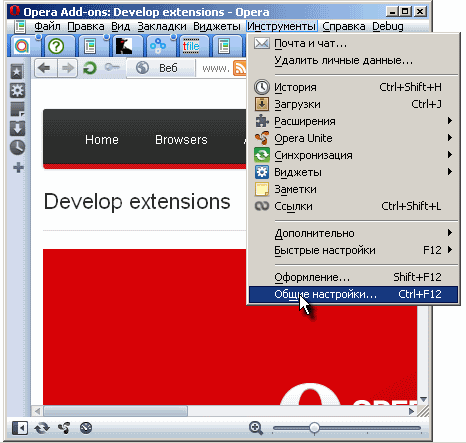
Hereinafter we will show Opera 11.61 in WinXP with the theme (Shift-F12)Netbook Skin v.11.3 - for compactness:

1.b) Open the tab " Tools - General Settings - Advanced - Content - Configure Javascript " - we get into the settings of the 1st mode of user scripts. If you place the script in the User Files Folder specified in the settings, it will be executed in each browser window. If you write include directives , as is usual for scripts, indicating sites, it will be filtered by directives in other sites. Scripts are rarely left without directives. Not always a script written for a particular site can work correctly everywhere (do nothing on all other sites), and resources for the initial launch of the script in each window will be spent.
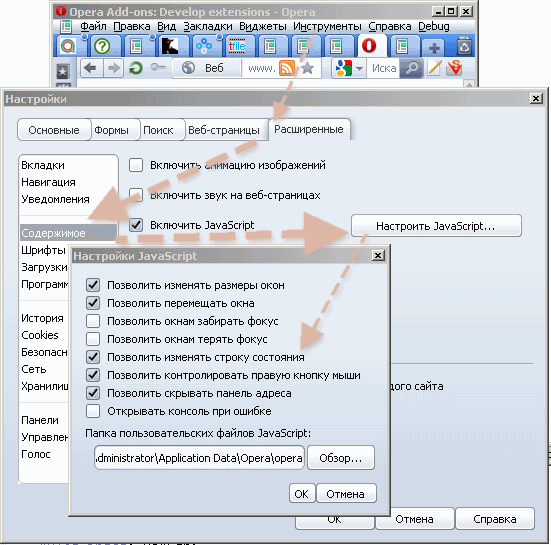
Features of user scripts: if there is a script with include directives in the shared scripts folder and at the same time there are more precise settings for sites for the same site ("Settings for sites ..." button), it is not executed. The script does not have to have the * .user.js extension, * .js is enough. Scripts are executed in alphabetical order of their file names, not case sensitive (in Win at least).
1.c) Similar to scripts, there are settings for common styles: for all sites, for each window in " Tools - General Settings - Advanced - Content - Customize Styles ... ".
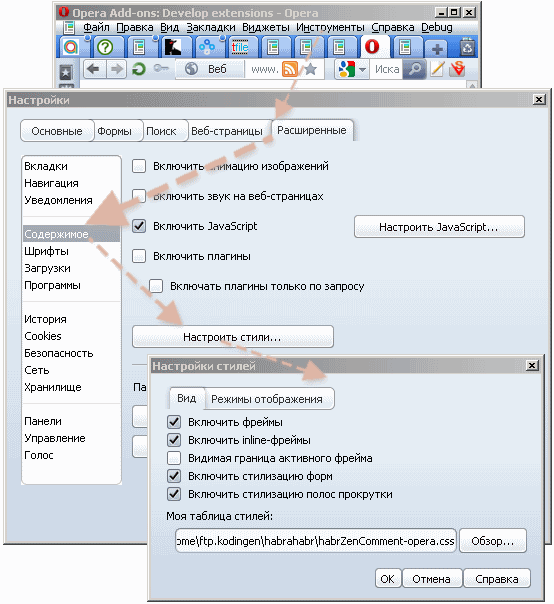
They, too, can have side effects on non-sites, if we put the style for a particular site in the folder for all sites (the inscription in the screenshot is " My style sheet"). IE7-9 and Safari have such a primitive feature. Therefore, for sites in the Opera, individual site settings for scripts and styles have been made.
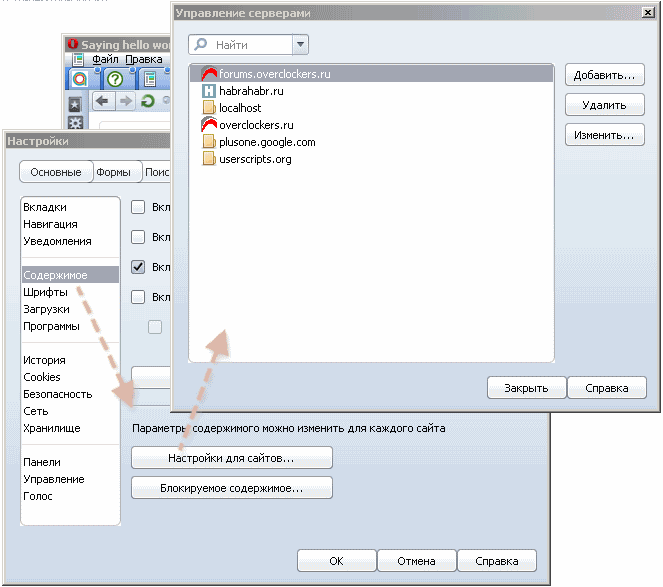
Individual settings for scripts and styles that are available only for Opera among the main browsers are also an outdated and non-modern phenomenon in the background add-ons that Opera supports (from the 11th version), because the user’s work on the browser settings is much more than when installing the add-on.
1.d) Open " Tools - General settings - Advanced - Content - Settings for sites ..."to install scripts and styles for some sites. Since all other settings are set to their normal position, you need to pay attention to 3 places: domain name, path to styles for the site, path to scripts for the site (to the scripts folder). Total, it turns out that if the site has at least one feature other than scripts, for example, user styles, then the scripts are forced to write not in the shared script folder with the directives, but in “Settings for sites.” Then, if more than one site is mentioned in the directives it is necessary for them about isat settings for sites . If the script is in the common scripts folder, you can rely on yuzerskripta directives - they will work.
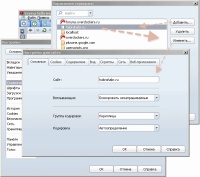
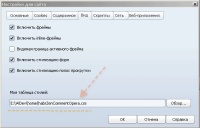
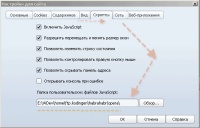
The general description of 2 installation options for user scripts in the Opera and their features has been completed. But there is another feature, after which it will be clear that the difficulties of browser interfaces are just beginning.
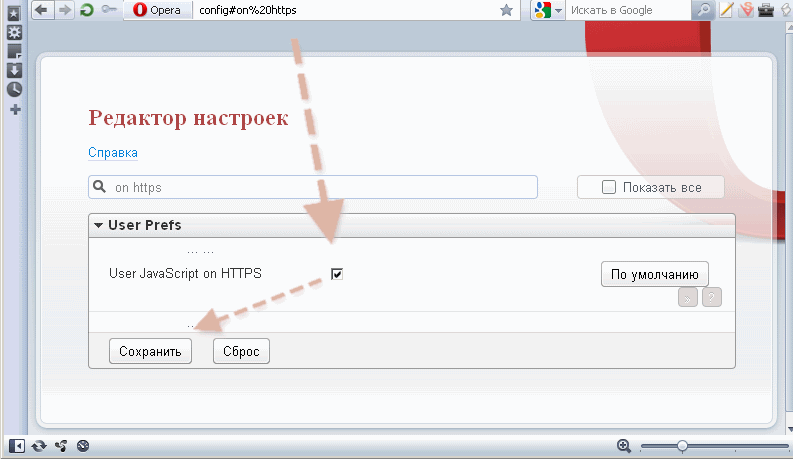
2. What if there is a URL with a secure https protocol among sites? Opera simply does not miss such sites for working with user scripts. They do not work by default in it. You can enable user scripts on such sites by installing a browser:
" opera: config # on% 20https " (write this in the address bar; show the desired setting in the "User Prefs" section)
- User JavaScript on HTTPS - Checked (select the checkbox)
- " Save "(click the button below in this section)
- restart the Opera browser.
This installation will deliver a lot of unpleasant minutes in the future. On every site with HTTPS, she will ask the same question (the first time she visits the site after opening the browser or after changing the script): "And it doesn’t matter that the user’s script is not going to look into this domain. Open, say, GMail - the question will be (the first time). After restarting the Opera - again.
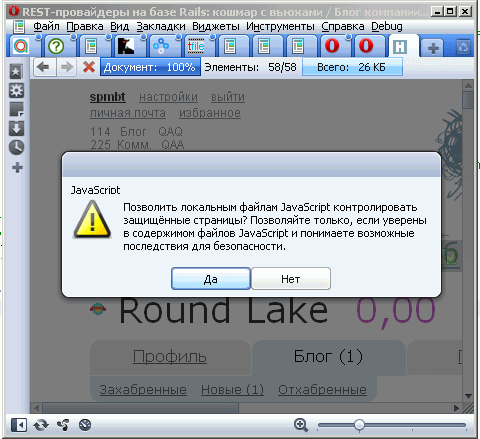
Failure to install the obsessive parameter cannot be avoided when running the script from a shared folder - and there this permission is required in the settings.
The imperfection of the paranoid and illogical issue is unlikely to be fixed in the near future - the company has many more serious bugs hanging over the years. It would be logical to have more flexible settings (UserJS on https in the "Settings for sites") and ask for permission only when the browser has a user script for working in this site. Therefore, to achieve perfection, you have to abandon this method of resolving https and try to create an addon using a script.
(In order for the Opera not to feel alone among the bugs of user scripts, in the next article we will analyze the Chrome bug (2.5 years from the moment of its execution) with access to the next frame and its solution.)
Switching from a user script to an add-on is another amount of the “fuss” of a developer around codes and their options for browsers. Cross-browser user script is a convenient way to design and publish. The developer does not need a special environment for compiling options for browsers. Therefore, the developer is less dependent on the workplace. More precisely, independent. A text editor is enough to correct or add a user script.
It’s also convenient for the user to work with one file. At least in Firefox and Chrome, it takes 2 clicks to download and confirm the installation. In Safari, too, although NinjaKit does not support GreaseMonkey for some reason, a user-scripting support environment in Firefox that exists as a de facto standard. In Opera, if you do not make settings for sites - there is also a little fuss - copy the file to the shared script folder.
But, starting with the "customization" (in the bad sense) of browsers, it gets worse for everyone. The user needs to know that for different browsers there are different places for hosting scripts. He needs to restart the browser in most cases. One convenience - the same 1-2 clicks for installation, not counting the restart.
To the developer, it’s even worse, because the logic of customization goes beyond the limits of one language (JS) and spreads to a build script or to a set of its own rules for manual assembly and publication in different places. Therefore, whenever possible, we should strive for a minimal mix of technologies in customization by browsers. But since Opera cannot do decent work of scripts with HTTPS, you have to look into the problems of building add-ons.
There is still a crazy idea - to create cross-browser add-ons that work everywhere with the same code, distinguished by extension letters. This is also very suitable for Safari, for which there is no full support for user scripts (problems, for example, in the implementation of cross-domain exchange). True, for IE7-9 you will also need a unique solution, going back to the user script, because the user script format for IE add-ons is a classic user script with a lot of restrictions and, of course, the difference in JS logic.
This is the price of solving the transition to an addon instead of a user script. If both parties - the developers and the user group - agree to switch to the add-on in order to avoid problems with HTTPS, we proceed to the instructions for creating the add-on in Opera.
As a positive factor, we get more flexible and new features in add-ons that are partially unavailable in user scripts. For example, the moment the scripts are launched is defined more flexibly, styles are set before the document is created, so the picture of the site does not “jump” in the first second after loading.
On this we will allow ourselves to interrupt the permitted speeches, and disassemble the creation of the addon the next time to complete the topic of the features of creating user scripts for the Opera.
Installing in Opera such a multifunctional script as HabrAjax , supplemented by user styles ( ZenComment ), containing work with several sites and with secure pages (https), runs into 2 installation features. Depending on the type of installation (in the general directory or in a special one for the site), if you set individual site settings, you must remember to prescribe the settings for the same script for all sites mentioned in the include directives . Or put the script in a shared directory, but specify it in the individual settings. Otherwise, confusion will arise - why do auxiliary functions not work? Bug? No, this will not be a bug, but insufficient settings. And if the script works with protected pages (and it has to work with them if there is cross-domain exchange), you have to enable HTTPS permission for user scripts, which in the future prevents you from “living quietly” at the Opera. Salvation is in add-ons, but more about that next time.
(The article is from the general pool of articles generated by working with user scripts for Habr.)
The first feature of the operation of user scripts in the Opera is that special BeforeScript events do not work for them, which work fine for regular scripts and provide cross-browser compatibility. Therefore, if we want to work with another domain in the frame, the user script must provide access to another domain, which means that in the script settings for sites both the main site and the site located in the frame should be strictly in accordance with what is written in the meta script directives for other browsers.
The second feature - if the sites are running on the https: protocol, for them you need to set the user scripts permission in this protocol - the general Opera setting, which then will often remind yourself out of place. If you do not want to do this, there is a way out in the design of a user script as an addon. Now in more detail.
How to run a simple one-site user script in Opera?
User scripts in Opera can launch a lot of users. Just look at the statistics of using the HabrAjax user script in browsers that agreed to give 26 people, it can be seen that 8 people installed the script on the Opera (not excluding other browsers). By the way, if you used HabrAjax, please vote in this poll: " In which browser do you use HabrAjax ?". It will help to gain more statistics.
For reference, for those who have not yet installed user scripts in the Opera, the instruction below. It is not the easiest, but the whole focus of this article is that it is even more complicated for secure pages with user scripts. Not everyone also knows that there are not one, but two ways to install scripts in Opera (not counting add-ons); in the instructions - both are illustrated. The Mobile Opera also has all the features for working with user scripts and user styles, but the function resolution settings can be disabled in opera: config and you need to verify them if something doesn’t work (beyond the scope of the article).
1. You can install a user script (without the mechanism of add-ons introduced in the 11th version) in Opera in 2 modes: for all sites at once, using meta-directives of scripts, or for some site on one domain (and there may be many such sites). User scripts, accepted as the actual standard in 2 main browsers (Firefox and Chrome), have meta-directives - a few commented lines, usually located at the beginning of the user script file. The URLs in which the scripts operate are recorded in them, so the installation of the rules of work is determined by the directives and requires a single click on the "Allow installation" button in these browsers. In Opera, it was originally not like that, but it was better than at the dawn of introducing user scripts, when in Safari scripts were run for all sites at once, and only the actions of the script itself could select a group of URLs in which it continued to work.
The second way - to prescribe settings for sites - is moving away from the modern way of setting user scripts through directives. But they were left in the Opera due to the fact that sites can be manually set many restrictions and features, including individual styles and scripts. These 2 methods conflict somewhat with each other: the application of the second one blocks the operation of the first method (scripts from the shared folder do not run, even with the necessary directives) for the selected site. This should be understood when prescribing individual settings, as it is not obvious. We show this general information with illustrations.
1.a) Open the browser and its General Settings (Ctrl-F12 or from the menu, as in the picture).
Hereinafter we will show Opera 11.61 in WinXP with the theme (Shift-F12)Netbook Skin v.11.3 - for compactness:
1.b) Open the tab " Tools - General Settings - Advanced - Content - Configure Javascript " - we get into the settings of the 1st mode of user scripts. If you place the script in the User Files Folder specified in the settings, it will be executed in each browser window. If you write include directives , as is usual for scripts, indicating sites, it will be filtered by directives in other sites. Scripts are rarely left without directives. Not always a script written for a particular site can work correctly everywhere (do nothing on all other sites), and resources for the initial launch of the script in each window will be spent.
Features of user scripts: if there is a script with include directives in the shared scripts folder and at the same time there are more precise settings for sites for the same site ("Settings for sites ..." button), it is not executed. The script does not have to have the * .user.js extension, * .js is enough. Scripts are executed in alphabetical order of their file names, not case sensitive (in Win at least).
1.c) Similar to scripts, there are settings for common styles: for all sites, for each window in " Tools - General Settings - Advanced - Content - Customize Styles ... ".
They, too, can have side effects on non-sites, if we put the style for a particular site in the folder for all sites (the inscription in the screenshot is " My style sheet"). IE7-9 and Safari have such a primitive feature. Therefore, for sites in the Opera, individual site settings for scripts and styles have been made.
Individual settings for scripts and styles that are available only for Opera among the main browsers are also an outdated and non-modern phenomenon in the background add-ons that Opera supports (from the 11th version), because the user’s work on the browser settings is much more than when installing the add-on.
1.d) Open " Tools - General settings - Advanced - Content - Settings for sites ..."to install scripts and styles for some sites. Since all other settings are set to their normal position, you need to pay attention to 3 places: domain name, path to styles for the site, path to scripts for the site (to the scripts folder). Total, it turns out that if the site has at least one feature other than scripts, for example, user styles, then the scripts are forced to write not in the shared script folder with the directives, but in “Settings for sites.” Then, if more than one site is mentioned in the directives it is necessary for them about isat settings for sites . If the script is in the common scripts folder, you can rely on yuzerskripta directives - they will work.


The general description of 2 installation options for user scripts in the Opera and their features has been completed. But there is another feature, after which it will be clear that the difficulties of browser interfaces are just beginning.
Use of user scripts on pages with the secure HTTPS protocol
2. What if there is a URL with a secure https protocol among sites? Opera simply does not miss such sites for working with user scripts. They do not work by default in it. You can enable user scripts on such sites by installing a browser:
" opera: config # on% 20https " (write this in the address bar; show the desired setting in the "User Prefs" section)
- User JavaScript on HTTPS - Checked (select the checkbox)
- " Save "(click the button below in this section)
- restart the Opera browser.
This installation will deliver a lot of unpleasant minutes in the future. On every site with HTTPS, she will ask the same question (the first time she visits the site after opening the browser or after changing the script): "And it doesn’t matter that the user’s script is not going to look into this domain. Open, say, GMail - the question will be (the first time). After restarting the Opera - again.
Failure to install the obsessive parameter cannot be avoided when running the script from a shared folder - and there this permission is required in the settings.
The imperfection of the paranoid and illogical issue is unlikely to be fixed in the near future - the company has many more serious bugs hanging over the years. It would be logical to have more flexible settings (UserJS on https in the "Settings for sites") and ask for permission only when the browser has a user script for working in this site. Therefore, to achieve perfection, you have to abandon this method of resolving https and try to create an addon using a script.
(In order for the Opera not to feel alone among the bugs of user scripts, in the next article we will analyze the Chrome bug (2.5 years from the moment of its execution) with access to the next frame and its solution.)
Creating an Opera addon and addon issues in general
Switching from a user script to an add-on is another amount of the “fuss” of a developer around codes and their options for browsers. Cross-browser user script is a convenient way to design and publish. The developer does not need a special environment for compiling options for browsers. Therefore, the developer is less dependent on the workplace. More precisely, independent. A text editor is enough to correct or add a user script.
It’s also convenient for the user to work with one file. At least in Firefox and Chrome, it takes 2 clicks to download and confirm the installation. In Safari, too, although NinjaKit does not support GreaseMonkey for some reason, a user-scripting support environment in Firefox that exists as a de facto standard. In Opera, if you do not make settings for sites - there is also a little fuss - copy the file to the shared script folder.
But, starting with the "customization" (in the bad sense) of browsers, it gets worse for everyone. The user needs to know that for different browsers there are different places for hosting scripts. He needs to restart the browser in most cases. One convenience - the same 1-2 clicks for installation, not counting the restart.
To the developer, it’s even worse, because the logic of customization goes beyond the limits of one language (JS) and spreads to a build script or to a set of its own rules for manual assembly and publication in different places. Therefore, whenever possible, we should strive for a minimal mix of technologies in customization by browsers. But since Opera cannot do decent work of scripts with HTTPS, you have to look into the problems of building add-ons.
There is still a crazy idea - to create cross-browser add-ons that work everywhere with the same code, distinguished by extension letters. This is also very suitable for Safari, for which there is no full support for user scripts (problems, for example, in the implementation of cross-domain exchange). True, for IE7-9 you will also need a unique solution, going back to the user script, because the user script format for IE add-ons is a classic user script with a lot of restrictions and, of course, the difference in JS logic.
This is the price of solving the transition to an addon instead of a user script. If both parties - the developers and the user group - agree to switch to the add-on in order to avoid problems with HTTPS, we proceed to the instructions for creating the add-on in Opera.
As a positive factor, we get more flexible and new features in add-ons that are partially unavailable in user scripts. For example, the moment the scripts are launched is defined more flexibly, styles are set before the document is created, so the picture of the site does not “jump” in the first second after loading.
On this we will allow ourselves to interrupt the permitted speeches, and disassemble the creation of the addon the next time to complete the topic of the features of creating user scripts for the Opera.
Practical findings
Installing in Opera such a multifunctional script as HabrAjax , supplemented by user styles ( ZenComment ), containing work with several sites and with secure pages (https), runs into 2 installation features. Depending on the type of installation (in the general directory or in a special one for the site), if you set individual site settings, you must remember to prescribe the settings for the same script for all sites mentioned in the include directives . Or put the script in a shared directory, but specify it in the individual settings. Otherwise, confusion will arise - why do auxiliary functions not work? Bug? No, this will not be a bug, but insufficient settings. And if the script works with protected pages (and it has to work with them if there is cross-domain exchange), you have to enable HTTPS permission for user scripts, which in the future prevents you from “living quietly” at the Opera. Salvation is in add-ons, but more about that next time.
(The article is from the general pool of articles generated by working with user scripts for Habr.)