Features of the behavior of the new TCP / IP stack Windows
Starting with Windows Vista, Microsoft in its operating systems switched to a new network stack - Next Generation TCP / IP Stack. The stack includes many different goodies: Windows Filtering Platform, a scalable TCP-window and other goodies, but we will not talk about them at all, but about one specific feature of the behavior of the new network stack.
Any self-respecting network scanner should be able to determine the OS of the scanned node, while the more parameters are used, the more accurate the result is expected. For example, the Nmap network scanner uses a very wide set of metrics to determine the operating system: a variety of TCP metrics (timestamp behavior, reordering of TCP options), IP metrics (packet sequence number generation algorithm, processing IP packet flags) and other metrics.
At Positive Technologies, we are also collecting metrics and determining the OS version, so I would like to talk about a recently discovered metric that allows me to identify Windows systems with a new stack. The method is based on the analysis of ICMP Timestamp responses. ICMP Timestamps are a distant ancestor of time synchronization protocols, allowing you to query the time set on a remote system. The structure of the ICMP Timestamp request and response is shown in Figure 1.

Figure 1 - Structure of the response to the ICMP Timestamp request
The standard ICMP header is highlighted in red, followed by the timestamp fields of the moment the request was sent, the moment the request was received by the user acting remotely, and the moment the user sent the response. Timestamps - The number of milliseconds that have elapsed since midnight UTC. If the host does not have the ability to transmit data about its time with an accuracy of milliseconds, then it must set the most significant bit to one and transmit at least some data about the time. We are interested in the last tag. The thing is that Microsoft, as often happens, very frivolously approached the implementation of RFC: instead of network byte order, Windows sends a timestamp with host byte order and does not set the most significant bit to one, despite sending timestamps with accurate to the second. Not only that, starting with Vista, for reasons
The expected behavior of time stamps is shown in Figure 2. In the graphs, the blue dots are responsible for the time stamps received from the server, and the server time graph is marked in red. The abscissa axis in the graphs shows the time from the start of the experiment, the ordinate axis represents the timestamp value in seconds. Line indicates that a transfer was made from the network byte order to the host byte order.
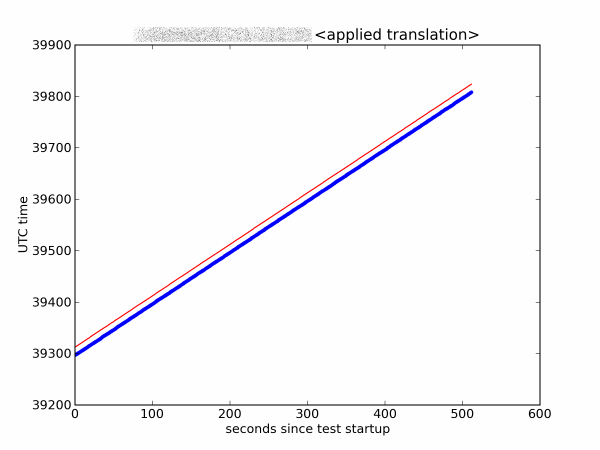
Figure 2 - Normal behavior of time stamps
However, in fact, the picture depicted in Figure 3 (in higher time resolution) was observed.
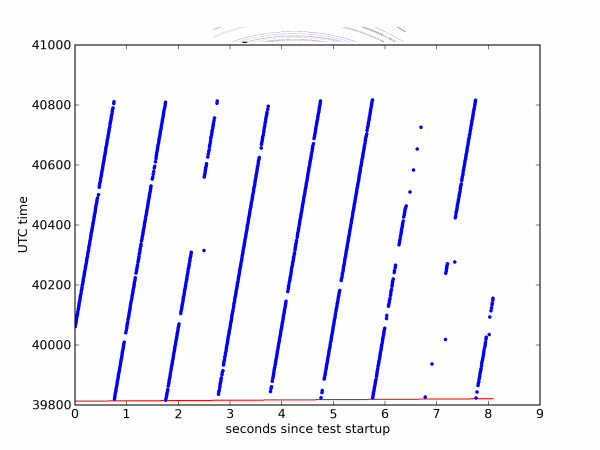
Figure 3 - The behavior of timestamps on a large scale
It can be seen that with a period of one second the value of the sent timestamp increases from true to more than true by 10,000 seconds. The gaps visible on the graph are just a consequence of the fact that the Windows scheduler decided that it was time to interrupt the execution of our program.
Probably, with such timestamps, Windows wants to confuse an attacker trying to find out the time on a remote host. This behavior is observed only for Windows systems with a new stack, which allows a new way to define these systems.
Thanks for attention.
Sources:
Next Generation TCP / IP Stack in Windows Vista and Windows Server 2008
Depths and Peaks of the Network Stack Vista Chris Kaspersky aka Mysh
Nmap Network Scanning. Chapter 8. Remote OS Detection
Any self-respecting network scanner should be able to determine the OS of the scanned node, while the more parameters are used, the more accurate the result is expected. For example, the Nmap network scanner uses a very wide set of metrics to determine the operating system: a variety of TCP metrics (timestamp behavior, reordering of TCP options), IP metrics (packet sequence number generation algorithm, processing IP packet flags) and other metrics.
At Positive Technologies, we are also collecting metrics and determining the OS version, so I would like to talk about a recently discovered metric that allows me to identify Windows systems with a new stack. The method is based on the analysis of ICMP Timestamp responses. ICMP Timestamps are a distant ancestor of time synchronization protocols, allowing you to query the time set on a remote system. The structure of the ICMP Timestamp request and response is shown in Figure 1.
Figure 1 - Structure of the response to the ICMP Timestamp request
The standard ICMP header is highlighted in red, followed by the timestamp fields of the moment the request was sent, the moment the request was received by the user acting remotely, and the moment the user sent the response. Timestamps - The number of milliseconds that have elapsed since midnight UTC. If the host does not have the ability to transmit data about its time with an accuracy of milliseconds, then it must set the most significant bit to one and transmit at least some data about the time. We are interested in the last tag. The thing is that Microsoft, as often happens, very frivolously approached the implementation of RFC: instead of network byte order, Windows sends a timestamp with host byte order and does not set the most significant bit to one, despite sending timestamps with accurate to the second. Not only that, starting with Vista, for reasons
The expected behavior of time stamps is shown in Figure 2. In the graphs, the blue dots are responsible for the time stamps received from the server, and the server time graph is marked in red. The abscissa axis in the graphs shows the time from the start of the experiment, the ordinate axis represents the timestamp value in seconds. Line
Figure 2 - Normal behavior of time stamps
However, in fact, the picture depicted in Figure 3 (in higher time resolution) was observed.
Figure 3 - The behavior of timestamps on a large scale
It can be seen that with a period of one second the value of the sent timestamp increases from true to more than true by 10,000 seconds. The gaps visible on the graph are just a consequence of the fact that the Windows scheduler decided that it was time to interrupt the execution of our program.
Probably, with such timestamps, Windows wants to confuse an attacker trying to find out the time on a remote host. This behavior is observed only for Windows systems with a new stack, which allows a new way to define these systems.
Thanks for attention.
Sources:
Next Generation TCP / IP Stack in Windows Vista and Windows Server 2008
Depths and Peaks of the Network Stack Vista Chris Kaspersky aka Mysh
Nmap Network Scanning. Chapter 8. Remote OS Detection