 December 17, 2011 at 16:13
My first steps in SWT: A simple tabbed notepad
There are very few articles on SWT on Habrahabr , so I will try to correct this small omission.
From this article you will learn:
If you are interested - I ask for a cat.
As you know, Java is famous for its cross-platform (write-once - run anywhere), and this also applies to GUI applications. Although, perhaps, Java is not the most common platform for writing GUI applications. And there are a number of reasons.
Perhaps the main reason for this is the belief that code written for a particular platform will work faster than code that is written for something abstract in a vacuum. Well, in my opinion, perhaps this is true.
Some will disagree with me and say that this is just the style of Java - written once should be executed and look the same on all platforms. And swinggood confirmation of that. Of course, the Swing application can be customized using various themes (Look And Feel), but still it will feel and look not quite like its own.
Although the guys from JetBrains managed to prove (at least to me personally) that Swing applications can be very, very friendly, but the fact remains that it starts to slow down over time, not because it is poorly written, but precisely because The framework GUI is used by Swing, which is somewhat worse friends with operating systems than their native components.
SWT just approached this issue from the other side. By and large, SWT is a thin layer between the Java programmer and the native APIs of a particular operating system, which somewhat violates the Java ideology. But, as they say, the rules just exist in order to break them. Especially if it is for the good. And this, in my opinion, is the main motivation why it is worth paying attention to SWT.
I think that the reader would understand, I should tell you what I wanted to achieve from my notebook.
The idea was very simple:
I wanted to make a semblance of a classic notepad, what we observe under Windows. Only with tabs.
Looking ahead, I’ll say that I didn’t fully realize my idea - there are no opportunities to send a document to a printer for printing, the ability to change the font, search through a document. But, what happened, made it possible to feel the “taste of SWT”, which turned out to be quite pleasant.
Well then. So far there have been only a lot of words, but no action. It's time to bring a little code.
The entry point to the application is (Bootstrap.java):
What have we done here:
Initialized the shell (TextEditor.java):
In short, the menu creation process:
And we launch our application:
Further, during the execution of our notebook, one of the listeners will work (in response to some of our actions), from which we will do what we need, let's run some task in synchronous or asynchronous mode:
Another portion of the pseudo-difficulties that I encountered:
For each operating system and architecture, you need to create your own build. For this we need jars for each specific platform. I'm used to using Maven, but for these purposes it is not very suitable, because alas, I did not find the latest SWT versions in the Maven repositories, and I had to manually download packages for each of the operating system / architecture platforms. In addition, where you need a lot of customization, Maven is not particularly suitable, but good-old Ant comes to the rescue. As a dependency manager, I took Ivy.
A piece of ant-script (build.xml) responsible for packaging for a specific operating system / architecture:
The size of the Jar was 2 - 2.5 MB (depending on the OS and architecture), which is actually not so much.
Having missed a small development cycle through myself, I can notice the
Minuses of SWT in my opinion:
* Few documentation / tutorials
* Google doesn’t know much about SWT as about Swing
* Many problems have to be solved longer.
SWT advantages in my opinion:
* In general, a simple and understandable API
* Cross-platform, native-looking application
* Out of the box faster than the same on Swing
What have I learned from this little experiment?
SWT with all its charms and flaws made a good impression on me. The next time I decide to write a desktop application, I will no doubt choose the Java + SWT bundle.
PS A few screenshots in the end.
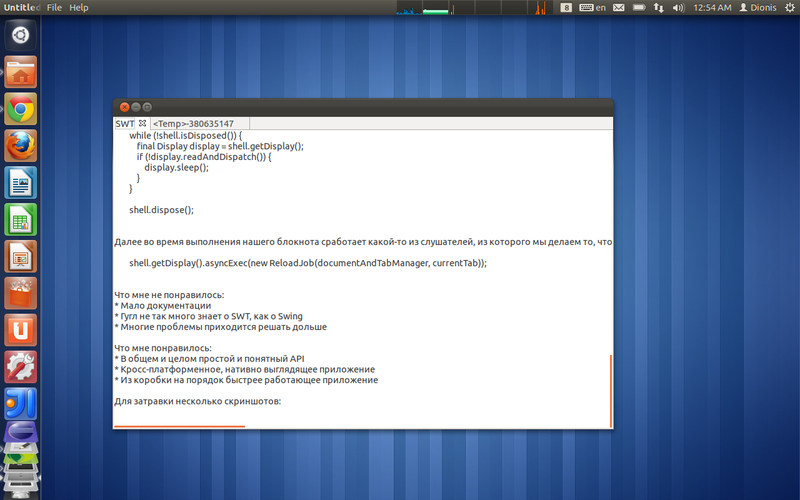
From under Linux:
Native scrolling for Ubuntu (Unity)

Native menu for Ubuntu (Unity)
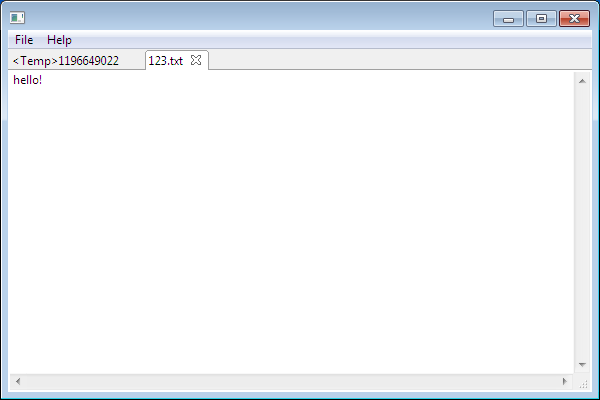
And from Windows:
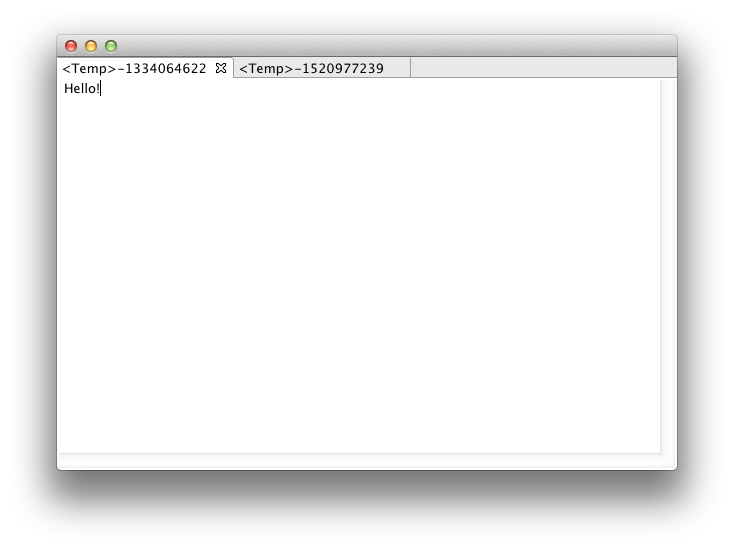
For Mac OS, unfortunately, there are no screenshots for lack of Mac OS X. A
kindly provided screenshot by seneast :
Source codes are available here : code.google.com/p/swt-text-editor/source/browse
You can download my notepad variation for your OS here: code.google.com/p/swt-text-editor/downloads/list
It starts from under Windows double-click, from under Mac OS X java -XstartOnFirstThread -jar simple_edit *., Linux with the command java -jar simple_edit *. Runs under Java 1.6 and higher.
Short instructions on how to start messing with the IDE code (in English)code.google.com/p/swt-text-editor/wiki/SourceCodeImport
I would be glad to any comments, complaints and tips.
From this article you will learn:
- What is the motivation to use SWT in contrast to the main competitor - Swing
- The main difficulties that I encountered when developing a simple notepad using Java + SWT and some code
- How to package and distribute your application for several platforms
If you are interested - I ask for a cat.
Preamble
As you know, Java is famous for its cross-platform (write-once - run anywhere), and this also applies to GUI applications. Although, perhaps, Java is not the most common platform for writing GUI applications. And there are a number of reasons.
Perhaps the main reason for this is the belief that code written for a particular platform will work faster than code that is written for something abstract in a vacuum. Well, in my opinion, perhaps this is true.
Some will disagree with me and say that this is just the style of Java - written once should be executed and look the same on all platforms. And swinggood confirmation of that. Of course, the Swing application can be customized using various themes (Look And Feel), but still it will feel and look not quite like its own.
Although the guys from JetBrains managed to prove (at least to me personally) that Swing applications can be very, very friendly, but the fact remains that it starts to slow down over time, not because it is poorly written, but precisely because The framework GUI is used by Swing, which is somewhat worse friends with operating systems than their native components.
SWT just approached this issue from the other side. By and large, SWT is a thin layer between the Java programmer and the native APIs of a particular operating system, which somewhat violates the Java ideology. But, as they say, the rules just exist in order to break them. Especially if it is for the good. And this, in my opinion, is the main motivation why it is worth paying attention to SWT.
First steps
I think that the reader would understand, I should tell you what I wanted to achieve from my notebook.
The idea was very simple:
I wanted to make a semblance of a classic notepad, what we observe under Windows. Only with tabs.
Looking ahead, I’ll say that I didn’t fully realize my idea - there are no opportunities to send a document to a printer for printing, the ability to change the font, search through a document. But, what happened, made it possible to feel the “taste of SWT”, which turned out to be quite pleasant.
Well then. So far there have been only a lot of words, but no action. It's time to bring a little code.
The entry point to the application is (Bootstrap.java):
    final Display display = new Display();
	final Shell shell = new Shell(display);
	final DocumentAndTabManager documentAndTabManager = new DocumentAndTabManager(shell);
	final TextEditor textEditor = new TextEditor(shell, documentAndTabManager);
	textEditor.init();
	textEditor.run();
What have we done here:
- We created a display, they said that the shell would use our display. (In my opinion, SWT has a rather coherent ideology - an application should not have more than one display object.)
- The Shell is where the main action will take place. If we draw an analogy with Swing, then we can say that it is to some extent an analogue of JPanel.
- They made an injection from the shell to our document manager and text editor, so that they would not forget why they are needed and who their boss is.
Initialized the shell (TextEditor.java):
    shell.setLayout(new FillLayout());
	//И поставили поставили меню оболочке(окошку):
	shell.setMenuBar(createAndSetUpMenu());
In short, the menu creation process:
    //Говорим что у нас есть такое-то меню, чей родитель - оболочка:
	final Menu menu = new Menu(shell, SWT.BAR);
	// Создаем пункт в меню.
	final MenuItem helpItem = new MenuItem(menu, SWT.CASCADE);
	//Ставим текст: знак "&" говорит нам о том, что пункт меню будет доступен по комбинации клавиш Alt+H.
	helpItem.setText("&Help");
	//Далее делаем под-меню для нашего меню Item'a:
	final Menu helpMenu = new Menu(menu);
	helpItem.setMenu(helpMenu);
	final MenuItem about = new MenuItem(helpMenu, SWT.NONE);
	about.setText("About");
	about.addSelectionListener(new HelpMenuAboutSelectionListener(shell));//Вешаем слшуатель события на нажатие этого пункта меню.
And we launch our application:
    shell.open();//Отображаем окно
	while (!shell.isDisposed()) {
	    final Display display = shell.getDisplay();
	        if (!display.readAndDispatch()) {
	            display.sleep();
	        }
	}
	shell.dispose();
Further, during the execution of our notebook, one of the listeners will work (in response to some of our actions), from which we will do what we need, let's run some task in synchronous or asynchronous mode:
shell.getDisplay().asyncExec(new ReloadJob(documentAndTabManager, currentTab));Packaging
Another portion of the pseudo-difficulties that I encountered:
For each operating system and architecture, you need to create your own build. For this we need jars for each specific platform. I'm used to using Maven, but for these purposes it is not very suitable, because alas, I did not find the latest SWT versions in the Maven repositories, and I had to manually download packages for each of the operating system / architecture platforms. In addition, where you need a lot of customization, Maven is not particularly suitable, but good-old Ant comes to the rescue. As a dependency manager, I took Ivy.
A piece of ant-script (build.xml) responsible for packaging for a specific operating system / architecture:
The size of the Jar was 2 - 2.5 MB (depending on the OS and architecture), which is actually not so much.
Instead of a conclusion
Having missed a small development cycle through myself, I can notice the
Minuses of SWT in my opinion:
* Few documentation / tutorials
* Google doesn’t know much about SWT as about Swing
* Many problems have to be solved longer.
SWT advantages in my opinion:
* In general, a simple and understandable API
* Cross-platform, native-looking application
* Out of the box faster than the same on Swing
What have I learned from this little experiment?
SWT with all its charms and flaws made a good impression on me. The next time I decide to write a desktop application, I will no doubt choose the Java + SWT bundle.
PS A few screenshots in the end.
From under Linux:
Native scrolling for Ubuntu (Unity)
Native menu for Ubuntu (Unity)
And from Windows:
kindly provided screenshot by seneast :
Source codes are available here : code.google.com/p/swt-text-editor/source/browse
You can download my notepad variation for your OS here: code.google.com/p/swt-text-editor/downloads/list
It starts from under Windows double-click, from under Mac OS X java -XstartOnFirstThread -jar simple_edit *., Linux with the command java -jar simple_edit *. Runs under Java 1.6 and higher.
Short instructions on how to start messing with the IDE code (in English)code.google.com/p/swt-text-editor/wiki/SourceCodeImport
I would be glad to any comments, complaints and tips.










