November 17, 2011 at 16:06
Fakeroot, Xcode and PackageMaker
I want to share my experience adapting fakeroot for use on a Mac in conjunction with Xcode. Fakeroot runs programs in a special environment that emulates a super-user session. Root rights may be required when building the installer using PackageMaker.
Historically, on UNIX-like systems, which include Mac OS X, there is a certain approach to the distribution of software. At the heart of any package, whether deb, rpm or pakosy pkg, there is an archive that is deployed directly to the target file system. For example, if the package litware.pkg is deployed to the folder / usr / local / bin, and the archive contains the executable lit with access mask 0755 and the owner / group root: wheel, then the program / usr / local / bin / lit will appear on the system (mask access 0755, owner / group root: wheel, i.e. the same as in the archive).
The package is created using special utilities (on Mac OS X it is a console packagemaker) The utility puts the contents of the folder that is specified at startup into the package. The contents of the folder are included in the package as is. In particular, in order to make the correct litware.pkg, you need to make the lit file the owner of root: wheel. Unfortunately, the success of this operation requires super-user rights.
On Linux, this problem is bypassed with fakeroot. In fact, programs are run on behalf of the current user, but by intercepting a number of system calls, the appearance of working as root is created. For example, chown and stat are intercepted. Chown successfully changes the owner: group of the file, and instead of actually modifying these fields on the file system (which would require a real root), the faked daemon remembers the information. The intercepted stat silently modifies the file parameters received from the file system based on the stored information about previous chown calls.
Fakeroot supports MacOS X up to and including version 10.7. Unfortunately, fakeroot is missing from both popular port managers for Mac OS X ( MacPorts , Fink ). For correct operation, installation is required. In addition, the classic fakeroot is inconvenient in conjunction with Xcode, since there is no way to combine all the scripts that require fakeroot into one fakeroot session. Different fakeroot sessions are completely independent: changes made in one session are not visible in another.
Based on the fakeroot code, I made a modified version of fakeroot-mini with the following key features:
The principle of operation has remained unchanged - a dynamic library that intercepts system calls is implemented in the programs that are launched. The introduction of the library into the process is a regular feature of the dynamic loader, which is activated using the environment variable DYLD_INSERT_LIBRARIES:
According to the link you can download a demo project for XCode. The project builds a simple console application + installer.
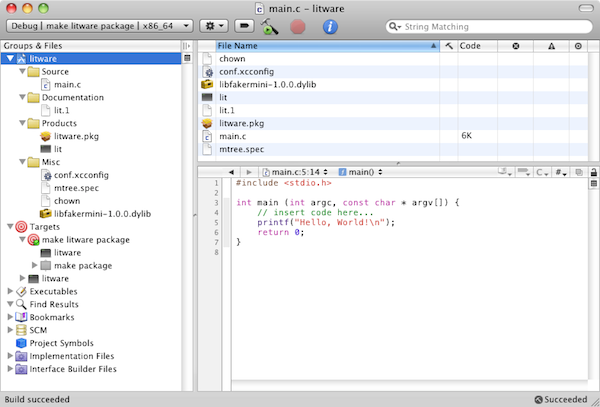
Project Settings:
The LIBFAKER and PACKAGE variables are defined for convenience; they are not affected by Xcode behavior.
The installer is made using the following script:
First, mtree is launched in the fakeroot environment to configure the access mask and owner / group for folders in $ (DSTROOT). This is necessary because although Xcode sets the access mask and owner / group for $ (DSTROOT) / usr / local / bin / lit, intermediate folders (ex: $ (DSTROOT) / usr / local / bin) are not processed.
For an unknown reason, packagemaker does not overwrite existing files when generating the installer. Therefore, we explicitly delete the existing installer file if it exists before running packagemaker in the fakeroot environment.
The described technology allows you to create installers directly in Xcode, with a minimum of settings and without installing additional software. A number of tasks in the manufacture of the installer require superuser rights. Fakeroot allows you to successfully complete these tasks for an unprivileged user.
The information may be useful to developers of system utilities and daemons for MacOS. The installer for ordinary custom applications can usually be built without fakeroot.
Historically, on UNIX-like systems, which include Mac OS X, there is a certain approach to the distribution of software. At the heart of any package, whether deb, rpm or pakosy pkg, there is an archive that is deployed directly to the target file system. For example, if the package litware.pkg is deployed to the folder / usr / local / bin, and the archive contains the executable lit with access mask 0755 and the owner / group root: wheel, then the program / usr / local / bin / lit will appear on the system (mask access 0755, owner / group root: wheel, i.e. the same as in the archive).
The package is created using special utilities (on Mac OS X it is a console packagemaker) The utility puts the contents of the folder that is specified at startup into the package. The contents of the folder are included in the package as is. In particular, in order to make the correct litware.pkg, you need to make the lit file the owner of root: wheel. Unfortunately, the success of this operation requires super-user rights.
On Linux, this problem is bypassed with fakeroot. In fact, programs are run on behalf of the current user, but by intercepting a number of system calls, the appearance of working as root is created. For example, chown and stat are intercepted. Chown successfully changes the owner: group of the file, and instead of actually modifying these fields on the file system (which would require a real root), the faked daemon remembers the information. The intercepted stat silently modifies the file parameters received from the file system based on the stored information about previous chown calls.
Fakeroot-mini
Fakeroot supports MacOS X up to and including version 10.7. Unfortunately, fakeroot is missing from both popular port managers for Mac OS X ( MacPorts , Fink ). For correct operation, installation is required. In addition, the classic fakeroot is inconvenient in conjunction with Xcode, since there is no way to combine all the scripts that require fakeroot into one fakeroot session. Different fakeroot sessions are completely independent: changes made in one session are not visible in another.
Based on the fakeroot code, I made a modified version of fakeroot-mini with the following key features:
- No installation required. The only dynamic library is distributed. This library can be put directly into the repository, which removes the need to install additional software to build the project.
- Stores information in extended file system attributes. This solution fixes the problem of independent fakeroot sessions.
The principle of operation has remained unchanged - a dynamic library that intercepts system calls is implemented in the programs that are launched. The introduction of the library into the process is a regular feature of the dynamic loader, which is activated using the environment variable DYLD_INSERT_LIBRARIES:
/usr/bin/env DYLD_INSERT_LIBRARIES=<имя-библиотеки> command [args]Xcode Demo Project
According to the link you can download a demo project for XCode. The project builds a simple console application + installer.
Project Settings:
DEPLOYMENT_LOCATION=YES
DEPLOYMENT_POSTPROCESSING=YES
INSTALL_OWNER=root
INSTALL_GROUP=wheel
STRIP_INSTALLED_PRODUCT=NO
CHOWN=$(SRCROOT)/chown
LIBFAKER=$(SRCROOT)/libfakermini-1.0.0.dylib
PACKAGE=$(BUILT_PRODUCTS_DIR)/litware.pkg
DEPLOYMENT_LOCATION=YES forces Xcode to lay out files on installation paths. For example, for the lit program, the installation path is / usr / local / bin / lit. With the DEPLOYMENT_LOCATION setting enabled, Xcode will put lit along the path $ (DSTROOT) / usr / local / bin / lit. The value of $ (DSTROOT) is configurable, by default it is /tmp/<project-name>.dst. The following file tree will be built in the temporary folder:/tmp/litware.dst/
└── usr
├── local
│ └── bin
│ └── lit
└── share
└── man
└── man1
└── lit.1DEPLOYMENT_POSTPROCESSING=YES includes additional file processing in $ (DSTROOT). Among other things, the owner of $ (INSTALL_OWNER) and the group of $ (INSTALL_GROUP) files are set. STRIP_INSTALLED_PRODUCT=NO disables the removal of debugging information in collected binaries. Due to an error in Xcode, sometimes when reassembling a project, debugging information is copied after the strip has worked and deleted everything. CHOWN=$(SRCROOT)/chown tells Xcode to use the script in the project source folder instead of the standard utility / usr / sbin / chown. The script sets up a fakeroot environment and calls standard chown. The LIBFAKER and PACKAGE variables are defined for convenience; they are not affected by Xcode behavior.
The installer is made using the following script:
/usr/bin/env "DYLD_INSERT_LIBRARIES=${LIBFAKER}" \
    /usr/sbin/mtree -f "${SRCROOT}/mtree.spec" -p "${DSTROOT}" -U && \
rm -f "${PACKAGE}" && \
/usr/bin/env "DYLD_INSERT_LIBRARIES=${LIBFAKER}" \
    /Developer/usr/bin/packagemaker --id org.example.litware \
    --root "${DSTROOT}" --no-recommend --target 10.5 \
    --out "${PACKAGE}"
First, mtree is launched in the fakeroot environment to configure the access mask and owner / group for folders in $ (DSTROOT). This is necessary because although Xcode sets the access mask and owner / group for $ (DSTROOT) / usr / local / bin / lit, intermediate folders (ex: $ (DSTROOT) / usr / local / bin) are not processed.
For an unknown reason, packagemaker does not overwrite existing files when generating the installer. Therefore, we explicitly delete the existing installer file if it exists before running packagemaker in the fakeroot environment.
Conclusion
The described technology allows you to create installers directly in Xcode, with a minimum of settings and without installing additional software. A number of tasks in the manufacture of the installer require superuser rights. Fakeroot allows you to successfully complete these tasks for an unprivileged user.
The information may be useful to developers of system utilities and daemons for MacOS. The installer for ordinary custom applications can usually be built without fakeroot.
References
- Demo Project for Xcode
- Original fakeroot
- Fakeroot-mini
- Using xcconfig files in Xcode
- Intercepting system calls on Mac OS X