Billion File Speed Sync
There are several identical servers (4 nodes) on Amazon EC2 with Ubuntu. Each generates and stores on its disk a cache that I would like to synchronize. But a simple rsync will not work here - a few billion files, nfs - is too slow, etc. A complete list of the options considered with explanations below.
In addition, from time to time it is necessary to delete obsolete files on all servers at once, which is done manually so far and takes several days. I plan to describe the question of the fastest file system for such a Use Case later. I can only make a reservation that for several reasons XFS was chosen.
After testing several cluster technologies and file systems, on the advice of a senior friend, we decided to use the same rsync, but in conjunction with inotify. Having searched a little on the Internet for a ready-made solution, in order not to reinvent the wheel, I came across csyncd, inosync and lsyncd. There was already an article on csyncd on the hub , but it doesn’t work here, because stores a list of files in the SQLite database, which is unlikely to be able to work even with a million records. And an extra link with such volumes is useless. But lsyncd turned out to be exactly what we needed.
UPD: As practice has shown, a tangible change and additions to the text are needed. I decided to make only minor changes to the main part, and share new findings at the end of the article.
Lsyncd is a daemon that monitors changes in the local directory, aggregates them, and after a certain time rsync starts to synchronize them.
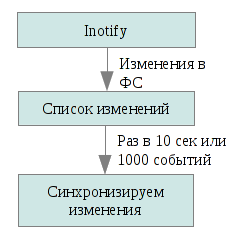
So, we cannot rsync everything at once, but we can only update what has changed. Inotify will tell us about the latter, a kernel subsystem that notifies applications of changes to the file system. Lsyncd monitors the events of the local file tree change, collects this information in 10 seconds (you can specify any other time) or until 1000 events are collected (whichever event occurs first), and runs rsync to send these files to the other nodes in our cluster. Rsync starts with the update parameter, that is, the file on the recipient will be replaced by the sent one only if the latter is newer. This makes it possible to avoid collisions and unnecessary operations (for example, if the same file was generated in parallel both on the sender and on the receiver).
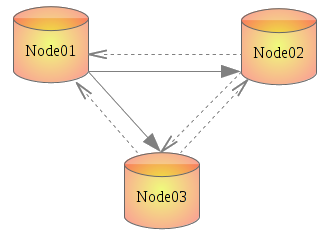
The installation process is described for Ubuntu 11.10. Other versions may vary.
1. Configure ssh so that you can log in from any node to another without authorization. Most likely everyone knows how to do this, but just in case I will describe.
Passphrase leave empty.
Next, add the contents of ~ / .ssh / id_rsa.pub to all other nodes in the cluster in ~ / .ssh / authorized_keys. Naturally, we select $ HOME for the user who has write permissions to the synchronization folder. The easiest way is if it is / root, but it is not the best choice from a security point of view.
It is also advisable to register all the nodes in / etc / hosts. I called them node01, node02, node03.
Repeat on all nodes.
2. Install lsyncd
3. Although the config needs to be created manually, it is quite simple. It is written in the Lua language . Also interesting is the comment about the reasons for choosing Lua from the author lsyncd. I also created a separate directory for logs.
The contents of the config with comments:
It’s easier to make the config once and then distribute it to all the nodes, commenting out the extra block for each specific server. Comments are all between “- [[” and “]]”.
Used call options rsync:
a - archive mode; equivalent to -rlptgoD, that is, copy recursively, along with symlinks and special files, while retaining access rights, group, owner.
l - copy symlinks;
u - do not update files on the recipient if they are newer;
t, p, o, g - copy time, access rights, owner, group, respectively.
s - in case a space appears in the file name.
S - optimize the transmission of data consisting of zeros.
More details in man lsyncd or indocumentation .
4. We start the demon on all nodes:
If you left "nodaemon = true" in the config, you can see what is happening.
Next, copy / create / delete something in the directory that we specified for synchronization (I have / raid), wait a few seconds and check the result of synchronization.
The data transfer rate reaches 300 Mbit / s and this has little effect on server load (compared to the same GlusterFS, for example), and the delay in this case smooths the peaks. Much more depends on the FS used. Here, too, I had to conduct a little research, with numbers and graphs, since the situation is quite specific and the results of existing published tests do not reflect what is required in the task.
The entire study was aimed at working with Amazon EC2, taking into account its limitations and features, therefore, the findings mainly concern only her.
UPD: This solution proved to be excellent in tests (after which the article was written), but in combat conditions everything turned out to be completely different. The minimum production configuration is 584 thousand nested directories. And lsyncd hangs inotify on eachdirectory. It is impossible to do this right away for the whole tree. The memory, 584 thousand notes, is consumed relatively little, about 200 MB (of the 16 GB available), but this process takes 22 minutes. In principle, it’s not scary: just started and forgot. But after that, with the standard configuration, lsyncd starts synchronization of all files, which in our conditions was either buggy or took days. In general - not an option. 100% consistency is not required and you can do without initial synchronization. It remained to turn it off. Fortunately, the daemon is written so that you can change almost all of its functions directly from the config. Also, to increase the performance, default.rsync was replaced with default.rsyncssh, and the kernel was nunyun for inotify limits. That is, the config above is suitable for most tasks, but in our specific situation the following works:
Kernel settings
Inotify has three parameters (see ls / proc / sys / fs / inotify /):
max_queued_events - the maximum number of events in the queue; default = 16384;
max_user_instances - how many inotify instances a single user can run; default = 128;
max_user_watches - how many files one user can track; default = 8192.
Operating values:
So everything worked already in the production.
Thanks for attention!
In addition, from time to time it is necessary to delete obsolete files on all servers at once, which is done manually so far and takes several days. I plan to describe the question of the fastest file system for such a Use Case later. I can only make a reservation that for several reasons XFS was chosen.
After testing several cluster technologies and file systems, on the advice of a senior friend, we decided to use the same rsync, but in conjunction with inotify. Having searched a little on the Internet for a ready-made solution, in order not to reinvent the wheel, I came across csyncd, inosync and lsyncd. There was already an article on csyncd on the hub , but it doesn’t work here, because stores a list of files in the SQLite database, which is unlikely to be able to work even with a million records. And an extra link with such volumes is useless. But lsyncd turned out to be exactly what we needed.
UPD: As practice has shown, a tangible change and additions to the text are needed. I decided to make only minor changes to the main part, and share new findings at the end of the article.
Rsync + inotify = lsyncd
Lsyncd is a daemon that monitors changes in the local directory, aggregates them, and after a certain time rsync starts to synchronize them.
So, we cannot rsync everything at once, but we can only update what has changed. Inotify will tell us about the latter, a kernel subsystem that notifies applications of changes to the file system. Lsyncd monitors the events of the local file tree change, collects this information in 10 seconds (you can specify any other time) or until 1000 events are collected (whichever event occurs first), and runs rsync to send these files to the other nodes in our cluster. Rsync starts with the update parameter, that is, the file on the recipient will be replaced by the sent one only if the latter is newer. This makes it possible to avoid collisions and unnecessary operations (for example, if the same file was generated in parallel both on the sender and on the receiver).
Implementation
The installation process is described for Ubuntu 11.10. Other versions may vary.
1. Configure ssh so that you can log in from any node to another without authorization. Most likely everyone knows how to do this, but just in case I will describe.
ssh-keygenPassphrase leave empty.
Next, add the contents of ~ / .ssh / id_rsa.pub to all other nodes in the cluster in ~ / .ssh / authorized_keys. Naturally, we select $ HOME for the user who has write permissions to the synchronization folder. The easiest way is if it is / root, but it is not the best choice from a security point of view.
It is also advisable to register all the nodes in / etc / hosts. I called them node01, node02, node03.
Repeat on all nodes.
2. Install lsyncd
apt-get install lsyncd3. Although the config needs to be created manually, it is quite simple. It is written in the Lua language . Also interesting is the comment about the reasons for choosing Lua from the author lsyncd. I also created a separate directory for logs.
mkdir -p /etc/lsyncd
mkdir -p /var/log/lsyncd
vi /etc/lsyncd/lsyncd.conf.lua
The contents of the config with comments:
settings = {

  logfile    = "/var/log/lsyncd/lsyncd.log",

  statusFile = "/var/log/lsyncd/lsyncd.status",

  nodaemon   = true --<== лучше оставить для дебага. потом выключите.

}

--[[

sync {

  default.rsync, --<== используем rsync для синхронизации. по-идее, можно использовать и что-то другое.

  source="/raid", --<== локальная директория, которую синхронизируем

  target="node01:/raid", --<== dns-имя и директория на ноде-получателе через двоеточие

  rsyncOps={"-ausS", "--temp-dir=/mnt-is"}, --<== temp-dir нужна если синхронизация двухсторонняя.

  delay=10 --<== время, которое будет собираться список событий для синхронизации

}

]]

sync {

  default.rsync,

  source="/raid",

  target="node02:/raid",

  rsyncOps={"-ausS", "--temp-dir=/mnt-is"},

  delay=10

}


sync {

  default.rsync,

  source="/raid",

  target="node03:/raid",

  rsyncOps={"-ausS", "--temp-dir=/mnt-is"},

  delay=10

}
It’s easier to make the config once and then distribute it to all the nodes, commenting out the extra block for each specific server. Comments are all between “- [[” and “]]”.
Used call options rsync:
a - archive mode; equivalent to -rlptgoD, that is, copy recursively, along with symlinks and special files, while retaining access rights, group, owner.
u - do not update files on the recipient if they are newer;
s - in case a space appears in the file name.
S - optimize the transmission of data consisting of zeros.
More details in man lsyncd or indocumentation .
4. We start the demon on all nodes:
/etc/init.d/lsyncd startIf you left "nodaemon = true" in the config, you can see what is happening.
Next, copy / create / delete something in the directory that we specified for synchronization (I have / raid), wait a few seconds and check the result of synchronization.
The data transfer rate reaches 300 Mbit / s and this has little effect on server load (compared to the same GlusterFS, for example), and the delay in this case smooths the peaks. Much more depends on the FS used. Here, too, I had to conduct a little research, with numbers and graphs, since the situation is quite specific and the results of existing published tests do not reflect what is required in the task.
What else was considered and why it does not fit in this case
The entire study was aimed at working with Amazon EC2, taking into account its limitations and features, therefore, the findings mainly concern only her.
- DRBD - replication is on a block level. In the case of degradation of one carrier, both are killed. Limitation of 2 nodes. (More is possible, but 3rd and 4th can only be connected as slaves.)
- Ocfs2 - it is used either on top of DRBD (which is a good article on Habr), or you need to be able to mount one partition from several nodes. Impossible on ec2.
- Gfs2 is an analogue of ocfs2. I have not tried it, because according to tests, this FS is slower than ocfs2, otherwise it's its counterpart.
- GlusterFS - here it all worked almost immediately and as it should! Simple and logical to administer. You can make a cluster of up to 255 nodes with an arbitrary replica value. Created a cluster partition from a pair of servers and mounted it on them but in a different directory (that is, the servers were also clients at the same time). Unfortunately, on the client, this cluster is mounted via FUSE, and the write speed turned out to be lower than 3 MB / s. And so, the experience of use is very good.
- Luster - to run this thing in krenel mode you need to patch the kernel. Oddly enough, in the Ubuntu repository there is a package with these patches, but I did not find the patches themselves for it, or at least for Debian. And judging by the reviews, I realized that getting it into the deb-system is shamanism.
- Hadoop w / HDFS, Cloudera - did not try, because another solution was found (see below). But the first thing that catches your eye is written in Java, therefore there will be a lot of resources to eat, and the scale is not like on Facebook or Yahu, there are only 4 nodes so far.
UPD: This solution proved to be excellent in tests (after which the article was written), but in combat conditions everything turned out to be completely different. The minimum production configuration is 584 thousand nested directories. And lsyncd hangs inotify on eachdirectory. It is impossible to do this right away for the whole tree. The memory, 584 thousand notes, is consumed relatively little, about 200 MB (of the 16 GB available), but this process takes 22 minutes. In principle, it’s not scary: just started and forgot. But after that, with the standard configuration, lsyncd starts synchronization of all files, which in our conditions was either buggy or took days. In general - not an option. 100% consistency is not required and you can do without initial synchronization. It remained to turn it off. Fortunately, the daemon is written so that you can change almost all of its functions directly from the config. Also, to increase the performance, default.rsync was replaced with default.rsyncssh, and the kernel was nunyun for inotify limits. That is, the config above is suitable for most tasks, but in our specific situation the following works:
settings = {
  logfile    = "/var/log/lsyncd/lsyncd.log",
  statusFile = "/var/log/lsyncd/lsyncd.status",
  statusInterval = 5, --<== чтобы видеть что происходит без включения подробного лога
}
sync {
  default.rsyncssh,
  source = "/raid",
  host = "node02",
  targetdir = "/raid",
  rsyncOps = {"-ausS", "--temp-dir=/tmp"}, --<== описано выше
  delay = 3, --<== ставим по-меньше, чтобы очередь не забивать
  init = function(event) --<== перезагрузка функции инициализации. как она выглядела в оригинале можно посмотреть в документации или в исходниках
    log("Normal","Skipping startup synchronization...") --<== чтобы знать, что мы этот код вообще запускали и когда
  end
}
sync {
  default.rsyncssh,
  source = "/raid",
  host = "node03",
  targetdir = "/raid",
  rsyncOps = {"-ausS", "--temp-dir=/tmp"},
  delay = 3,
  init = function(event)
    log("Normal","Skipping startup synchronization...")
  end
}
Kernel settings
Inotify has three parameters (see ls / proc / sys / fs / inotify /):
max_queued_events - the maximum number of events in the queue; default = 16384;
max_user_instances - how many inotify instances a single user can run; default = 128;
max_user_watches - how many files one user can track; default = 8192.
Operating values:
echo "
fs.inotify.max_user_watches = 16777216 #
fs.inotify.max_queued_events = 65536
" >> /etc/sysctl.conf
echo 16777216 > /proc/sys/fs/inotify/max_user_watches
echo 65536 > /proc/sys/fs/inotify/max_queued_events
So everything worked already in the production.
Thanks for attention!









