 October 24, 2011 at 12:18
IOCELL Netdisk: Unusual NAS

There are many online datastores on the market. Big and small, fast and slow, good and different. We are so accustomed to them that it seems that manufacturers will not be able to surprise the sophisticated audience with anything. Well, NAS. Well, it connects through the network. Surely, after all, through SMB or NFS, according to the old familiar TCP / IP, with an almost "standard" web interface.
It is all the more pleasant when unexpected exceptions appear, the novelty of the solutions used causing at least a raised eyebrow and the surprised “Wow!” IOCELL's Netdisk SOLO and Netdisk DUO fell into my hands is a vivid example.
What is so unusual about them?
Great and terrible NDAS
Devices are positioned as NDAS (Network Direct Attached Storage), that is, despite the fact that they are connected via a regular Ethernet network, the TCP / IP protocol stack is not used for data exchange . The client computer sees the storage not as a network drive or a ball, but as ... a regular, directly connected, SCSI-hard drive.
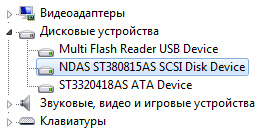
The proprietary LPX protocol is responsible for the communication of storage with clients and with each other, which means:
- To work with devices through the network, you must install the driver.
- The device must be in the same level 2 network with all clients, it will not work to organize access through routers.
- It becomes very, very difficult for someone without a driver (read, an attacker) to connect to the device.
Let's take a closer look

IOCELL Netdisk supports the installation of 1 (SOLO model) or 2 (DUO model) SATA hard drives, and DUO allows you to immediately collect RAID 0 or 1 array from them. Disks are supported up to 4TB, but I want to note right away that there are no disks in the package .
You can connect to a computer either directly via eSATA or USB 2.0, or via Ethernet (all three cables are included, which, you will agree, is nice). The manufacturer strongly discourages connecting via 10MB or 802.11b - networks, possible connection problems are reported.
Connection process
It’s simple, like an orange, and it looks like this:1. Install the driver
Windows 7 / Vista / XP / 2003/2000 operating systems are officially supported. Declared operability also with MAC OS X and Linux, but NDAS-drivers for them have worse functionality. So, in MAC OS X it is impossible to connect several computers to the storage with write permission - only one can write. On Linux, this is possible, but requires the use of special file systems. Finally, only on Windows can you build (and build on!) The RAID array from several separate NETDISK storages.
2. Connect the device
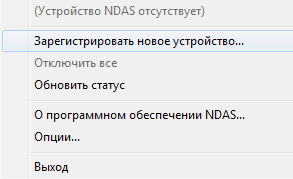
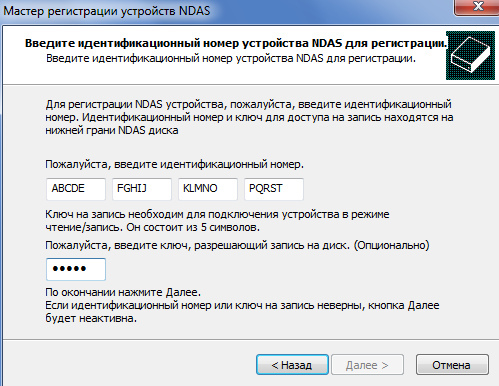
Fill the fields with the values from the sticker on the device. If you plan to write access from the client, enter the second code.
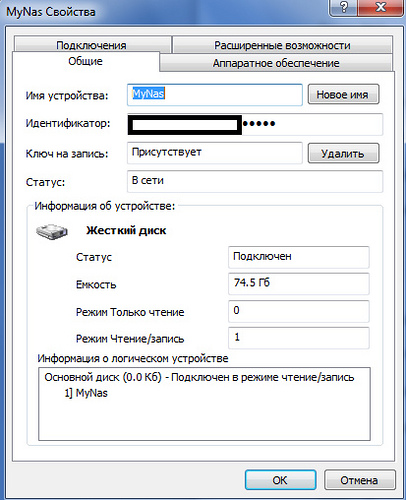
3. Voila, you have a new device. It can be used as you like (format, etc). In the control program hanging in the tray, you can see the characteristics of the device, a list of connected clients and their rights.
And finally, about speed
The manufacturer claimed a significant superiority of NDAS over colleagues in the workshop, and, which is characteristic, does not deceive. Using LPX really gives an increase - I got average values of 25MB / s for writing and 60MB / s for reading (in the configuration of a 1Gb / s network, without RAID), which, you see, is very good for a network storage of this price category.
By the way, about the price. The cost of devices (in SOLO stores today costs about 3500 rubles, DUO - about 4800 rubles) is very attractive and competitive.
To summarize:
+ Speed
+ Security
+ Scalability
+ Interfaces for every taste and color
+ Built-in RAID controller (in the DUO model)
+ Access as in DAS (do whatever you want with the hard drive!)
- Limited support for non-Windows operating systems
- The need for clients to be in one L2-networks with storage
- Lack of ability to manage the device without installing drivers
- Lack of “goodies” like built-in torrent client
Manufacturer website: www.iocellnetworks.com









