 May 3, 2011 at 09:02
Fifteen on LibCanvas
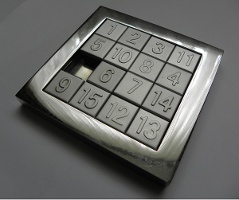 Recently on Habré there was an article about tag on Canvas .
 An excellent article, I'm sure beginners will find a lot of useful information in it. Unfortunately, comments commented on a slightly overpriced CPU consumption.
This is not a lack of technology, but a lack of experience and convenient tools.
In this topic, I will tell you how, using LibCanvas , to make this game completely undemanding to the processor and looking great.
In the game, by reference, it was enough to fix only one nuance - to remove the unnecessary redrawing of each frame and cause it only when the canvas was changed.
But we will go further - we will introduce an animation of the movement of chips. During the animation, when we redraw the entire canvas, we will have the same problem - the processor is unreasonably loaded, so we’ll think about what we can do.


Dirty rectangles
It is easy to notice that the image changes infrequently. It is necessary to take advantage of this and, instead of redrawing the entire canvas, we erase the old location of the tag with clearRect and draw a new one.
It is enough for us to sketch the old cell and clean the new one (in fact, we could constantly save the previous place of drawing the chips, but this is not so critical).
var Tile = atom.Class({
	[...]
	redraw: function () {
		this.libcanvas.ctx
			.clearRect( this.lastPositionRectangle )
			.clearRect( this.field.emptyRectangle );
		this.draw()
	},
	[...]
})
So now we have the chip redraw code. Let's say before our application redrawn every frame. The chip movement code looked something like this:
var Tile = atom.Class({
	[...]
	move: function (point) {
		// Блокируем поле, чтобы, пока не закончится передвижение, никто не двигал фишки
		this.field.blocked = true;
		this.animate({
			time: 150,
			props: { x: point.x, y: point.y },
			onFinish: function () {
				// Разблокируем поле
				this.field.blocked = false;
			},
			fn: 'sine-out'
		});
	},
	[...]
})
We turn off the automatic redrawing of each frame and add a code that forces each chip to redraw itself when moving:
var Tile = atom.Class({
	[...]
	move: function (point) {
		// Блокируем поле, чтобы, пока не закончится передвижение, никто не двигал фишки
		this.field.blocked = true;
		this.animate({
			time: 150,
			props: { x: point.x, y: point.y },
			onProccess: this.redraw.bind(this),
			onFinish: function () {
				// Разблокируем поле
				this.field.blocked = false;
				this.redraw();
			},
			fn: 'sine-out'
		});
	},
	[...]
})
Now every step will be called a canvas redraw. In principle, this is quite enough for a completely smooth animation and an almost free process, but let's go further.
Buffering
If you inspect the application in the Javascript console, you will notice that the most significant part is the canvas redrawing, in which such heavy functions like gradient rendering are called.

For your application, you can roughly assume that (program) == 'Inactivity of the system'
Let 's fix this annoying misunderstanding by first rendering the chip to the buffer. Create a new hidden canvas, draw a chip into it and then draw the canvas itself instead of calling a bunch of heavy functions. I use the atom.Class.Mutators.Generators plugin for this - an easy way to generate an object once and then take it from the cache.
Suppose we used to have the following code that rendered a chip:
var Tile = atom.Class({
	[...]
	draw: function () {
		this.callHardDrawFunctions( this.libcanvas.ctx );
	}
	[...]
})
Change it to the following code:
var Tile = atom.Class({
	[...]
	Generators: {
		buffer: function () {
			var buffer = LibCanvas.buffer( this.shape, true );
			this.callHardDrawFunctions( buffer.ctx );
			return buffer;
		}
	},
	draw: function () {
		this.libcanvas.ctx.drawImage({
			image: this.buffer,
			draw : this.shape
		});
	}
	[...]
})
Yes, it became a little less elegant, but on the other hand, we reached the goal, rendering our spots is very fast and completely undemanding to resources:
Before the introduction of the buffer

After the introduction of the buffer
Conclusion
Program and enjoy the result )









