
 January 16, 2011 at 10:03
Mikrotik Router OS, We are looking for our server on a foreign network. Or how not to pay big money
Mikrotik Router OS, We are looking for our server on a foreign network. Or how not to pay big money
All of us have repeatedly heard about the tremendous support of small business and private entrepreneurship in our country. As long as you are an individual, you have no problem. But as soon as you have gathered your thoughts and decided to open your own business, you instantly get money (horse interest in banks, taxes, deductions to the Pension Fund, levies, fines, inflation, and other cotton). Providers were especially distinguished in this regard, if the requirements for a simple home user are minimal, then the approach to private entrepreneurs and organizations is special. Namely: if you rented a non-residential premises for work, this means that you are a cash cow and must pay a lot of money to the provider. Yes, of course it’s very good if you managed to agree with the provider and draw up an agreement for an individual, well, or let's say your friend lives nearby who agrees to put wifi in the window. But if these options do not work, there is another way not to pay the provider a lot of money. :)
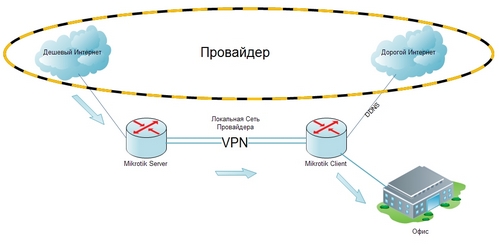
The idea is that nowadays it is not difficult to find a provider with an internal local network 10.0.0.0/255.0.0.0 or 192.168.0.0/255.255.0.0 and organize two points in it (An individual with cheap, unlimited Internet will be a Server) ( An organization with expensive megabyte Internet will be the Client) between them we raise the VPN.
In principle, there is no problem if the gray addresses of the provider are static, but if not, then we will have to use the DDNS service on the Internet because there may not be a local service.
There is a

substantial amount of full-size DDNS services on the Internet, but most of them are fading into the background, because Mikrotik does not work with them, or they are not suitable for our purposes.
We will use the changeip.com DDNS service because of its support starting from 2.X versions.
During the development of the script for sending a gray ip address, one significant problem arose. The changeip.com service, at each DNS name update, checks that the ip address that was sent in the message belongs to networks with the first octets 10 and 192.168. If this affiliation takes place, it replaces the address from the message with a white ip, which is automatically determined by the changeip.com service, and unfortunately we can’t disable this option :(
It was decided to mask the first octet of the ip address before sending, and replace it back upon receipt .
Server part, parameters:
:local interfacename ("eth1"); -Имя интерфейса локальной сети провайдера.

:local replacement ("222"); -Маска для первого октета ip адреса, имейте ввиду, что количество цифр должно совпадать. Если маскируете 10. -устанавливайте 00-99, если 192. то 100-254.

:local dnsname ("my.server.ddns.info"); -DNS имя для обновления.

:local login ("login"); - Логин в changeip.com

:local password ("password"); - Пароль в changeip.com
Server part, code:
##################################################

#Server Part

##################################################


#Settings

##################################################


:local interfacename ("eth1");

:local replacement ("222");

:local dnsname ("my.server.ddns.info");

:local login ("login");

:local password ("password");


##################################################


##################################################


:local CurrentDynDNSIP ([:resolve $dnsname]);

:local TMPDynDNSIP ([/ip address get [/ip address find interface=$interfacename] address]);

:local RealDynDNSIP ([:pick $TMPDynDNSIP 0 ([:len $TMPDynDNSIP]-3)]);

:local ShortIP ([:pick $RealDynDNSIP ([:len $replacement]) ([:len $RealDynDNSIP])]);

:local FakeIP ($replacement . $ShortIP);

:if ($CurrentDynDNSIP != $FakeIP) do={/tool dns-update name=$dnsname address=$FakeIP key-name=$login key=$password};


##################################################

#(C) Inlarion icq 429-587 mikrotik.axiom-pro.ru Copyright!

##################################################
Description:
The principle of operation of the server side is very simple, the IP address is taken from the specified interface, the subnet mask is cut off, the first octet is replaced by masking and sent to changeip.com
Client part, parameters:
:local dnsname ("my.server.ddns.info"); -DNS имя с которого снимаем маскированный ip адрес.

:local replacement ("192"); - Параметр для замены маскированного октета.

:local gateoctet ("1"); - Параметр работает только в случае если :local internettype равен "ethernet" и если шлюз интернета провайдера отличается от 192.168.ХХХ.1 его можно изменить.


:local internetname ("LAN"); - Имя интерфейса в который приходит интернет от провайдера.

:local internettype ("ethernet"); - Тип интерфейса провайдера принимает два значения "ethernet" и любой другой.

:local internetdns ("192.168.3.1"); DNS сервер провайдера.


:local tunnelname ("ISP1"); - Имя интерфейса через который мы подключаемся к серверу.

:local tunneltype ("pptp"); - Тип интерфейса, принимает два значения "pptp" или "l2tp".

:local tunneldns ("192.168.90.1"); - DNS нашего PPTP или L2TP сервера.
Client part, code:
####################################################

#Client part

####################################################


#Settings

####################################################


:local dnsname ("my.server.ddns.info");

:local replacement ("192");

:local gateoctet ("1");


:local internetname ("LAN");

:local internettype ("ethernet");

:local internetdns ("192.168.3.1");


:local tunnelname ("ISP1");

:local tunneltype ("pptp");

:local tunneldns ("192.168.90.1");


####################################################


:global internetgate (" ");


####################################################

:if ( $internettype != "ethernet" ) do={

:set internetgate ([/ip address get [/ip address find interface=$internetname] network]);

} else={

:set internetgate ([/ip address get [/ip address find interface=$internetname] network]);

:local ShortIP ([:pick $internetgate 0 ([:len $internetgate]-1)] );

:set internetgate ($ShortIP . $gateoctet);

};

####################################################


:if ($tunneltype = "pptp") do={

/interface pptp-client monitor [/interface pptp-client find name=$tunnelname] once do={

:if ($status != "connected") do={

:if ($internetdns != [/ip dns get servers]) do={ /ip dns set servers=$internetdns; };

} else={

:if ($tunneldns != [/ip dns get servers]) do={ /ip dns set servers=$tunneldns; };

};

};

};


:if ($tunneltype = "l2tp") do={

/interface l2tp-client monitor [/interface l2tp-client find name=$tunnelname] once do={

:if ($status != "connected") do={

:if ($internetdns != [/ip dns get servers]) do={ /ip dns set servers=$internetdns; };

} else={

:if ($tunneldns != [/ip dns get servers]) do={ /ip dns set servers=$tunneldns; };

};

};

};


####################################################

:local WWW ([:resolve changeip.com]);

:local NIC ([:resolve nic.changeip.com]);

:if ( [/ip route find comment="WWW_changeip.com"] = "" ) do={ /ip route add dst-address=$WWW gateway=$internetgate comment="WWW_changeip.com" };

:if ( [/ip route find comment="NIC_changeip.com"] = "") do={ /ip route add dst-address=$NIC gateway=$internetgate comment="NIC_changeip.com" };

:if ( [/ip route find comment="INTERNET_DNS"] = "") do={ /ip route add dst-address=$internetdns gateway=$internetgate comment="INTERNET_DNS" };

:if ( [/ip route get [/ip route find comment="WWW_changeip.com"] dst-address] != $WWW) do={ /ip route set [/ip route find comment="WWW_changeip.com"] dst-address=$WWW gateway=$internetgate };

:if ( [/ip route get [/ip route find comment="NIC_changeip.com"] dst-address] != $NIC) do={ /ip route set [/ip route find comment="NIC_changeip.com"] dst-address=$NIC gateway=$internetgate };

:if ( [/ip route get [/ip route find comment="INTERNET_DNS"] dst-address] != $internetdns) do={ /ip route set [/ip route find comment="INTERNET_DNS"] dst-address=$internetdns gateway=$internetgate };

####################################################


:if ($tunneltype = "pptp") do={

:local CurrentVHNIP ([:resolve $dnsname]);

:local TMPVHNIP ([/interface pptp-client get [/interface pptp-client find name=$tunnelname] connect-to]);

:local ShortIP ([:pick $CurrentVHNIP ([:len $replacement]) ([:len $CurrentVHNIP])]);

:local RealDNSIP ($replacement . $ShortIP);

:if ($RealDNSIP != $TMPVHNIP) do={/interface pptp-client set [/interface pptp-client find name=$tunnelname] connect-to=$RealDNSIP; };

};


:if ($tunneltype = "l2tp") do={

:local CurrentVHNIP ([:resolve $dnsname]);

:local TMPVHNIP ([/interface l2tp-client get [/interface l2tp-client find name=$tunnelname] connect-to]);

:local ShortIP ([:pick $CurrentVHNIP ([:len $replacement]) ([:len $CurrentVHNIP])]);

:local RealDNSIP ($replacement . $ShortIP);

:if ($RealDNSIP != $TMPVHNIP) do={/interface l2tp-client set [/interface l2tp-client find name=$tunnelname] connect-to=$RealDNSIP; };

};


####################################################

#(C) Inlarion icq 429-587 mikrotik.axiom-pro.ru Copyright!

####################################################
Description:
The principle of the client side is a little more complicated. First of all, the Internet gateway is identified through an expensive provider. The second step is checking the connection with the VPN server, if there is no connection, the DNS provider is established, if there is a connection, the DNS of the VPN server is established. In the third step, routes are installed / updated through the main provider for DNS and changeip.com servers. The last step is to check the server ip address in the connection properties with the address that was received from changeip.com with the image-modified octet.
In conclusion, I want to note that this method is not a violation of the terms of the contract, if the contract with the provider is concluded on you, and you personally use it.
This method has obvious disadvantages, about the strong distance of the client from the server, traffic will go through the provider’s subnet, and in addition to the routers, there are smart switches with QoS support in each subnet, which during prime time will negate the entire transmission.
In order to avoid packet loss and not fall heavily under QoS, it is advisable to place the server and the client on the same subnet, or pay attention to the “Paid Interpersonal Traffic” service where information is transferred between two white addresses of subscribers of the same provider. This service costs from 2-15kop. / Mb. and has the same priority as internet traffic.