Acceptance Test Automation or FitNesse to Improve Software Product Quality

The quality of the software product is not least dependent on current documentation and rigorous testing. I would like to highlight the issue of software development and testing in general and using the FitNesse environment in particular.
Intro
When people talk about software testing, most often they mean testing done after a fair amount of code has been written and there is a need to check "whether they wrote what they wanted."
It is clear that the coverage of the code with tests, the types and duration of testing depend on many factors, but in this case it is worth mentioning the unit tests and the acceptance tests.
If unit testing is usually performed by the one who writes this or that piece of code, then acceptance testing is usually performed by the customer. And here it all depends on how high the requirements of the customer are (and, importantly, how much he is able to qualitatively test the finished product he accepts).
So, unit tests are usually automated for execution (they are written once and run many times in automatic mode).
And acceptance tests are usually slowly run in manual mode and constantly change and usually quite rarely fixed on paper.
Why all this talk about testing? A properly organized testing process of the created software product will ultimately save money and time on fixing errors, and moreover, increase profits from the good reputation of the company.
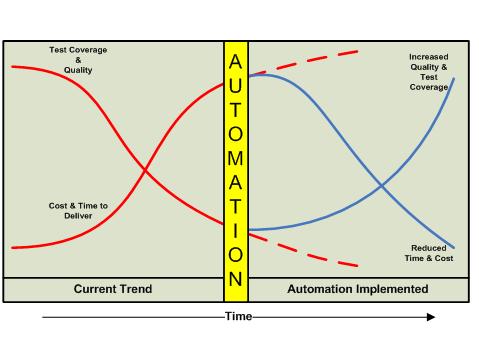
Problemm definition
Usually, when explaining the importance of testing, they like to give a graph of the exponential growth of the cost of fixing a bug in a software product depending on the stage of its detection.
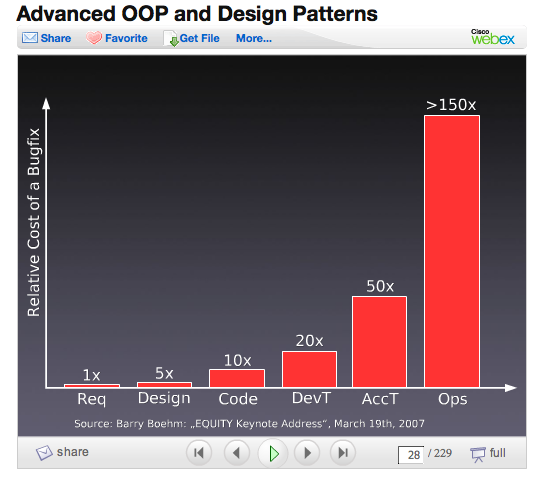
But also we must not forget that the cost of testing, especially manual, is too high. So if we have more than 4500 tests for the run (which is normal for acceptance testing of an average project), then we will need more than 40 person-days for such a test to be performed once. Now imagine that we found a mistake and after fixing this error it will be necessary to run 4500 tests manually again.

In addition to the problem with manual testing, there is a problem with keeping the documentation up to date.
It is necessary to ensure the synchronization of the following documents: requirements, user interface specifications, test specifications and their implementation.
For the specification of user interfaces, there is a certain tendency for the documentation to be freed from screen shots and design schemes over time to make it more resistant to possible errors. But at the same time, such documentation becomes unreadable and it becomes difficult to understand. It displays too many low-level scripts (Use Cases) and it becomes difficult to maintain. All this, ultimately, results in the fact that the motivation for developers to keep the documentation up to date disappears.

Test specifications usually completely duplicate the user interface specification with specific names, numbers, and lines in Use Cases (scripts). They are more specific and specific than the specification of user interfaces. But they still leave the possibility for people to freely interpret what is reflected in them.
It is difficult to maintain the motivation of developers and managers to keep the documentation up to date.
The ideal option, of course, would be to use a robot to manually run tests and reflect the results in the documentation ...

But the era of such smart gizmos has not come yet, so you have to use other methods ...
Fitness introduction
I propose to consider FitNesse
FitNesse is primarily a tool for collaborative software development.
FitNesse allows customers, testers, and programmers to learn what their software needs to do and automatically compare it with what the software actually does. FitNesse allows you to compare customer expectations with the result.
FitNesse is a software testing tool.
Jointly define AcceptanceTests - web pages containing simple tables of entries and expected exits. Run these tests and see the results.
FitNesse is a wiki.
You can easily create and edit pages.
FIT (“Framework for Integrated Testing”) is the core that actually processes each FitNesse table using the FixtureCode related to that table. Designed by Ward Cunningham as an extension of the xUnit environment. It supports most modern programming languages (.Net, Java, Python, Ruby, C ++, ...).
FIT + Wiki + Web Server = FitNesse

In addition to FIT, today there is support for SLIM technology, which can be found in more detail on the product website.

You can give an example of what the fixture code looks like, a table for the test, and the result of the environment.
Example
Here is an example fixture code for testing a certain application in C #:
using System;

using System.Collections.Generic;

using System.Text;

using Ranorex;

namespace NetFit

{

  public class AddVIPTest : fit.ColumnFixture

  {

  ///

  /// UI Repository instance for VIP Application

    ///

  private VIPRepo repo = VIPRepo.Instance;

  private string gender;

  private string lastName;

  private string firstName;

  ///

  /// Property for FirstName parameter.

  /// By setting the property Ranorex directly clicks

  /// the text box and simulates the keyboard events

  /// Returns the current text value of the text box.

  ///

  public string FirstName

  {

    set

        {

          this.firstName = value;

          repo.VIPApplication.FirstName.Click();

          Ranorex.Keyboard.Press(firstName);

        }

        get

        {

          return repo.VIPApplication.FirstName.TextValue;

        }

    }

    ///

    /// Property for FirstName parameter.

    /// By setting the property Ranorex directly clicks

    /// the text box and simulates the keyboard events

    /// Returns the current text value of the text box.

    ///

    public string LastName

    {

        set

        {

          this.lastName = value;

          repo.VIPApplication.LastName.Click();

          Ranorex.Keyboard.Press(lastName);

        }

        get

        {

          return repo.VIPApplication.LastName.TextValue;

        }

    }

    ///

    /// Property for Gender parameter.

    /// Depending on the given value Ranorex selects

    /// the right radio button.

    /// Returns the currently selected gender

    ///

    public string Gender

    {

      set

      {

        gender = value;

        if (gender.Equals("Female"))

          repo.VIPApplication.Gender.Female.Click();

        else if (gender.Equals("Male"))

          repo.VIPApplication.Gender.Male.Click();

      }

      get

      {

        if (repo.VIPApplication.Gender.Female.Checked)

          return "Female";

        else

          return "Male";

      }

    }

    /// Method is used to simulate a click on

    /// specified button.

    ///

    ///

    /// Specifies the label of the button to press

    ///

    public void Action(string button)

    {

      repo.VIPApplication.Self.FindChild(button).Click();

    }

    ///

    ///

    /// Returns the current text value of

    /// the status bar.

    ///

    public string ValidateStatusBox()

    {

       return repo.VIPApplication.StatusBar.TextValue;

    }

}


* This source code was highlighted with Source Code Highlighter.
This is the table for the Test Case on FitNesse
:! | NetFit.AddVIPTest |
| FirstName | LastName | Gender | Action | ValidateStatusBox? |
| Marylin | Monroe | Female | Add | VIP count: 1 |
| Bill | Gates | Male | Add | VIP count: 2 |
| Hillary | Clinton | Female | Add | VIP count: 3 |
And this is how the result of this test looks:
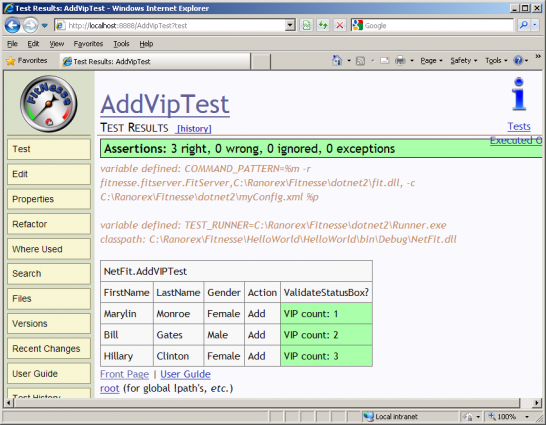
Using FitNesse, you can create test kits, which greatly simplifies the acceptance testing of software. In addition, since FitNesse is WiKi, in the same environment you can store and keep up-to-date all project documentation with reference to the tests performed, both modular and acceptance.
In addition, you can watch the video from the Automated Testing Conference, where Uffe Overgaard Koch talks about Automated Testing of
Mobile Handsets.
I hope that this material will be useful.









