 December 13, 2009 at 02:54
Blogging C # 3.0 Syntax Highlighting
I have plans to write a series of programming articles. There will be many examples of C # code. And for the code to be read, it must be highlighted.
But syntax highlighting disappears when you paste code into a blog. You need to use special programs to generate HTML with equivalent highlighting. I know about two such projects - Ookii.FormatC and Source Code Highlighter .
However, the functionality of both of them was not enough for me. I needed the ability to publish in LJ and on Habré (that is, without using css) plus LINQ highlighting. I decided to modify Ookii.FormatC and wrote my syntax highlighter.
Binary: Syntax Highlighter.rar
Sources: SyntaxHighlighter.src.rar
Requirements: Installed .NET Framework 3.5 SP1 (maybe lower, did not check)
- LINQ syntax highlighting.
- Correct processing of lines and comments.
- Open Source.
- Does not use css and pre tag.
- Replaces leading spaces with nbsp.
I modified the Ookii.FormatC code exactly as much as I needed for the working C # 3.0 backlight in LJ and Habré. If the project proves to be in demand, perhaps I will:
- transfer the code to a normal host.
- I will be engaged in refactoring and code reorganization.
- I will complete the highlighting for other languages supported by the Ookii.FormatC library (C #, Visual Basic, C ++, XML, HTML, Transact-SQL, PowerShell).
But syntax highlighting disappears when you paste code into a blog. You need to use special programs to generate HTML with equivalent highlighting. I know about two such projects - Ookii.FormatC and Source Code Highlighter .
However, the functionality of both of them was not enough for me. I needed the ability to publish in LJ and on Habré (that is, without using css) plus LINQ highlighting. I decided to modify Ookii.FormatC and wrote my syntax highlighter.
Binary: Syntax Highlighter.rar
Sources: SyntaxHighlighter.src.rar
Requirements: Installed .NET Framework 3.5 SP1 (maybe lower, did not check)
Example:
using System;

// A single line comment starting at the beginning of the line

using System.IO;

/* A comment block starting at the beginning of the line */

using MyNamespace;


namespace CSharpTest

{

    // A comment containing what looks like a "string"

    // A comment containg /* what looks like */ a block comment

    /* A multiline comment

     * also containing a // regular comment

     * And containing what looks like a "string"

     */


    public class Program

    {

        ///

        /// An XML comment .

        ///

        public static void Main()

        {

            int Int; // case sensitive test

            int @int; // escaping test

            Console.WriteLine("A string \" \\\" hello \t\\");

            Console.WriteLine("A string containing what // looks like a comment."); // followed by a real comment

            Console.WriteLine(@"An @ string"" \"); /* and another comment */

            Console.WriteLine(@"Another @ string """"");

            Console.WriteLine("{0} {1} {2}", "more than one\\", /* embedded comment */ @"string on ""the same", "line");

#if PREPROCESSORTEST

            for( int x = 0; x < 10; ++x )

            {

                Console.WriteLine('x');

                Console.WriteLine('\'');

                Console.WriteLine('\\');

            }

#endif

        }


        public static void Linq()

        {

            IObservable> draggingEvent =

                from mouseLeftDownEvent in control.GetMouseLeftDown( )

                from mouseMoveEvent in control.GetMouseMove( ).Until( control.GetMouseLeftUp( ) )

                let comparer = new MouseEventComparer( mouseMoveEvent )

                group mouseMoveEvent by comparer into cluster

                select cluster;

        }

    }

}
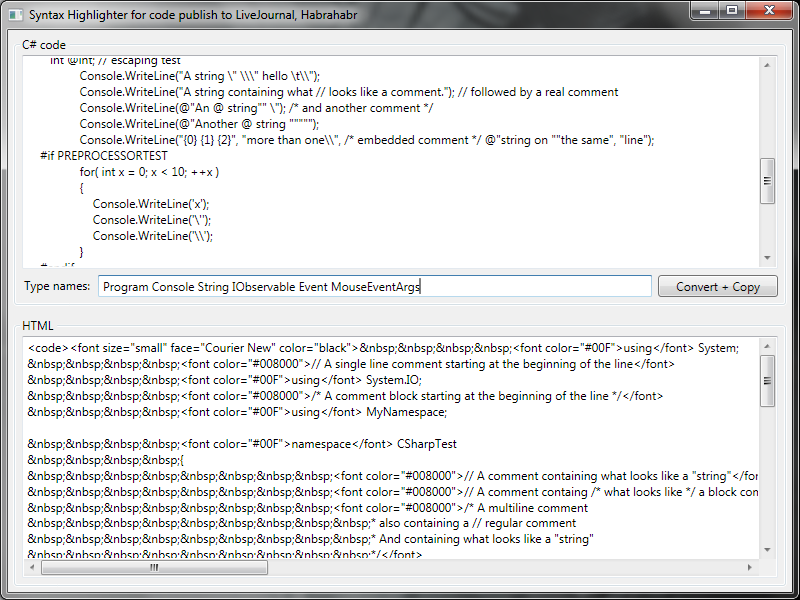
Screenshot:
Differences from Source Code Highlighter
- LINQ syntax highlighting.
- Correct processing of lines and comments.
- Open Source.
Differences from Ookii.FormatC
- Does not use css and pre tag.
- Replaces leading spaces with nbsp.
Notes
I modified the Ookii.FormatC code exactly as much as I needed for the working C # 3.0 backlight in LJ and Habré. If the project proves to be in demand, perhaps I will:
- transfer the code to a normal host.
- I will be engaged in refactoring and code reorganization.
- I will complete the highlighting for other languages supported by the Ookii.FormatC library (C #, Visual Basic, C ++, XML, HTML, Transact-SQL, PowerShell).









