 November 12, 2009 at 7:12 pm
Windows mouse acceleration for Mac
Good day to all.
This post will be interesting first of all to “switches”, to those who recently moved to Mac. Mac on PC (hackintosh) or original, it doesn't matter.
The problem of the "lazy" cursor has repeatedly raised in the network. Everyone solved it in their own way. Someone used SteerMouse, USBOverdrive and other programs supposedly solving these problems, someone got used to it and took it for an indistinguishable feature.
But there is a method that may not be absolutely accurate, but it will help to make your mouse run on a Mac just like on a PC (Windows). About it further.
The problem lies in the acceleration curve. It so happened that these two OSs look differently at the correct mouse behavior.
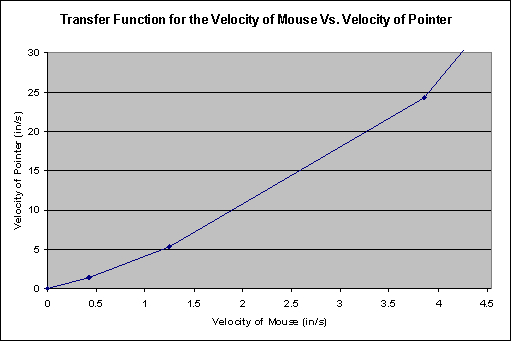
Windows curve.
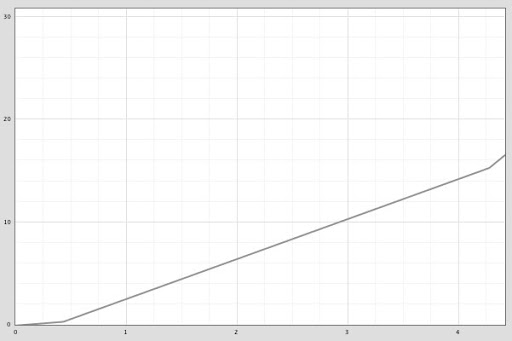
Mac curve.
The graphs are clearly different.
You need to transfer the curve from Microsoft to our Mac. To do this, you need the ControllerMate program ($ 15). In fact, the program’s capabilities are far from being limited to this trick; it is possible to reprogram any button, scroll and other input, including joysticks and remote control. Universal utility :).

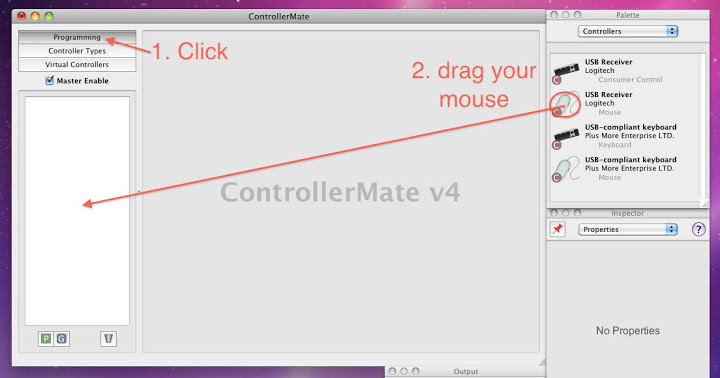
Install ControllerMate, run.
I will not describe the interface. There was no such purpose to review the program. (Maybe in the future? :)) In general, further actions on the screenshots.
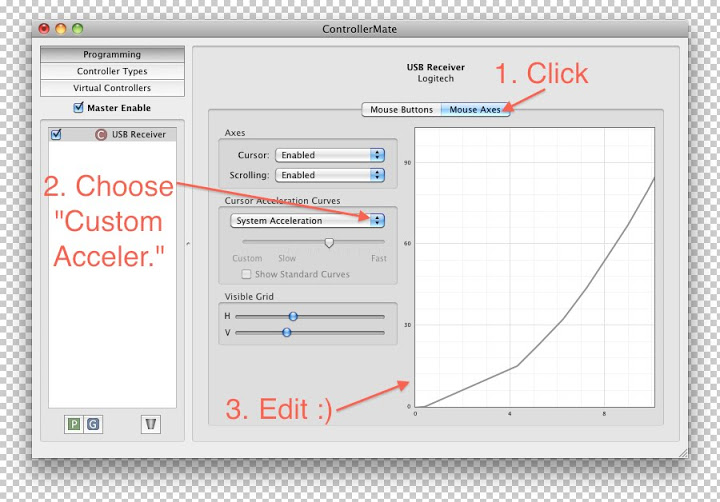
What follows is probably the most difficult. "Redraw a carbon copy" chart from Microsoft. Here is my saved option . Perhaps it is not 100% close to the Windows version, it made for itself conveniently.
By the way, about the settings. I leafed through the entire CMate website and forum, googled it, and didn’t find anyone to share their presets ((((. Therefore, I ask you to post your version if you customize yourself and leave a link in the comments.
Thank you for your attention. Not judge strictly.
* If the pictures suddenly die)
** Attach the video.
This post will be interesting first of all to “switches”, to those who recently moved to Mac. Mac on PC (hackintosh) or original, it doesn't matter.
The problem of the "lazy" cursor has repeatedly raised in the network. Everyone solved it in their own way. Someone used SteerMouse, USBOverdrive and other programs supposedly solving these problems, someone got used to it and took it for an indistinguishable feature.
But there is a method that may not be absolutely accurate, but it will help to make your mouse run on a Mac just like on a PC (Windows). About it further.
The problem lies in the acceleration curve. It so happened that these two OSs look differently at the correct mouse behavior.
Windows curve.
Mac curve.
The graphs are clearly different.
You need to transfer the curve from Microsoft to our Mac. To do this, you need the ControllerMate program ($ 15). In fact, the program’s capabilities are far from being limited to this trick; it is possible to reprogram any button, scroll and other input, including joysticks and remote control. Universal utility :).
Install ControllerMate, run.
I will not describe the interface. There was no such purpose to review the program. (Maybe in the future? :)) In general, further actions on the screenshots.
What follows is probably the most difficult. "Redraw a carbon copy" chart from Microsoft. Here is my saved option . Perhaps it is not 100% close to the Windows version, it made for itself conveniently.
By the way, about the settings. I leafed through the entire CMate website and forum, googled it, and didn’t find anyone to share their presets ((((. Therefore, I ask you to post your version if you customize yourself and leave a link in the comments.
Thank you for your attention. Not judge strictly.
* If the pictures suddenly die)
** Attach the video.









