Martin Fowler - GUI Architectures. Part 2
Hello again. It is me again. Inside the habrakat is a translation of another paragraph of Martin Fowler's article.
This time around the MVC theme. Fowler wrote very popular about him. I tried to translate popularly :) Now you can understand why everyone is running around with MVC, like with a written bag. And by the way, Fowler is right - there are a lot of people and many who perceive MVC in their own way. Fowler himself writes about the original MVC, which worked on the Smalltalk platform. Very informative.
The previous part is here . The original article is here . It is highly advisable to read the first part, because Fowler outlined the general problem-example, which he solves using the described architectures. If you do not read about this task, it will be a little unclear what it is about.
I’ll write the next part of the translation when I get angry and pull myself together.
Model-View-Controller. Perhaps the most common pattern in UI development is Model-View-Controller (MVC). In addition, most often the most misunderstood. I already lost count how many times I saw something described as MVC, which they did not find themselves. Frankly, this is because the classic MVC is no longer suitable for fat customers these days. Let's see where MVC came from.
Before we delve into MVC, it is important to remember that he was one of the first attempts to seriously approach the solution of UI problems regardless of the scale of the solution. In the 70s, the concept of "Graphical User Interface" was not very popular. The Shapes and Elements template, which I described above, appeared later than MVC. I described it primarily because it is simpler, and not always in the good sense of the word. I will look at the Smalltalk 80 MVC with an already well-known example of ice cream concentration. At the same time, I will allow myself a few liberties and give some description of the Smalltalk 80 platform. To begin with, I will say that the system was monochrome.
The core of the MVC idea, as well as the core idea for all subsequent frameworks, is what I call Separated Presentation.) The meaning of a separate view is to draw a clear line between the domain objects that reflect our real world and the presentation objects, which are GUI elements on the screen. Domain objects must be completely independent and operate without reference to the presentation, they must be able to support multiple representations, possibly even simultaneously. This approach, by the way, was also one of the important aspects of the Unix culture, which allows even today to work in many applications both through the command line and through the graphical interface (at the same time).
In MVC, a model refers to a domain object. Domain objects have nothing to do with the UI. In order to lay out our example with concentration and measurements in MVC, we take the reading object, which has all the fields of interest to us, as a model. (As you can see, the presence of a list box element should complicate the model a little, but we will ignore this nuance for a while).
In MVC, I refer to ordinary Domain Model objects , unlike the “forms and elements” where I worked with the Record Set) This is one of the differences between the two patterns due to their design. It is assumed that in “forms and elements” most people want to easily manipulate data from a relational database, while MVC involves working with ordinary Smalltalk objects.
The presentation part of MVC is created from two elements: presentation and controller. The controller’s job is to collect user input and figure out what to do with it.
Here I should emphasize that in our example, the view and controller do not exist in the singular. We must have a view-controller pair for each item on the screen, for each control on the screen, and for the screen itself. Therefore, in our example, the first reaction to user input is the joint work of the controllers, which determines which element is currently receiving this data. Such an element will be a text field of actual concentration. The controller of this text field will process the entered data.
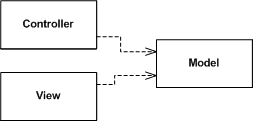
Figure 4. Basic relationships between model, view, and controller. (I call them basic, because in fact, the view and the controller can be directly related to each other. However, developers mostly do not use this connection.)
Like subsequent development environments, the Smalltalk platform provided the ability to create generic UI components that could be reused. In our case, such a component would be a view-controller pair. Both are generic classes ( depending on the so-called configuration - approx. Transl. ). Generalization is necessary so that they can be used in different applications. The first is the assessment view, which will play the role of the entire screen and determine the location of simpler elements. This order is similar to the one in the “forms and elements”. However, unlike the form object in “forms and elements”, MVC does not have text field event handlers in the evaluation controller.
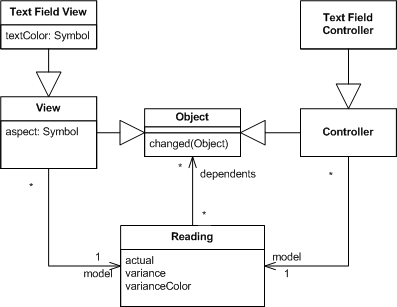
Figure 5. Classes of the MVC version for an example with an ice cream concentration.
Consider the use case for entering the actual value. The configuration of the text field element of the actual value consists of its connection with the model (measurement object), i.e. the method that must be called on the model when the text changes on the element. After initializing the screen, the selected method will be "#actual" (the '#' character at the beginning of the line indicates the interned line). Once the text is entered, the controller makes a reflexive call to the specified method on the measurement object (changes the value of the actual field). In fact, exactly the same mechanism occurred in data binding ( the Data the Binding ). The control is associated with the underlying object (record) and knows which method (i.e. column) it controls.

Figure 6. Changing the actual value field
So, in the resulting solution there are no common browsing objects (remember the form object with event handlers). Instead, the controls overlook a model whose behavior is defined in it (and not in the form object). That is, when it is necessary to determine the value of the difference of indicators (variance), the model copes with this itself.
Browsers are found in MVC. In truth, this is one of the ideas generated by MVC. In our case, all views and controllers overlook the model. When the model changes, representations react. The representation of the actual value text field receives information that the measurement object has changed, after which it calls the model method, defined as an aspect for the given text field - in our case #actual - and sets its value in the field. (Almost exactly the same thing happens for the color of the text box, but there are their own “ghosts” that I will get to soon.)
Note that the text field controller itself does not expose the value to the text field view. It updates the model and allows the browser mechanisms to take care of updates to other objects. This approach differs from what it was in “forms and elements”, where updating the form object updated the control, which in turn updated the underlying record set (record-set) through data binding. I select these two approaches into templates and name them accordingly: Stream Synchronization and Observer Synchronization . They describe different ways of synchronizing between screen state and session state.) “Forms and elements” synchronize data through the flow of application calls to various controls that need to be updated directly through direct access to them. MVC synchronizes through model updates and then relies on updating the representations of the controls through their association with the browser.
Stream synchronization becomes more pronounced when there is no data binding in the application. In this case, the application must explicitly synchronize at one of its important stages (application flow) - for example, when you open the screen or by the event of pressing the save button.
One of the consequences of synchronization through the browser ( Observer Synchronization) is that the controller does not know about the changes of any other element, if suddenly the user somehow changed it (i.e. another element). While the form object in “Forms and Elements” needs to carefully monitor the integrity of the state of the screen when something changes (which can be very time-consuming with a complex layout of the form), the controller does not need to do the same.
This useful advantage is especially convenient when multiple screens are open that overlook the same model objects. A classic example of MVC is a table, for example, a screen with data, plus a couple of windows of various graphs of this data. A window with a table does not need to know that other windows are open. It just updates the model, and Observer Synchronization does the rest. With streaming synchronization (Flow Synchronization ) would need to somehow know which other windows are open in order to update them.
With all the benefits of Observer Synchronization , it has one drawback. The Observer Synchronization problem is the browser itself - looking at the code, you can’t tell what is happening. When I understood the examples implemented on Smalltalk 80, I very clearly remembered this inconvenience. I can know what is happening in a section of some code, but as soon as the browser enters into business, I need a tracer and a debugger to understand what is going on. The behavior of the browser is difficult to understand and debate, because it is implicit.
Various approaches to state synchronization can be observed in the diagrams given. However, the most important and influential difference between MVC is its use of Separated Presentation . The calculation of the deviation between the actual and target values should be the behavior of the domain model and not depend on the UI. Therefore, we implement this behavior in the domain layer of the system - that layer, which is the object of measurement (reading). The deviation calculation method is absolutely logical for the measurement object and has no idea about the user interface.
Now, however, we can consider a couple of complications of the current state of things. There are two uncomfortable areas that I slipped through, talking about the theory of MVC. The first problem area is the assignment of color to the difference text field. This logic does not entirely belong to the domain object, since the color with which we highlight the deviation value is not part of it. Nevertheless, some part of such logic is nevertheless a part of it. For example, an assessment of the quality of the deviation: good (more than five percent), poor (less than ten percent) and normal (all other values). Evaluation calculation is domain logic. Text field coloring is presentation logic. The problem is where to place the presentation logic, as it is not part of the logic of our regular text field.
The first developers on Smalltalk faced this problem, they also proposed solutions to this problem. The solution shown above is dirty because it violates the "purity" of domain logic. I admit to a random act of "pollution" and try to prevent it from becoming a habit ( this is Fowler joking so much - approx. Transl. ).
We can also solve this problem in the same way as “Forms and Elements” - let the evaluation screen overlook the representation of the deviation text field. When its value changes, the screen will respond and assign a color to the text field. But such a solution involves the use of browser mechanisms - and the more you dig into them, the more (exponentially) the work with them becomes more complicated, the number of unnecessary connections between different representations also increases.
I would prefer to develop a new type of UI element. A characteristic feature of the behavior of this element is that it requests an estimate from a domain object, compares it with an internal table of values and colors, and highlights it with the color obtained from the table. Both the table and the query for the value of the domain object will be assigned by the presentation of the evaluation at the assembly stage of itself. In exactly the same way, an aspect of a value is assigned to a text field to keep track of it. This approach will work very well if I have an easy way to inherit from the text field (in it I will add a new behavior). Whether there is such a method - it depends on how well-designed components support inheritance - in Smalltalk it is very easy, and in other environments it can be more complicated.

Figure 7: Using an inheritor of a text field class that supports color definition.
The final touch will be the creation of a special domain object that will follow the elements on the screen, but at the same time do not depend on it. In other words, create a model for the screen. Methods that were previously called for the measurement object will be delegated by the model to the measurement object. It will also define “only UI” methods, for example, color determination.
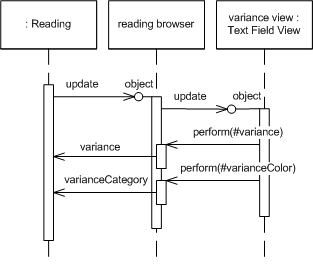
Figure 8: Using the Presentation Model in processing presentation logic.
The proposed solution works in many cases, and as we will see later, it has become a common technique that Smalltalk developers adhere to. I call it the view model () because it is designed for (and is part of) the view layer.
The presentation model solves another problem of presentation logic - the problem of presentation state. The basic concept of MVC assumes that the state of a view is inherited from the state of the model. How then to determine which station is selected in the list? Model presentation ( Presentation Model) solves this problem by providing a place where you can place this kind of condition. A similar problem arises if we have “save” buttons that can be pressed only when the data has changed - this state is determined by the interaction with the model, and not the model itself.
Now, I think, it's time to identify the characteristics of MVC.
To be continued .
This time around the MVC theme. Fowler wrote very popular about him. I tried to translate popularly :) Now you can understand why everyone is running around with MVC, like with a written bag. And by the way, Fowler is right - there are a lot of people and many who perceive MVC in their own way. Fowler himself writes about the original MVC, which worked on the Smalltalk platform. Very informative.
The previous part is here . The original article is here . It is highly advisable to read the first part, because Fowler outlined the general problem-example, which he solves using the described architectures. If you do not read about this task, it will be a little unclear what it is about.
I’ll write the next part of the translation when I get angry and pull myself together.
Model View Controller
Model-View-Controller. Perhaps the most common pattern in UI development is Model-View-Controller (MVC). In addition, most often the most misunderstood. I already lost count how many times I saw something described as MVC, which they did not find themselves. Frankly, this is because the classic MVC is no longer suitable for fat customers these days. Let's see where MVC came from.
Before we delve into MVC, it is important to remember that he was one of the first attempts to seriously approach the solution of UI problems regardless of the scale of the solution. In the 70s, the concept of "Graphical User Interface" was not very popular. The Shapes and Elements template, which I described above, appeared later than MVC. I described it primarily because it is simpler, and not always in the good sense of the word. I will look at the Smalltalk 80 MVC with an already well-known example of ice cream concentration. At the same time, I will allow myself a few liberties and give some description of the Smalltalk 80 platform. To begin with, I will say that the system was monochrome.
The core of the MVC idea, as well as the core idea for all subsequent frameworks, is what I call Separated Presentation.) The meaning of a separate view is to draw a clear line between the domain objects that reflect our real world and the presentation objects, which are GUI elements on the screen. Domain objects must be completely independent and operate without reference to the presentation, they must be able to support multiple representations, possibly even simultaneously. This approach, by the way, was also one of the important aspects of the Unix culture, which allows even today to work in many applications both through the command line and through the graphical interface (at the same time).
In MVC, a model refers to a domain object. Domain objects have nothing to do with the UI. In order to lay out our example with concentration and measurements in MVC, we take the reading object, which has all the fields of interest to us, as a model. (As you can see, the presence of a list box element should complicate the model a little, but we will ignore this nuance for a while).
In MVC, I refer to ordinary Domain Model objects , unlike the “forms and elements” where I worked with the Record Set) This is one of the differences between the two patterns due to their design. It is assumed that in “forms and elements” most people want to easily manipulate data from a relational database, while MVC involves working with ordinary Smalltalk objects.
The presentation part of MVC is created from two elements: presentation and controller. The controller’s job is to collect user input and figure out what to do with it.
Here I should emphasize that in our example, the view and controller do not exist in the singular. We must have a view-controller pair for each item on the screen, for each control on the screen, and for the screen itself. Therefore, in our example, the first reaction to user input is the joint work of the controllers, which determines which element is currently receiving this data. Such an element will be a text field of actual concentration. The controller of this text field will process the entered data.
Figure 4. Basic relationships between model, view, and controller. (I call them basic, because in fact, the view and the controller can be directly related to each other. However, developers mostly do not use this connection.)
Like subsequent development environments, the Smalltalk platform provided the ability to create generic UI components that could be reused. In our case, such a component would be a view-controller pair. Both are generic classes ( depending on the so-called configuration - approx. Transl. ). Generalization is necessary so that they can be used in different applications. The first is the assessment view, which will play the role of the entire screen and determine the location of simpler elements. This order is similar to the one in the “forms and elements”. However, unlike the form object in “forms and elements”, MVC does not have text field event handlers in the evaluation controller.
Figure 5. Classes of the MVC version for an example with an ice cream concentration.
Consider the use case for entering the actual value. The configuration of the text field element of the actual value consists of its connection with the model (measurement object), i.e. the method that must be called on the model when the text changes on the element. After initializing the screen, the selected method will be "#actual" (the '#' character at the beginning of the line indicates the interned line). Once the text is entered, the controller makes a reflexive call to the specified method on the measurement object (changes the value of the actual field). In fact, exactly the same mechanism occurred in data binding ( the Data the Binding ). The control is associated with the underlying object (record) and knows which method (i.e. column) it controls.
Figure 6. Changing the actual value field
So, in the resulting solution there are no common browsing objects (remember the form object with event handlers). Instead, the controls overlook a model whose behavior is defined in it (and not in the form object). That is, when it is necessary to determine the value of the difference of indicators (variance), the model copes with this itself.
Browsers are found in MVC. In truth, this is one of the ideas generated by MVC. In our case, all views and controllers overlook the model. When the model changes, representations react. The representation of the actual value text field receives information that the measurement object has changed, after which it calls the model method, defined as an aspect for the given text field - in our case #actual - and sets its value in the field. (Almost exactly the same thing happens for the color of the text box, but there are their own “ghosts” that I will get to soon.)
Note that the text field controller itself does not expose the value to the text field view. It updates the model and allows the browser mechanisms to take care of updates to other objects. This approach differs from what it was in “forms and elements”, where updating the form object updated the control, which in turn updated the underlying record set (record-set) through data binding. I select these two approaches into templates and name them accordingly: Stream Synchronization and Observer Synchronization . They describe different ways of synchronizing between screen state and session state.) “Forms and elements” synchronize data through the flow of application calls to various controls that need to be updated directly through direct access to them. MVC synchronizes through model updates and then relies on updating the representations of the controls through their association with the browser.
Stream synchronization becomes more pronounced when there is no data binding in the application. In this case, the application must explicitly synchronize at one of its important stages (application flow) - for example, when you open the screen or by the event of pressing the save button.
One of the consequences of synchronization through the browser ( Observer Synchronization) is that the controller does not know about the changes of any other element, if suddenly the user somehow changed it (i.e. another element). While the form object in “Forms and Elements” needs to carefully monitor the integrity of the state of the screen when something changes (which can be very time-consuming with a complex layout of the form), the controller does not need to do the same.
This useful advantage is especially convenient when multiple screens are open that overlook the same model objects. A classic example of MVC is a table, for example, a screen with data, plus a couple of windows of various graphs of this data. A window with a table does not need to know that other windows are open. It just updates the model, and Observer Synchronization does the rest. With streaming synchronization (Flow Synchronization ) would need to somehow know which other windows are open in order to update them.
With all the benefits of Observer Synchronization , it has one drawback. The Observer Synchronization problem is the browser itself - looking at the code, you can’t tell what is happening. When I understood the examples implemented on Smalltalk 80, I very clearly remembered this inconvenience. I can know what is happening in a section of some code, but as soon as the browser enters into business, I need a tracer and a debugger to understand what is going on. The behavior of the browser is difficult to understand and debate, because it is implicit.
Various approaches to state synchronization can be observed in the diagrams given. However, the most important and influential difference between MVC is its use of Separated Presentation . The calculation of the deviation between the actual and target values should be the behavior of the domain model and not depend on the UI. Therefore, we implement this behavior in the domain layer of the system - that layer, which is the object of measurement (reading). The deviation calculation method is absolutely logical for the measurement object and has no idea about the user interface.
Now, however, we can consider a couple of complications of the current state of things. There are two uncomfortable areas that I slipped through, talking about the theory of MVC. The first problem area is the assignment of color to the difference text field. This logic does not entirely belong to the domain object, since the color with which we highlight the deviation value is not part of it. Nevertheless, some part of such logic is nevertheless a part of it. For example, an assessment of the quality of the deviation: good (more than five percent), poor (less than ten percent) and normal (all other values). Evaluation calculation is domain logic. Text field coloring is presentation logic. The problem is where to place the presentation logic, as it is not part of the logic of our regular text field.
The first developers on Smalltalk faced this problem, they also proposed solutions to this problem. The solution shown above is dirty because it violates the "purity" of domain logic. I admit to a random act of "pollution" and try to prevent it from becoming a habit ( this is Fowler joking so much - approx. Transl. ).
We can also solve this problem in the same way as “Forms and Elements” - let the evaluation screen overlook the representation of the deviation text field. When its value changes, the screen will respond and assign a color to the text field. But such a solution involves the use of browser mechanisms - and the more you dig into them, the more (exponentially) the work with them becomes more complicated, the number of unnecessary connections between different representations also increases.
I would prefer to develop a new type of UI element. A characteristic feature of the behavior of this element is that it requests an estimate from a domain object, compares it with an internal table of values and colors, and highlights it with the color obtained from the table. Both the table and the query for the value of the domain object will be assigned by the presentation of the evaluation at the assembly stage of itself. In exactly the same way, an aspect of a value is assigned to a text field to keep track of it. This approach will work very well if I have an easy way to inherit from the text field (in it I will add a new behavior). Whether there is such a method - it depends on how well-designed components support inheritance - in Smalltalk it is very easy, and in other environments it can be more complicated.
Figure 7: Using an inheritor of a text field class that supports color definition.
The final touch will be the creation of a special domain object that will follow the elements on the screen, but at the same time do not depend on it. In other words, create a model for the screen. Methods that were previously called for the measurement object will be delegated by the model to the measurement object. It will also define “only UI” methods, for example, color determination.
Figure 8: Using the Presentation Model in processing presentation logic.
The proposed solution works in many cases, and as we will see later, it has become a common technique that Smalltalk developers adhere to. I call it the view model () because it is designed for (and is part of) the view layer.
The presentation model solves another problem of presentation logic - the problem of presentation state. The basic concept of MVC assumes that the state of a view is inherited from the state of the model. How then to determine which station is selected in the list? Model presentation ( Presentation Model) solves this problem by providing a place where you can place this kind of condition. A similar problem arises if we have “save” buttons that can be pressed only when the data has changed - this state is determined by the interaction with the model, and not the model itself.
Now, I think, it's time to identify the characteristics of MVC.
- Make a clear separation between the presentation (view and controller) and the domain model - Separated Presentation .
- Separate the UI elements into a controller (responding to user input) and a view (to display the state of the model). The controller and view should not (in most cases) interact directly, only through the model.
- Let views (and controllers) overlook the model. This will allow several windows to always be up to date without direct interaction with each other - synchronization through a browser ( Observer Synchronization ).
To be continued .









