January 19, 2009 at 16:18
Livescribe Pulse smartpen - digital pen
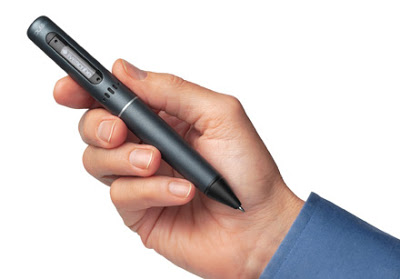
In this topic I will talk about Livescribe Pulse smartpen - a digital pen with the ability to record audio. Functions, Unpacking, Use, Impressions
Introduction
It so happened that, along with various services, I constantly use ordinary, old-school tools - a pen, a diary, a notebook for notes. After reading an article about the latest MacWorld, where this gadget was extremely popular, I decided to get one.
No sooner said than done. Ordered in Amazon, delivery gobbled up an extra $ 40, after 5 days the courier dragged the box.

What it is?
What the manufacturer promises us (more on livescribe.com ):
- Saving handwritten notes digitally in pen memory
- Ability to record audio synchronized with notes
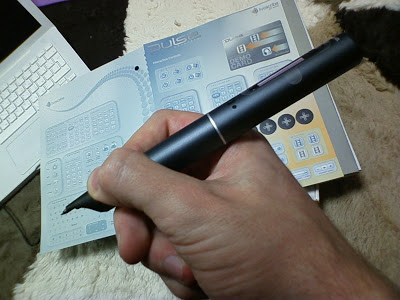
- Unusual interface - controls printed on paper
- Desktop client for Win & Mac
- Online -service for publishing and sharing digital notes
- SDK for developers (Wow!)
What the manufacturer asks for:
$ 150 for a 1GB model (approx. 100 hours of notes and videos) and $ 200 for 2GB

What is in the box?
- Pen, moderately thick, lightweight, hidden to the touch
- USB-stand-charging. there is a magnet, the pen rests securely, you can simply stick the pen into it, without charging
- the Starter Notebook - a 100-sheet notebook, with a format even larger than A4 - heavy, but also enough for a long time
- A set of cartridges - 3 black and one stylus. The rods are short and non-standard. Enough for a while
- Headphones-microphone and cord. You can use headphones to listen to the recordings, or just hang them on your neck for better recordings
- A scary-looking case

Using
This is undoubtedly a breakthrough. I think it's better to watch the videos, there are enough of them on livescribe.com .
A great example. You want to take a note, turn on the pen (second load), make notes, at that moment only time on the pen screen.
If you want to record a sound, touch the record button on the notebook page, the pen starts writing additionally and the sound.
The microphone is excellent, sufficient for recording a meeting, lecture. If you want more, turn on your headphones.
Finished recording - clicked on the “stop” on the page. Play recording - controls printed on page - rewind, bookmarks. Point to any word on the page - the pen will start playing from this point - full interactive.

Desktop
I must say right away - while the Mac version is losing the functionality of the Win version.
Using the application is convenient, although the functionality is poor.
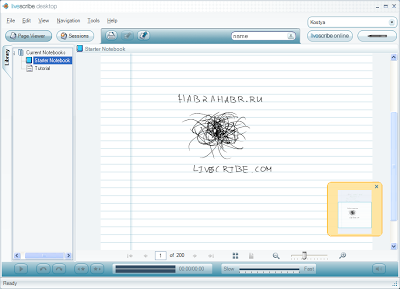
The desktop client automatically downloads all the fresh pages, shows both the list and the thumbnails of the pages. Controls repeat paper. We click on any word on the page with the mouse - the record jumps to this place. There is a search (after all, OCR is present), there is an export as an image.
To the developer
First of all, the SDK is still in pre-release stage. You can develop small Java applications that run in a pen, the so-called penlets. The functionality is quite rich, access to the entered data both in the form of geometric figures and strokes, and in the form of recognized words. Work with the display and with sound. An important limitation is that the module is not yet ready for the development and download of its printed forms. The manufacturer promises an online store for custom applications. It sounds very tempting, I already want to go there. As a demo in a notebook, a calculator and a keyboard are printed.

What do not like yet:
- On the one hand, it’s bad - the pen doesn’t accept notes made in a notebook other than your own — for technology, see the information on the site — amusing. BUT! Notepad can be printed on the printer from the program.
- The desktop application is damp, for example, it is not friendly with the proxy, poor export options
- Small ink cartridges, new ones are expensive, an undeveloped network of representatives in the world
- Handwriting recognition is certainly not friendly with the Russian, plus this service is at the mercy of another application, with a 30 day trial
Summary:
I am very pleased, that is exactly what I was looking for. While I decided to buy - I read reviews - there are simply no negative reviews.
The company (founded by former Ajplovtsev) leaves a good impression, the guys really have an idea how to make a great gadget, make money by ourselves and let others do it. Note that the technology of pens and paper is not theirs; they work under license.
I would recommend this gadget:
- to a diligent student - just a masthead - to have interactive lectures with sound at the end of the semester - the group will carry you on your hands for the next semester, but the teacher will be delighted
- An employee who takes part in meetings and / or negotiates with the customer is very convenient, you will appreciate it. the first photo is from livescribe.com, the rest are mine