July 3, 2007 at 12:47
 Create AIR applications in Flash CS3
At this time, you can create an AIR application using Flex Builder. Adobe has already announced a special extension that will allow you to create AIR applications directly in the Flash CS3 IDE . But at the moment, we already have this opportunity, with the help of the good Gay Watson and Grant Skinner, who have already written their extension, without waiting for Adobe.
We will tell you more about this.
Step one: Install the global AIR SWC:
AIR SWC is a compiled AIR API class library. Flash CS3 must know the path to this library.
Unfortunately, the AIR SDK does not include this file and in order to get it you need to install it in FlexBuilder 3.
Step two: Install the AIRComplier
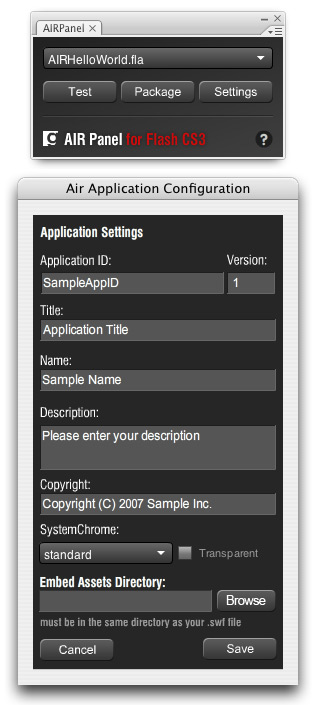
panel This panel is installed in Flash CS3 and with it you can configure, test and compile AIR applications.
If the panel does not appear, make sure that you installed it using Extension Manager v1.8.
Step Three: Using the
Everyone panel . Now the code panel and the AIR SDK are installed, you can create AIR applications in Flash CS3 as promised.
Testing AIR runtime
Step Five: Create an AIR Application
At any time, you can change various settings specific to the AIR application by clicking on the Settings button. We warn you that the airglobal.swc and adl files can be in other directories other than the standard installation. In this case, you can use the search.
A prerequisite for the presence of these files is the installation of FlexBuilder3 “Moxie”.
The panel is currently in “continuous improvement” mode.
You can leave your wishes and comments here.
We will tell you more about this.
Step one: Install the global AIR SWC:
AIR SWC is a compiled AIR API class library. Flash CS3 must know the path to this library.
- Install FlexBuilder 3 “Moxie,” or download the Flex 3 SDK from Adobe Labs .
- Install airglobal.swc in one of the following directories
- in the main directory of FlexBuilder 3 “Moxie”, in the sdks / moxie / frameworks / libs / air / folder
- if you use Flex Builder 3 as a plug-in for Eclipse, then the path will be like this: Adobe Flex Builder 3 Plug-in / sdks / moxie / frameworks / libs / air /
- as well as in the FlexBuilder 3 “Moxie” SDK - frameworks / libs / air / - Create a copy of this file in the main directory of Flash CS3 - Configuration / ActionScript 3.0 / Classes /
Unfortunately, the AIR SDK does not include this file and in order to get it you need to install it in FlexBuilder 3.
Step two: Install the AIRComplier
panel This panel is installed in Flash CS3 and with it you can configure, test and compile AIR applications.
- Install Extension Manager v1.8
- Download the AIRCompiler Panel (MXP)
- Install MXP
- Reboot Flash
- After all these actions - the AIRCompiler panel will be available here - Window / Other Panels / AIRCompiler
If the panel does not appear, make sure that you installed it using Extension Manager v1.8.
Step Three: Using the
Everyone panel . Now the code panel and the AIR SDK are installed, you can create AIR applications in Flash CS3 as promised.
Testing AIR runtime
- In the AIRComplier panel, select your own from the list of available FLA files. If your file is not visible, make sure it is saved (unsaved files are not shown in the list). If not, save and wait a few seconds.
- Click TEST on the panel
- When testing the application for the first time, you need to select the adl file. Choose adl (without decryption) if you are compiling the application under MAC or adl.exe if under Windows.
The path to adl is as follows:
- If FlexBuider 3 - then sdks / moxie / bin /
- If Flex Builder 3 SDK - then in the bin folder - Your application compiles and opens in AIR Runtime. In principle, the test can be called successful.
Step Five: Create an AIR Application
- Select the FLA file. Actions are similar to the previous step.
- Click “Package”
- If everything is done correctly, the air file will appear in the directory where the swf file was compiled.
At any time, you can change various settings specific to the AIR application by clicking on the Settings button. We warn you that the airglobal.swc and adl files can be in other directories other than the standard installation. In this case, you can use the search.
A prerequisite for the presence of these files is the installation of FlexBuilder3 “Moxie”.
The panel is currently in “continuous improvement” mode.
You can leave your wishes and comments here.