March 23, 2007 at 2:02 pm
Yahoo Widgets Learn to Hide and Update
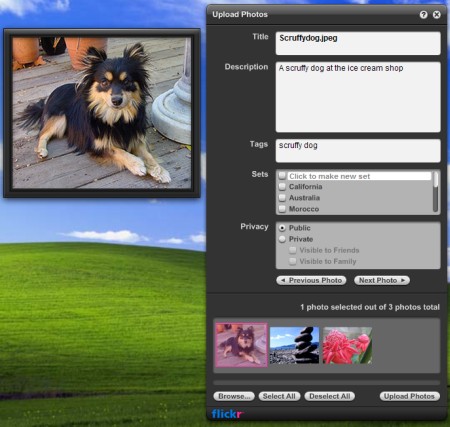
Yahoo has released the fourth version of the Yahoo Widgets platform on the Konfabulator engine. As you know, this is one of the best widget platforms for the desktop, which competes with similar platforms from Google, Apple and Microsoft Vista (see the review of engines for desktop widgets ). Along with the new engine, a beautiful widget for Flickr has been released.
 The new version of the widget engine has been significantly improved compared to the previous one ( list of major innovations ). The main thing is an improved interface and a new, bright and colorful Widget Dock launcher (it is shown in the screenshot on the right), which can be “glued” to any corner of the screen or even stretched to several monitors.
Yahoo widgets now support automatic updating (so far only for branded Yahoo widgets). As soon as a new version becomes available for some of them, a bright indicator appears on the panel. If you click on it, the widget will be updated. Another new feature of mini-programs is the work in "hidden" mode, with the display of a simplified version of the interface on the screen or no interface at all.
To facilitate the process of selecting widgets (and more than 4300 of them have already been developed ), a special “gallery of widgets” has appeared, built right into the panel. Developers offer to pay special attention to the new widget for Flickr: the most powerful of all widgets ever created by Yahoo programmers, by their own admission.
In addition, in Yahoo Widgets 4, the speed of the engine has been increased, memory consumption has been reduced by 40%, the function of automatically installing the engine (distribution has been reduced from 11.3 MB to 6 MB) has appeared on the computer of the user who downloaded any widget, as well as many other "bells and whistles" ( full list of innovations ).
The new version of the widget engine has been significantly improved compared to the previous one ( list of major innovations ). The main thing is an improved interface and a new, bright and colorful Widget Dock launcher (it is shown in the screenshot on the right), which can be “glued” to any corner of the screen or even stretched to several monitors.Yahoo widgets now support automatic updating (so far only for branded Yahoo widgets). As soon as a new version becomes available for some of them, a bright indicator appears on the panel. If you click on it, the widget will be updated. Another new feature of mini-programs is the work in "hidden" mode, with the display of a simplified version of the interface on the screen or no interface at all.
To facilitate the process of selecting widgets (and more than 4300 of them have already been developed ), a special “gallery of widgets” has appeared, built right into the panel. Developers offer to pay special attention to the new widget for Flickr: the most powerful of all widgets ever created by Yahoo programmers, by their own admission.

In addition, in Yahoo Widgets 4, the speed of the engine has been increased, memory consumption has been reduced by 40%, the function of automatically installing the engine (distribution has been reduced from 11.3 MB to 6 MB) has appeared on the computer of the user who downloaded any widget, as well as many other "bells and whistles" ( full list of innovations ).