 June 17, 2019 at 18:56
MVCC in PostgreSQL-8. Freezing
We started with issues related to isolation , made a digression about organizing data at a low level , and talked in detail about row versions and how snapshots are obtained from versions .
Then we examined different types of cleaning: intra-page (along with HOT-updates), regular and automatic .
And got to the last topic of this cycle. Today we’ll talk about the problem of transaction id wraparound and freezing.
PostgreSQL has 32 bits allocated for the transaction number. This is a fairly large number (about 4 billion), but with the active operation of the server, it may well be exhausted. For example, at a load of 1000 transactions per second, this will happen after only a month and a half of continuous operation.
But we talked about the fact that the multi-versioning mechanism relies on the sequence of numbering - then out of two transactions, a transaction with a lower number can be considered to have started earlier. Therefore, it is clear that you cannot just reset the counter and continue numbering again.
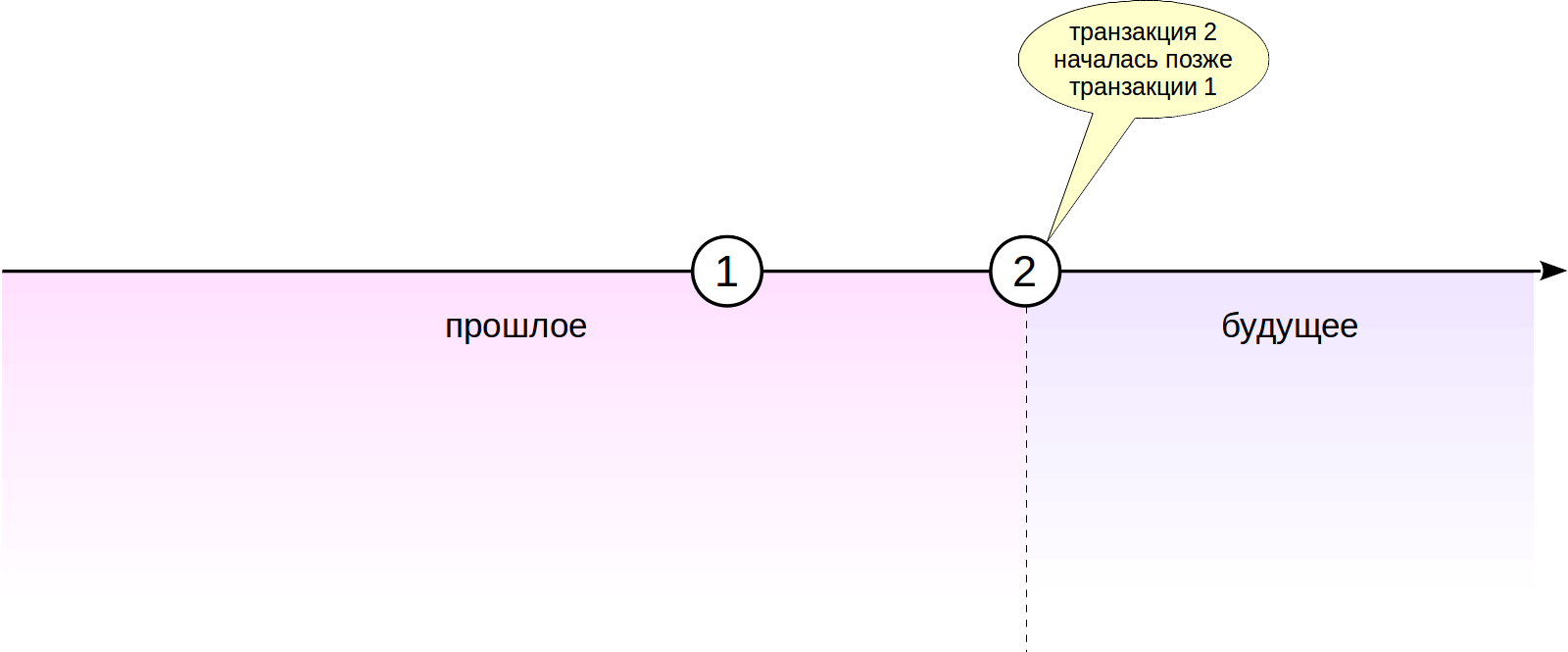
Why is it that 64 bits are not allocated for the transaction number - because this would completely eliminate the problem? The fact is that (as previously discussed) in the header of each version of the line two transaction numbers are stored - xmin and xmax. The header is already quite large, at least 23 bytes, and an increase in bit depth would lead to its increase by another 8 bytes. This is absolutely no way.
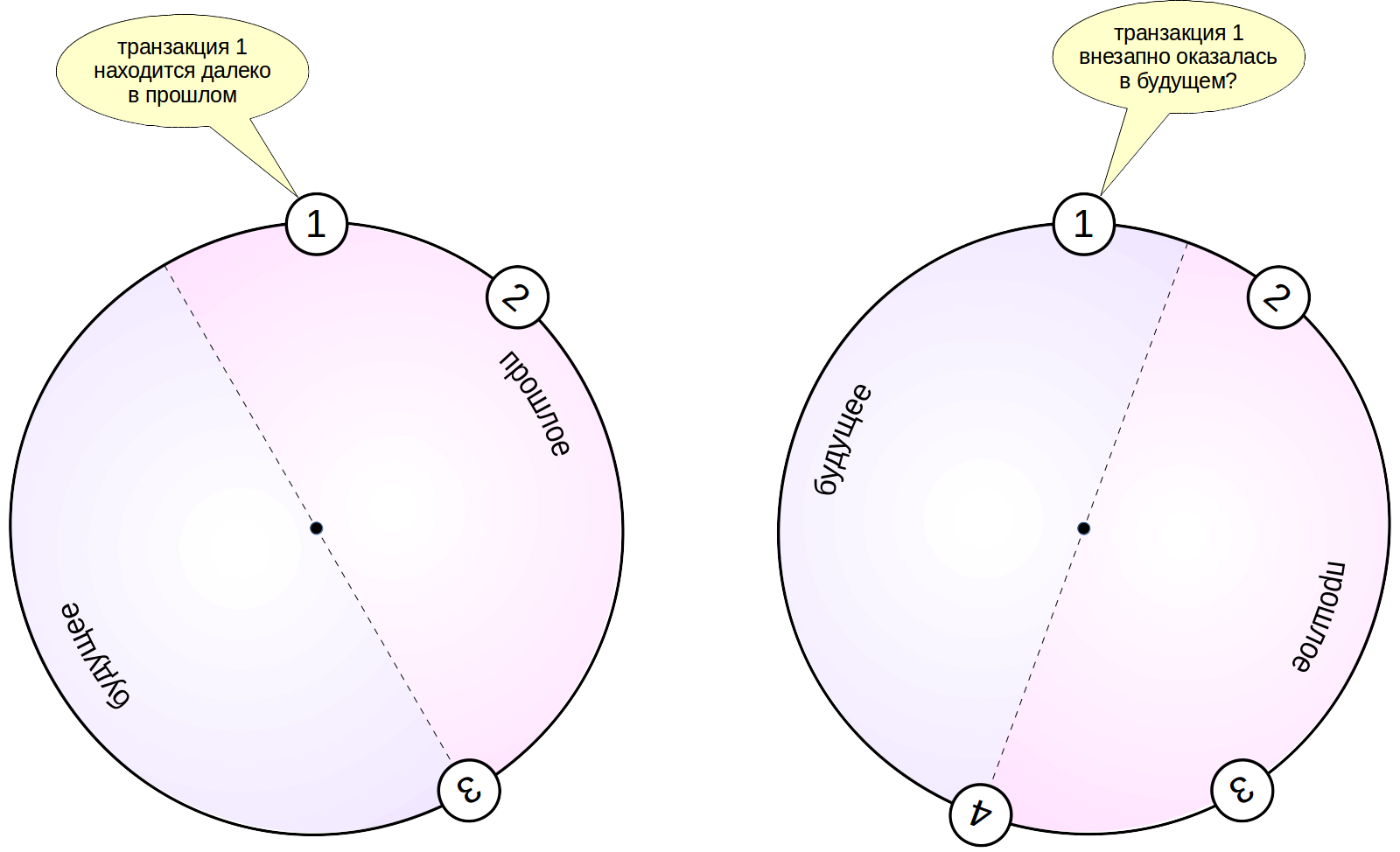
What to do? Instead of a linear diagram, all transaction numbers are looped. For any transaction, half of the numbers “counterclockwise” are considered to belong to the past, and half “clockwise” to the future.
The age of a transaction is the number of transactions that have passed since it appeared in the system (regardless of whether the counter passed through zero or not). When we want to understand whether one transaction is older than another or not, we compare their age, not numbers. (Therefore, by the way, the operations “greater” and “less” are not defined for the xid data type.)

But in such a looped circuit, an unpleasant situation arises. A transaction that was in the distant past (transaction 1 in the figure), after a while will be in that half of the circle that relates to the future. This, of course, violates the rules of visibility and would lead to problems - the changes made by transaction 1 would simply disappear from view.
In order to prevent such “travels” from the past to the future, the cleaning process (in addition to freeing up space in the pages) performs another task. He finds rather old and “cold” versions of the lines (which are visible in all the pictures and the change of which is already unlikely) and in a special way marks them - “freezes” them. The frozen version of the row is considered older than any regular data and is always visible in all data snapshots. Moreover, it is no longer necessary to look at the transaction number xmin, and this number can be safely reused. Thus, frozen versions of strings always remain in the past.
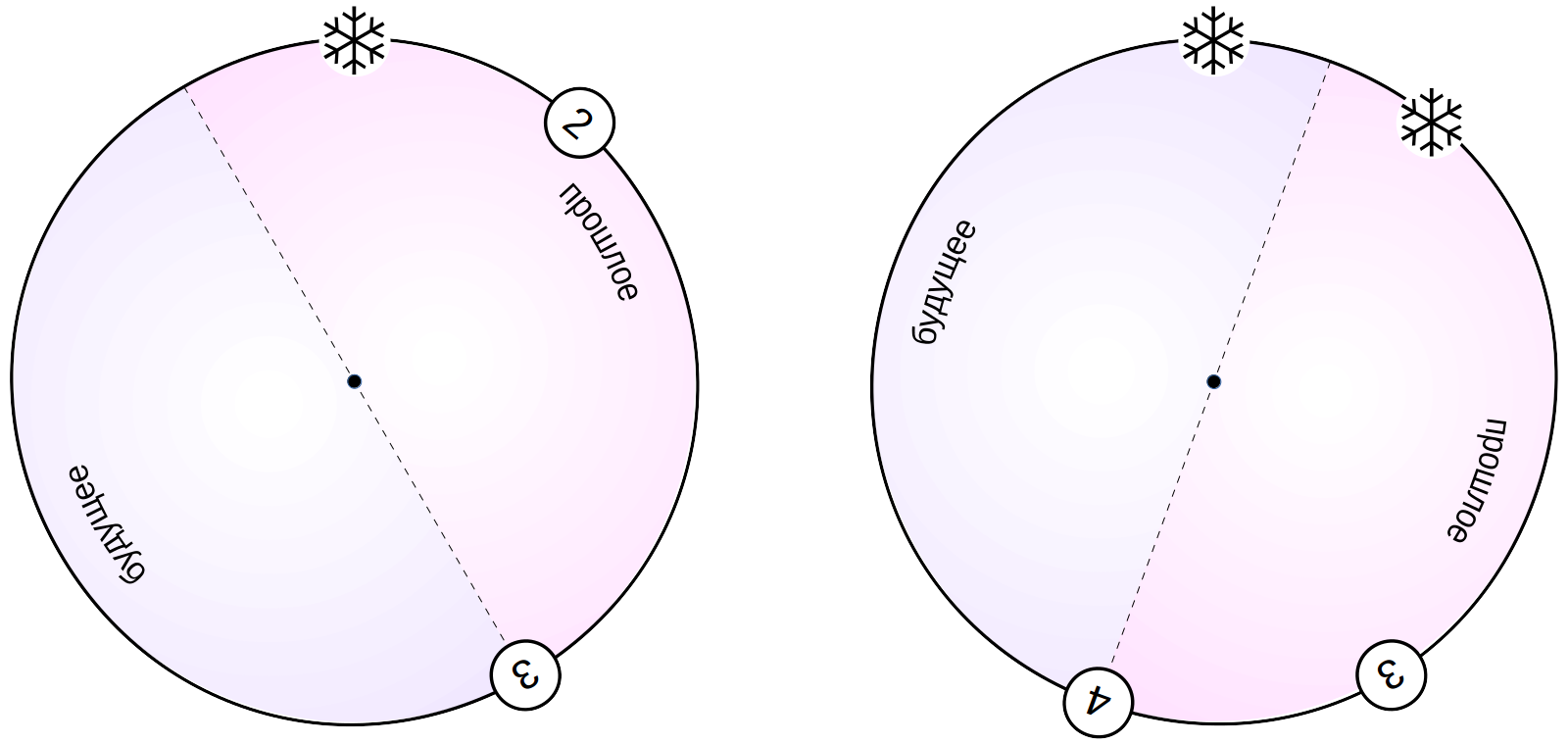
In order to mark the transaction number xmin as frozen, both hint bits are set at the same time - the commit bit and the cancel bit.
Note that the xmax transaction does not need to be frozen. Its presence means that this version of the string is no longer relevant. After it ceases to be visible in data snapshots, this version of the row will be cleared.
For experiments, create a table. We set the minimum fillfactor for it so that only two lines fit on each page - so it will be more convenient for us to observe what is happening. And turn off the automation to control the cleaning time yourself.
We have already created several options for a function that, using the pageinspect extension, shows the version of the lines that are on the page. Now we will create another variant of the same function: now it will display several pages at once and show the age of the xmin transaction (the system function age is used for this):
Please note that the sign of freezing (which we show with the letter f in brackets) is determined by the simultaneous installation of committed and aborted prompts. Many sources (including documentation) mention the special number FrozenTransactionId = 2, which marks frozen transactions. Such a system worked until version 9.4, but now it has been replaced by tooltip bits - this allows you to save the original transaction number in the line version, which is convenient for support and debugging purposes. However, transactions with number 2 can still occur in older systems, even upgraded to the latest versions.
We also need the pg_visibility extension, which allows you to look into the visibility map:
Prior to PostgreSQL 9.6, the visibility map contained one bit per page; it marked pages containing only “fairly old” versions of strings that are already guaranteed to be visible in all pictures. The idea here is that if the page is marked in the visibility map, then for its version of the lines you do not need to check the visibility rules.
Starting with version 9.6, a freeze map was added to the same layer - one more bit per page. The freeze map marks the pages on which all versions of the rows are frozen.
We insert several rows into the table and immediately perform the cleaning to create a visibility map:
And we see that both pages are now marked in the visibility map (all_visible), but not frozen yet (all_frozen):
The age of the transaction that created the rows (xmin_age) is 1 - this is the last transaction that was performed on the system:
Three main parameters control freezing, and we will consider them in turn.
Let's start with vacuum_freeze_min_age , which defines the minimum transaction age xmin at which the string version can be frozen. The smaller this value, the more unnecessary overhead costs may turn out: if we are dealing with “hot”, actively changing data, then freezing more and more new versions will disappear without any benefit. In this case, it is better to wait.
The default value for this parameter sets that transactions begin to freeze after 50 million other transactions have passed since they appeared:
In order to see how freezing occurs, we reduce the value of this parameter to unity.
And we’ll update one line on the zero page. The new version will get to the same page due to the small fillfactor value.
Here is what we see now in the data pages:
Now lines older than vacuum_freeze_min_age = 1 are to be frozen. But note that the zero line is not marked in the visibility map (the bit was reset by the UPDATE command, which changed the page), and the first one remains checked:
We have already said that cleaning scans only pages that are not marked in the visibility map. And so it turns out:
On the zero page, one version is frozen, but the first page did not consider cleaning at all. Thus, if only current versions are left on the page, then cleaning will not come to such a page and will not freeze them.
To still freeze the version of the lines left in the pages that the cleanup just doesn’t look at, a second parameter is provided: vacuum_freeze_table_age . It determines the age of the transaction, at which the cleanup ignores the visibility map and goes through all the pages of the table to freeze.
Each table stores a transaction number, for which it is known that all older transactions are guaranteed to be frozen (pg_class.relfrozenxid). With the age of this remembered transaction, the value of the vacuum_freeze_table_age parameter is compared .
Prior to PostgreSQL 9.6, cleanup performed a full table scan to ensure that all pages were crawled. For large tables, this operation was long and sad. The matter was aggravated by the fact that if the cleaning failed to reach the end (for example, an impatient administrator interrupted the execution of a command), it was necessary to start from the very beginning.
Starting with version 9.6, thanks to the freeze map (which we see in the all_frozen column in the pg_visibility_map output), clearing bypasses only those pages that are not already marked in the map. This is not only a much smaller amount of work, but also resistance to interruptions: if the cleaning process is stopped and started again, he will not have to again look at the pages that he already managed to mark in the freezing map last time.
One way or another, all pages in the table are frozen once in ( vacuum_freeze_table_age - vacuum_freeze_min_age ) transactions. With default values, this happens once per million transactions:
Thus, it is clear that too much vacuum_freeze_min_age should not be set, because instead of reducing overhead, this will begin to increase them.
Let's see how the whole table is frozen, and to do this, reduce vacuum_freeze_table_age to 5 so that the condition for freezing is met.
Let's clean:
Now, since the entire table has been guaranteed to be verified, the number of the frozen transaction can be increased - we are sure that the pages do not have an older, unfrozen transaction.
Now all versions of the lines on the first page are frozen:
In addition, the first page is marked in the freeze map:
It is important that row versions freeze on time. If a situation arises where a transaction that has not yet been frozen risks entering the future, PostgreSQL will crash to prevent potential problems.
What could be the reason for this? There are various reasons.
In such cases, an “aggressive” auto-cleaning operation is provided, and it is regulated by the autovacuum_freeze_max_age parameter . If in any table of any database there may be an unfrozen transaction older than the age specified in the parameter, auto-cleaning starts forcibly (even if it is disabled) and sooner or later it will reach the problem table (regardless of the usual criteria).
The default value is pretty conservative:
The limit for autovacuum_freeze_max_age is 2 billion transactions, and a value 10 times smaller is used. This makes sense: increasing the value we increase the risk that for the remaining time, auto-cleaning just does not have time to freeze all the necessary versions of the lines.
In addition, the value of this parameter determines the size of the XACT structure: since there should not be any older transactions in the system for which you might need to find out the status, auto-cleaning removes unnecessary XACT segment files, freeing up space.
Let's see how cleaning handles append-only tables, using tfreeze as an example. For this table, auto-cleaning is generally disabled, but this will not be an obstacle.
Change autovacuum_freeze_max_agerequires a server restart. But all the parameters discussed above can also be set at the level of individual tables using storage parameters. Usually it only makes sense to do this in special cases, when the table really requires special care.
So, we will set autovacuum_freeze_max_age at the table level (and at the same time return the normal fillfactor as well). Unfortunately, the minimum possible value is 100,000:
Unfortunately, because we have to complete 100,000 transactions in order to reproduce the situation that interests us. But, of course, for practical purposes, this is a very, very low value.
Since we are going to add data, we will insert 100,000 rows into the table - each in our transaction. And again I have to make a reservation that in practice this should not be done. But now we are just exploring, we can.
As we can see, the age of the last frozen transaction in the table has exceeded the threshold value:
But if you wait a bit now, then in the server’s message log there will be an entry about automatic aggressive vacuum of table “test.public.tfreeze”, the number of the frozen transaction will change, and its age will return to decency:
Sometimes it’s convenient to manually control the freeze rather than wait for the arrival of auto-cleaning.
You can manually freeze a command using the VACUUM FREEZE command — all row versions will be frozen, regardless of the age of the transactions (as if the autovacuum_freeze_min_age = 0 parameter ). When a table is rebuilt with the VACUUM FULL or CLUSTER commands, all rows are also frozen.
To freeze all databases, you can use the utility:
Data can also be frozen during initial loading using the COPY command by specifying the FREEZE parameter. To do this, the table must be created (or emptied with the TRUNCATE command) in the same
transaction as COPY.
Since there are separate visibility rules for frozen rows, such rows will be visible in snapshots of data from other transactions in violation of the usual isolation rules (this applies to transactions with the Repeatable Read or Serializable level).
To verify this, in another session, start a transaction with the Repeatable Read isolation level:
Note that this transaction built a snapshot of the data, but did not access the tfreeze table. Now we will empty the tfreeze table and load new rows into it in one transaction. If a parallel transaction read the contents of tfreeze, the TRUNCATE command would be locked until the end of the transaction.
Now a parallel transaction sees new data, although this breaks isolation:
But, since such data loading is unlikely to occur regularly, this is usually not a problem.
Significantly worse, COPY WITH FREEZE does not work with the visibility map - loaded pages are not marked as containing only versions of the lines that are visible to everyone. Therefore, when you first access the table, the cleaning is forced to re-process it all and create a visibility map. To make matters worse, data pages have a sign of full visibility in their own header, so cleaning not only reads the entire table, but also completely rewrites it, putting down the desired bit. Unfortunately, the solution to this problem does not have to wait earlier than version 13 ( discussion ).
This concludes my series of articles on PostgreSQL isolation and multiversion. Thank you for your attention and especially for the comments - they improve the material and often point out areas that require more careful attention on my part.
Stay with us, to be continued!
Then we examined different types of cleaning: intra-page (along with HOT-updates), regular and automatic .
And got to the last topic of this cycle. Today we’ll talk about the problem of transaction id wraparound and freezing.
Transaction Counter Overflow
PostgreSQL has 32 bits allocated for the transaction number. This is a fairly large number (about 4 billion), but with the active operation of the server, it may well be exhausted. For example, at a load of 1000 transactions per second, this will happen after only a month and a half of continuous operation.
But we talked about the fact that the multi-versioning mechanism relies on the sequence of numbering - then out of two transactions, a transaction with a lower number can be considered to have started earlier. Therefore, it is clear that you cannot just reset the counter and continue numbering again.
Why is it that 64 bits are not allocated for the transaction number - because this would completely eliminate the problem? The fact is that (as previously discussed) in the header of each version of the line two transaction numbers are stored - xmin and xmax. The header is already quite large, at least 23 bytes, and an increase in bit depth would lead to its increase by another 8 bytes. This is absolutely no way.
64-bit transaction numbers are implemented in the product of our company, Postgres Pro Enterprise, but they are not completely honest there either: xmin and xmax remain 32-bit, and the page’s heading contains a common “beginning of an era” page-wide.
What to do? Instead of a linear diagram, all transaction numbers are looped. For any transaction, half of the numbers “counterclockwise” are considered to belong to the past, and half “clockwise” to the future.
The age of a transaction is the number of transactions that have passed since it appeared in the system (regardless of whether the counter passed through zero or not). When we want to understand whether one transaction is older than another or not, we compare their age, not numbers. (Therefore, by the way, the operations “greater” and “less” are not defined for the xid data type.)
But in such a looped circuit, an unpleasant situation arises. A transaction that was in the distant past (transaction 1 in the figure), after a while will be in that half of the circle that relates to the future. This, of course, violates the rules of visibility and would lead to problems - the changes made by transaction 1 would simply disappear from view.
Version Freezing and Visibility Rules
In order to prevent such “travels” from the past to the future, the cleaning process (in addition to freeing up space in the pages) performs another task. He finds rather old and “cold” versions of the lines (which are visible in all the pictures and the change of which is already unlikely) and in a special way marks them - “freezes” them. The frozen version of the row is considered older than any regular data and is always visible in all data snapshots. Moreover, it is no longer necessary to look at the transaction number xmin, and this number can be safely reused. Thus, frozen versions of strings always remain in the past.
In order to mark the transaction number xmin as frozen, both hint bits are set at the same time - the commit bit and the cancel bit.
Note that the xmax transaction does not need to be frozen. Its presence means that this version of the string is no longer relevant. After it ceases to be visible in data snapshots, this version of the row will be cleared.
For experiments, create a table. We set the minimum fillfactor for it so that only two lines fit on each page - so it will be more convenient for us to observe what is happening. And turn off the automation to control the cleaning time yourself.
=> CREATE TABLE tfreeze(
  id integer,
  s char(300)
) WITH (fillfactor = 10, autovacuum_enabled = off);
We have already created several options for a function that, using the pageinspect extension, shows the version of the lines that are on the page. Now we will create another variant of the same function: now it will display several pages at once and show the age of the xmin transaction (the system function age is used for this):
=> CREATE FUNCTION heap_page(relname text, pageno_from integer, pageno_to integer)
RETURNS TABLE(ctid tid, state text, xmin text, xmin_age integer, xmax text, t_ctid tid)
AS $$
SELECT (pageno,lp)::text::tid AS ctid,
       CASE lp_flags
         WHEN 0 THEN 'unused'
         WHEN 1 THEN 'normal'
         WHEN 2 THEN 'redirect to '||lp_off
         WHEN 3 THEN 'dead'
       END AS state,
       t_xmin || CASE
         WHEN (t_infomask & 256+512) = 256+512 THEN ' (f)'
         WHEN (t_infomask & 256) > 0 THEN ' (c)'
         WHEN (t_infomask & 512) > 0 THEN ' (a)'
         ELSE ''
       END AS xmin,
      age(t_xmin) xmin_age,
       t_xmax || CASE
         WHEN (t_infomask & 1024) > 0 THEN ' (c)'
         WHEN (t_infomask & 2048) > 0 THEN ' (a)'
         ELSE ''
       END AS xmax,
       t_ctid
FROM generate_series(pageno_from, pageno_to) p(pageno),
     heap_page_items(get_raw_page(relname, pageno))
ORDER BY pageno, lp;
$$ LANGUAGE SQL;
Please note that the sign of freezing (which we show with the letter f in brackets) is determined by the simultaneous installation of committed and aborted prompts. Many sources (including documentation) mention the special number FrozenTransactionId = 2, which marks frozen transactions. Such a system worked until version 9.4, but now it has been replaced by tooltip bits - this allows you to save the original transaction number in the line version, which is convenient for support and debugging purposes. However, transactions with number 2 can still occur in older systems, even upgraded to the latest versions.
We also need the pg_visibility extension, which allows you to look into the visibility map:
=> CREATE EXTENSION pg_visibility;
Prior to PostgreSQL 9.6, the visibility map contained one bit per page; it marked pages containing only “fairly old” versions of strings that are already guaranteed to be visible in all pictures. The idea here is that if the page is marked in the visibility map, then for its version of the lines you do not need to check the visibility rules.
Starting with version 9.6, a freeze map was added to the same layer - one more bit per page. The freeze map marks the pages on which all versions of the rows are frozen.
We insert several rows into the table and immediately perform the cleaning to create a visibility map:
=> INSERT INTO tfreeze(id, s)
  SELECT g.id, 'FOO' FROM generate_series(1,100) g(id);
=> VACUUM tfreeze;
And we see that both pages are now marked in the visibility map (all_visible), but not frozen yet (all_frozen):
=> SELECT * FROM generate_series(0,1) g(blkno), pg_visibility_map('tfreeze',g.blkno)
ORDER BY g.blkno;
 blkno | all_visible | all_frozen
-------+-------------+------------
     0 | t           | f
     1 | t           | f
(2 rows)
The age of the transaction that created the rows (xmin_age) is 1 - this is the last transaction that was performed on the system:
=> SELECT * FROM heap_page('tfreeze',0,1);
 ctid  | state  |  xmin   | xmin_age | xmax  | t_ctid
-------+--------+---------+----------+-------+--------
 (0,1) | normal | 697 (c) |        1 | 0 (a) | (0,1)
 (0,2) | normal | 697 (c) |        1 | 0 (a) | (0,2)
 (1,1) | normal | 697 (c) |        1 | 0 (a) | (1,1)
 (1,2) | normal | 697 (c) |        1 | 0 (a) | (1,2)
(4 rows)
Minimum age for freezing
Three main parameters control freezing, and we will consider them in turn.
Let's start with vacuum_freeze_min_age , which defines the minimum transaction age xmin at which the string version can be frozen. The smaller this value, the more unnecessary overhead costs may turn out: if we are dealing with “hot”, actively changing data, then freezing more and more new versions will disappear without any benefit. In this case, it is better to wait.
The default value for this parameter sets that transactions begin to freeze after 50 million other transactions have passed since they appeared:
=> SHOW vacuum_freeze_min_age;
 vacuum_freeze_min_age
-----------------------
 50000000
(1 row)
In order to see how freezing occurs, we reduce the value of this parameter to unity.
=> ALTER SYSTEM SET vacuum_freeze_min_age = 1;
=> SELECT pg_reload_conf();
And we’ll update one line on the zero page. The new version will get to the same page due to the small fillfactor value.
=> UPDATE tfreeze SET s = 'BAR' WHERE id = 1;
Here is what we see now in the data pages:
=> SELECT * FROM heap_page('tfreeze',0,1);
 ctid  | state  |  xmin   | xmin_age | xmax  | t_ctid
-------+--------+---------+----------+-------+--------
 (0,1) | normal | 697 (c) |        2 | 698   | (0,3)
 (0,2) | normal | 697 (c) |        2 | 0 (a) | (0,2)
 (0,3) | normal | 698     |        1 | 0 (a) | (0,3)
 (1,1) | normal | 697 (c) |        2 | 0 (a) | (1,1)
 (1,2) | normal | 697 (c) |        2 | 0 (a) | (1,2)
(5 rows)
Now lines older than vacuum_freeze_min_age = 1 are to be frozen. But note that the zero line is not marked in the visibility map (the bit was reset by the UPDATE command, which changed the page), and the first one remains checked:
=> SELECT * FROM generate_series(0,1) g(blkno), pg_visibility_map('tfreeze',g.blkno)
ORDER BY g.blkno;
 blkno | all_visible | all_frozen
-------+-------------+------------
     0 | f           | f
     1 | t           | f
(2 rows)
We have already said that cleaning scans only pages that are not marked in the visibility map. And so it turns out:
=> VACUUM tfreeze;
=> SELECT * FROM heap_page('tfreeze',0,1);
 ctid  |     state     |  xmin   | xmin_age | xmax  | t_ctid
-------+---------------+---------+----------+-------+--------
 (0,1) | redirect to 3 |         |          |       |
 (0,2) | normal        | 697 (f) |        2 | 0 (a) | (0,2)
 (0,3) | normal        | 698 (c) |        1 | 0 (a) | (0,3)
 (1,1) | normal        | 697 (c) |        2 | 0 (a) | (1,1)
 (1,2) | normal        | 697 (c) |        2 | 0 (a) | (1,2)
(5 rows)
On the zero page, one version is frozen, but the first page did not consider cleaning at all. Thus, if only current versions are left on the page, then cleaning will not come to such a page and will not freeze them.
=> SELECT * FROM generate_series(0,1) g(blkno), pg_visibility_map('tfreeze',g.blkno)
ORDER BY g.blkno;
 blkno | all_visible | all_frozen
-------+-------------+------------
     0 | t           | f
     1 | t           | f
(2 rows)
Age to freeze the entire table
To still freeze the version of the lines left in the pages that the cleanup just doesn’t look at, a second parameter is provided: vacuum_freeze_table_age . It determines the age of the transaction, at which the cleanup ignores the visibility map and goes through all the pages of the table to freeze.
Each table stores a transaction number, for which it is known that all older transactions are guaranteed to be frozen (pg_class.relfrozenxid). With the age of this remembered transaction, the value of the vacuum_freeze_table_age parameter is compared .
=> SELECT relfrozenxid, age(relfrozenxid) FROM pg_class WHERE relname = 'tfreeze';
 relfrozenxid | age
--------------+-----
          694 |   5
(1 row)
Prior to PostgreSQL 9.6, cleanup performed a full table scan to ensure that all pages were crawled. For large tables, this operation was long and sad. The matter was aggravated by the fact that if the cleaning failed to reach the end (for example, an impatient administrator interrupted the execution of a command), it was necessary to start from the very beginning.
Starting with version 9.6, thanks to the freeze map (which we see in the all_frozen column in the pg_visibility_map output), clearing bypasses only those pages that are not already marked in the map. This is not only a much smaller amount of work, but also resistance to interruptions: if the cleaning process is stopped and started again, he will not have to again look at the pages that he already managed to mark in the freezing map last time.
One way or another, all pages in the table are frozen once in ( vacuum_freeze_table_age - vacuum_freeze_min_age ) transactions. With default values, this happens once per million transactions:
=> SHOW vacuum_freeze_table_age;
 vacuum_freeze_table_age
-------------------------
 150000000
(1 row)
Thus, it is clear that too much vacuum_freeze_min_age should not be set, because instead of reducing overhead, this will begin to increase them.
Let's see how the whole table is frozen, and to do this, reduce vacuum_freeze_table_age to 5 so that the condition for freezing is met.
=> ALTER SYSTEM SET vacuum_freeze_table_age = 5;
=> SELECT pg_reload_conf();
Let's clean:
=> VACUUM tfreeze;
Now, since the entire table has been guaranteed to be verified, the number of the frozen transaction can be increased - we are sure that the pages do not have an older, unfrozen transaction.
=> SELECT relfrozenxid, age(relfrozenxid) FROM pg_class WHERE relname = 'tfreeze';
 relfrozenxid | age
--------------+-----
          698 |   1
(1 row)
Now all versions of the lines on the first page are frozen:
=> SELECT * FROM heap_page('tfreeze',0,1);
 ctid  |     state     |  xmin   | xmin_age | xmax  | t_ctid
-------+---------------+---------+----------+-------+--------
 (0,1) | redirect to 3 |         |          |       |
 (0,2) | normal        | 697 (f) |        2 | 0 (a) | (0,2)
 (0,3) | normal        | 698 (c) |        1 | 0 (a) | (0,3)
 (1,1) | normal        | 697 (f) |        2 | 0 (a) | (1,1)
 (1,2) | normal        | 697 (f) |        2 | 0 (a) | (1,2)
(5 rows)
In addition, the first page is marked in the freeze map:
=> SELECT * FROM generate_series(0,1) g(blkno), pg_visibility_map('tfreeze',g.blkno)
ORDER BY g.blkno;
 blkno | all_visible | all_frozen
-------+-------------+------------
     0 | t           | f
     1 | t           | t
(2 rows)
Age for “aggressive” response
It is important that row versions freeze on time. If a situation arises where a transaction that has not yet been frozen risks entering the future, PostgreSQL will crash to prevent potential problems.
What could be the reason for this? There are various reasons.
- Auto cleaning can be turned off, and regular cleaning does not start either. We have already said that this is not necessary, but technically it is possible.
- Even the included auto-cleaning does not come to databases that are not used (remember the track_counts parameter and the template0 database).
- As we saw last time , cleaning skips tables in which data is only added, but not deleted or changed.
In such cases, an “aggressive” auto-cleaning operation is provided, and it is regulated by the autovacuum_freeze_max_age parameter . If in any table of any database there may be an unfrozen transaction older than the age specified in the parameter, auto-cleaning starts forcibly (even if it is disabled) and sooner or later it will reach the problem table (regardless of the usual criteria).
The default value is pretty conservative:
=> SHOW autovacuum_freeze_max_age;
 autovacuum_freeze_max_age
---------------------------
 200000000
(1 row)
The limit for autovacuum_freeze_max_age is 2 billion transactions, and a value 10 times smaller is used. This makes sense: increasing the value we increase the risk that for the remaining time, auto-cleaning just does not have time to freeze all the necessary versions of the lines.
In addition, the value of this parameter determines the size of the XACT structure: since there should not be any older transactions in the system for which you might need to find out the status, auto-cleaning removes unnecessary XACT segment files, freeing up space.
Let's see how cleaning handles append-only tables, using tfreeze as an example. For this table, auto-cleaning is generally disabled, but this will not be an obstacle.
Change autovacuum_freeze_max_agerequires a server restart. But all the parameters discussed above can also be set at the level of individual tables using storage parameters. Usually it only makes sense to do this in special cases, when the table really requires special care.
So, we will set autovacuum_freeze_max_age at the table level (and at the same time return the normal fillfactor as well). Unfortunately, the minimum possible value is 100,000:
=> ALTER TABLE tfreeze SET (autovacuum_freeze_max_age = 100000, fillfactor = 100);
Unfortunately, because we have to complete 100,000 transactions in order to reproduce the situation that interests us. But, of course, for practical purposes, this is a very, very low value.
Since we are going to add data, we will insert 100,000 rows into the table - each in our transaction. And again I have to make a reservation that in practice this should not be done. But now we are just exploring, we can.
=> CREATE PROCEDURE foo(id integer) AS $$
BEGIN
  INSERT INTO tfreeze VALUES (id, 'FOO');
  COMMIT;
END;
$$ LANGUAGE plpgsql;
=> DO $$
BEGIN
  FOR i IN 101 .. 100100 LOOP
    CALL foo(i);
  END LOOP;
END;
$$;
As we can see, the age of the last frozen transaction in the table has exceeded the threshold value:
=> SELECT relfrozenxid, age(relfrozenxid) FROM pg_class WHERE relname = 'tfreeze';
 relfrozenxid |  age
--------------+--------
          698 | 100006
(1 row)
But if you wait a bit now, then in the server’s message log there will be an entry about automatic aggressive vacuum of table “test.public.tfreeze”, the number of the frozen transaction will change, and its age will return to decency:
=> SELECT relfrozenxid, age(relfrozenxid) FROM pg_class WHERE relname = 'tfreeze';
 relfrozenxid | age
--------------+-----
       100703 |   3
(1 row)
There is also such a thing as freezing multi-transactions, but we won’t talk about it yet - we will postpone it until we talk about locks so as not to get ahead of ourselves.
Manual freezing
Sometimes it’s convenient to manually control the freeze rather than wait for the arrival of auto-cleaning.
You can manually freeze a command using the VACUUM FREEZE command — all row versions will be frozen, regardless of the age of the transactions (as if the autovacuum_freeze_min_age = 0 parameter ). When a table is rebuilt with the VACUUM FULL or CLUSTER commands, all rows are also frozen.
To freeze all databases, you can use the utility:
vacuumdb --all --freeze
Data can also be frozen during initial loading using the COPY command by specifying the FREEZE parameter. To do this, the table must be created (or emptied with the TRUNCATE command) in the same
transaction as COPY.
Since there are separate visibility rules for frozen rows, such rows will be visible in snapshots of data from other transactions in violation of the usual isolation rules (this applies to transactions with the Repeatable Read or Serializable level).
To verify this, in another session, start a transaction with the Repeatable Read isolation level:
|  => BEGIN ISOLATION LEVEL REPEATABLE READ;
|  => SELECT txid_current();
Note that this transaction built a snapshot of the data, but did not access the tfreeze table. Now we will empty the tfreeze table and load new rows into it in one transaction. If a parallel transaction read the contents of tfreeze, the TRUNCATE command would be locked until the end of the transaction.
=> BEGIN;
=> TRUNCATE tfreeze;
=> COPY tfreeze FROM stdin WITH FREEZE;
1	FOO
2	BAR
3	BAZ
\.
=> COMMIT;
Now a parallel transaction sees new data, although this breaks isolation:
| => SELECT count(*) FROM tfreeze;
|   count
|  -------
|       3
|  (1 row)
| => COMMIT;
But, since such data loading is unlikely to occur regularly, this is usually not a problem.
Significantly worse, COPY WITH FREEZE does not work with the visibility map - loaded pages are not marked as containing only versions of the lines that are visible to everyone. Therefore, when you first access the table, the cleaning is forced to re-process it all and create a visibility map. To make matters worse, data pages have a sign of full visibility in their own header, so cleaning not only reads the entire table, but also completely rewrites it, putting down the desired bit. Unfortunately, the solution to this problem does not have to wait earlier than version 13 ( discussion ).
Conclusion
This concludes my series of articles on PostgreSQL isolation and multiversion. Thank you for your attention and especially for the comments - they improve the material and often point out areas that require more careful attention on my part.
Stay with us, to be continued!









