Software Defined Radio - how does it work? Part 6
- Tutorial
Hi, Habr.
In the previous part, we looked at the possibility of transmitting simple signals using GNU Radio. Now we will go further and see how to convey something more complicated. Let's start with the amateur radio signals WSPR, and then create a working software QAM modem.
And as in the previous case, we will do this without writing a single line of code, the program will also be cross-platform, and will be able to work both under OSX / Linux and under Windows. I will also show how to debug a modem using GNU Radio, without any hardware at all.
Continued under the cut.
For those who have not used GNU Radio, it is recommended to read parts 4 and 5 , which described the principles of working with the program.
Let's start with a simpler one, with WSPR - this type of communication was specially made for propagation tests of weak signals, i.e. what we need is a power level of devices like LimeSDR no more than 100mW. The WSPR signal is transmitted at a very low speed (2 minutes per message of approximately 30 bytes) in a very narrow band, which allows it to be received even below the noise level. Transmit such a signal using GNU Radio.
First you need to record the signal. To do this, take the WSJT program, set all the necessary parameters (power, call sign, location, etc.). Specify Virtual Audio Cable as the output audio device in the settings, and record the signal in WAV. Pauses at the edges need to be cut off in any editor (for example, Cool Edit), as a result, we should get a file with a duration of about 2 minutes.
Now create a graph in the GNU Radio Companion.

This method does not claim to be maximum efficiency, but it is quite simple and straightforward. The WSPR signal is initially at a frequency of 1500 Hz, the recorded wav file has a sampling frequency of 22050 s / s. First, we resample the signal 57/5 times to bring the sampling frequency to the required 250.000 s / s. Then we shift the frequency up by 10KHz (the useful signal will be at the frequency of 11.5KHz), translate the signal into the complex form required by the receiver, and cut out the excess filter, leaving the frequencies 11-12KHz.
WSPR signals are time-bound and transmitted every even minute (0:00, 0:02, etc.). I started the transfer to GNU Radio manually, by eye, determining the interval by the hour, anyone who wants can add a script in Python to automatically start the transfer.
We are waiting for the right time, turn on the transmitter, receiver, and check the result.

If you wish, you can also add automatic generation of a WSPR file to the program based on input data (call sign, location, transmit power), examples of WSPR generation for Python can be taken on github.
It is interesting to note that at 432 MHz the frequency drift is already quite noticeable, although the signal is still decoded. But at a frequency of 1.3 GHz, the drift becomes so large that WSPR is no longer accepted - an external reference generator with a more stable signal is needed for SDR (or at least software frequency correction during transmission, although this is less convenient).
If the SDR allows you to transmit at low frequencies, then you can try transmission on the HF band. Thus, with HackRF, it was possible to transmit a signal at 1000 km at 14 MHz from a room antenna, which can be considered a good result. Although the high frequencies (433 MHz and 1.3 GHz) are perhaps even more interesting for experiments, the signals are transmitted only in direct line of sight, so for such experiments you need a second participant on the receiving side. The second plus of such tests is that only the lazy did not transmit to HF in wspr, but high frequencies are much less mastered. So, with boards like LimeSDR or USRP, you can carry out quite interesting experiments with reception and transmission at ultra-high frequencies.
Let's go further. WSPR is a fairly simple format, let's do something more interesting - a full-fledged (well, almost) modem. With quadrature amplitude modulation, both the amplitude and phase of the signal simultaneously change, which allows data to be transmitted at a higher speed (but the occupied band is also larger).
Consider the first part - the transmitter.

As you can see, we read the data from the data.txt file, then with a sampling frequency of 25KHz we send data to the packet encoder, which converts the stream into a 4-bit code. This stream goes to the quadrature modulator, then the sampling frequency is increased to a transmitter frequency of 250KHz, and the signal is shifted upward by 80KHz (many receivers have a peak at zero frequency, and this will interfere). The Constellation Rect component sets the modulation parameters - the number of characters and the phase and amplitude shift.
The first part is ready. We start the “transfer” and see our signal.

We can test our transmitter without even having any equipment - for this there is a special Channel Model block - a communication channel model. There you can set the noise, frequency shift, etc.
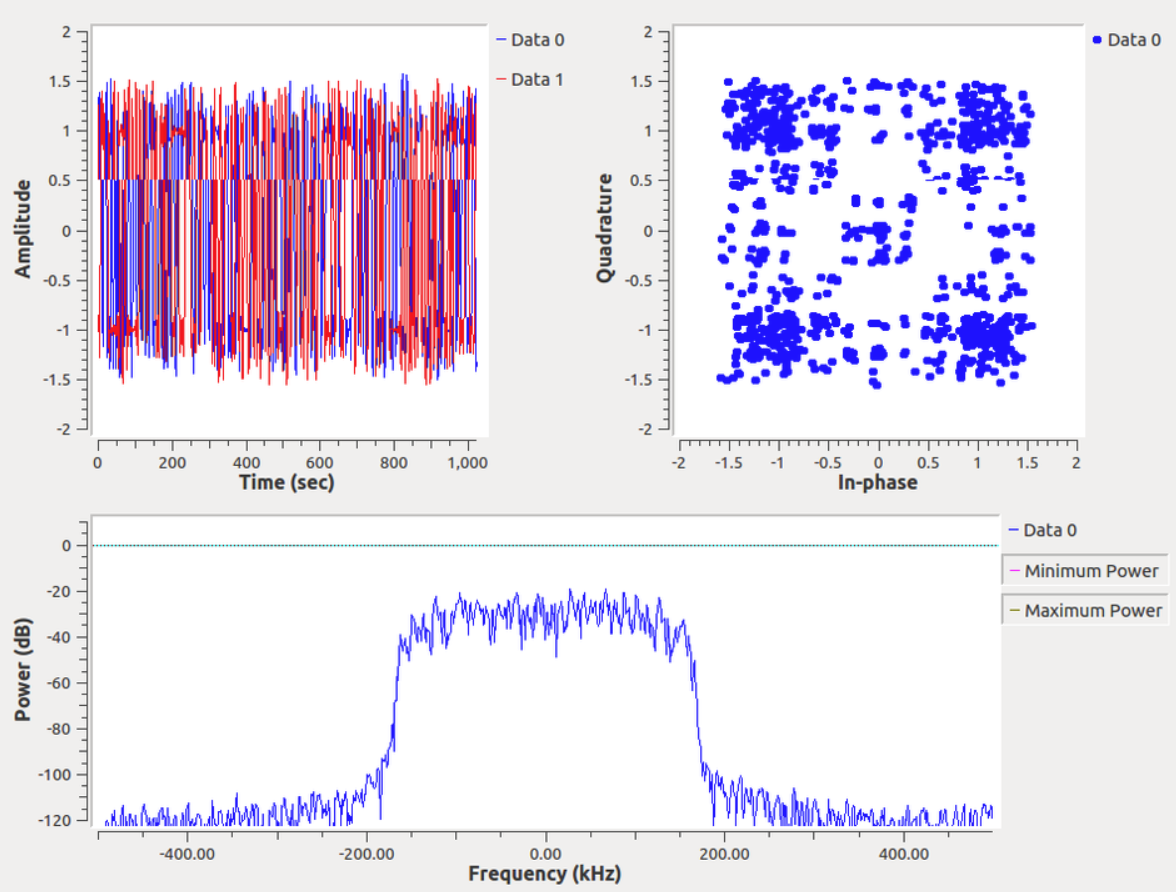
This is what our signal looks like before and after the transmission. By the way, as you can see, all the "harmonics" of the transmitter below 120 dB have gone much lower than the noise level.

Now the reception. In fact, the same thing, only in reverse order.

Separately, you can stop at the last UDP Sink block. It is not clear why, but in GNU Radio there is no component for viewing text data. Therefore, we simply send data via UDP to any local port (I chose 999).
To receive, we write a simple program in Python.
Result: run the script, run GNU Radio, and see the received messages in the console.

As you can see, everything works, and you can not have either a receiver or antennas :)
For those who want to repeat the experiments, the project grc-file is under the spoiler. It should work on both Linux and Windows.
A good guide to creating a more sophisticated modem is on the GNU Radio website , but they use a custom block for demodulation, which was only launched under Linux. There is no problem with this in the above example.
As you can see, GNU Radio is a rather interesting program for working with signals in different ways, in which you can do many different interesting things. If the audience does not lose interest (there is a feeling that I delve into narrow topics that are of little interest to most), you can try to consider transmitting something more interesting, for example, a video.
In the previous part, we looked at the possibility of transmitting simple signals using GNU Radio. Now we will go further and see how to convey something more complicated. Let's start with the amateur radio signals WSPR, and then create a working software QAM modem.
And as in the previous case, we will do this without writing a single line of code, the program will also be cross-platform, and will be able to work both under OSX / Linux and under Windows. I will also show how to debug a modem using GNU Radio, without any hardware at all.
Continued under the cut.
For those who have not used GNU Radio, it is recommended to read parts 4 and 5 , which described the principles of working with the program.
Wspr
Let's start with a simpler one, with WSPR - this type of communication was specially made for propagation tests of weak signals, i.e. what we need is a power level of devices like LimeSDR no more than 100mW. The WSPR signal is transmitted at a very low speed (2 minutes per message of approximately 30 bytes) in a very narrow band, which allows it to be received even below the noise level. Transmit such a signal using GNU Radio.
First you need to record the signal. To do this, take the WSJT program, set all the necessary parameters (power, call sign, location, etc.). Specify Virtual Audio Cable as the output audio device in the settings, and record the signal in WAV. Pauses at the edges need to be cut off in any editor (for example, Cool Edit), as a result, we should get a file with a duration of about 2 minutes.
Now create a graph in the GNU Radio Companion.
This method does not claim to be maximum efficiency, but it is quite simple and straightforward. The WSPR signal is initially at a frequency of 1500 Hz, the recorded wav file has a sampling frequency of 22050 s / s. First, we resample the signal 57/5 times to bring the sampling frequency to the required 250.000 s / s. Then we shift the frequency up by 10KHz (the useful signal will be at the frequency of 11.5KHz), translate the signal into the complex form required by the receiver, and cut out the excess filter, leaving the frequencies 11-12KHz.
WSPR signals are time-bound and transmitted every even minute (0:00, 0:02, etc.). I started the transfer to GNU Radio manually, by eye, determining the interval by the hour, anyone who wants can add a script in Python to automatically start the transfer.
We are waiting for the right time, turn on the transmitter, receiver, and check the result.
If you wish, you can also add automatic generation of a WSPR file to the program based on input data (call sign, location, transmit power), examples of WSPR generation for Python can be taken on github.
It is interesting to note that at 432 MHz the frequency drift is already quite noticeable, although the signal is still decoded. But at a frequency of 1.3 GHz, the drift becomes so large that WSPR is no longer accepted - an external reference generator with a more stable signal is needed for SDR (or at least software frequency correction during transmission, although this is less convenient).
If the SDR allows you to transmit at low frequencies, then you can try transmission on the HF band. Thus, with HackRF, it was possible to transmit a signal at 1000 km at 14 MHz from a room antenna, which can be considered a good result. Although the high frequencies (433 MHz and 1.3 GHz) are perhaps even more interesting for experiments, the signals are transmitted only in direct line of sight, so for such experiments you need a second participant on the receiving side. The second plus of such tests is that only the lazy did not transmit to HF in wspr, but high frequencies are much less mastered. So, with boards like LimeSDR or USRP, you can carry out quite interesting experiments with reception and transmission at ultra-high frequencies.
QAM Modem
Let's go further. WSPR is a fairly simple format, let's do something more interesting - a full-fledged (well, almost) modem. With quadrature amplitude modulation, both the amplitude and phase of the signal simultaneously change, which allows data to be transmitted at a higher speed (but the occupied band is also larger).
Consider the first part - the transmitter.
As you can see, we read the data from the data.txt file, then with a sampling frequency of 25KHz we send data to the packet encoder, which converts the stream into a 4-bit code. This stream goes to the quadrature modulator, then the sampling frequency is increased to a transmitter frequency of 250KHz, and the signal is shifted upward by 80KHz (many receivers have a peak at zero frequency, and this will interfere). The Constellation Rect component sets the modulation parameters - the number of characters and the phase and amplitude shift.
The first part is ready. We start the “transfer” and see our signal.
We can test our transmitter without even having any equipment - for this there is a special Channel Model block - a communication channel model. There you can set the noise, frequency shift, etc.
This is what our signal looks like before and after the transmission. By the way, as you can see, all the "harmonics" of the transmitter below 120 dB have gone much lower than the noise level.
Now the reception. In fact, the same thing, only in reverse order.
Separately, you can stop at the last UDP Sink block. It is not clear why, but in GNU Radio there is no component for viewing text data. Therefore, we simply send data via UDP to any local port (I chose 999).
To receive, we write a simple program in Python.
import socket
UDP_IP = "127.0.0.1"
UDP_PORT = 999
sock = socket.socket(socket.AF_INET, socket.SOCK_DGRAM) # UDP
sock.bind((UDP_IP, UDP_PORT))
sock.settimeout(1.0)
while True:
  try:
    data, addr = sock.recvfrom(64) # buffer size is 64 bytes
    print("Msg:", data)
  except socket.timeout:
   pass
Result: run the script, run GNU Radio, and see the received messages in the console.
As you can see, everything works, and you can not have either a receiver or antennas :)
For those who want to repeat the experiments, the project grc-file is under the spoiler. It should work on both Linux and Windows.
qam_test.grc
Mon May 27 21:52:42 2019 options author window_size category [GRC Hier Blocks] comment description _enabled True _coordinate (8, 8) _rotation 0 generate_options qt_gui hier_block_src_path .: id top_block max_nouts 0 qt_qss_theme realtime_scheduling run_command {python} -u {filename} run_options prompt run True thread_safe_setters title variable comment _enabled True _coordinate (1144, 172) _rotation 0 id excess_bw value 0.35 variable comment _enabled True _coordinate (1104, 436) _rotation 0 id nfilts value 32 variable comment _enabled True _coordinate (1096, 588) _rotation 0 id nfilts_0 value 32 variable_constellation_rect comment const_points [0.707+0.707j, -0.707+0.707j, -0.707-0.707j, 0.707-0.707j] _enabled True _coordinate (1104, 16) _rotation 0 id qpsk imag_sect 2 real_sect 2 rot_sym 4 soft_dec_lut None precision 8 sym_map [0, 1, 2, 3] w_imag_sect 1 w_real_sect 1 variable comment _enabled True _coordinate (1104, 372) _rotation 0 id rrc_taps value firdes.root_raised_cosine(nfilts, nfilts, 1.0/float(sps), 0.35, 45*nfilts) variable comment _enabled True _coordinate (1112, 508) _rotation 0 id rrc_taps_0 value firdes.root_raised_cosine(nfilts, nfilts, 1.0/float(sps), 0.35, 45*nfilts) variable comment _enabled True _coordinate (168, 12) _rotation 0 id samp_rate value 250000 variable comment _enabled True _coordinate (1144, 244) _rotation 0 id sps value 4 variable comment _enabled True _coordinate (1104, 308) _rotation 0 id timing_loop_bw value 6.28/100.0 analog_sig_source_x amp 1 alias comment affinity _enabled True freq 80000 _coordinate (664, 20) _rotation 0 id analog_sig_source_x_0 maxoutbuf 0 minoutbuf 0 offset 0 type complex samp_rate samp_rate waveform analog.GR_COS_WAVE analog_sig_source_x amp 1 alias comment affinity _enabled True freq -80000 _coordinate (48, 540) _rotation 0 id analog_sig_source_x_1 maxoutbuf 0 minoutbuf 0 offset 0 type complex samp_rate samp_rate waveform analog.GR_COS_WAVE blks2_packet_decoder access_code alias comment affinity _enabled 1 _coordinate (296, 676) _rotation 0 id blks2_packet_decoder_0 maxoutbuf 0 minoutbuf 0 type byte threshold -1 blks2_packet_encoder access_code bits_per_symbol 4 alias comment affinity _enabled 1 _coordinate (224, 76) _rotation 0 id blks2_packet_encoder_0 type byte maxoutbuf 0 minoutbuf 0 pad_for_usrp True payload_length 0 preamble samples_per_symbol 4 blocks_file_source alias comment affinity _enabled 1 file D:\MyProjects\GNURadio\data.txt _coordinate (8, 92) _rotation 0 id blocks_file_source_0 maxoutbuf 0 minoutbuf 0 type byte repeat True vlen 1 blocks_multiply_xx alias comment affinity _enabled True _coordinate (920, 88) _rotation 0 id blocks_multiply_xx_0 type complex maxoutbuf 0 minoutbuf 0 num_inputs 2 vlen 1 blocks_multiply_xx alias comment affinity _enabled True _coordinate (224, 496) _rotation 0 id blocks_multiply_xx_1 type complex maxoutbuf 0 minoutbuf 0 num_inputs 2 vlen 1 blocks_throttle alias comment affinity _enabled 1 _coordinate (96, 196) _rotation 0 id blocks_throttle_1 ignoretag True maxoutbuf 0 minoutbuf 0 samples_per_second 25000 type byte vlen 1 blocks_udp_sink alias comment affinity ipaddr 127.0.0.1 port 999 _enabled 1 _coordinate (680, 660) _rotation 0 id blocks_udp_sink_0 type byte psize 64 eof True vlen 1 channels_channel_model alias block_tags False comment affinity _enabled 1 epsilon 1.0 freq_offset 0.0 _coordinate (504, 284) _rotation 180 id channels_channel_model_0 maxoutbuf 0 minoutbuf 0 noise_voltage 0.1 seed 0 taps 1.0 + 1.0j digital_qam_demod alias comment affinity differential True _enabled 1 excess_bw 0.35 freq_bw 6.28/100.0 _coordinate (672, 456) _rotation 0 mod_code "gray" id digital_qam_demod_0 log False maxoutbuf 0 minoutbuf 0 constellation_points 4 phase_bw 6.28/100.0 samples_per_symbol 4 timing_bw 6.28/100.0 verbose False digital_qam_mod alias comment affinity differential True _enabled True excess_bw 0.35 _coordinate (384, 116) _rotation 0 mod_code "gray" id digital_qam_mod_0 log False maxoutbuf 0 minoutbuf 0 constellation_points 4 samples_per_symbol 4 verbose False low_pass_filter beta 6.76 alias comment affinity cutoff_freq 12000 decim 1 _enabled True type fir_filter_ccf _coordinate (320, 460) _rotation 0 gain 1 id low_pass_filter_0 interp 1 maxoutbuf 0 minoutbuf 0 samp_rate samp_rate width 1000 win firdes.WIN_HAMMING qtgui_const_sink_x autoscale False axislabels True alias comment affinity _enabled 1 _coordinate (456, 20) gui_hint _rotation 0 grid False id qtgui_const_sink_x_0 legend True alpha1 1.0 color1 "blue" label1 marker1 0 style1 0 width1 1 alpha10 1.0 color10 "red" label10 marker10 0 style10 0 width10 1 alpha2 1.0 color2 "red" label2 marker2 0 style2 0 width2 1 alpha3 1.0 color3 "red" label3 marker3 0 style3 0 width3 1 alpha4 1.0 color4 "red" label4 marker4 0 style4 0 width4 1 alpha5 1.0 color5 "red" label5 marker5 0 style5 0 width5 1 alpha6 1.0 color6 "red" label6 marker6 0 style6 0 width6 1 alpha7 1.0 color7 "red" label7 marker7 0 style7 0 width7 1 alpha8 1.0 color8 "red" label8 marker8 0 style8 0 width8 1 alpha9 1.0 color9 "red" label9 marker9 0 style9 0 width9 1 name "" nconnections 1 size 1024 tr_chan 0 tr_level 0.0 tr_mode qtgui.TRIG_MODE_FREE tr_slope qtgui.TRIG_SLOPE_POS tr_tag "" type complex update_time 0.10 xmax 2 xmin -2 ymax 2 ymin -2 rational_resampler_xxx alias comment affinity decim 1 _enabled True fbw 0 _coordinate (648, 148) _rotation 0 id rational_resampler_xxx_0 interp 10 maxoutbuf 0 minoutbuf 0 taps type ccc rational_resampler_xxx alias comment affinity decim 10 _enabled True fbw 0 _coordinate (480, 484) _rotation 0 id rational_resampler_xxx_0_0 interp 1 maxoutbuf 0 minoutbuf 0 taps type ccc analog_sig_source_x_0 blocks_multiply_xx_0 0 0 analog_sig_source_x_1 blocks_multiply_xx_1 0 1 blks2_packet_decoder_0 blocks_udp_sink_0 0 0 blks2_packet_encoder_0 digital_qam_mod_0 0 0 blocks_file_source_0 blocks_throttle_1 0 0 blocks_multiply_xx_0 channels_channel_model_0 0 0 blocks_multiply_xx_1 low_pass_filter_0 0 0 blocks_throttle_1 blks2_packet_encoder_0 0 0 channels_channel_model_0 blocks_multiply_xx_1 0 0 digital_qam_demod_0 blks2_packet_decoder_0 0 0 digital_qam_mod_0 qtgui_const_sink_x_0 0 0 digital_qam_mod_0 rational_resampler_xxx_0 0 0 low_pass_filter_0 rational_resampler_xxx_0_0 0 0 rational_resampler_xxx_0 blocks_multiply_xx_0 0 1 rational_resampler_xxx_0_0 digital_qam_demod_0 0 0 A good guide to creating a more sophisticated modem is on the GNU Radio website , but they use a custom block for demodulation, which was only launched under Linux. There is no problem with this in the above example.
Conclusion
As you can see, GNU Radio is a rather interesting program for working with signals in different ways, in which you can do many different interesting things. If the audience does not lose interest (there is a feeling that I delve into narrow topics that are of little interest to most), you can try to consider transmitting something more interesting, for example, a video.









