
Apple Extended Keyboard II
Despite the abundance of keyboard designs in today's market, mechanics still deservedly lead for decades. This post will be about one, not deservedly forgotten in the domestic spaces, from the most worthy keyboards.
In view of the rather chaotic lifestyle, saturated with moving and running around, you have to work on a laptop. For many years of working with laptop computers, I did not succeed in falling in love with the built-in keyboards, and at the slightest opportunity I always try to connect an external one. At home, I have a pretty good HP Standard Keyboard, but until recently, at work, I had to be content with a 4-dollar A4Tech.
Once, on a hot July day, reading Habrahabr at work, I came across a post called “The Queen of the Click”, and realized that we can’t get along with A4Tech anymore. Having plagued Google a bit on the compatibility of my favorite IBM Model M and MacBook, I realized that the physical absence of the Win button (which the Cmd button is on while working with OS X) will still not be very convenient. And then I came across the heroine of this post - Apple Extended Keyboard II .
From the point of view of the layout, everything turned out to be identically modern, a nice vintage - design, reviews on different boards also turned out to be very warm. In general, a strong-willed decision was made under the name "We must take." Everyone is familiar with the process of buying equipment at a well-known online auction, so I will not dwell on it.
After some time, a rather weighty bundle with the coveted equipment was delivered to me.
I got a model M3501 assembled in Ireland with Alps SKCM Cream Damped buttons . To my regret, the seller did not have a box and pieces of paper and the equipment consisted of the keyboard itself and ADB cable.

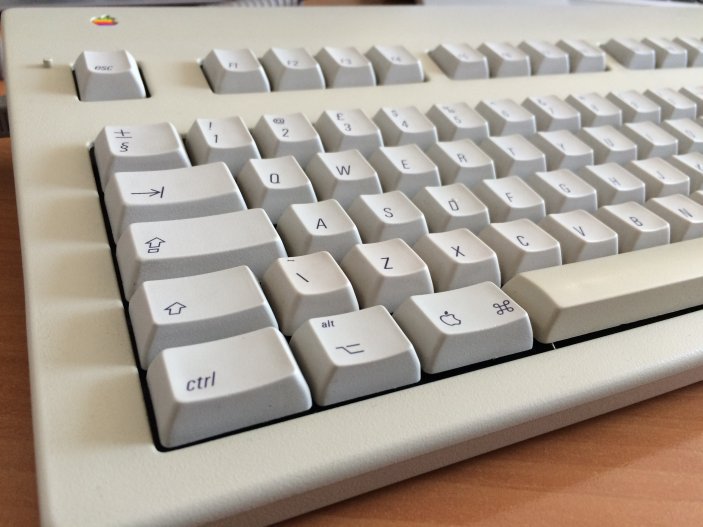
The first thing that immediately feels is the weight, after working with almost weightless modern keyboards, AEKII with its 1.22 kg. It seems just a stone. The case and the space bar are made of ABS plastic, so some yellowness was reflected on them, while the rest of the keys made of PBT were preserved in almost pristine condition. I would like to pay special attention to the “sticky” “CapsLock” key - it feels extremely unusual, while I still find it difficult to say whether it is convenient or not. For some time it remained a mystery to me the presence of plastic pins near the “Esc” and “Power” keys, which turned out to be just holders for paper labels with the signature of the function keys. And of course, the old, “rainbow” Apple logo is striking.

While the keyboard was still traveling from the UK to me, I started looking for options for connecting it via USB.
The first, and easiest, solution to this problem was to buy an ADB to USB adapter from Griffin. But since this option promised an additional cost of approximately $ 50 and two more weeks of painful expectation, it was discarded and the search continued. The second option, which my choice fell on, is a home-made ADB to USB converter. I would like to dwell on it in more detail.
To obtain the necessary result, we needed:
ADB is made in the form of a 4-pin miniDIN connector, by the way completely identical to S-Video. The ADB protocol requires only one wire for data transfer, two are used for power and the fourth wire is a power key that connected directly to the computer’s power supply (in my case, I did not use it, if you are interested you can find connection instructions here ) . Teensy was connected to one of the two physically present connectors with a pull-up 1k ohm resistor between + 5V and the data wire.

After that, the firmware was compiled and uploaded and ... Hurray !, AEKII sent the first commands to the laptop.
But then the question arose of what to do with the cable. Since Teensy is quite miniature, it quietly fit in the keyboard case, but the ordinary black USB cable connecting the controller to the laptop looked a little less than nothing. Plus, I did not want to throw away the original curly ADB cable. Having escaped to a nearby store with radio components, I purchased a collapsible USB connector and heat shrink. After another hour, the second ADB connector wasbrutally torn out neatly removed from the board and a miniUSB connecting to the controller was soldered to it.

The ADB cable was cut off on one side and a USB connector was soldered to it.

As a result, for quite reasonable money, I got an excellent keyboard, after working only one day for which, after writing this article, I finally realized that I no longer want to think about returning to rubber-film. Moderate rigidity, excellent tactile feedback and of course this wonderful click - all the same, there is still a little bit of beauty in this world.
Information on creating an ADB-USB converter was taken from the geekhack.org forum
PS: As it turned out, a twisted wire is also quite useful in addition to beauty, - it made an excellent holder for the headphone wire, which periodically flew to my floor.

Foreword
In view of the rather chaotic lifestyle, saturated with moving and running around, you have to work on a laptop. For many years of working with laptop computers, I did not succeed in falling in love with the built-in keyboards, and at the slightest opportunity I always try to connect an external one. At home, I have a pretty good HP Standard Keyboard, but until recently, at work, I had to be content with a 4-dollar A4Tech.
Once, on a hot July day, reading Habrahabr at work, I came across a post called “The Queen of the Click”, and realized that we can’t get along with A4Tech anymore. Having plagued Google a bit on the compatibility of my favorite IBM Model M and MacBook, I realized that the physical absence of the Win button (which the Cmd button is on while working with OS X) will still not be very convenient. And then I came across the heroine of this post - Apple Extended Keyboard II .
Purchase and first impression
From the point of view of the layout, everything turned out to be identically modern, a nice vintage - design, reviews on different boards also turned out to be very warm. In general, a strong-willed decision was made under the name "We must take." Everyone is familiar with the process of buying equipment at a well-known online auction, so I will not dwell on it.
After some time, a rather weighty bundle with the coveted equipment was delivered to me.
I got a model M3501 assembled in Ireland with Alps SKCM Cream Damped buttons . To my regret, the seller did not have a box and pieces of paper and the equipment consisted of the keyboard itself and ADB cable.
The first thing that immediately feels is the weight, after working with almost weightless modern keyboards, AEKII with its 1.22 kg. It seems just a stone. The case and the space bar are made of ABS plastic, so some yellowness was reflected on them, while the rest of the keys made of PBT were preserved in almost pristine condition. I would like to pay special attention to the “sticky” “CapsLock” key - it feels extremely unusual, while I still find it difficult to say whether it is convenient or not. For some time it remained a mystery to me the presence of plastic pins near the “Esc” and “Power” keys, which turned out to be just holders for paper labels with the signature of the function keys. And of course, the old, “rainbow” Apple logo is striking.
DIY
While the keyboard was still traveling from the UK to me, I started looking for options for connecting it via USB.
The first, and easiest, solution to this problem was to buy an ADB to USB adapter from Griffin. But since this option promised an additional cost of approximately $ 50 and two more weeks of painful expectation, it was discarded and the search continued. The second option, which my choice fell on, is a home-made ADB to USB converter. I would like to dwell on it in more detail.
To obtain the necessary result, we needed:
- Teensy 2.0 controller (ATmega32U4) and firmware developed by tmk
- miniUSB cable that was put on the organs
- collapsible USB A connector
ADB is made in the form of a 4-pin miniDIN connector, by the way completely identical to S-Video. The ADB protocol requires only one wire for data transfer, two are used for power and the fourth wire is a power key that connected directly to the computer’s power supply (in my case, I did not use it, if you are interested you can find connection instructions here ) . Teensy was connected to one of the two physically present connectors with a pull-up 1k ohm resistor between + 5V and the data wire.
After that, the firmware was compiled and uploaded and ... Hurray !, AEKII sent the first commands to the laptop.
But then the question arose of what to do with the cable. Since Teensy is quite miniature, it quietly fit in the keyboard case, but the ordinary black USB cable connecting the controller to the laptop looked a little less than nothing. Plus, I did not want to throw away the original curly ADB cable. Having escaped to a nearby store with radio components, I purchased a collapsible USB connector and heat shrink. After another hour, the second ADB connector was
The ADB cable was cut off on one side and a USB connector was soldered to it.
Afterword
As a result, for quite reasonable money, I got an excellent keyboard, after working only one day for which, after writing this article, I finally realized that I no longer want to think about returning to rubber-film. Moderate rigidity, excellent tactile feedback and of course this wonderful click - all the same, there is still a little bit of beauty in this world.
Information on creating an ADB-USB converter was taken from the geekhack.org forum
PS: As it turned out, a twisted wire is also quite useful in addition to beauty, - it made an excellent holder for the headphone wire, which periodically flew to my floor.