
Canon Mobile Printing: Connect Directly to Devices
The time has long passed when the smartphone was exclusively a means of communication and entertainment. Now a mobile device is a full-fledged, or almost full-fledged, business tool. And such developments as, for example, Windows Continuum , the latest version of iOS 11 for iPad or DeX technology in the new Samsung Galaxy S8 suggest that pocket gadgets are becoming a real replacement for desktop PCs and laptops.
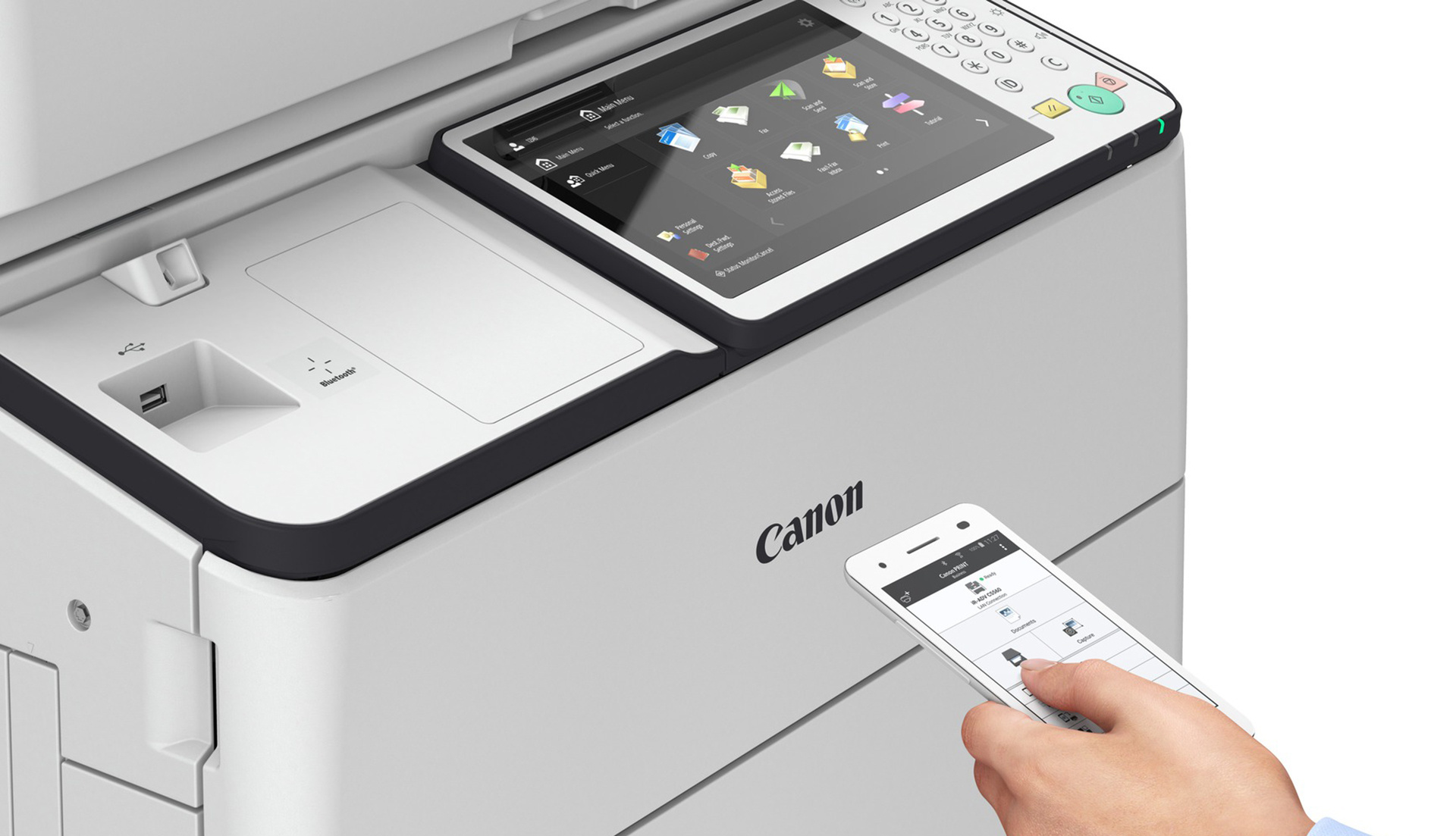
Yes, probably, the mobile revolution has not yet happened, but working smartphones and tablets began to be used more often and more efficiently. Consequently, the paradigm of using printing devices has changed: most of Canon's new corporate printers and MFPs support working with mobile solutions.
Even ordinary smartphones and tablets (especially using external keyboards) have long been able to fruitfully work with text documents and spreadsheets, take notes and make changes to presentations (or create them right on the run), receive and send corporate correspondence, edit photos and work with databases. However, why are we telling you all this, you already know everything very well.
However, not so long ago, the use of mobile devices caused great problems with integration into the internal work network. This and the relatively limited technical capabilities of the printing devices themselves did not allow the full use of mobile printing - most of the printing tasks still had to be solved through a desktop computer.
At the moment, mobile printing technology has stepped far forward, including thanks to the efforts of Canon engineers and developers. Printing the necessary documents from any gadget on an office printer, sometimes even without connecting to a corporate network, is becoming commonplace in many companies. And analysts predict further growth in the mobile printing sector.
If you try to answer this question in a few words, any printing scenarios on office printers and Canon MFPs from virtually any mobile device. Thanks to the broad capabilities of Canon PRINT Business and uniFLOW Mobile Printing technologies, implementing this scenario is no more difficult than starting printing from your office PC. In our post today, consider the first of them.
Canon PRINT Business Technology is supported by most Canon's modern imageRUNNER printers and MFPs.

If tablets or smartphones are on the same network with the above listed printing devices, then their owners will be able to do everything the same as users of stationary PCs: print, scan, manage the operation of the MFP. In addition, scanned documents can immediately be sent to an email address.
In order to take full advantage of Canon PRINT Business, just install the application of the same name from Google Play or the AppStore . For devices running on Android, you need to install another component - Canon Print Service (we'll talk about it a bit later).
After installing the application, the user just needs to select the type of connection on the device itself: through the network environment or directly. In order not to configure the connection manually, QR codes with all settings are displayed in the "Mobile Portal" menu on Canon printing devices. In addition, the necessary printer can be found through the application itself.
To work with documents in the application provides a full file manager. All that remains for the user is to find the directory containing documents for printing, select the desired file and click "Print".
In the preview window that opens, by clicking on the appropriate fields, you can select a different printer, and specify printing options, including number of copies, size, page range, and color or monochrome modes, single or double-sided.

For more detailed print settings that correspond to all the capabilities of the MFP, the user can enter the remote user interface, similar to what we see when working from a computer.
“Mobile” scanning of documents is not without personal interaction with a printing device, but it greatly simplifies the process of sending scanned copies to a smartphone or tablet. One touch of the mobile application (launching the script) and one click on the MFP (launching Scan for Mobile) - and the user receives the document on his mobile device.
To interact with devices running on the Android OS (4.4.2 and higher), you can use the already mentioned Canon Print Service direct printing technology. It works through a separate application (https://play.google.com/store/apps/details?id=jp.co.canon.android.printservice.plugin&hl=en). Of course, the full set of settings described above for PCL and PS drivers will not be available, but the most important parameters - the number of copies, paper size, paper orientation, color mode and the range of printed pages for a multi-page document can be set. The same application will help print documents and images on devices from other lines of Canon printers.

Recall also that many models of Canon printing devices have support for NFC or Bluetooth LE. Therefore, working with them will be even easier and more convenient.
It's no secret that Apple devices are highly popular among ordinary users. However, for many organizations, Cupertino’s mobile devices and computers are the corporate standard. This makes it easier for them to print thanks to AirPrint support.
Tablets, smartphones or computers from an American manufacturer will automatically receive all network settings and find all printing devices on the network. Therefore, it will be enough for the user to enter his data once and press the “Print” button in the program menu to create a new task. No need to install any additional drivers or programs: print settings will be available in a standardized interface familiar to iOS and macOS users.
A similar wireless printing standard exists for Android devices: most modern gadgets support Mopria technology. Like many Canon branded solutions, it allows mobile technology to automatically recognize printers on the same Wi-Fi network. For less modern Android devices or devices that do not support this technology, there is a plugin for the Mopria Print Service print service . By installing it from the Google Play app store, the user will get basic print management capabilities on any compatible print device.
In this post, we covered all the possibilities of mobile printing on Canon devices through a simple connection to a wireless network. In the next article, we will talk about uniFLOW Mobile Printing technology, which will allow you to create print jobs from anywhere in the world.
Yes, probably, the mobile revolution has not yet happened, but working smartphones and tablets began to be used more often and more efficiently. Consequently, the paradigm of using printing devices has changed: most of Canon's new corporate printers and MFPs support working with mobile solutions.
Even ordinary smartphones and tablets (especially using external keyboards) have long been able to fruitfully work with text documents and spreadsheets, take notes and make changes to presentations (or create them right on the run), receive and send corporate correspondence, edit photos and work with databases. However, why are we telling you all this, you already know everything very well.
However, not so long ago, the use of mobile devices caused great problems with integration into the internal work network. This and the relatively limited technical capabilities of the printing devices themselves did not allow the full use of mobile printing - most of the printing tasks still had to be solved through a desktop computer.
At the moment, mobile printing technology has stepped far forward, including thanks to the efforts of Canon engineers and developers. Printing the necessary documents from any gadget on an office printer, sometimes even without connecting to a corporate network, is becoming commonplace in many companies. And analysts predict further growth in the mobile printing sector.
What can Canon offer for their devices today?
If you try to answer this question in a few words, any printing scenarios on office printers and Canon MFPs from virtually any mobile device. Thanks to the broad capabilities of Canon PRINT Business and uniFLOW Mobile Printing technologies, implementing this scenario is no more difficult than starting printing from your office PC. In our post today, consider the first of them.
Canon PRINT Business
Canon PRINT Business Technology is supported by most Canon's modern imageRUNNER printers and MFPs.
If tablets or smartphones are on the same network with the above listed printing devices, then their owners will be able to do everything the same as users of stationary PCs: print, scan, manage the operation of the MFP. In addition, scanned documents can immediately be sent to an email address.
In order to take full advantage of Canon PRINT Business, just install the application of the same name from Google Play or the AppStore . For devices running on Android, you need to install another component - Canon Print Service (we'll talk about it a bit later).
After installing the application, the user just needs to select the type of connection on the device itself: through the network environment or directly. In order not to configure the connection manually, QR codes with all settings are displayed in the "Mobile Portal" menu on Canon printing devices. In addition, the necessary printer can be found through the application itself.
To work with documents in the application provides a full file manager. All that remains for the user is to find the directory containing documents for printing, select the desired file and click "Print".
In the preview window that opens, by clicking on the appropriate fields, you can select a different printer, and specify printing options, including number of copies, size, page range, and color or monochrome modes, single or double-sided.
For more detailed print settings that correspond to all the capabilities of the MFP, the user can enter the remote user interface, similar to what we see when working from a computer.
“Mobile” scanning of documents is not without personal interaction with a printing device, but it greatly simplifies the process of sending scanned copies to a smartphone or tablet. One touch of the mobile application (launching the script) and one click on the MFP (launching Scan for Mobile) - and the user receives the document on his mobile device.
To interact with devices running on the Android OS (4.4.2 and higher), you can use the already mentioned Canon Print Service direct printing technology. It works through a separate application (https://play.google.com/store/apps/details?id=jp.co.canon.android.printservice.plugin&hl=en). Of course, the full set of settings described above for PCL and PS drivers will not be available, but the most important parameters - the number of copies, paper size, paper orientation, color mode and the range of printed pages for a multi-page document can be set. The same application will help print documents and images on devices from other lines of Canon printers.
Recall also that many models of Canon printing devices have support for NFC or Bluetooth LE. Therefore, working with them will be even easier and more convenient.
AirPrint and Mopria Standards Support
It's no secret that Apple devices are highly popular among ordinary users. However, for many organizations, Cupertino’s mobile devices and computers are the corporate standard. This makes it easier for them to print thanks to AirPrint support.
Tablets, smartphones or computers from an American manufacturer will automatically receive all network settings and find all printing devices on the network. Therefore, it will be enough for the user to enter his data once and press the “Print” button in the program menu to create a new task. No need to install any additional drivers or programs: print settings will be available in a standardized interface familiar to iOS and macOS users.
A similar wireless printing standard exists for Android devices: most modern gadgets support Mopria technology. Like many Canon branded solutions, it allows mobile technology to automatically recognize printers on the same Wi-Fi network. For less modern Android devices or devices that do not support this technology, there is a plugin for the Mopria Print Service print service . By installing it from the Google Play app store, the user will get basic print management capabilities on any compatible print device.
In this post, we covered all the possibilities of mobile printing on Canon devices through a simple connection to a wireless network. In the next article, we will talk about uniFLOW Mobile Printing technology, which will allow you to create print jobs from anywhere in the world.