February 28, 2017 at 06:08
We look and disassemble a light alarm
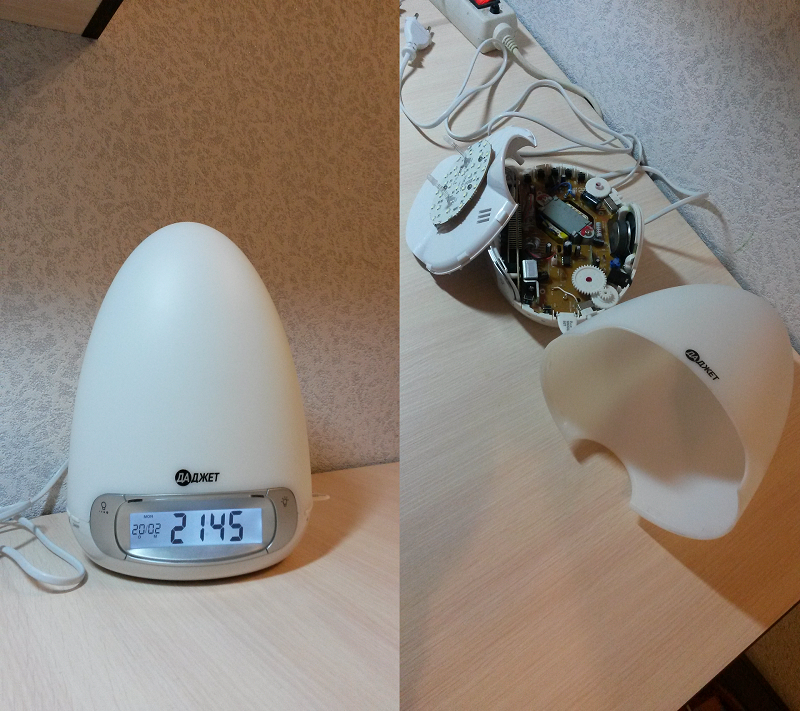
I decided to check the work of the light alarm. I wrote a letter, voiced my offer and received this product on hand. The code name is "Dawn Light Alarm". Under the cut will be a small review of the product with a description, comments and shortcomings. At the end there will be a video with a view of the characteristics at work.
Further along the text with the word “Alarm Clock” - I will call the entire device, and with the word “Alarm Clock” - the function of the alarm clock, which is set for waking up.
Inspection
The first impression of an unpacked product is a very pleasant effect on the quality of the product made. There are no gaps between the different elements. All assembled efficiently. I liked the shape of the light alarm clock. Something like a half-egg. The material is similar to that used for LED bulbs.
Appearance
When disassembled, it looks like this:
Insides
Control
At the bottom of the light-emitting diode, along the entire perimeter, there are controls. Here you have not only buttons, but also switches, adjustments and one connector. Oh yes, another super key sticking out to the side. All of these various manipulators reminded me of the Fidget Cube. There are many buttons, each is pressed in its own way. Let's talk about it.
Control buttons

Work
When you turn on the light alarm for the first time, you need to set the date + time. The following setting is available at your disposal: Day, Month, Year, Hours, Minutes, Format (12h / 24h). The Day of the week is automatically filled out with a bonus based on what date is entered. By the way, the 12-hour format changes the order in which the date is displayed on MM / DD and, accordingly, on PM / AM.
You can set 2 alarms. Each for his time. Each has its own soundtrack: Natural sounds (4 types), Radio, AUX. No installation problems. The instructions show everything. Alarms are set and turned on. The alarm clock can be set to turn on the lighting smoothly with increasing brightness. Using the super-key, the included alarm can be paused for several minutes. Then after these few minutes he will ring again. You can completely turn off the button “ON / OFF”.
The light alarm has 3 lighting options:
- Fully white color, with the ability to indicate the brightness of the lighting in the range from 1 to 20, where 20 is the brightest value.
- Multi-colored lighting. Moreover, you can set a smooth transfusion of colors, and you can fix a specific color for lighting. For colored lighting, the brightness value cannot be changed.
- Without lighting.
Lighting options


In more detail, how and what works will be shown in the video.
Remarks and weaknesses
- The first time you hear “Light-alarm clock”, I personally had an association with a device that can wake a person by the level of illumination. For example, an alarm clock stands on a window, and as soon as dawn begins, the alarm clock starts ringing because it is already getting light. This is not there and probably should not be. This is just my association with the device name. This device would probably fit the name "Luminous alarm clock."
- The presence of a large number of controls will not be written down as disadvantages, but the location of the buttons is not very convenient. To set the date or alarm, to set natural sounds for the alarm or adjust the volume, you need to turn the light alarm, because the control buttons occupy almost the entire perimeter of the device in a circle. Of course, you don’t have to use the light alarm too often to install or configure something. On top of that, you’ll probably get used to it and learn the ten-finger method of setting the light alarm. But first, you must definitely look in a circle to see where to click and what to switch.
- I DO NOT like the switch button for selecting Sounds and Radio, and the exact same button for choosing the Date setting and setting the Alarm. They have a very small installation step. And constantly the button jumps through 1-2 positions, instead of moving in order. You have to gently, gently move so that there is one click - this means that you have moved one position.
- You will not be able to press the buttons with one hand to configure and control the light alarm, because it is light and moves around the table when you click on it. Theoretically, you can, if you hold the device with 4 fingers and press the buttons with your free finger. But it is still necessary to try. Believe me - it's hard. Therefore, there is a two-handed option. For some it doesn’t matter, but it didn’t seem convenient for me. By the way, with one hand you can only press the super-key.
- The left-right button is one button. Click on one edge - this is “right”, on the other edge - “left”. From here the problem of such a button arises - periodically pressing “in the middle” is triggered. For a light-alarm clock - this does not lead to any action, but for me a click is heard that says that the button is pressed, but essentially nothing happened.
- The “Light” button is large and allows you to click anywhere. But then suddenly a problem suddenly arises that when pressed, the button clicks, as if pressed, but nothing happens. I discovered this bug by accident when a child who almost 4 years old wanted to press a button to switch the lighting from white to color. 5 times he pressed the button, but nothing happened, although the button clicked. Therefore, you have to click harder to make it work (video from 03:21).
- And about the super-key. It works and performs its functions - there are no questions. It seemed to me that it is so tender and fragile that with very strong pressure it can break. This I make an analogy with the other buttons, which are hard pressed with one hand. Plus, this key dangles very strongly in its place. As if not fixed (in the video from 03:39).
Conclusion
In the end, I want to say that this device performs its primary task, namely the installation of the Alarm Clock. There are also nice extras such as: lighting, turning on the radio, and the AUX jack. And the comments that I wrote for some may not be significant. This is just my observation of using the device.
PS iPhone is NOT included. He is pictured instead of a matchbox so that you can imagine the dimensions of this device.
Information for potential buyers
With a 10% discount, you can purchase a Light Alarm by specifying the GEEKT-POL promotional code
Information for bloggers and authors
The Dadget company is interested in publishing independent objective reviews of dadgets in various media and is happy to provide dadgets to bloggers and authors who want to test them and write a review. The device after writing the review remains with the author. The company does not try to tell the author exactly what to write about our product, but asks to show the article before publication. In this case, it is possible to clarify information and prevent errors. Whether or not to consider company comments is always at the discretion of the author.
Learn more
Learn more